
Alesis 4Ch iPad Record IOMix
Alesis IOMIX – a new four channel audio dock interface Capable of recording up to four channels of audio into your iPad simultaneously – assuming that you can find the software for it.
Sara Yule takes us through.
More Information
iO Mix – 4-Channel Mixer/Recorder for iPad
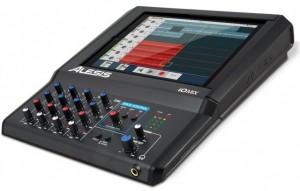
Alesis has introduced the iO Mix4-Channel Mixer/Recorder for iPad.
The Alesis iO Mix lets you mix and record four channels of audio directly into GarageBand or other compatible Core Audio apps, turning the iPad into a multitouch portable studio.
Features:
- The world’s first mixer/multi-channel interface for iPad
- Mix and record up to four channels, or a stereo mix into your iPad
- Works with mics, instruments, speakers, headphones, video monitors and projectors
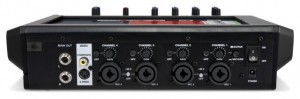
- Four combo XLR-1/4? input channels, each with trim, channel gain, pan, and low & high EQ
- Switchable 48V phantom power for use with studio condenser microphones
- Guitar-direct (DI) switch for guitar recording without an amp
- Balanced, stereo 1/4? outputs and 1/4? headphone output with separate volume controls
- Direct Monitor switch for latency-free input monitoring while recording
- Switchable limiter for clip-free recordings
- Hinged door completely encloses and secures your iPad
- Core Audio-compliant: works with virtually any app in the App Store
- Video output for connection to TVs and projectors: perfect for presentations, meetings and VJs
- Mountable to a mic stand using the Alesis Module Mount (sold separately)
- Complete routing and signal-management controls
- Power supply also charges your iPad
iO Mix allows you to connect microphones, instruments, speakers, headphones and more to your iPad.
While it looks like an interesting option for people wanting to record straight to an iPad, others may miss support for MIDI and digital video connections.
Pricing and availability are TBA.
Free iPad Control Surface for JP-80
This is a free file I created which you can download by going to jupiter80.music-technology-online.com. This control surface for the iPad adds extra control to your JP-80. The “JP-80 Mixer” runs via the MIDI Touch app which can be found on the iTunes app store.
This control surface for the iPad adds extra control to your JP-80. The “JP-80 Mixer” runs via the MIDI Touchapp which can be found on the iTunes app store. The control surface offers the following control for your JP-80:
1. Global control of Upper, Lower, Solo and Percussion parts.
2. Independent On/Off control of tones for the Upper and Lower parts.
3. Independent control of Cutoff and Resonance for the Upper and Lower parts.
4. Independent Toneblender control for the Upper and Lower parts.
5. Independent Matrix controls of the Cutoff and Resonance for the Upper and Lower Parts.
“To use the control surface, you will need to download MIDI Touch from the iTunes app store and install it on your iPad. Then simply send me an email to request the control surface plug-in and installation instructions. You will also need the Apple Camera Connection Kit in order to connect your iPad to the JP-80 via USB.”
Mix on the Fly – Mackie DL1608 16-Channel Digital Live Sound Mixer with iPad Control
For the full scoop, visit www.mackie.com/DL1608
See what happens when the sound guy for the Portland band Vanimal is introduced to the new Mackie DL1608. It’s a trip!
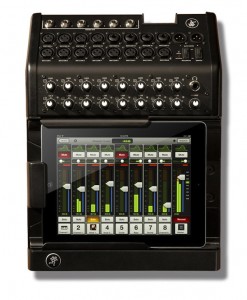
We live in a world where we have mobile control over everything that we love. We communicate, are entertained and use tools that drive both our personal and professional goals. The Apple® iPad® is at the forefront of this revolution, making it easier to accomplish just about everything. The Mackie DL1608 combines the intuitive control of the iPad with a full-featured 16-channel mixer that is ultra-powerful, professional and portable. It replaces racks full of gear, is built to be worked and offers a completely modern way to mix.
NAMM: New Behringer mixers optimized for iPad


BEHRINGER introduces three small format premium mixers that directly interface with the ever-popular iPad.
Drawing on the power of the most ubiquitous mobile digital device, the XENYX iX Series mixers are designed to handle live performance and provide state-of-the-art tools to create professional recordings. Users can also sync performances to video by utilizing the iPad’s video out capability.
The new XENYX iX Series, which include the XENYX iX3242USB, iX2442USB and iX1642USB, feature a built-in iPad docking station designed to send signal to and from the iPad with a wide range of routing options.
The innovative feature set included in the new XENYX iX Series USB mixers makes it possible to record and mix on a professional level thanks to the built-in, stereo USB audio interface. Connect these mixers directly to a PC or Mac computer via a single USB cable to record any signal source connected to the mixer.
All iX mixers include the new dual-engine KLARK-TEKNIK FX processor with 32 editable, studio-grade presets such as reverb, chorus, flange, delay, pitch shifter and multi-effects. In addition to literally thousands of apps, the iX mixers use the iPad to control the new KLARK-TEKNIK FX Processor App, enhancing the mix by allowing the user deep control of EQ’s, compressors and reverbs and a full spectrum analyzer.
The iX series mixers also feature high performance XENYX mic pre amps, which represent a major step in the evolution of audio technology. Comparable to far more expensive, stand-alone mic preamps, XENYX preamps offer a staggering 130 dB of dynamic range, with a bandwidth that extends from below 10 Hz to 200 kHz for transparent, crystal-clear performance.
XENYX mixers’ 3-band channel EQ is based on the same circuitry used in British consoles that allows users to create signals with incredible warmth and detailed musical character. Additionally, ‘one-knob’ compression is available on all mono channels. Dial in the perfect amount of compression for instruments and vocals, creating powerful mixes with punch and clarity.
“The new XENYX iX mixers demonstrate the innovation that stems from our massive investment in Research and Development, says Mark Wilder, VP of Marketing Communications. “These are the first of many more ground-breaking products to be announced at NAMM 2012.”
A closer look at the Roland R-Mix Tab
This looks really useful  R-Mix Tab for iPad lets you filter our areas from music
“View the instruments or components of the music which imported from your iPod library as color-coded clouds of energy and harmonic matter onscreen. You can lower the level, keep or move the panning position of the selected instrument on the screen. You can use R-Mix to easily create “minus-one” type play-along tracks. You can also isolate guitar sound, for example, and solo that phrases for study.” – Roland
Download: http://itunes.apple.com/us/app/r-mix-tab/…
Taking a closer look at the Mixr 1.1 Update – Sample Pad
http://youtu.be/q64JYj3SOXc
Featuring a 9-Pad Sampler and a completely redesigned UI, Mixr 1.1 makes it easy to add that extra layer of awesome to your mixes! Check out the all-new 1.1 video on youtube and check out the full list of features and improvements on our blog. Think adding a wicked sampler pad to your decks is going to cost you big time? Wrong! Mixr 1.1 is a free update for existing users. Just our way of saying thanks to our users for all the incredible support over the past two months.
Description:
Mixr was designed to capture and redefine the mobile DJ experience.
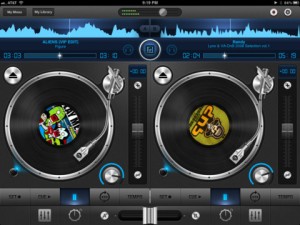
Mixr delivers a rich feature set designed for mobile DJ’s. You can pitch, tap to tempo, scratch, multi-cue and mix with precision. You can manage your iPod library with the revolutionary Crate Manager. Make crates with the touch of your finger in the drag-n-drop interface, you have complete control over your mixes. Featuring high quality DSP effects, you can add Delay and Reverb to your mixes to add that extra punch to your sets. Supporting mono split audio output, you can monitor pre-cueing with your headphones for live performances. Record your mixes and play them back in a sleek player. Recording a mix automatically creates playlists! Turn your iPad into the best mobile DJ Turntable Studio, with Mixr.
Features
Interface
✓ Dual Multi-Touch Turntables
✓ Audio Waveforms
✓ Multi Cue Loops
✓ Tempo
✓ Equalizer
✓ Effects
✓ Quick Loader
✓ Double-Tap Slider Reset
✓ Manual Crossfader
✓ Crate Manager
✓ Settings
✓ My Library
✓ My Mixes
✓ Recorded Mix Player
✓ LCD Track: Artist, Song/Album. Elapsed/Remaining Time.
Audio
✓ Tap to Tempo
✓ Tempo control (+/- increments)
✓ Pitch-Bend (6%, 12%, 25%)
✓ 4-band equalizer (-24 dB to +6 dB)
✓ 3 Manual Loops
✓ High Fidelity Vinyl Scratching
✓ Ultra-low latency
Music Library
✓ Direct iPod library access
✓ Quick track load popover
✓ Browser by play list, songs, artist, genre
✓ AAC, AIFF, WAV, MP3
✓ Create, delete & rename Crates
General
✓ Pre-cueing thorough headphones (Mono Split)
✓ Advanced recording
✓ Auto track listings
✓ Auto-saving (cues, crates, bpm, waveforms)
✓ Fully optmized for iOS 5
Tips & Tricks
★ Crossfader: Use the A and B buttons to perform a smooth auto crossfade
★ Library: You can rearrange crates and tracks in wiggle mode
★ Sliders & Faders: Tap any where to instantly change values
★ Mixr Academy: Watch training tutorial videos to sharpen your DJ skills at http://mixrdj.com/academy
For more information, please visit: www.mixrdj.com
For news and updates, please follow us on Twitter: www.twitter.com/ipadmixr
Mixr Tutorials: Using Waveforms and Create
http://youtu.be/DHkioGtWuvI
iPad DJ App Mixr training tutorial on using waves. http:// www.mixrdj.com
http://youtu.be/UsouxhnBs0U
iPad DJ App Mixr training tutorial on using the Crate Manager.
http://youtu.be/EU2kfUKdr3Q
New Standard in Mobile DJ
BEHRINGER NOX Series DJ Mixers released
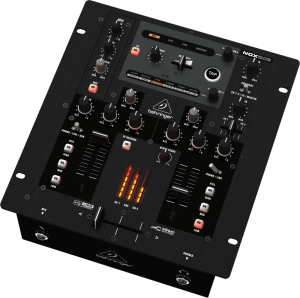
BEHRINGER brand announces that their new NOX Series DJ mixers are now shipping, and will soon be available with the company’s authorized retail partners worldwide. The feature-rich new mixers, which drew a considerable amount of buzz with their 2011 NAMM show debut, are designed to connect directly to PC and Mac computers, allowing the user to record and play back virtually any digital music file—without the need for any special drivers. With models ranging from two to six channels, all feature Infinium “Contact-Free” VCA crossfaders with adjustable crossfader curves, BEHRINGER’s premium-grade phono and legendary XENYX mic preamps, as well as beat-syncable FX for years of flawless performance.
RCA inputs are provided for turntables, tape decks and CD players, plus all NOX mixers feature built-in USB connectivity for unparalleled access to MP3 libraries and other digital file formats, directly via the user’s computer. Thanks to BEHRINGER’s “Planet Earth” power supply, NOX Series mixers can be used anywhere in the world.
V-DJM 2Ch – Virtual Dj Mixer (VST/PC)
V-DJM 2ch is a virtual 2ch mixer with dj functions. It reproduces the best features of the professional dj mixers in any audio host applications (it was designed to be use specifically for Ableton Live) that support VST technology.
V-DJM reproduces the “touch” of real mixers with its realistic design that gives you the sensation to mix your audio track on a real dj mixer. It can be used as an internal mixer in your host audio applications with the sound and the feeling of a dj consolle.
Sliders and knobs reproduce the typical dj mixers eq bend and volumes and this make your mixes sound more natural and warm.
All controls of V-DJM can be midi-mapped and automated (Yes, just map controls and you can use your favourite midi controller!)
MAFFIALIFE V-DJM 2Ch is free for not commercial use
Features:
2 Ch-Line mixer with slider and eq
2 Ch-Mic mixer with eq
4 Great Dj Effects for Line channels
– Reverb
– Sweep
– Delay with feedback knob and bpm-sync selector
– Filter with Cutoff and Reso Knobs
– LCD display with host bpm
Cue function for pre-listening
Cue Level Knob and Cue Mixing knob (Cue/Master)
MIC-Line and MASTER Led-meters
2 Ch-line Bypass switches
2 Ch-line Equalization Bypass switches
Input/Output
2 virtual Line Stereo Inputs
2 virtual Mic Stereo Inputs
1 Stereo Master Output
1 Stereo Cue Output
for info / free download
http://blog.maffialife.com
DATAMASKIN

