
Mixing Control Voltages
Mixing Control Voltages with the Moog CP-251 Control Processor – two favorite methods of creating tempo-synced control voltages are combined and processed, then routed to the Moog Voyager’s Filter In for a wide range of rhythmic expression.
New online music making competition
Nissan and La Roux have launched Behind The Hit, a new online music making competition. Be part of our exclusive gig at Koko on April 5th by entering today!
Simply mix and submit a track for your chance to win one of a 1000 pairs of tickets to see Delphic, the Naked and Famous, and Pony Pony Run Run perform live.
Also, enter a track on our Pro tool and you could win studio time with Ben Langmaid of La Roux and hear your track performed live at the gig in a DJ set by Elly Jackson.
All you wannabe musicians visit www.behindthehit.com to create a track. In addition to the ticket prizes, everyone who submits a mix also enters the draw for VIP tickets to the gig and Spotify Premium memberships.
Entries close on February 28 so get mixing now.
AudioStage – Full-3D Sound Mixing With Virtual Sound Scenes
Introducing AudioStage LITE, a free edition of our 3D audio mixing technology AudioStage, now available for public download. Visit us on www.longcat-audio.com!The interface may be used with tactile screens or a mouse, and allows for a simple sound and space authoring.
Mix everything in 3D
Longcat Audio Technologies has released AudioStage, 3D audio authoring and mixing software, but comes at a price that, unfortunately, puts it out of the range of most users.
Aimed at movie and music postproduction, AudioStage inserts in major audio workstations such as ProTools, Pyramix, Nuendo or Logic Pro, and lets you visually place and animate audio tracks in editable 3D environments.
Features
- Input tracks: Mono or multichannel.
- Acoustic environment: complete with connected rooms, physical simulation of openings, walls and reverb.
- Authoring: infinite number of scenes, tracks and environments in one single project.
- Automation: Full parameter automation and animation of audio objects.
- Commercial editions: AudioStage Stereo, Surround and Unlimited.
- Free LITE edition: to achieve your first 3D mixes.
- 3D object-based mixing: simultaneously mix in stereo, surround or any full-3D format up to 64 channels.
- Spatialization: Comprehensive techniques (including stereo, binaural, stereo3D, surround, Ambisonics and VBAP) applied individually to audio sources in each mix.
AudioStage starts at 990 € (special introductory price for Stereo edition), and is available immediately in Longcat’s online shop for Windows and Mac OS X, with VST/AU/RTAS plug-in connectors.
The free AudioStage LITE edition is also immediately downloadable from Longcat Audio’s website.
Do you mix in the box?

…90% of the people unhappy with their sound are making the same mistake. They are completely overdriving their internal summing bus! Take all your song’s individual channel faders and bring them at least -12db and keep the Master fader at 0dB at all times.
Look at your DAW’s mixer. Now imagine the volume of your individual channel fader’s adding up from left to right heading to your Master. If you keep your channel faders close to zero surely your Master will go over odB and clip. As we all know any clipping in the digital realm is very bad.
Why not keep your channel faders all hot and turn the master down? Because you will still be overdriving cheap plug-ins. Well written plug-ins can handle a hot signal but some of the coolest freeware and to be honest some big name effects clip internally when even a warm signal is shot at them. The worst part about this happening is there is no visual warning. All you know is your mixes just sound like crap.
If you ran a test overdriving one plug-in and pushing a channel fader too hot you may not notice anything. But keep your levels low in a complicated song with over 10 channels and you will definitely notice a major improvement.
Read the full post at wiretotheear
And then head over to gearslutz for a heated thread on mixing in the box.
Compression Tips for the Best Mixes
New tutorial from the Prop guys on compression
For many people, compressors are the biggest obstacle between them and a professional mix. But if you know how to use them, compressors are your best tool to achieve that professional mix. Most early interactions with compressors involve cranking them up until they sound horrible and then removing them – wondering why anyone would even want to use them in the first place. This week I’ll explain what a compressor’s actually doing and how to make it work the way you want.
Pro-L a new limitereffect for both mastering and mixing
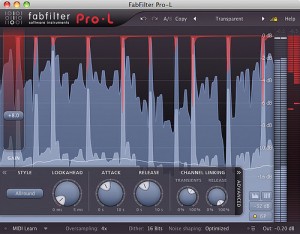
FabFilter launches Pro-L, a limitereffect for both mastering and mixing. Available for both Mac OS and Windows.
“FabFilter Pro-L is a feature-packed limiter plug-in for mastering and mixing, with multiple advanced limiting algorithms and precise metering.”
Key Features
- Great transparent sound combined with maximum loudness
- Four different limiting algorithms, all with their own character
- Low CPU usage
- Highly accurate output and gain reduction metering
- Adjustable meter scale, including K-System support
- Unique, highly informative real-time level display
- Adjustable look-ahead, attack and release settings
- Separate channel linking for both the transient and release stages
- Up to four times linear-phase oversampling
- Advanced dithering with three different noise shaping algorithms
- Inter-sample peak detection
- Double-click text entry of parameter values
- Stereo and mono plug-ins available
- MIDI Learn
- Undo/redo and A/B comparison
- Smart Parameter Interpolation
- Extensive help file with interactive help hints
- Available in RTAS, VST, VST 3 and AU for Mac OS X and Windows
Price: 169 EUR / $229 / £149
DATAMASKIN

