
New powerful EQ for magnificent mixes
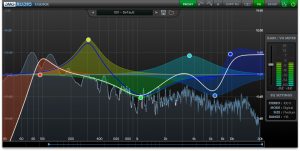
DMG Audio has released EQuick, an equalizer effect plug-in for Windows and Mac.
EQuick is a streamlined, ultramodern EQ built to help you make your mixes magnificent. Fast, intuitive and unbelievably flexible, we’ve packed it with digital functionality. We built its beautiful, clear graph with accessibility and efficiency in mind, and it’ll refine your workflow forever; but don’t take our word for it – test the claim and download the demo! We wanted to play with the idea of the interface; we wondered whether EQ could be made more intuitive, more direct, and how one would go about making an EQ that made the process even faster. EQuality speeds up your workflow because it sounds great, and you don’t waste any time compensating for defects in what it does. For EQuick we wanted to delve deeper into the design of the interface. Perfection is when there’s nothing more to take away, so we started by stripping down the interface to its most essential element – the graph. EQuick has nothing else. We had to work in all the controls (like Range and Shift) that made EQuality so special and we found that we could do that with the graph. Also, we took account of the fact that different people have different size screens – so you can pick your size for EQuick. But we couldn’t do that at the expense of control, so we built the tooltip system that provides you will all the data you need, when you need it.
EQuick features
- Overview
- Unbelievably low CPU usage for high instance counts.
- Generates super-high-quality prototypes. Clear undistorted top.
- Linear phase mode for mastering and special channels.
- 32 bands of EQ, Q 0.1->50, +/-36dB range.
- Each band can be Peak, HPF, LPF, High Shelf, Low Shelf or Notch.
- Each bank can process Mid, Side or the full stereo image.
- Fully parametric filters (high and low-pass), 6/12/18/24/30/36/42/48db/oct.
- Five different UI sizes.
- M/S processing per-band with listen.
- Windows VST and VST3 as 32+64bit, RTAS 32bit.
- Mac VST, VST3 and AU as 32+64bit, RTAS 32bit.
- Sound
- Bells and notches, with a +/-36dB range, and a Q range from 0.1 to 50.
- Shelves which let you move the resonance above or below the curve.
- Filters at 6/12/18/24/30/36/42/48 db/octave, sweepable resonance.
- Adjustable gain-q interaction for ‘musical’ usage.
- Vision
- Beautiful, clutter-free modern interface.
- Big, clear, antialiased graph.
- Hi-res Spectrum analyser.
- Range, to scale the EQ response, both +ve and -ve.
- Frequency shift, to allow you to retune the response.
- Large, configurable spectrum-analyser with readout.
- Control linking to move sets of bands together.
- Configurable VU, with variable ballistics.
- 8 banks of A/B.
- Full preset management system.
- Undo/redo.
- Autolisten mode, for quick finding/adjustment of frequencies.
EQuick is available to purchase for £74.99 GBP. A bundle with EQuality and EQuick is £124.99 GBP, and the EQuality, EQuick and Compassion Bundle is £224.98 GBP. Previous EQuality customers get EQuick at no cost.
Mixing 20 tracks in 10 minutes with Touch DJ Evolution on iPhone
Here is a cool teaser for an upcoming mixing app for iPhone:
Mix done 100% visually (without headphones), shows the usage of Auto-Sync and Auto-EQ features of Touch DJ Evolution. The app allows extremely easy, almost perfect instant mixing. The preparation phase for this mix was just loading the tracks an defining some cue points to mark entries and transitions. The tracks were loaded in alphabetical order (what is wrong in general, but good for demo purposes)
What happens in the video is simply navigating on cuepoints (by tapping them in the track waveform overview), engaging Auto-Sync at the right time, and ultimately moving the crossfader and loading another track.. App handles mantaining constant BPM of the mix through time-stretching the tracks, not pitch-shifting (although that setting is also possible, separate for each deck).
The application will hit AppStore soon, as a universal app for iPhone & iPad.
Re-Recording Mixer Presentation
Michael Semanick is a two-time Academy Award winner and has been nominated six other times for Achievement in Sound Mixing. He was nominated for all three Lord of The Rings films and won for Return of the King in 2004. He received his second Academy Award for Peter Jackson’s King Kong. Semanick has been nominated twice for his work with Pixar on Ratatouille and Wall-E, and for his efforts on The Curious Case of Benjamin Button in 2008. His nominations for both Wall-E and Benjamin Button were given in the same year. Semanick was recently nominated this year for his work on The Social Network. Michael is excited to be joining our Ex’pression family to speak with the students, faculty, and staff upon the completion of Cars 2 for Pixar.
Ex’pert Series with Michael Semanick hosted at Ex’pression College for Digital Arts in Emeryville, CA on June 23, 2011.
MashTactic mashup tool!
MashTactic is a plug-in that can separate various parts of a full audio mix.
Many sounds, include vocals can be cut or isolated from a track.
* 8 stereo areas of sharp cut-off filtering.
* Adjust levels separately in all selected zones.
* A great tool for mashup music makers, as vocals and other sounds can be identified and manipulated within a full mix.
* Works on transients, allowing the user to emphasise or cut percussive sounds giving control over punch in drum tracks.
* Great for analysing balance and frequency mix of a track you’re composing.
Coming soon to:
http://www.quikquak.com
How to create Mix Groups in Propellerhead Record
Here’s a new video showing how to create a mix group. Promoted as the DAW for musicians, Propellerhead Record nevertheless features some of the most sophisticated (and intimidating) mix routing of any multi-track recording software. While this opens the opportunity to do some very creative things in the mix interface, it also makes certain basic functions — like creating mixing sub groups — a little confusing.
That’s why we’ve put together this step-by-step video on how to create submixes in Record. It may require a few more steps than creating subgroups in other DAWs, but the visual routing component presented by the virtual rack view (ported from Reason) aides the process. As does Owen’s patient, guiding voice.
Via GW
Mixing a concert guitar with breakbeat
Not your everyday mix up 
In this video:
here i am trying to mix concertguitar and breakbeat… this are the steps to my coming live shows. keep control over various parameters makes my performance challenging but also fun
if technical detail is needed, please ask me
Mixing & Mastering Tutorials
Dubspot Instructor and Mixing & Mastering engineer Daniel Wyatt teaches you How To Use A Limiter using Ozone 4 from Izotope in this two-part video tutorial series offering tips and techniques for polishing your tracks, and give them a finished, professional sound. Daniel Wyatt offers a universal mastering technique using Ozone 4, which is indeed one of the most powerful mastering plug-ins, but you can use this method to attain loudness in any host application. In part 1, Daniel Wyatt navigates the Limiter section and explains some the essential functions of the Loudness Maximizer (another name for the Limiter) in a step by step process; from Master Output setting to Dithering, correcting mixing mistakes, adding fullness without distortion, and Release control, for making the sound loud and bouncy. Stay tuned for part 2, as Daniel Wyatt concludes the series with a focus on Multiband Dynamics, Harmonic Exciter, and more.
Future DJ – new mixing software app for iOS

Xylio has announced the release of Future DJ, a mixing software app for iOS.
Future DJ is a DJ mixing software for iPhone, iPad, iPod touch that allows you to mix like a pro dj in no time. This is not a toy, it’s a full-blown software that you can use to mix for an entire party if you want to.
Although DJ software on the iPhone and iPod touch is only at the beginning, Future DJ raises the standards through features such as automatic BPM detection, beat-matching and seamless looping, thus making it the first professional handheld DJ solution.
Future DJ features
- Classic DJ setup with 2 decks and mixer.
- Fully manual or automatic mixing.
- Pitch/speed control and crossfader.
- One-click beat-matching and sync.
- Seamless intelligent looping and skip-beat.
- Automatic BPM detection (grid like) on the device.
- Effects, eqs, filters.
- Vinyl simulation including scratch, pitch, reverse play, brake, spin.
- Separate headphones/speakers output (using a simple stereo splitter).
- IPod library browsing system with search.
- Professional CUE point functions including hot Cue-Play.
- Pitch bend (using the pitch sliders).
- MotionPlaying™ – place your iPhone/iPod on a turntable and scratch any song (requires an iOS device with a gyroscope – eg. iPhone 4).
- Extensive settings.
- Built-in help.
Future DJ for iOS is available to purchase for an introductory price of $1.99 USD.
More information: Xylio
Mind-blowing music app for creatively mixing and rearranging beats
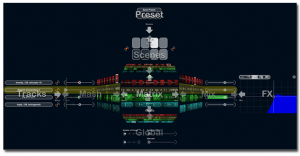
Steinberg today releases LoopMash, a mind-blowing music app for creatively mixing and rearranging beats, tunes and effects. Now available for your iPhone and iPod touch, this inspiring mobile instrument lets you choose from over 40 presets and 250 addictive loops ranging all the way from ethno to disco.
With its innovative approach to mixing music, LoopMash simultaneously merges up to four two-bar loops by matching and replacing comparable elements. By using the included studio-grade effects, you can easily spice up your performance and make your music sound even gnarlier.
Quality content, intuitive control and 3-D navigation for effortless page browsing make this app a must-have for party-goers, music aficionados and pretty much everyone in between.
Key Features
- More than 250 addictive audio loops included
- Over 40 presets to get you started right away
- Intuitive 3-D swipe-page navigation
- Load and play with up to 4 loops per scene
- 8 scenes available per preset
- 4 studio-grade effects for more sound control
Loopmash at the iTunes App Store
FirstMix – USB powered DJ-ing
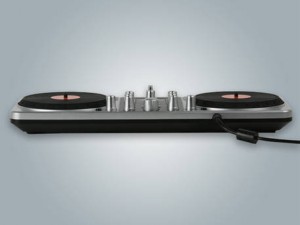
Gemini has announced a May 2011 release for the latest addition to its digital DJ accessory lineup, FirstMix.
The USB controller features two touch-sensitive jog wheels, traditional mixer/crossfader controls, and can connect with any music library including iTunes. FirstMix ships with MixVibes’ Cross LE DJ software, but is also compatible with the likes of Traktor and Algoriddim djay.
RRP is $79.95, official press blurb below, see Gemini DJ for more.
Scratch like a pro
Gemini, a division of GCI Technologies and a leading innovator of modern DJ technology, is excited to unveil the FirstMix USB DJ Controller for aspiring DJs. This easy to use, yet feature rich controller with two touch sensitive jog wheels that allow anyone to scratch like a pro.
A Best in Show winner at the 2011 Winter NAMM show, FirstMix connects via USB and allows users to DJ using their iTunes or other music library.FirstMix ships with Cross LE DJ software from MixVibes and is also compatible with Traktor, Virtual DJ and Algoriddims DJAY and other popular DJ software.
We took many of the best features from our Gemini professional DJ products and integrated them into FirstMix for anyone who is interested in a fun and easy way to get started in digital DJ, says Mark Wilder, Vice President of Marketing for GCI Technologies. FirstMix lets you scratch right out of the box and gives you the tools you need to put together a great party mix.
Other key features include the ability to seamlessly mix songs together, spice up tracks with effects, play music in reverse, adjust bass and treble output and record your set. Priced at $79.95, the FirstMix is the newest addition to Gemini’s Digital DJ Controller line and will be available through musical instrument, electronics, and DJ retailers in May, 2011.
DATAMASKIN

