
All new – SLVR Spreader
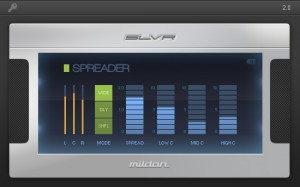
SLVR Spreader is a state-of-the-art stereo widener suitable for mixing and mastering. It combines different stereo imaging technologies, letting you apply ample amounts of widening without weakening the overall sound. Use it on individual tracks like vocals, on group tracks like drums, and all the way to the final master.
Widening without Weakening
Most stereo wideners work by increasing the level of the side signal against the mid or center signal (often referred to as mid-side imaging). This results in a wider sound but it also weakens everything in the center section (e.g. Bass, Kick, Vocals, Snare). The problem is that you can’t just bring up the center level, as that will simply cancel out the widening, which brings you back to square one.
With SLVR Spreader, you can apply as much widening as you want, as it lets you bring back important center signals lost in the widening. It does this by carefully screening out which parts of the center are being widened and protecting those signals. It also splits the center into 3 bands so that you can restore only the affected frequencies.
Three Powerful Modes
Wide mode uses a mid-side algorithm for widening the signal. This is suitable for stereo recordings, group tracks, and mastering.
Delay mode spreads the signal’s frequencies across the stereo image and applies minute amounts of delay to emphasize the stereo effect. This can be used to fatten ambient sounds like vocals and pads.
Shuffle mode interleaves the signal’s frequencies and spreads them across the stereo image. While the stereo effect is less pronounced in this mode, it can help the signal cut-through a busy mix without introducing artifacts or phase issues.
3 Channel Meters
SLVR Spreader has separate meters for Left, Center, and Right channels, allowing you to apply just the right amount of widening to the signal. For best results, increase the Spread fader until the Center peak is at the same level as or just above the Left and Right peaks.
Plugin Alliance introduces Brainworx bx_saturator
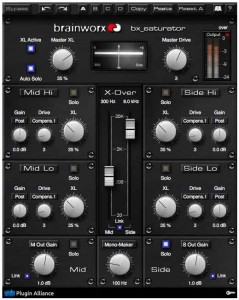
Brainworx’ new bx_saturator is an M/S and multi-band saturation tool that can be used for mastering, mixing, and sound design applications.
“Recording and mixing instruments and vocals using the Mid-Side (M/S) technique is one of the secret weapons that professional audio engineers and producers use when they want to capture a performance in a way described by most listeners as, ‘Natural-sounding,’ ‘Wide,’ and ‘Big.’ Moreover, M/S recordings produce a very mono-compatible sound, and, although bx_saturator brings a mono/multi-mono version of the plug-in to the musical mix, the stereo M/S version of bx_saturator is considered by Brainworx to be the definitive plug-in for thickening or boosting any stereo signal or mix in a more discrete way than ever before.”
As with all other Brainworx bx_ prefixed plug-ins, bx_saturator users can record Mid and Side tracks individually to retain total control over the stereo information until the final stage of production; as implied by name, Brainworx says that it offers a subtle, warm distortion — or saturation — that works wonders on individual audio signals, yet can also be applied to the stereo master channel in the M/S stereo model, while Brainworx’s new ‘True-Split’ crossover technology ensures that Mid and Side channels are always perfectly in phase.
Brainworx tells us that this new plug-in’s creative use knows no bounds: increasing the perceived volume of mixes without them clipping, or bringing delicate signals like acoustic guitars and percussion to the fore in full mixes without increasing their actual level or EQ’ing them in harsh, offensive ways; distorting vocals in full mixes without sacrificing drum-track punchiness or stereo guitar and keyboard clarity, for instance. They say that independently fattening — or even slightly distorting — Mid and Side signals separately for high and low frequencies should serve up a tasty selection of imaginative and inspirational sounds in next to no time… technical excellence for the creative musician and engineer, indeed (And for those needing a helping hand to get them started straight away, bx_saturator handily comes complete with 30 cool presets.)
Pricing and Availability:
Available in 64- and 32-bit versions, Brainworx’s bx_ saturator plug-in can be purchased and downloaded (in all Mac OS X and Windows formats — VST 2.4, VST 2.3, RTAS, AU, AAX) for an introductory price of $179.00 USD (rising to $229.00 USD).
(Note: Plugin Alliance is offering a 30% off list price deal for all bx_ALL 2012 Bundle owners, saving them $69.00 USD — equalling an additional $19.00 USD saving over and above the introductory offer)
More information:
Fraunhofer IIS Previews Pro Tools Plug-in From Sonnox For “Mastered For iTunes”
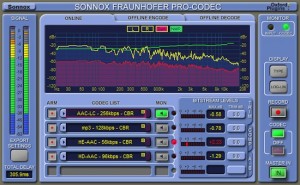
Sonnox and Fraunhofer IIS have announced a new version 2 of the Sonnox Fraunhofer Pro-Codec Plug-in that will come with iTunes Plus codec and multi-channel support. At NAB 2012 in Las Vegas, Fraunhofer IIS is showing a preview of the new version of the Sonnox Fraunhofer Pro-Codec Plug-in.
For the first time, the plug-in enables mastering engineers to use the iTunes Plus codec for real-time auditioning of their mix. This makes the plug-in a tool to mix directly for the “Mastered for iTunes” program, including clipping detection and the possibility for real-time corrections while mixing. For this new functionality, Sonnox has added the Apple versions of the AAC and HE-AAC codecs to the plug-in so that the exact clipping behaviour of the iTunes encoding chain may be monitored.
In addition, Sonnox and Fraunhofer have integrated the latest surround audio codecs MPEG Surround, AAC multi-channel, and HE-AAC multi-channel. These codecs provide improved audio quality for surround music and are used in surround broadcasting and streaming. Of course, the Sonnox Fraunhofer Pro-Codec still includes Fraunhofer implementations of all major MPEG audio codecs, including mp3, AAC, and HE-AAC as well as lossless codecs such as mp3HD and HD-AAC. This makes the Pro-Codec the most powerful codec plug-in available for digital audio workstations.
The upgrade will be available in July for free for all current users of the Sonnox Fraunhofer Pro-Codec.
BeatCleaver – slicing made simple
BeatCleaver is a slicing tool for sampling from songs and cutting up beats. This new 1.2 release adds MP3/M4A support, smooth zooming, a new timeline bar, and more! Check it out at: http://www.oscillicious.com/beatcleaver
Here’s what they have to say about the update:
“With new support for MP3 and AAC formats, sampling from existing songs and recordings has never been easier. DJs can now easily save loops from songs to use with sampler decks and artists can cut samples for remixes and mashups.
The new Advanced Slicing menu facilitates slicing audio by fixed bars or beats, perfect for chopping multi?track exports for live resequencing.”
Additional – Santoni shares info on an open source library that they’ve been working on:
In partnership with Mixxx, the free DJ software, we’ve released an open
source library for decoding compressed audio in a cross-platform way
called “libaudiodecoder”. This library grew out of the common needs of
both projects, and we hope it’ll help other audio developers too.
BeatCleaver now ships with libaudiodecoder for enhanced audio format support.
BeatCleaver 1.2 is available now for US $15 /13 EUR. It’s a free update for existing users.
MixEmergency – What’s new in 2.0
http://www.inklen.com/mixemergency – Introducing MixEmergency 2.0.
MixEmergency is a unique visualisation application capable of being controlled by Scratch Live. It allows the user to mix, scratch and record video and visualisations in real-time. MixEmergency’s powerful controls and high-performance rendering engine allow users to quickly and easily add stunning effects and transitions to their mix. A free time-limited demo version is available for download. Download and try the demo today.
Yamaha launches the all new CL-series for digital mixing
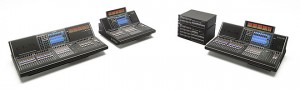
25 years after first setting the standards in digital mixing, Yamaha has taken digital consoles to another evolutionary level with the launch of the three-model CL series at ProLight + Sound 2012.
Retaining essential features and functionality that have become standards over the past quarter of a century, the CL series of digital mixing consoles offers an evolved experience in accessible mixing. Combined with sonic purity and advanced sound shaping capabilities, the new range gives the most imaginative artists and engineers unprecedented creative freedom.
Yamaha CL series:
Combining a tactile, ergonomic user interface with elegant and contemporary design, the CL series comprises three models – the CL1, CL3 and CL5. Ranging in mix capacity from 48 to 72 mono plus eight stereo inputs, all models feature 16 DCAs, 24 mix and eight matrix busses, plus stereo and mono output busses.
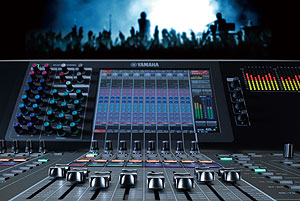
User interface
At the heart of the CL series is Yamaha’s acclaimed Centralogic user interface, ensuring that the consoles will be immediately familiar to many thousands of live sound engineers.
It has evolved considerably on the new consoles, incorporating a new generation, highly responsive colour touch screen and an array of user definable rotary encoders and buttons. Newly designed faders offer optimum feel, visibility and accuracy and are freely configurable to allow control of any combination of inputs, outputs or the 16 DCA faders. The control surface also provides editable, backlit channel name displays above each fader, with assignable colour bars. The CL1 and CL3 also feature the option of an external meter bridge.
Audio quality
Audio quality and character were top priorities in the development of the new consoles. In addition to featuring newly-designed mic preamps and delays on every input channel and output port, the range debuts a prestigious line up of studio quality processing.
The Effects Rack provides the equivalent of eight SPX2000 effects processors, along with a range of VCM EQs and dynamics, while two further virtual racks provide access to up to 32 channels of graphic EQs.
However, probably the most exciting sonic innovation is the introduction of the Premium Rack concept. Developed by Yamaha’s Dr K (Toshi Kunimoto) and his team, the Premium Rack provides a range of extremely high quality, dynamic processors and EQs. Yamaha is particularly proud and pleased to have collaborated closely with Rupert Neve to incorporate the highly acclaimed Portico 5033 EQ and 5043 Compressor as key elements in this new concept. These processors are included as standard in the CL series, eliminating the need for any plug-in management.
“For the first time we have the capability of bringing Rupert Neve sound into the live audio field, entirely due to Yamaha VCM technology. I believe that it is indistinguishable from the original analogue sound,” says Neve.
Scalable solution
A key factor in making the CL series so flexible is the pair of accompanying I/O racks, the Rio3224-R and Rio1608-D, and the fact that consoles are the first to feature built-in Dante networking as a standard feature.
A scalable system is easily constructed by simultaneously attaching up to eight I/O racks via Dante, providing up to 256 input sources. Pairs of CL series consoles can also be cascaded to handle larger mixing requirements.
Connection of basic systems is easy, using the console’s auto-configuration facility. Two or more consoles can share the inputs from one set of I/O racks without fear of unexpected level changes due to the inclusion of Auto Gain Compensation within the I/O racks themselves. With the new Dante 32-bit mode of operation, gain compensation can be provided without audibly affecting the dynamic range.
“We are extremely excited to be collaborating with Yamaha on the extraordinary new CL series and I/O racks,” notes Audinate CEO Lee Ellison. “Dante provides a flexible, low latency, highly scalable, plug and play networking solution to connect Yamaha networked systems, Dante Virtual Soundcards or any other Dante networked device. We believe the combination of technologies integrated in this new platform will provide an unsurpassed digital experience.”
The Rio3224 also includes four stereo AES-EBU outputs, keeping signals in the digital domain right through to the amplifier. The new consoles feature three MY card slots on the rear panel, maintaining compatibility with every existing audio format as well as newer cards like the MY8-Lake speaker processing card and the MY16-Dugan auto mixing card.
The three card slots also allow for additional i/o alongside the consoles’ onboard eight mic inputs and eight line outputs.
Software control
CL Editor is a new standalone online / offline editor which runs on both Macs and Windows PCs. Featuring all the functionality that users will be familiar with from other Yamaha Editor software, it does not require Yamaha Studio Manager as a host.
Further new software applications include a new version of StageMix for iPad, which offers comprehensive wireless remote control and has been expanded to include new features such as channel naming, DCA fader control and tap tempo. Crucially, both CL Editor and StageMix can be run simultaneously, allowing very flexible options for engineers, sound designers and system technicians alike.
Meanwhile, Yamaha’s new File Converter software has been upgraded to allow straightforward exchange of console files between the CL series, PM5D, M7CL and LS9.
Recording
Every CL console customer will receive a copy of the new Steinberg Nuendo Live recording software, which has been designed specifically for live recording applications. Available from July, it includes unique features not found in any other live recording software and will be tightly integrated with CL consoles to provide optimum ease of use.
When combined with Audinate’s Dante Virtual Soundcard (also included with every CL console) engineers can easily use the Dante network to record up to 64 tracks of audio to either a Mac or Windows PC.
“Nuendo Live is not only ultra stable and easy to use, but it integrates seamlessly with the latest generation of Yamaha live consoles,” says Steinberg Managing Director, Andreas Stelling. “This is another successful example of the strong ongoing relationship between Yamaha and Steinberg.”
In addition, basic stereo recordings can be done via a convenient two track USB recording and playback function.
Setting the standards
Having worked very closely with engineers and rental companies for a quarter of a century, Yamaha knows that the key requirements from digital consoles are flexibility, audio quality, ease of use and, of course, the company’s well known standards of reliability.
With the advent of the CL Series, the company is confident these products strike the perfect balance between innovative functionality and sound investment potential.
“The CL series ideally answers today’s needs using today’s technology” says Kazunori Kobayashi, General Manager of Yamaha’s Pro Audio Division. “The collaboration between Yamaha, Rupert Neve Designs, Audinate and Steinberg has made it possible to deliver a sublime balance of sound, performance, and features that results in uncompromised overall mixing capability and quality. After a quarter century of evolution, the CL series represents a momentous new chapter in the history of Yamaha digital mixing.”
The CL5 and Rio3224-D are scheduled to be released in the spring of 2012, with the CL1, CL3 and Rio1608-D available in the summer.
Start Up & Mix with DJ Rig The Professional DJ Mixing App for iOS Devices
IK Multimedia has announced the release of what they say is their first professional DJ Mixing app: DJ Rig – a full-featured, double-deck DJ mixing app for iOS devices.
SPECIAL INTRODUCTORY PRICE $1.99 / €1.59 in the App Store!
http://www.djrig.net | http://www.irigmix.com for more information
DJ Rig is a full-featured, double-deck DJ mixing app for iPhone. It provides instant song-playing from the device’s music library, automatic tempo sync and beat match, sample-based pads and performance recording, plus an arsenal of high-quality DJ effects. When used with the new iRig MIX audio mixer for iOS devices, DJ Rig provides the most portable professional setup for mobile DJs and musicians.
DJ Rig has many professional features not found in other DJ apps like its unique beat match, its selection of 12 high-quality DJ effects with XY control, built-in sampling pads, multiple cue points, crossfade curves and X-Sync. X-Sync (available when used with iRig MIX) enables anyone to automatically synchronize the app audio with any other external audio source like a second iOS device but also regular CD or MP3 players.
DJ Rig — What you Get
DJ Rig comes with all the professional DJ features above — including 6 high-quality DJ effects (Low pass, Band pass, High pass, Delay, Stutter, Phazer) — and 8 built-in sound banks plus one adjustable cue point.
These can be expanded with 6 more effects (Flanger, Comp, Fuzz, Reverb, Auto Wah, Crush), 7 extra sound banks, 3 more cues points plus digital deck interface, all available together through in-app purchase in the Pro Bundle pack.
Scratching on iPad with DJ Rig and iRig MIX
http://www.irigmix.com | http://www.djrig.net
iRig™ MIX is the first mobile mixer for iPhone, iPod touch or iPad devices. iRig MIX offers the same controls you would expect from a professional DJ mixer (crossfader, cues, EQ and volume controls, etc.) in an ultra-compact mobile mixer that can be used with a huge variety of iOS DJ mixing and other apps.
DJ Rig™ is a full-featured, double-deck DJ mixing app for iPhone. DJ Rig provides instant song play from the device’s music library, tempo sync, sample-based pads, performance recording and an arsenal of high-quality DJ effects. Together with iRig™ MIX, DJ Rig is the most portable, pro-quality setup for mobile DJs and musicians.
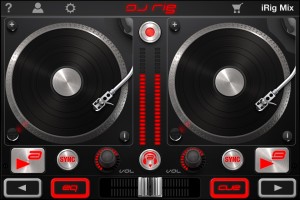
iRig MIX allows regular DJ-ing using two iOS device but also just one device on its two separate channels (using apps that split out to mono signals). Additionally — as seen for the first time on any DJ mixer – it can be used for mixing any type of audio sources (coming from mp3 players, CD players, etc.) with an iOS device using automatic tempo matching and beat synching thanks to its X-Sync feature when used with the DJ Rig app from IK Multimedia.
• 2 stereo inputs with gain, bass, treble and volume controls, independent cue on each channel with LED indication and channel crossfader
• Instrument/microphone/extra input with volume control can be processed by iOS apps (such as AmpliTube, VocaLive)
• Stereo output with RCA connectors, master level and LED meters
• High quality, pristine sound
• Quality headphone output for master or cue monitoring with independent volume control
• Input switch splits Input 1 into dual-mono for use with DJ mixing apps on a single iOS device
• “X-Sync” mode allows auto-sync with any audio source using the included DJ Rig free app
• Can also be powered with battery packs and mobile chargers
• Includes 4 free apps: DJ Rig, AmpliTube, VocaLive, GrooveMaker
iRig MIX and DJ Rig with one iPad and CDJ (iOS device + any other music player)
Using Multi Cues & Loops – Tutorial
http://youtu.be/ktADwlMuDnU
Here’s a brand new tutorial from MixrDJ – Learn how to master the multi cues to quickly produce loops, cuts and remixes with muscle memory exercises and technique. Mixr features 4 hot cues that allow you to instantly go back to a specific point in time. You can tap on multi cue/loop button to activate the panel. To set a cue, simply tap on the “set” button, or the “in” buttons in the multi cue panel to set your markers. Each marker is color coded to help differentiate the multi cues.
You can set up to 3 manual loops by setting “out” points and enabling the “loop” function. You can clear out the in and out points by tapping on the “in” and “out” buttons. Each multi cue is saved and can be used when you reload your tracks. Each deck can save a different set of multi cues per song allowing you to customize your cue sets. Alright, and thats how to use multi cues and loops. Remember, each deck can save a new set of multi cues per song. Don’t forget to follow us on twitter, Facebook and subscribe on youtube, we’ll see you guys in the next video.
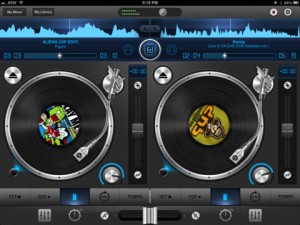
Mixr delivers a rich feature set designed for mobile DJ’s. You can pitch, tap to tempo, scratch, multi-cue and mix with precision. You can manage your iPod library with the revolutionary Crate Manager. Make crates with the touch of your finger in the drag-n-drop interface, you have complete control over your mixes. Featuring high quality DSP effects, you can add Delay and Reverb to your mixes to add that extra punch to your sets. Supporting mono split audio output, you can monitor pre-cueing with your headphones for live performances. Record your mixes and play them back in a sleek player. Recording a mix automatically creates playlists! Turn your iPad into the best mobile DJ Turntable Studio, with Mixr.
Five tips on how to improve your recordings
When learning to mix – sound is of paramount importance. Understanding the ins and outs, and how it all interacts is the building blocks from which any mix is made. However, once sound and the manipulation of sound is learned, there is a further and more important step: feel. People listen to music on laptop speakers, ear-buds, and in cars on the freeway with the windows down. They’re probably also listening to the mp3 version.
Under all these circumstances, the sound is clearly compromised. I’d venture that sound quality, is not really the be-all end-all of a record. Mind you, I do feel it’s important, but I don’t think that’s what people attach to and get hooked by when they listen to music.
When dealing with sound, we tend to think in terms of tone, timbre, balance, image, and punch. But why do these things even matter?
Punch is how the sound jumps out at you, image is the world the sound lives in, and balance allows the important elements to step forward. These all have emotional ramifications, and directly influence the feel of a record. So I would posit, that without “feel,” sound quality is essentially meaningless.
Here are some feel-related ideas for you to ruminate on:
1. Unbalanced Sounds – Sometimes when a certain element is unbalanced, stepping on other elements, it can feel really good. It might not sound so hot, but it can feel ever so good.
Sometimes it’s nice to momentarily unbalance a key element to build tension, and then return it to a balanced level as the release. It’s also a good way to direct the listener’s attention.
2. Groove is Everything – No matter what, at all costs, get the groove working. Whether this compromises the sound or not, groove is the innate part of music that we all feel with our body. It determines whether or not we like something before we even determine thoughtfully whether or not we like something.
Consider old Motown recordings. Any technological hurdle was superseded by incredible musicians playing with great feel. Consider this next time you’re obsessing over that hot new plugin bundle.
3. Transitions & Arrangement Dynamics – It’s very rare that a song that doesn’t vary much or have any solid transitions actually captivates people. Address and consider the points immediately before & after a song changes sections. Automate some dynamics between and during sections if necessary. [editor’s note: for transitions, check out these free cymbal swells from Joe Gilder of Home Studio Corner.]
4. Depth – That 3D image is an important part of the emotion of a song. As Jimmy Page said: “the emotion is in the room.” That can be interpreted both figuratively that the emotion is in the interchange between musicians working together in the same space, or literally that it’s the sound in the space that resonates emotionally. I think both are accurate.
5. Make the Moments Special – A song is a series of moments – if every moment is special, the song is always impactful. When recording, take the time to get the performance right. Like Edward J “UK” Nixon says, “keep working until the goosebumps come.”
Matthew Weiss records, mixes, and masters music in the Philadelphia, New York, and Boston areas. Find out more about him here.
Via PSW
DATAMASKIN

