
The full power of the Intellijel µMod
A brief audio and visual demo of the processing capabilities of the Intellijel µMod four quadrant multiplier.
About µMod:
Four quadrant multiplying modulator (aka ring mod) in 4 hp.
Features:
dedicated ac and dc inputs (all four can be used at the same time).
attenuators for x and y input groups.
polarity switches for x and y inputs (positive, negative or both).
a unique ‘q’ control which stands for “quadrant” which allows you to shift the multiplication into positive or negative quadrants.
very low leakage from x input (when q is in center).
changing the q value in fm adds the signal frequencies back into the sum+difference frequencies (typical output of a rigmod) which adds richness to the classic ringmod sound and allows for many variations of bell tones, chimes and mallet-type timbres.
it can be used as a linear vca.
great for waveshaping (especially two synced audio sources).
excellent for cv mangling (use the dc inputs and play with the rectifier switches).
connecting cv sources to the ac inputs results in interesting lag effects.
Native Instruments REAKTOR’s Massive: We Are In Control
Time to blow the doors off stale drum programming by going nuts with Massive’s powers of modulation. You owe it to your drums to check this out.
The Modulation Section looks like a step sequencer, and, in fact, it functions like one as well. The difference here is that you are not programming hits but modulation instructions. (In the sequencer tracks, the bar height in each step determines the velocity of the hit; in the Modulation Section it determines the intensity of the modulation). We are presented with three modulation lanes—MOD1 (blue), MOD2 (green), and MOD3 (orange). There is also fourth modulation source, which is sequencer lane velocity (yellow, to match the color of the steps). These sources give you flexibility in creating modulation patterns, since you likely more than one modulation source for the many destinations available.
The gray boxes you see next to various parameters are Modulation Source selectors (in other words, they tell you that the nearest parameter is modulatable). Click and drag up or down to match the color of the modulation lane (MOD1, MOD2, or MOD3) of your choosing. Once you’ve set up the modulation, you’ll need to tell Massive how much you want to modulate the parameter. That is, you won’t notice any difference in the sound until you dial in a Modulation Amount (as a positive or negative value); do this by clicking and dragging up or down on the numbered field below the (now-colored) box. As illustrated by the video, one of the most interesting parameters to modulate is the Sample Select (SELECT) in the Modulation Section. With this, it’s possible to create dynamic kits that cycle through a wide variety of samples over the course of the pattern. Try it yourself and see if you don’t blow your own mind.
Field recording
No reason to sit indoors all summer if you are a modular noodler!
This is Frederic Gerchambeau recording his performance in one take by using two Doepfer Dark Energy, a Moog CP-251 and a Boss DD-7.
Modular environment for iPad
The heart of Tabletop is a modular environment where you can mix and match different devices. Select from more than a dozen devices including samplers, mixers, effects, sequencers and more. Plug the output of a keyboard into a delay to add an echo, or wire it up to a mixer and adjust the pan. Chain up multiple effects to create new and evolving sounds. Tabletop is an audio playground where you can create beats, compose songs, mix live, make mashups with samples from your iPod library… the possibilities are wide open.
Powerful Features
15 unique Devices at launch
300 sounds (multisample instruments, loops, phrases)
Record sequences, arrange into songs
Adjustable quantization (pre- and post-record)Recordable parameter automation
Overdub and replace record modes
Trigger sequences and patterns live
Multitouch instruments and devicesSampling (internal mic, line in)
Adjustable tempoImport your own sound library, save presets
Support for imported .mid phrasesInsert and send/return (master) effects
Undo history44Khz, studio-quality audio
Sync 2 iPads running Tabletop or other apps with WIST
Import sounds from dozens of apps with AudioPaste
… and much more! See the full feature list
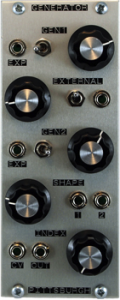
Teaser of the new Generator module from Pittsburgh Modular
The Generator is a dual oscillator built around two triangle core, wide range, periodic waveform generators. Ideal as the basis for tuned percussion/noise, abrasive amplitude, frequency and timbral modulation. Tones, drones and textures. As a multipurpose signal generator, Generator can provide the basis of a wide range of complex sounds from drums to atonal, nintendo zipper/fart noises.
How to add multitouch capability to your preferred software
Emulator Modular, add multitouch capability to your preferred software!! (coming soon)
Track ID: “Dusty” by David Jones (Starlight Unlimited), courtesy of Plus 39 Group.
Emulator Modular, www.smithsonmartin.com
Here is a background based on the existing version:
Emulator is the most revolutionary experience for DJ’s in the last 30 years!, is the first REAL and USABLE Multi-Touch DJ System that allows the crowd to see exactly what the DJ is doing on a huge transparent touch screen.
The art of DJ’ing is now part of the clubs lightshow, this is the next level in DJ performance!
Emulator is the first native multi-touch software for windows 7, this makes it possible to convert even a simple Tablet PC into a powerful multi-touch midi controller.
A version specifically for Mac OSX is currently under development.
Is ready to use and does not require any special programming or configuration, follow the basic set up instructions and you are ready to play within 5 minutes.
Emulator is the only MIDI controller that can show all the information needed on one single screen.
Our patented technology gives the user a ”heads-up” display of all tracks and information.
Supports multiple controller layouts, covering the most important DJ’ing software on the market.
Versions for Ableton, Serato and Virtual DJ are in development.
The Traktor Pro version is available now.
Is a complete multi-touch MIDI controller, for example, the Traktor version has more than 130 MIDI buttons, knobs and sliders covering all common features of Traktor Pro and more!!!
Emulator Multi-Touch System has an extreme low latency, with our touchscreen units the latency is only 7ms, this results in fast real time touch points, without the fear of false touchs or ghost points.
Is fully upgradable, buying the Emulator software or any of our multi-touch packages, you receive lifetime product software upgrades with direct support from our private support forum.
Software use low CPU resources, all graphics in Emulator are accelerated by hardware, our graphical engine guarantees low cpu usage.
Emulator is the most durable midi controller available, touch screens support extremely hard usage, the continuous usage will never deteriorate the sliders, knobs or buttons.
Modular: Modcan Vocoder 71B and a Synth Tech MOTM-101
The Vocoder 71B is a solid DSP interpretation of the classic Vocoder effect. Analogue Vocoders that offer an adequate number of filter bands can be a challenge to manufacture with high parts count, large circuit boards and enclosures and lengthy calibration procedures. All of which adds up to high costs and large dimensions. The 71B attempts to address this, providing the most important features of a mid range Vocoder in a small package ideal for a modular environment.
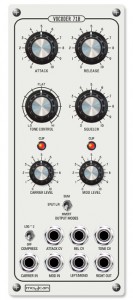
To keep the footprint small we chose a simple “tone” knob which provides a “tilt” like control that scales the high and low bands with center position being flat. This method combines considerable space saving and versatility without the need for individual sliders for band levels. It also makes it possible to have with voltage control. The filter/envelope detector network uses ten 4 pole 24dB band pass filters which we found to provide good frequency isolation, important for clarity when used with vocals or speech. Also works very well processing Drum loops and other sources.
In this video:
This is just two modules, a Modcan Vocoder 71B and a Synth Tech MOTM-101 noise source. The EV dynamic mic goes through a Shure mic pre and then to the vocoder, along with some pink noise. Having the speakers up a bit was causing some feedback that helped produce some of the sustain and depth.
Filter modulation on the U-HE ACE
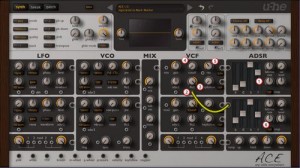
My friend Mark Mosher has posted a nice article on how to modulate a filter with an envelope:
U-HE ACE is my favorate analog modeled virtual synth and once you “grok”” the cabling you can do amazing things with it. If you find the cabling confusing, checkout my video from last year “U-HE ACE Tutorial: Patch Cables 101” which I’m happy to report is closing in on 12,000 views.
Via a YouTube I got a question from a reader on how to modulate the filter with an envelope so I thought I’d put together a quick step-by-step tutorial. Click the image above to see a larger version to follow along.
- Bump the “r” or release time on the amp envelope to give us more sustain time so we can make room for the filter envelope to work
- Patch a cable from the output socket of ADSR2 to the socket under LFO2. Now the knob for LFO2 turns into a bi-polar gain knob.
- Turn the the gain knob all the way up for maximum modulation from the ADSR
- Turn cutoff to 0 so the filter is 100% controlled by ADSR2
- Turn the “res” up just to make the effect more pronounced
- Adjust the ADSR value to match the screen shot
Tweak to your heart’s desire.
SunVox on iPad with MIDI-keyboard
SunVox is a small, fast and powerful music sequencer with modular synthesizers. It is a tool for those people who want to compose music anywhere. SunVox available for desktop PC (Windows, Linux, Mac OS X), pocket computers (Windows Mobile, PalmOS, Maemo, iPhone/iPad) and netbooks.
Key features
- Modular interface.
- Highly optimized synth algorithms.
- Flexible architecture: SunVox can working on variuos devices. For example: PDA with slow CPU – 16bit sound (fixed point arithmetic); or big PC with powerfull CPU: 32bit sound (floating point arithmetic).
- Built-in synthesizers & effects:
- FM synthesizer;
- Generator (saw,triangle,square,noise waveforms);
- Kicker;
- Sampler (supported formats: WAV, XI, AIFF);
- SpectraVoice (FFT-based synthesizer for analog-like pads);
- DC Blocking Filter;
- Delay;
- Distortion;
- Echo;
- EQ;
- Filter (Low-pass, High-pass, Band-pass, Notch);
- Flanger;
- LFO;
- Loop;
- Modulator;
- Reverb (with DC Blocking Filter);
- Vocal Filter;
- Vorbis Player;
- Vibrato.
- Supported systems: Windows, Linux (x86/x86_64/arm), Mac OS X, PalmOS, WindowsCE (Windows Mobile), iPhone/iPad.
- Export to WAV.
- MIDI IN/OUT.
- Realtime sample recording.
What’s New in Version 1.6.2
* quantization noise is reduced by 4 times;
* improved sound quality of the following modules: Generator, SpectraVoice;
* new Generator waveforms: half-sine (6); abs-sine (7); pulse-sine with duty cycle (8);
* added Copy and Paste of modules;
* added new control “Velocity” to MultiSynth module;
* now Sampler can record signals from another modules; just connect some output module (Generator, for example) to the Sampler and press the “Rec”, “Rec mono” or “Rec LoFi” button under the Sampler controllers; “Rec” – record stereo; “Rec mono” – record mono; “Rec LoFi” – record mono with reduced sampling frequency;
* added Input module for audio receiving from microphone or line-in; at the moment only iOS supported; the Input for other systems will be available in the next releases;
* iOS: added D-pad for more precise cursor positioning in the pattern editor;
* iOS: added Audio Copy/Paste (Intua Audio Sharing); Sonoma compatible; Where to find: Main menu -> Export/import -> Copy/Paste;
* iOS: added multitouch support to Touch Theremin;
* iOS: added multitouch support to piano keyboard;
* added base MIDI IN/OUT in versions for Linux (ALSA), OSX and iOS (CoreMidi), Windows (MM);
* supported commands for MIDI IN: NoteON/OFF;
* supported commands for MIDI OUT: NoteON/OFF; Control Change; Program Change; Bank Select;
* use controllers with number 80+X to send MIDI Control Change; where the X is MIDI Controller Number; for example: 8100 8000 – set Modulation (MSB and LSB) to the max value;
* added ASIO support (for Windows only);
* added Preferences (in the Main menu);
* templates support (in the Preferences);
* fixed bug with overload of EQ module;
* added new songs and instruments (samples);
* many bugs fixed.
Demo of the Benjolin suitcase synth
Description:
Just finished the Benjolin. It’s in the suitcase synth i’m currently building. the ‘sun bear’ module to the left is a MFOS dual LFO. Enjoy!
DATAMASKIN

