
Lemur iPad app – first attempt at controlling Reason 6
Background data:
Always coveted a Jazzmutant Lemur, but could never justify the cost. So I couldn’t pass up the opportunity to work with the iOS app adaptation by liine! This is my first attempt experimenting with the multiball control and physics model to trigger MIDI notes and generate interesting modulation patterns of Malstrom and Echo devices.
How to create a gated delay effect – Reason Sound Design
Propellerhead Software’s product specialist Mattias Häggström Gerdt shows you how to great a gated delay combinator in Reason based on the patch “Echodile” from the Reason Factory Soundbank.
Ball Beats – Alkex Instruments
Make the balls create the beat:
www.alkex.com
8×6 Midi Drum Step Sequencer!
Triggering Reason Redrum Samples,
Midi Synched to Ableton Live.
Acid bass = Mode Machine’s XoXboX2
Filter controlled by TouchOSC ipad
Reason 6 – Getting up to Speed
ASK Video has released Reason 6 Getting up to Speed, a new video tutorial covering the new features and effects in Propellerhead’s Reason 6 music software.
https://askvideo.com/product_info.php?&products_id=331
Reason and Record have been combined into one feature packed product aptly titled, Reason 6. There are lots of new features and effects and we want to get you up to speed! The aim of this tutorial is to help those of you who are already using Reason or who already have our Reason 5 to tutorial, to get up and running quickly with the new elements Propellerhead has added.
We won’t simply be glossing over these features however, we want you to know them just as well as you would after watching one of our full length tutorials. We cover 5 main topics: The new Mixer, The Pulveriser, Alligator, The Echo, and Neptune. By the time you’re done watching you should feel confident in using them in your next project.
If you’re on old Reason veteran or you already have some of our older Reason tutorials, picking this up is a no-brainer because it avoids talking about stuff you already know and gets right to the stuff you need to know. The easy-going and fun style of the tutorial will also make learning about the new features in Reason 6 a really great experience.
Reason Wizardry Demo Video
Reason Wizardry is a series of advanced video tutorials for Propellerhead Reason 4/5/6, produced fresh and delivered electronically each month.
Artist Interview: DJ Lucky Date
When Jordan Atkins-Loria (DJ Lucky Date) was introduced to Reason, he instantly recognized the potential of it’s synths and set about to master them. Originally following tutorials he found online, Lucky Date began making his own tutorials which showcased his penchant for modern electro dance synths in Reason. As his tutorials grew in popularity, so did his career as a DJ and Producer.
In just a couple short years, DJ Lucky Date has gone from making his first video tutorial to completing 4 dirty electro dance ReFill sound libraries, charting on Beatport, and massive club and festival gigs as a headlininer.
We met up with Jordan one night in LA where he had a few thousand Angelinos jumping and screaming at Avalon in Hollywood, CA. Before the show he walked us through some of the secrets to his massive sounds and even gave us the patches so we can share them with you all.
More about Propellerhead and Reason:
http://www.propellerheads.se
http://www.propellerheads.se/reason/
Download the patches from this video:
http://www.propellerheads.se/stuff/luckydate.zip
DJ Lucky Date’s Electro ReFills:
http://store.payloadz.com/results/results.asp?m=96514
More info on the Panorama controller for Reason 6
The basic idea of the Panorama is a custom front end controller for Reason 6, based around a MIDI keyboard and plenty of knobs and sliders.
Mixer
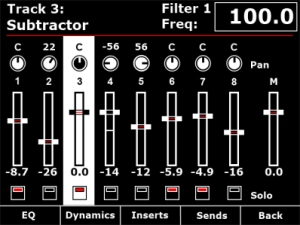
Channel strip
The mixer channel strips in Reason are comprehensive and like the real world hardware – quite long! Panorama breaks the channel strip down in to manageable localized sections, accessible at the push of a button. From the mixer menu described in Part 1, you have access to EQ, Dynamics, Inserts and Sends across the buttons below the display. The encoders to the right of the display map to the targeted channel strip in the mixer. If a track is selected in the sequencer, the corresponding mixer channel becomes targeted. Alternatively, you can target a mix channel using the 8 buttons when set to ‘select’ mode (described in part 1).
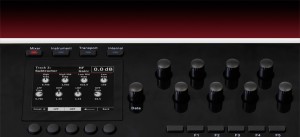
Here we are taking a closer look at how Panorama access’s the EQ parameters.
Panorama allows you to gain access to Reason’s mixer at the touch of a button. Here you see the Reason mixer channels assigned to be operated by each of Panorama’s controls. The display gives you an accurate overview of what parameter each control is assigned to as well as current value state. Let’s look at the display screen in some more detail.
Panorama is our vision of how a great controller should work. Yes, there are many ‘generic’ controllers on the market already but we have yet to find one that satisfies our criteria of operating the software, as if it’s hardware – That’s Panorama. Panorama uses a communication protocol that has been custom designed for Reason 6, putting control – every control – at your fingertips. There’s nothing generic about this controller. Panorama really does access all areas.
Nektar Panorama general specifications
- 49 note weighted keyboard w/aftertouch
- Pitch bend + modulation wheels
- Motorized fader
- 9 50mm faders
- 9 encoders above the faders
- 8 programmable LED buttons
- Display
- Additional 8 encoders
- 12 velocity and pressure sensitive pads
- Navigation and menu buttons
- Transport control
- Sustain socket
- Pedal socket
The whole design is custom for Panorama including the keybed. Our communications protocol that handles interaction with Reason 6 is also custom. The main idea behind Panorama is to complement the computer ,so a user can have immediate access to areas of Reason where tactile control is an advantage without having to reach for the mouse which typically disrupts workflow.
Or to put it in other words: Panorama is first an instrument and gives the user the experience of operating Reason, as if it was hardware.
Reason 6 Tutorial : The Alligator 2 Patterns, LFOs & Envelopes
http://youtu.be/9NzikmhVI8c
Playlist:
Reason 6 Tutorial : The Alligator 2 Patterns, LFOs & Envelopes
Reason 6 Tutorial : The Alligator 3. Pattern Section
Reason 6 Tutorial : The Alligator 4. Amp Envelope
Reason 6 Tutorial : The Alligator 5. LFO
Reason 6 Tutorial : The Alligator 6. Filter Envelope
Reason 6 Tutorial : The Alligator 7. Delay
Reason 6 Tutorial : The Alligator 8. Phaser
Reason 6 Tutorial : The Alligator 9. Drive, Pan & Master Volume
Reason 6 Tutorial : The Alligator 12. Bass Processing
Reason 6 Tutorial : The alligator 13 Alligator as MIDI Instr
Reason 6 Tutorial : The Alligator 14. External Sequencer
Reason 6 Tutorial : The Alligator 15. Alligator Multi Out
Reason 6 Tutorial : The Alligator 16. Alligator CV Outs
Reason 6 Tutorial : The Alligator 17. Vocal Processing
Reason 6 Tutorial : The Alligator 18. Vocal Combinator
Reason 6 Tutorial : The Alligator 19. Vocal Combinator with Effects
Reason 6 Tutorial : The Alligator 20. Conclusion
Panorama controller for Reason 6
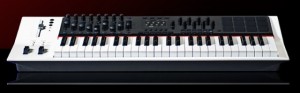
Nektar has presented a dedicated MIDI Controller for Reason 6, the Panorama controller.
Here’s what they have to say about the Nektar Panorama:
Reason 6 is here! Need a controller?
Panorama is our vision of how a great controller should work. Yes, there are many ‘generic’ controllers on the market already but we have yet to find one that satisfies our criteria of operating the software, as if it’s hardware – That’s Panorama. Panorama uses a communication protocol that has been custom designed for Reason 6, putting control – every control – at your fingertips. There’s nothing generic about this controller. Panorama really does access all areas.
Pricing, specs and availability are to be announced.
Mixer Operation:
Panorama allows you to gain access to Reason’s mixer at the touch of a button.
The display gives you an accurate overview of what parameter each control is assigned to as well as current value state.
Channel Strip Control
Panorama breaks the channel strip down in to manageable localized sections, accessible at the push of a button. From the mixer menu, you have access to EQ, Dynamics, Inserts and Sends across the buttons below the display.
Propellerhead’s James Bernard’s Favorite New Patches
The expanded factory sound bank in Reason 6 is a new source of inspiration. Propellerhead product specialist James Bernard put together a sampling of new music he’s been making with the new patches in the Reason 6 sound bank.
This file is also downloadable in Reason’s demo song format. If you’re trying out Reason and want to see these patches and sequencer clips up close, just go here: http://www.propellerheads.se/stuff/sounds.zip
DATAMASKIN

