
How to make a gated filter sweep – Reason Sound Design
Propellerhead Software’s product specialist James Bernard shows you how to do a gated filter sweep in this Reason Sound Design video. This effect is great for transitions and it’s very playable once you’ve set up the Combinator controls!
You can download the patches shown in the video here: http://www.propellerheads.se/stuff/RSD5.zip
Reason – Nektar P4 Controller Preview video
The new dedicated Reason controller from Nektar
Nektar Technology Panorama P4 Keyboard Controller Delivers Hands-On Reason Control
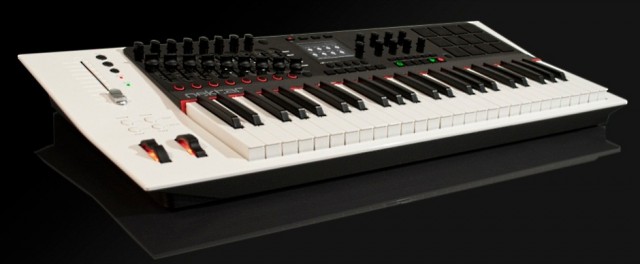
This week at Winter NAMM 2012, Nektar Technology will unveil the new keyboard controller in the most complete version we’ve seen yet; the company even has an anticipated release date of March, 2012.
The Panorama P4 offers the discerning Reason user tactile control and a number of intuitive features that make working with Reason a piece of cake. According to the manufacturer, the established workstation keyboard concepts allow for complete “on device” selecting and editing of sound with direct visual feedback. The keyboard controller is also said to be comfortable and very easy to operate in the studio or during live performances. The front panel is angled, raising important controls so that they are easy to see and reach, as well as providing the ideal viewing angle for reading the centered high-resolution display.
The synth keybed itself has 49 notes, plus a choice of 5 velocity curves (each optimized dynamically but with different response emphasis), monophonic Aftertouch, and a zone function that enables you to program four zones that can be switched on and off during performance.
As for controls, the Panorama P4 has a ton of them — 90 control elements assignable to a MIDI-message. Buttons and pads can be assigned to ASCII messages, allowing for sending shortcut commands to Reason, while 20 preset locations store the assignments of controls for later recall. A preset is linked to a Pad Map, Keyboard Map, and F-Keys Map, so that you can save and load these components independently of the individual presets.
For percussive performances, 12 Velocity- and pressure-sensitive pads are included, which can be programmed using the “Learn Note” function and then saved to any of the 20 Pad Map locations. The Velocity Spread feature spreads 1 note across all 12 pads, each with its own fixed Velocity, which allows for nuanced dynamics. Meanwhile, the Scale-Function assigns each pad to pitches within a defined scale for percussive performances with any sort of keyboard sound, while freely changing intervals or transposing the whole set.
Why you need it – It’s the controller’s dedicated Reason control, of course. The Panorama P4 is said to offer completely transparent and with unlimited access to all areas. Every single Reason device is mapped with parameters and their values clearly visible in the display. Switching between Mixer, Instrument, and Transport mode reconfigures the entire control surface by just pressing one button. Overall, the Panorama P4 was designed to give Reason the feel of hardware.
Panorama P4 Specifications:
- 49-Note Velocity-sensitive keyboard
- Aftertouch
- Weighted synth-style keybed
- Pitch bend and Modulation wheels
- 4 Keyboard function buttons
- 3.5″ High-resolution TFT display
- 16 Encoders
- 9 x 45 mm faders
- 100 mm ALPS motorized fader
- 10 Assignable LED buttons
- 28 Additional assignable buttons
- 12 Pads with Velocity / pressure sensitivity
- 4 LED mode buttons
- 5 Menu buttons under display
- Pads and motorized fader select buttons
- View and mute buttons
- Sustain pedal jack (pedal not included)
- Expression pedal jack (pedal not included)
- USB port for communication with computer
- USB Micro B connector for extra and external power
- Compatible with Mac OS X and Windows XP, Vista, and 7
Nektar Technology plans on shipping the Panorama P4 in March, 2012 for $599.99 (MSRP) or $499.99 (estimated street price). Visit nektartech.com.
Via GW
OP-1 as Control Surface for Reason
Teenage Engineering OP-1 meets Propellerheads Reason in a very short demo of the OP-1 / Reason control surface functionality.
Working with Reason 6.0.2, OP-1 OS #12234 and newer.
http://www.teenageengineering.com/
http://www.propellerheads.se/
How to make a funky auto-wah bass effect – Reason Sound Design
Propellerhead Software’s product specialist Mattias Häggström Gerdt shows you how to make a Bootsy Collins-style funky auto-wah effect for electric bass (but you can use it on anything, really!).
Link to download the featured patch this week (Reason 6 song file format): http://www.propellerheads.se/stuff/Andrew_Skelton-Fifth_house_bass_Twist.reason
Reason Mobile
University Assignment
Graphic & Digital Design
Brief: Design an app for a next generation smart phone.
Concept: A mobile version of the well known music composition software from ‘Reason’ by Propellerhead.
Create The “Unleash The Fucking Dada” Synth in Reason
Click here to see tour dates: http://www.facebook.com/luckydatemusic?sk=app_123966167614127
Dada Life – Unleash The Fucking Dada (Official Video)
Director – Max Knight // AD – Harvey Eaton // DP – Sam Ebrahim // Delilah – Milli Prus // Frank – Tom Byamshaw // Bananabarman – Patrick Shipman
Solid State Logic Releases New Features for Nucleus
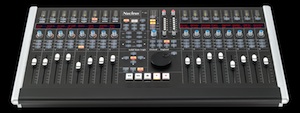
Solid State Logic in Oxford, UK, releases new features for its Nucleus control surface. Nucleus users can now download dedicated DAW control profiles for Ableton Live and Propellerhead Reason, in addition to existing profiles for Pro Tools, Logic, Cubase/Nuendo, and any other DAW applications that support MCU or HUI.
SSL states that OS X Lion is now fully supported for Nucleus, with a revised Java-based Console Browser. The Nucleus soundcard now also supports 64-bit for Mac users.
Sam Counihan, International Sales Manager at Ableton AG, says, “This new template tightly connects the feature sets of both the Nucleus and Ableton Live. Live’s unique and dynamic workflow is brought to life through the Nucleus’ tactile worksurface, and is complimented by the console’s high-end audio interface featuring the same SuperAnalogue technology as found in the company’s flagship Duality and AWS consoles. In other words, bring a laptop with Ableton Live to any studio with an SSL rig and you’re good to go.”
This download contains the latest upgrades for the Nucleus console: Nucleus console software Version 1.5; Nucleus browser V. 1.06; Mac Soundcard driver V. 2.00.05; IpMIDI (latest versions for both Mac and PC).
Additional documentation is available via the Documentation tab on the Nucleus product page.
Registered Nucleus users with a serial number can download the upgrade bundle by clicking on the download link on the Downloads tab of the Nucleus product page.
Reason 6 gets updated to Reason 6.0.2
Reason 6.0.2 and Reason Essentials 1.0.2 updates are now available for free download. These releases bring a number of bug fixes, better performance, as well as Remote support for more hardware controllers and are recommended for all users.

This download is available for owners of Reason 6 only – please do not redistribute.
Please note that the Reason sound banks are not included in this download.

Download Reason 6.0.2
Mac OS, 1.2 GB

A complete fix list is available here.
Artist Interview: Surkin
When a young Benoit Heitz saw a friend’s computer running Reason he had an epiphany: “His computer isn’t better than my parent’s computer. That means I could be making music.” He started out not knowing the first thing about drums or music in general. Three years later he was touring the world as an international DJ. Surkin had us over to check out his wild yet danceable cut-up sample work.
Benoit Heitz (born 1985), known by his stage name Surkin, is a French electro DJ and producer. He gained attention with his releases on the French Institubes music label as well as a remix for Teki Latex released on Virgin. In 2011 he launched the record label Marble along with Para One and Bobmo.

Heitz was born in southern France, and is now located in Paris.
DATAMASKIN

