
NodeBeat – iOS Music Sequencer
NodeBeat is an experimental node-based audio sequencer and generative music application for the iPhone, iPod Touch and iPad.
By combining music and exploration, NodeBeat allows anyone to create a variety of rhythmic sequences and ambient melodies in a fun and intuitive fashion.
Release Date: April 25th, 2011
The Early Days of Software Sequencers
KVR’s Chris Halaby is a skilled writer and in this editorial he takes on the early days of sequencers, enjoy:
This is the second part of my perspectives and it’s about the beginning of the transition from tape and hardware devices to computers.
Technology drives music. Once a talented individual gets a hold of a new technology and makes beautiful music with it the technology will evolve quickly. This was certainly the case with the computer. There was clearly a need for these software products. Sequencing musical events was taking off and the new technologies allowed music that couldn’t have been created without these new tools. In fact computers can make mediocre musicians sound good, good musicians sound great, and great musicians incredibly productive.
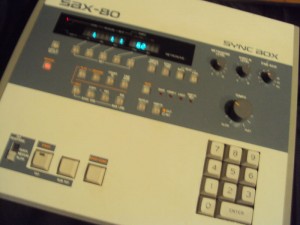
Everything changed for musicians and recording engineers in 1982 and 1984 with the standardization of MIDI and the introduction of the Macintosh computer. It also started a sea change for the musical instruments industry. MIDI allowed a standardized way to send musical data between devices. The Mac had a Graphic User Interface by initial design and the 512 x 342 screen of the Mac could display significantly more information than any LCD display at the time.
There were already some MIDI sequencing software products available for the PC running DOS in 1984, but the lack of a PC graphic user interface made them unusable by the faint of heart. Windows didn’t appear until later and wasn’t useable by musicians in any kind of professional environment until Windows 2.0. Always an innovator under the guidance of Ikutaro Kakehashi Roland had an early software sequencer application, but its interface was one step above command line, making it very cumbersome.
One Silicon Valley engineer who noticed the potential of MIDI and the Mac immediately was Dave Oppenheim, who had recently stopped working for Androbot (an early venture capital backed personal robotics company), and was thinking about what to do next. Dave and I had been housemates while we both attended Stanford University in Palo Alto, CA. Dave was a Music/EE major (also a classically trained pianist with perfect pitch!) and I was an Music/Art Major (Hunh! No really. I’m not joking).
Dave had been messing around with synthesizers as long as I had known him. In fact he had created his own interface to play an Oberheim SEM from the keyboard of a Vox Continental organ in the late ’70s. (An unfortunate side effect was the voiding of his warranty.) A later project was a hardware device that intercepted the keyboard connector inside an Oberheim OBXa. His box had several buttons, each of which would record or play back a small sequence.
Dave’s idea was to use the Mac to replace the dedicated hardware that people like me were using in recording sessions. In November of 1984, he bought a Macintosh, and after learning to program in a GUI environment, wrote the first version of ‘Sequencer’ (a software version of the aforementioned box) in six months. I loaned him my DSX for a couple of weeks so he could make sure that his software would be able to everything the DSX could do.
In order to connect to the Mac he designed a simple MIDI interface that could be connected to the printer and modem ports (RS-422) and in a stroke of brilliance made the package narrow enough so that one could screw two separate interfaces to the ports on back of their Mac and get a total of 32 MIDI channels.
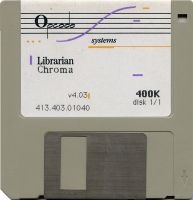
In 1985 he hooked up with Gary Briber, a friend from high school, and formed Opcode Systems. Though he asked me to get involved at the beginning I was too busy trying to be a rock star, and opted instead to help once a week with tech support and writing user manuals. Briber lost interest after about a year so Dave asked me to be fully involved. It was an easy decision given the momentum the company had generated. A new category within the musical instrument industry was growing very rapidly and Opcode was part of it.
Fresh sequencer-controlled multi-effects unit
Sinevibes have released Sequential, a sequencer-controlled multi-effects unit for Mac OS 10.5 or later. Sequential includes ten different effects ranging from filters to waveshapers to ring modulators to bit reduction and more. Effects are turned on or off via the up to 32-step sequencer providing all manner of rhythmic effects. Sequential goes for $49.
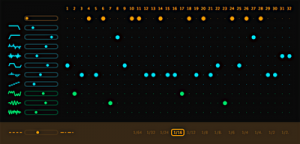
It features unique algorithms ranging from filters, waveshapers and distortion, to ring modulation and even audio-controlled oscillators. These effects are rhythmically switched via a step sequencer matrix, allowing you to create intricate, lively processing patterns. Sequential has been finely tuned to instantly deliver superb musical results, and is capable of radical sound transformations with any type of sound or music style.
Features
* Ten effect algorithms: low-pass and high-pass filters, two waveshape transformers, clipping booster, bit and sample rate reduction, sine oscillator with envelope follower, ring modulator and variable noise
* Sequencer matrix with up to 32 steps, variable speed and swing
* Intuitive, high-contrast user interface
* Useful preset templates
Compatibility
Sequential requires Mac OS 10.5 or later. It is a Universal Binary with 32 and 64 bit compatibility. You will also need an AudioUnit host application that supports Cocoa user interface technology. Please make sure to install the demo version to test Sequential on your system.
Demonstration of the Teenage Engineering OP-1 sequencer
Features
Synthesizers
* Multiple Synthesizer Engines with exchangable Architecture.
* 8 dedicated instant sound select keys
Sound Engines
* Dr Wave – Raw 8-bit yupe sound engine
* FM – Easy to tweak FM synthesis engine
* Pulse – Square wave type engine
* String – Physical modeling with a twist
* Digital – Raw digital type of engine
* Phase – Phase distortion engine
* Cluster – Multiple Wave Cluster
* Feature additions of Engines will be available with software upgrades
Sample Engines
* Dedicated instant Synth Sampler with 6 seconds sampling time for each slot.
* Dedicated instant Drum Sampler with 12 seconds sampling time for each slot.
With automated layout feature.
* Instant sampling with built-in Microphone or Line in
Envelopes
* Classic ADSR type of envelope
* Dynamic Envelope for Drum sounds.
* Future additions of Envelopes will be available with software upgrades
Effects
* Multiple Effects with exchangable Architecture.
* Delay – Classic delay type
* Phone – Hacked phone effect
* Punch – Adds punch to your sound
* Grid – Grid based echo
* Spring – Spring reverb type
* Future additions of Effects will be available with software upgrades
Tape Feature
* 4 individual tracks with instant Solo
* Instant variable Tape Speed
* 6 minutes recording time in Normal tape speed.
* Up to 24 minutes recording time in Low tape speed
* Loop function with movable region
* Tape tricks for Break Tape, Bits and Reverse.
* Memo 1 & 2 for instant memorizing Effects / EQ / Pan or Levels / Tape Speed
* Reverse Recording
* Classic Tape editing Features Lift / Split and Drop
* Lift tape recordings back into Sampler for endless sound design.
Remember to consider any copyright issues when sampling.
Motion Sensor
* 3 Axis Motion sensor (G-Force)
* Assignable to any synth, envelope, effect parameter or to pitch.
Built-in FM radio
# Sample direct from any radiostation
# Record direct to tape
Last Flight Out – live modular synthesizer
Live modular synthesizer.
Q960 sequencer for the bass line through a Oakley Super Diode Ladder Filter. Six voices comprised of nine oscillators and four VCF’s. Additional filters included Grove Audio PM Resonator, Q127 Fixed Filter Bank, two Oakley Equinoxe phasers and a Cyndustries Quad Low Pass Gates. Three sequencers included Q960, Q119 and STG Mini-Stores. A Yusynth Random Gates selected triggering for the percussion sounds and the high drone voice. FX included a TC Electronics D-Two delay and Lexicon MX200.
I’m handling the Q960 skip/reset points and using a Q149 Signal Selector to route cv’s for the pitch to the bass line with a Q123 Standards module for pitch/octave modulation. Almost everything else is automated and just faded in and out.
Generative Online Sound Sequencer – Otomata
Play with it at: http://batu.in/otomata
Otomata is a musical sequencer that you can play with online. Click the above URL and have fun.
Getting Started in Brainwave Sequencer for IPad
This video shows how to get started in Brainwave Sequencer.
Brainwave is a clip based MIDI sequencer for the IPad. Bring your melodies and drum beats into life with the streamlined and intuitive MIDI clip editor. Assemble and arrange entire songs with the Arrangement editor. Control up to 16 instruments using the built-in sampler. Use the built-in audio samples to quickly get up and running, or use your own samples for even more creative sounds. Then produce and export MIDI files to be imported to your favourite Digital Audio Workstation software. All this inside of an ergonomic and minimalist user interface that will help get your inspiration to fruition.
For more information: http://www.facebook.com/pages/Brainwave/139992022734576
DSI Prophet ’08 Module: Advanced Sequence
More info below:
DSI Prophet ’08 Module: Advanced Sequence
Audio & video by Arjen Schat
I bought the Prophet ’08 Module back in 2008 but never really used the internal step sequencer to its full potential. In this video I use three layered sequences which were all composed using the internal step sequencers. The first sequence modulates the pitch of oscillator 1 in layer A, the second sequence modulates the pitch of oscillator 2, also in layer A. The third sequence modulates the pitch of both oscillators in layer B.
I use key step triggers to trigger the different steps of the sequences and alternate between three different notes with yet another sequence coming from my DAW (Renoise). These notes transpose the pitch of the sequences at their respective steps and create intricate polyrhythms due to the different lenghts of the internal sequences and the key step trigger sequence from Renoise.
The notes in the trigger sequence are also transposed a few times to keep things sonically interesting.
The audio is routed through a Moog MF-104Z BBD delay, a Maxon AD999 BBD delay and T-Rex Room-mate reverb.
What a suitcase beauty from Analogue Solutions
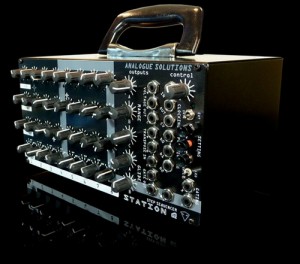
Analogue Solutions have announced a new product called the Station Q analog sequencer. This is a miniaturized edition of their Oberkorn sequencer. The new Station Q has 8 steps instead of 16 on the Oberkorn. Likewise there is no MIDI implimented on the Station Q.
Key Features:
* 24 CV knobs, 8 Gate switches, 9 LEDs
* 3x CV channels, 2x Gate channels
* CV control of Speed / Tempo
* Control of sequence position (step number)
* Rugged steel construction
* Compact, portable size
Station Q is like half an Oberkorn sequencer. It is identical to Oberkorn, except that it is 8 step instead of 16, and does not have the MIDI features. The Station Q is the perfect companion to the Station X/Y mini-modular combo.
Case version
£399 GPB / $650 USD exc. tax & delivery
New KORG Wavedrum at MusikMesse
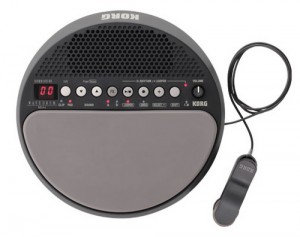
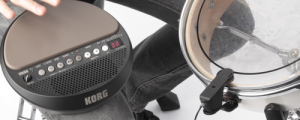
Korg will be releasing a Wavedrum Mini Dynamic Percussion Synthesizer. There is not so much information posted about the device functions or specifications, but the most apparent new feature seems to be a clip on pick-up for triggering the Wavedrum Mini. The new Wavedrum also appears to have a built in speaker and some kind of presets or sequencing functions.
DATAMASKIN

