
Making thing Endless
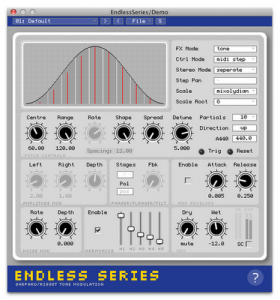
Endless Series is unique synthesis and effect plugin based on the Shepard Tone auditory illusion. It generates mind bending infinite scales, psychedelic drones and fascinating sonic textures and works as a tone generator, a ring modulator, phaser, flanger or resonant filter bank effect.
Features:
VST2 / AudioUnit plugin based on the Shepard Tone auditory illusion
Additive tone generator with up to 40 partials
Circular pitch ring modulator, flanger, filter and 24 stage phaser FX
Glissando, auto-stepped and MIDI stepped modes
Many options to tweak harmonicity and timbre
Stereo detune, phase offset and auto-panning
Quantise pitches to 14 different scales
Soft clipping, extra harmonics and noise modulation
Fast ASR amplitude envelope in MIDI stepped mode
MIDI reset-able for repeatable output
Integrated help system
32 high quality factory presets”
Reaktor Tutorial – Additive Synthesis
Native Instruments have just launched their latest Reaktor Synth called Razor and it is causing quite a stir in the sound design and production communities. So what makes this synth so exciting? Well it is down to a process called additive synthesis.
Put in the plainest terms possible, additive synthesis is the summation of simple tones to create more complex ones.
The sound is constructed from partials (or frequency components) firing in parallel, changing amplitude and even frequency over time. Additive synthesis is a very powerful sound design tool because the many micro-variations in the frequency and amplitude of individual partials mirrors those that makes natural sounds so rich and lively, and the resulting sound remains clear and precise at all times, even when heavily modulated.
This video demonstrates how to go about building an additive synth in Reaktor plus an overview of some of the other techniques that you will learn on the Point Blank Online Sound Design course ( http://www.pointblankonline.net/sound-design-course.php ). Even this fairly simple example consisting of just 8 partials, you can begin to hear how an additive synth can create an impressively rich and malleable sound. So when you think that Razor’s additive engine consists of up to 320 partials you can start to see why everyone is so eager to get their hands on it!
Intimacy
Synthesist Martin Peters‘ demonstrates his take on Berlin School space music with this live modular + keyboard synth jam, Intimacy.
Here are the details:
Hello my YouTube and Modular synth friends. It’s been some weeks since I uploaded my last video. But I was looking for a way to record the music of my video’s in multitrack. Multitrack recording allows me to develop the live recorded music later on by adding, altering, removing individual audio tracks for each instrument and mixing the tracks properly. So I was busy investigating the various possibilities to do this. I ended up upgrading my Pro Tools LE 8 software, which I did not use much anymore, to version 9 to be able to broaden the scope for audio interfaces. Then I was lusted for a Mackie Onyx 1220i because this integrates a mixer and an audio interface for each channel. But the remaining budget was to tight for that. So then I bought a second hand Alesis MultiMix 16 FireWire which is capable of more or less the same for a smaller budget. Now I can record up to 16 channels and the stereo main mix in one go. I used the stereo main mix for this YouTube video so this is still a live recording. If I develop this recording further I will upload it to the music section of my website.
This improvisation is in essence somewhat minimal. There a four sequences going on. I manually alternate between rows 1 and 2 of the Synthesizers.com Q960 which is driving the Synthesizers.com Modular. I also use 2 presets on the Doepfer MAQ16/3 to alternate the sequences for the self-built Modular with a 4- and 6-step sequence and the Ian Fritz Teezer Through-Zero VCO with the Blacet MiniWave with two 8-step sequences. The Waldorf Q Keyboard does a 2-step sequence for the bass. Chords are played on the Roland XP-80 and the Waldorf Q Keyboard. The solo is performed on the Clavia Nord Lead 1. The MIDI clock for all this comes from Pro Tools 9 to keep it in sync with the Pro Tools bars and beats. Pro Tools also transposes the sequences on the Synthesizers.com Q960 and the Doepfer MAQ16/3.
You can download/see/hear the video and music from my website. I also provided a pre-recording made on the 24th of February.
Samplerbanks releases “Logic’s ES2: Basic to Intermediate Synthesis” by Sound Guru
Synthesis can seem extremely daunting. When you open up a synth like Logic’s ES2, you’re confronted with a huge array of buttons, knobs and sliders whose function seems obscure at best.
Even if you study the manual and can find your way around, it can still be extremely frustrating; hearing the sounds you want to make in your head, but unable to produce them. ES2 Synthesis: Basic to Intermediate guides you all the way from the foundations of synthesis to advanced sound design in 2hrs 35mins of HD video.
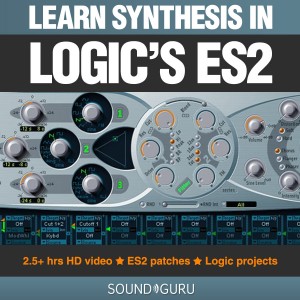
If you own Apple’s Logic Studio or Logic Express, you also own the ES2, since it’s one of the native synths that Logic ships with. If you’ve come across it, you’ll know that it’s a beast of an instrument, with a huge array of options for sound generation/modulation, and an almost limitless potential for new sounds. The ES2 is also a subtractive synthesizer. That makes it part of the most popular family of synths by far. As a result, the knowledge you will gain in this tutorial series is applicable to many thousands of other synthesizers, both virtual and analog.
ES2 Synthesis: Basic to Intermediate doesn’t simply teach you about buttons and knobs, however. The author, Tom Maisey created this tutorial series precisely because there aren’t any other tutorials out there that teach you the really juicy stuff: making amazing sounds that take your tracks to the next level.
The tutorial series is split into three parts:
Part 1 explains the layout of the ES2, and how its oscillators, filters and effects section can be employed to build starting points for your sounds.
Part 2 covers the modulation matrix and explains using Envelopes, LFOs and Expressive modulation sources to give your sound the dynamic shape and sonic character you’re after.
Part 3 is where things really start to get interesting. Over the course of 18 sound design workshop videos, we look at making Basses, Pads & Chords, Fx and Percussive sounds. In the process, you will learn a broad range of techniques that will allow you to turn the sounds in your head into reality.
The tutorial pack also includes several Logic project files and 21 ES2 patches to study and adapt at your leisure.
Creating synth sounds from scratch is not only gratifying, it makes your tracks stand out from the crowd. Why use someone else’s clichÈ when you can make your own?
CONTENT DETAILS:
Part 1
01. Intro
02. The ES2ís Signal path
03. Oscillator 1
04. Oscillators 2 & 3
05. Filters 1 & 2
06. Filter Blend, Parallel & Series
07. Effects
08. Polyphony, Monophony, Legato & Unison
09. Glide & Analog modes
Part 2
01. Intro
02. The Modulation Router
03. Envelope 3
04. Envelopes 1 & 2
05. LFOs 1 & 2
06. Expressive Modulation
07. Pulse Width Modulation
08. FM Synthesis
09. Ring modulation
10. Digiwave Modulation
11. Synced Oscillators
Part 3
01. Bass Workshop 1 – Bass Psychoacoustics
02. Bass Workshop 2 – Using envelopes & getting “fat”
03. Bass Workshop 3 – Expressive modulation, keyboard scaling, punchy subs & clean deep basses
04. Bass Workshop 4 – Lush, crushed bass & other modulation options
05. Bass Workshop 5 – Dark & twisted D’n’B & dubstep
06. Percussion Workshop 1 – Basic principles
07. Percussion Workshop 2 – FM metallic sounds & hihat patch
08. Percussion Workshop 3 – Self-resonating filters, kick drums and microtonal percussion loops
09. Percussion Workshop 4 – Snare patch & complete ES2 drumkit
10. Pads & Keyboards 1 – Basic principles
11. Pads & Keyboards 2 – PWM, string sounds and FM pads
12. Pads & Keyboards 3 – Morphing modwheel sounds & expression
13. Pads & Keyboards 4 – Stab chords 101: applying our knowledge
14. Pads & Keyboards 5 – House & techno chord sounds
15. FX Workshop 1 – Transition Fx, noise & the secret filter
16. FX Workshop 2 – Transcendant transitions
17. FX Workshop 3 – Atmospheric synth Fx
18. FX Workshop 4 – Voyage of probability; no limits Fx
Available here: Logic’s ES2: Basic to Intermediate Synthesis
Spectrasonics Omnisphere 1.5 – all the new features in the updated version
Here’s what they have to say about the update:
We are proud to announce a major new version of our award-winning Power Synth Omnisphere® – which includes a host of new features, in particular a new interactive interface called “The Orb” offering stunning real-time synthesis manipulation capabilities, along with many deeply expanded additions to the synthesis engine and user interface. The update also includes many important user-requested features such as the new 5-Column Browser view and support for polyphonic aftertouch. The new version also includes a significant update to the factory patch library – 780 brand new patches which take advantage of all the new sound design capabilities and brings the total number of included sounds to over 8,000.
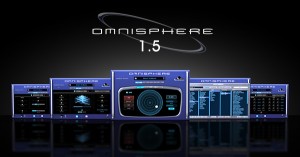
- New “Orb” ‘circular sound manipulation’ interface with Motion Recording and “Dice” button for infinite variations and one-touch sound customization
- Expanded Synthesis capabilities:
- Harmonia: New zoom page shows all Harmonia parameters per layer adding up to 10 oscillators per patch with new independent modulation options for Levels and Fine Tuning on each Harmonia oscillator.
- Waveshaper: New zoom page with extreme new processing modules including polyphonic ‘Crusher’ and ‘Reducer’ sections with ‘Force’ and ‘Animation’ controls that can all be modulated.
- Granular Synthesis: New ‘Speed’ and ‘Position’ modes. New zoom page with new ‘Granular Visualizer’ showing a graphic model of the effect of parameter edits which makes Granular synthesis easier to use.
- Patch Library Update: 780 new patches created by the Spectrasonics sound development team gives Omnisphere over 5,000 patches and 8,000 total included sounds.
- New 5-Column Browser view displays more sound categories and attributes simultaneously
- Support for new Omni TR iPad app
- New “Most Recent” Browser sorting option
- Added support for MIDI devices which send polyphonic aftertouch
- New ‘Clone Part’ feature allows easier editing/setup with multichannel MIDI controllers
- New MIDI Learn hardware control mode follows Live Mode selection
- Modulation Envelope points can be key-command snapped to semitone when modulating pitch
- User-assignable Legato Interval rule added
“Our goal for Omnisphere has always been to make it the ‘best of both worlds’ – awesome sounds and a dream instrument for sound design,” says Eric Persing, Founder of Spectrasonics. “As longtime synth geeks ourselves, we are just as excited as our customers to see how Omnisphere is growing and evolving as a synthesis platform. We’re really looking forward to hearing how our users explore the new sonic worlds this version opens up.”
Best of all – it’s a free upgrade for Spectrasonics Omnisphere owners.
Expanded Synthesis
Omnisphere 1.5 includes new synthesis capabilities, with newly designed “zoom” interface views for Harmonia, Waveshaper and Granular synthesis areas.
- Harmonia can create extremely rich sounds by adding up to 10 oscillators per patch with new independent modulation possibilities on each oscillator.
- The Waveshaper now includes more extreme sound mangling capabilities with the new polyphonic “Crusher” and “Reducer” modules, which include ‘Animation’ and ‘Force’ parameters that can all be modulated.
- Omnisphere’s Granular synthesis area has been made significantly more powerful by including new ‘Speed’ and ‘Position’ modes, which create dramatic polyphonic shifts through the audio and time spectrums. At the center of the Granular Zoom interface is a new real-time ‘Granular Visualizer’ showing a colorful graphic model of the effect of parameter edits, all of which makes Omnisphere’s complex Granular synthesis easier to understand and more fun to use.
The Orb
The “Orb” feature of Omnisphere 1.5 is both a sound manipulation tool and a performance interface — it can be thought of as a ‘circular controller.’
Now with a single click of the mouse, the user can instantly customize the sound. Best of all, the Orb automatically works with every patch a user has, there’s no setup necessary.
The user simply moves the Orb cursor with a mouse, a MIDI controller or in the case of an iPad, with fingers directly on the Orb itself. As the Orb moves around the concentric circles, it morphs between automatically generated parameter scenes in Omnisphere’s STEAM engine in a highly intelligent and musical manner — all patch dependent — manipulating the sound in subtle or radical ways appropriate to that particular patch. If the user doesn’t like what the Orb has created, a complete new set of manipulations can be chosen by simply rolling the “Dice” button, which instantly creates a brand new group of intelligent sonic modifications and effects to try. There’s no limit to how many serendipitous sonic variations the “Dice” can create – opening up the vast power of the STEAM engine to every user, regardless of synthesis knowledge.
For advanced synthesists seeking maximum flexibility, the Orb can also be setup manually and used as a new modulation source in Omnisphere’s sophisticated Mod Matrix.
The Inertia slider of the Orb allows the user to create a ‘movement trail’ after letting go of the Orb, just like a ball might roll and bounce off the walls of a circular enclosure, adding a musical symmetry to the “performance” of an Orb interaction. Users can also Record their performance movements directly into the Orb and play the performance back in sync with their controller or host. The Orb’s movements and sonic results are saved within the patch, multi or the host’s session for later recall. The movement of the Orb can also be automated in the users host.
The ideal control surface for Omnisphere’s new ‘Orb’ is the multi-touch interface of the simultaneously announced “Omni TR” iPad app, but the Orb can also be used with standard mice, trackpads and MIDI controllers.
Hands-On Expression
Omnisphere 1.5 includes support for Spectrasonics new “Omni TR” iPad app, which provides wireless multi-touch performance control over the instruments. Alternate controllers that send multiple simultaneous MIDI channels have improved handling with the new “Clone Part” feature, making it easier to edit with multichannel systems like Guitar synths and the Eigenharp™ controller. Omnisphere 1.5 also adds support for MIDI keyboards and devices that send polyphonic aftertouch. A special new MIDI Learn mode enables hardware controllers that send a single channel to have all of their learned knobs, sliders and switches affect any parts currently selected in Live Mode – making Omnisphere even more intuitive when controlled from a hardware synth such as a Moog Little Phatty.
Pro-quality model based drum synthesis plugin for Mac OS X
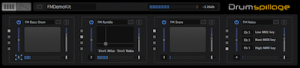
DrumSpillage is a pro-quality model based drum synthesis plugin for Mac OS X. DrumSpillage employs a diverse palette of technologies including elements of physical and analog modeling, additive, subtractive and FM synthesis techniques. It features:
- 13 custom drum synthesis algorithms
- High resolution 64-bit DSP engine
- Pad based real-time control surface
- Extensive synthesis editing features
- Full MIDI key map/pad layering
- Future-proof model based design
- Clean and intuitive user interface
- Runs as a native 64-bit Plugin
Now version 1.2 has been released and there’s even a chance of getting a great deal until January 15th 2011.
New features in 1.2:
- FM Percussion model
- FM Matrix model
- Export pads/kits as WAV/AIFF files
- Randomization tools
- DSP freeze function conserves CPU
- Workflow enhancements
- Code optimisations
Even better there’s a 25% discount on all DrumSpillage orders until 15th January 2011.
Regular price: £75 / €89 / $119Promotion prices: £55 / €69 / $89.
More information and a free demo here
Synthesis of complex stereo waveforms
Synthesis of complex stereo waveforms with CPLD programmable logic core. (Lattice ispLSI1032E).
If you are comfortable designing DIY digital circuitry with 7400 / CD4k chips, look into CPLDs, they are amazing. Inside a CPLD is a collection of primitive logic elements equivalent to hundreds of 7400/CD4k chips, and through the magic of logic synthesis, these elements are configured by software to realize your circuit. Its like a dream where the chips jump up and plug themselves into your breadboard, and wires magically appear to fulfill the schematics you draw on the screen. Plus they are erasable/reconfigurable indefinitely. It is a very futuristic feeling to use this technology.
I used Lattice’s free software environment ispLEVER Classic 1.4 and the ispDOWNLOAD USB JTAG programmer (~$80) to configure these devices.
This is a nice way to familiarize oneself with the toolchain. Once a few more concepts are in place, the power of FPGAs will be accessible.
O-Bow 1 – the first optical bow prototype
Demonstration of O-Bow 1, the first optical bow prototype. Uses a single sample for synthesis. Bow speed controls gain, bow angle controls vibrato.
The O-Bow is a bow controller consisting of an optical flow sensor mounted to measure the bow speed and horizontal angle with high resolution. The bow can be anything with a grained surface, such as a wooden stick.
Development of the O-Bow was prompted by the lack of robust, and inexpensive bow controllers. Synthesized string instruments frequently appear in recordings, yet the quality of articulation is very limited for such expressive instruments. Bowing is a fairly easy skill to aquire, whereas fingering and vibrato are very difficult. Combining the keyboard with bow allows a musician previously unskilled with string instruments to quickly produce much better articulation than using a keyboard alone.Controlling vibrato with bow angle or key pressure avoids the need to control vibrato directly.
From a less utilitarian viewpoint, bowing is a very natural and expressive mode of control. It deserves to be integrated better into the modern world of electronic sound, including that which is more removed from authentic strings.
So far the O-Bow has been used with a simple one-sample synthesiser as shown in the following video. More sophistocated synthesis is being developed, including physical modelling. A related patent application has been filed.
Stretta explores FM synthesis with the Straw
Live performance by Matthew Davidson (Stretta) that uses the monome to explore FM synthesis.
Here’s what he has to say about the performance:
On Saturday, I folded multiple loads of laundry, cleaned the bathroom, and played closet tetris in order to claim some space to put the air conditioner I pulled from the window. Then I cleaned the top floor. Feeling pretty good about releasing a 512 version of press cafe the day before, I decided to tackle an idea I had for the monome involving FM synthesis. The horizontal axis is pitch and a modal pitch map can be quickly generated on any base note, or you can edit the pitch map arbitrarily. The vertical axis is a modulation parameter that can be routed simultaneously to several destinations. Patch editing is very gratifying as everything is live all the time, so you don’t have to re-trigger notes to hear the effect. This also opens the door to additional real time control. It is easily hackable. There are no polyphony/voice limitations. The downside is it isn’t light on the processor. This patch consumes 20% of one core on my core i7. I’m using some hacked in support for the powermate knob to quickly make some parameter changes to broaden the range of timbres demonstrated.
I finished the patch on Saturday night and resolved to make a video on Sunday. I had in mind something more musical for a demonstration, but I was losing sunlight, so this will have to do for now. I added reverb after the fact (Valhalla Shimmer), otherwise, you’re hearing the real-time output.
20 years ago, I wished for the ability to design a purpose-built synthesizer/instrument in a specific configuration, and use an adaptable, non-specific interface to control that synthesizer. Today this is possible. I wish I could spend every day making things like this.
Modular synthesis in Germany
Some impressions of the Modular Synthesizer Meeting 21 – 23.5.2010 in Germany.
All sounds without external effects.”
Demos: Cwejman, Doepfer, events, Featured, Fonitronik, Kyma, Livewire, Malekko, MFB, synthesizers.com, theiss, TipTop Audio, Video, Wiard, EMS SYNTHI E and Logik (pt 2), Doepfer.
Part 2:
DATAMASKIN

