
The Radioactive Orchestra Making Music With Radiation
This is a project with the goal to make radiation more understandable. By translating the isotopes different energy levels to sound frequences we can ad another sense to grasp nuclear physics.
At http://www.nuclear.kth.se/radioactiveorchestra/ you can make your own music!
Polyoptics: FantasticleWorld – Teenage Engineering Op-1
Tiny OP-1 review (kind of):
The Op-1 arrived a couple of days ago, I wanted to experiment a lot more, but I ended up getting caught making a track straight off the bat. Great fun! The voice was sampled from the internal radio.
Goods:
Easily playable, intuitive, great interface, recording, looping, fm radio for sampling, super fun and addictive, amazing tech squeezed in (that’s why its so heavy I guess).
Not so good:
No midi clock sync, crashes a _TON_ when doing tape edits (although it boots back up with no loss, just takes time and funks up the workflow), faint but audible high pitch noises.
Verdict:
I love it!
Free Weekly Ableton Live Rack – Guitar Harmonics Synth
The ever so persistent AfroDJMac is yet again here with a new rack for Live:
Using my Fender Mustang electric guitar, I sampled all the harmonics on each string at the 5th, 7th, and 12th frets. From there I brought it into Ableton Live and created a pretty cool sounding instrument. Enjoy!
Download it here: http://bit.ly/freesynth20
I’m very excited to be bringing you the 20th Free Weekly Ableton Live Rack: “The AfroDJMac Guitar Harmonics Synth.” It’s been really great bringing you these racks every week, and today is a special one, not just because #20 is something of a milestone, but also because it happens to be my birthday
Thanks to everyone who keeps coming back every week and to those who have been so instrumental in spreading the word about this project. Alright let’s get down to business.
So, I’m currently enjoying a visit from my family, including a surprise visit by my two little nephews. The eldest one, Sam, is five and when he got to my house and saw some of my musical instruments, he told me he was “really good at music.” So I took him into the basement studio and after he banged out a beat on the drums, I gave him my Fender Mustang. It was a lot of fun seeing the sense of discovery and innocence in his eyes as he banged away on the guitar, unaware that his left hand not only had to touch the stings, but also press them down on the fretboard. By just placing his hands over the strings, he was actually producing some nice harmonics for a few seconds, and that inspired me to create this rack. (If you are not sure what I mean by “Guitar Harmonics” check out this link).
This weeks rack was created by sampling the harmonics produced by each string at the 5th, 7th, and 12th fret. The instrument comes set up with a macro knob that allows you to switch between the different samples, each of which has its own unique character. This allows for some cool effects, such as holding the sustain pedal and changing the sample while you play, which creates an interesting morphing timbre. There’s a macro knob that reverses the samples, creating a swelling, somewhat glitchy sound, not unlike those from some of my favorite psychedelic Beatles tracks (or my 3rd Ableton Live Rack: Reversed Piano”). I’ve also been experimenting with the Grain Delay plug-in more and more these days, and there are some macro knobs to control that effect. Check it out and have fun! PS. If you are not a Live user, you can still use the samples included in the download.
Twisted KP has been released – OSC Converter for Konkreet Labs Performer
Twisted Tools has released Twisted KP, an advanced OSC converter for Konkreet Labs Performer application for the iPad. It allows you to easily connect Performer to a variety of devices, both inside and outside of your computer. Twisted KP converts performer messages to MIDI, *Control Voltage and Reaktor IC Sends, and in any combination.
Simply put, Twisted KP is the bridge between Konkreet Labs Performer and your music software and hardware, allowing you to quickly control almost anything, anywhere.Twisted KP is a dedicated OSC converter for Konkreet Labs Performer application for the iPad. It allows you to easily connect Performer to a variety of devices, both inside and outside of your computer. Twisted KP converts performer messages to MIDI, *Control Voltage and Reaktor IC Sends, and in any combination.
How it works:
1) Konkreet Labs Performer sends OSC messages to Twisted KP, which runs in Native Instruments’ Reaktor standalone mode.
2) Twisted KP receives the messages and provides an easy-to-use interface to convert them to MIDI, analogue control voltage or internal Reaktor messages, called IC sends.
3) You can then route MIDI anywhere out of Reaktor using its virtual MIDI out port, send control voltage out a dc-coupled audio interface to analogue modular synths and/or use an IC SEND menu to instantly select a Reaktor parameter as a destination, via a simple drop down menu.
Features:
Converts Performer messages to MIDI, *Control Voltage or Reaktor IC Sends.
Fast, intuitive and powerful interface.
Presets for NI Maschine, Kore, Moog Voyager, Access Virus and more.
Demo versions and presets for Twisted Tools devices.
Musical scales to play KP in key and create chord clusters.
Bypass entire nodes and/or individual messages.
Message range adjustment.
Message value inversion.
Gate mode.
Quantized note lengths.
Quick Start setup guide within Reaktor.
Price:
$9
Technical Requirements:
Reaktor 5.6.0
iPad
Konkreet Labs Performer (http://konkreetlabs.com/)
*Control Voltage requires a dc-coupled audio interface. Consult your interface manufacturer’s guide to find out if it supports sending control voltage using its outputs before attempting use.
Spectral Machine – interesting new frequency-domain plug-in
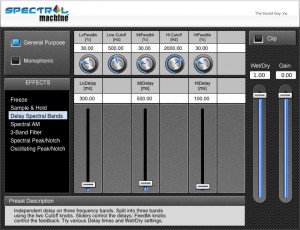
The Sound Guy has released Spectral Machine, a frequency-domain plug-in featuring a wide range of unique spectral effects.
Spectral Machine™ is an advanced frequency-domain multi-effects plug-in. Like SFX Machine, Spectral Machine wraps a great deal of power and flexibility inside an easy-to-use interface.
But unlike time-domain plug-ins like SFX Machine, Spectral Machine starts by converting the audio into the frequency domain using a Fast Fourier Transform (FFT). This gives us direct access to the signal’s frequency spectrum, enabling a number of effects that simply would not be possible in the time domain.
Spectral Machine features
- General Purpose Effects
- Delay Spectral Bands – Apply separate delays to different spectral bands, with individual control over the amount of feedback in each band!
- Spectral Freeze – Click the “Fire” button to freeze the sound, which then decays at different rates for high and low frequencies. Click the “Reset” button to unfreeze.
- Sample & Hold – Similar to Spectral Freeze, but it automatically retriggers at a specified interval.
- 3 AM – A tremolo effect with individual control over the modulation rate and depth in three frequency bands.
- 3-Band Filter – Precise control over the gain in three user-selected frequency bands.
- Spectral Peak/Notch – Lets you boost or attenuate an arbitrarily narrow frequency band around a specified frequency.
- Oscillating Peak/Notch – Interesting peak/notch effect with an oscillating center frequency.
- Monophonic Effects (for monophonic sources such as solo voice, clarinet, sax, etc.)
- Pitch Shift – Frequency-domain transposition with timbre preservation.
- Harmonize – Multiple transposition with timbre preservation
- Pitch Quantizer – Nudge each note to the nearest semitone, for pitch correction or to create an interesting vocal effect.
- Pitch Isolate –Isolates the tonal portion from the rest of the sound.
- Sine / Noise – Gives you independent control over the sinusoidal and noise/transient portions of the sound.
- Spectral Shapeshifter – Lets you change the shape of vocal formants (spectral envelope) without affecting the pitch.
- Vibrato – Frequency-modulates only the sinusoidal component.
- Robotization – Changes the pitch to a fixed frequency for a robotic effect.
Spectral Machine for Windows and Mac (VST/AU) is available to purchase for $75 USD excl. VAT.
Late night improvisation on the Cocostuber 2
The cocostuber is, simply, two state variable filters and two voltage controlled 8bit samplers. the unique or special aspect to the design is that the frequency of each sampler is “divided” into a different part of the circuit into 16 octaves (which follow the tuning), available as general modulators for use on any of the four “modules” of the circuit. a total of 32 tunable DC and audio range digital signals.
On a typical Cocostuber these are “nodes” to connect through your hands or alligator clips or whatever. since the Grass Stimulator had lotsof rotary switches, i decided to keep with that vibe, and put every single octave division onto rotary switches. all of the possible patches can be either obtained through the switches or they can be split and multed via banana jacks on the facepanel.
In this video:
This time I have connected the Serge to the cocostuber and the cocostuber is sending the pulses and some cv to the Serge. They talk nicely. Again this is a real time recording straight to a stereo track with no edits.
burn studios interview with Richie Hawtin (Plastikman)
Burn Studios caught up with minimal tech legend Richie Hawtin during the Burn Studios summer program in Ibiza.
Background data:
Richard (Richie) Hawtin (born June 4, 1970, Banbury, Oxfordshire) is an English-Canadian electronic musician and DJ who was an influential part of Detroit techno’s second wave of artists in the early 1990s and a leading exponent of Minimal techno since the mid 1990s. He is best known for his abstract, minimal works under the alias Plastikman, a pseudonym he still uses today.
Hawtin is known for DJing minimal techno sets making use of laptop computers and digital mixing equipment. In May 1990, Hawtin and fellow second-waver John Acquaviva founded the Plus 8 record label, which they named after their turntable’s pitch adjust function. In 1998, Hawtin launched Minus records
World’s first Kontakt Player virtual instrument – combining marching drums with cutting-edge cinematic sound design
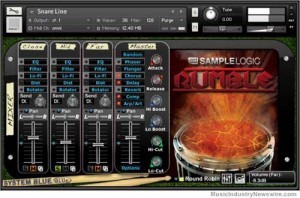
Sample Logic and System Blue have joined forces to release Rumble – the world’s first Kontakt Player virtual instrument that combines the finest in traditional marching drums with cutting-edge cinematic sound design. This superbly flexible virtual instruments will give educators, composers, and musicians an imaginative, innovative, and inspiring new sonic palette for creative music-making. Rumble features the legendary DCI World Champion Blue Devils drum & bugle corps and was recorded by Leslie Ann Jones on the Scoring Stage at Skywalker Sound (a Lucasfilm Ltd. Company).
What is Rumble? Rumble delivers a comprehensive set of pristine, carefully crafted marching drum samples. Each instrument was captured using modern-day film score recording techniques at multiple dynamic levels, round-robins, and at close, mid, and far microphone placements, affording composers, producers, arrangers, and performers a solid foundation for realizing accurate, dynamic musical productions. Sample Logic and System Blue have also partnered up with Avid delivering Rumble with seamless integration in Avid’s Sibelius 7 music notation software.
But that’s just the beginning…Rumble goes far beyond traditional marching drums and enters into the morphed sonic realm of Sample Logic’s trademark “blurring the line between music and sound design.” All of the drums recorded for Rumble are not only included as production-ready multi-sampled instruments, but are also used as the basis for all of the morphed sounds. The result is a library that contains both traditional instruments and an evocative collection of morphed “cinematic” instruments, including transitions, atmospheres, and rhythms aimed squarely at the needs of TV, film, game and electronic music composers.
Rumble offers unprecedented control over sound and performance, thanks to Sample Logic’s custom-designed Kontakt Player interface, one of the most advanced Kontakt user interfaces to date. Building on the exclusive “multi-core effects sequencer” first introduced in their Cinematic Guitars collection, Sample Logic puts complete, customizable user control right at your fingertips, from spatialization and sound-swirling effects to sequencers, LFOs, programmable arpeggiation, a unique Rhythmic Articulator, and a fully integrated multi-microphone mixer. Rumble also contains a newly invented loop engine that displays loop slices graphically and supports independent editing, effects processing, and real-time automation of each slice. All together, Rumble boasts over 40 screens of powerful, intuitive user interface controls!
A library that will stand the test of time. Every instrument included in Rumble has a full set of parameter randomization options that give you virtually infinite power to morph and sculpt any instrument in the library. Whether you’re in the studio or on stage, unique new sounds are always just one button-push away!
Technical Specifications:
* Kontakt Player 4.2.3 or higher
* Kontakt (Player) 4 supports: Stand-alone, VST(R), Audio Units, RTAS(R) (Pro Tools(R) 8 and higher), DXi, ASIO, Core Audio(R), DirectSound(R), WASAPI
* Native 64-bit support for stand-alone and plug-in versions on both Mac and PC
* Compatible with all major DAWs and with music notation software.
Minimum System Requirements:
* PC: Windows(R) XP (SP2, 32 Bit), Vista(R) / Windows 7(R) (32/64 Bit), Pentium(R) 4 2.4 GHz or Intel(R) Core Duo 2 GHZ or AMD Athlon 64, 2 GB RAM.
* Mac: Mac OS X 10.5 or higher, Intel(R) Core Duo 2 GHz, 2 GB RAM.
* Minimum of 2 GB RAM.
Rumble MSRP: $299.99
Rumble Ships: August 8, 2011
Rumble Download Available: August 16, 2011
Rumble Website: www.samplelogic.com/rumble.html .
Jordan beams in to tell us why he created SampleWiz
JR SampleWiz Holo Transmission
Background on SampleWiz:
“SampleWiz gets you playing instantly, and if you like to sample, there’s no quicker or more fun way to go from recording to playing your own samples. Amazing controls, easy to understand yet deep enough to let you create musical voices! And it comes with a library of great sounds from Jordan Rudess. SampleWiz is a wiz if ever there was!” – David Mash, VP of Technology and Education, Berklee College of Music
We have poured our hearts and minds into this and driven our families, bandmates, and friends insane by sampling everything that moves. I hope you enjoy this very expressive and wild music app creation!
*Choose from three different sampling modes: classic, granular, and modern.
*Classic – the traditional method of sampling where the sound will speed up and slow down as you go higher or lower than the recorded pitch.
*Granular – Wizdom Music’s own take on a granular synthesis engine. Adjust grain size and speed while the entire range of notes maintain the same speed.
*Modern – explore new sampling possibilities using Dirac technology to allow formants and time to be adjusted automatically over a device-selected range.
*Up to 10 seconds per sample.
*Jordan Rudess presets from his private collection.
*Resample anything that you play on the playing surface to create all new samples derived from your existing presets!
*Three playing surface modes allow you to play on the keyboard, wave-edit screen, and the ADSR window.
*Wizdom Music’s Advanced Pitch Rounding for initial attack as well as after a slide.
*Every note you play is an independent event allowing powerful, expressive control of pitch and amplitude.
*Finger vibrato effect allows you to achieve vibrato even when pitch lock is activated!
*Unique visuals for each sampling mode. A glow tracks your fingers and respond to the amount of amplitude of every note you play.
*Choose from many different scales and customize your own.
*Play your samples forward or reverse!
*Looping options include standard looping as well as back-and-forth looping.
*Allows trimming of samples.
*Unique visualization of the amplitude envelope on the ADSR page.
*FX include delay with a choice of tap-tempo, BPM, and seconds control over the rate.
*Have two keyboards on the screen, each with its own range and scale!
*Unique hold mode where every held note can be in a different synthesis mode!
*Share your presets with friends by mailing them as SampleWiz files or standard audio files.
*Play directly on the waveform and hear the audio that is right under your finger. Slide each finger separately in any direction to change pitch and position in the sample.
*MAPI AudioCopy/AudioPaste allows sharing of audio with top audio apps.
*Load your own audio files with iTunes file sharing.
*Onboard help screens explain every parameter. Touch the question mark to activate.
Moog Voyager XL, Roland MC505 and JEN SX1000 and Korg Radias Live
Here’s what the artist has to say about it: All music performed live into a Behringer X2442USB 24 Channel Mixer into Cubase. First live performance and featuring my Oldest Synth the JEN SX1000 (approximately 30 years old). The Voyager XL is connected via MIDI to the Roland MC505 via Midi Out to the In on the MC. JEN is a standalone and no MIDI, no memory, just Pots to twiddle. The Radias is standalone in this piece also. The Keyboard not being used is the Kawai K4 which I picked up cheap from eBay. All the Synths connected tot he Behringer Xenyx X2442USB with compression being applied to the JEN and the Radias, all but the MC Groovebox have some Echo and Reverb (Program 15 on the Mixer).
Just Jam Session, playing around….
The Audio is recorded Live as is the video, except I had to manually sync the vid to the audio – Sony HD camcorder appears not to to be able to operate as an external camera. Working in iMovie is probably not the best package to try and sync video and Audio…I think I managed to get away with it…maybe. The thumbs up at the end was for my purpose. and a thank you to all for watching.
Since doing this, I have a few other options for this piece – no title as yet, but I feel it needs some catchy Vocoding to be thrown in.
The Touch panel works great on the Voyager XL and you will see me trying (in vain) moving to one side, hoping the camera picked it up…Fail.
Also – one thing to note, when playing live, the Wood on the Moog is not playable but does allow your fingers to slip off and hit that top C…if you’re lucky.
Sorry for the view of my Back and an ill fitting T-Shirt. Trust me, when I do turn round, the Minimoog wins in the Beauty contest, i definitely have a face for Radio…. 
DATAMASKIN

