
Soft Cell Style Audio Cluster
http://youtu.be/f8jxqw1A5hs
Sound is generated by system based on real-time FFT analysis of musical spectram.
Gear:
Max/MSP/Jitter – tone cluster prosessing system
Turbulence – a new modular waveshape sequencer AU plug-in
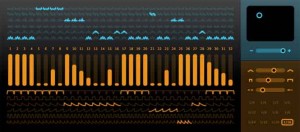
Sinevibes has announced Turbulence, an AudioUnit effect plugin for creating rich animated synth textures. At it’s core it employs unique waveshaping algorithms that drastically transform the input signal, enriching it’s spectral content. But most fun stuff comes from it’s flexible step sequencer which drives waveshape modulation, envelope matrix and model matrix, allowing you, say Sinevibes, to create almost any rhythmical pattern imaginable. With all these tools combined, Sinevibes believes that Turbulence can easily turn simple waveforms into a huge variety of complex motion sounds with incredible richness and character.
Turbulence features:
- Sequencer with up to 32 steps, variable swing and speed.
- Waveshape matrix with 6 high-definition algorithms.
- Envelope matrix with 6 shapes, adjustable time and smoothness.
- Intuitive, high-contrast user interface.
Pricing and Availability:
Turbulence is immediately available as a download for $39. It requires Mac OS 10.5 or later, and a 32 or 64 bit AudioUnit host application that supports Cocoa user interface technology.
More information:
Tutorial using screen set in Reaper 4
There’s a large amount of new features in Reaper 4. Here’s a tutorial how to use the new screen set feature adapting the layout to your way of working. Pretty impressive I’d say!
New VST recreation of the famous Oberheim™ SEM module
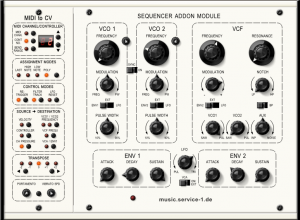
WOK has announced SAM, a VST recreation of the famous Oberheim™ SEM module.
While the soundwise construction is similar to the hardware unit, some limitations have been eliminated in the software version; so there is polyphony, a second LFO, a noise source and PWM for the saw waveform.
Special attention was given to recreate the analog variably of seperate hardware circuits for the audio paths in polyphonic mode.
SAM will be available end of August as a VST plugin for Windows with an introductory offer.
More information: WOK
Background info:
The SEM was Oberheim’s first official analog synthesizer. SEM stands for Synthesizer Expander Module. It was conceived with the notion of being used as a backup synth connected to a sequencer for layering or beefing up your existing monophonic analog synths. The SEM itself was a keyboard-less module with two analog oscillators, a 2-pole multimode filter, ADR envelopes, and an LFO. Each of the two oscillators offer triangle or rectangular waveforms. But unlike the Moog and ARP counterparts of the time, the SEM’s 2-pole (12dB/oct) filter was a little thin. The others used a 4-pole (24dB/oct) filter which has a steeper roll-off and so it sounds much better. But the SEM’s filter offered many modes in addition to low-pass, including high-pass, band-pass and band-reject.
New user friendly MIDI DAW Control Surface for Logic
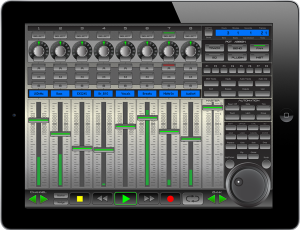
xMix – Logic Edition is an interactive, user friendly MIDI DAW (Digital Audio Workstation) Control Surface specifically designed and optimized for use with Logic Pro 9. No drivers required. Powered by CoreMidi Networking Technology with speeds of almost zero latency, xMix-Logic Edition connects wirelessly and seamlessly interacts with Logic Pro 9. The xMix user interface displays the absolute state of play in Logic Pro direct to your iPad. Giving you the freedom to control your session from anywhere within wifi range, delivering a new sense of control in your studio.
- Unlimited Tracks (in banks of 8)
- 8 Virtual Faders assignable to almost any purpose.
- 8 Virtual Multi-purpose Rotary Pots
- Complete Channel Strip Control over Pans, Solo, Mute, Record arm.
- Full VU db Meter displays for each channel.
- Scribble LCD strip displays name for each highlighted track.
For each channel, with one touch you have the power to access, control and modify the current EQ settings, with a mix of faders and VPots you can infinitely and precisely control each band of EQ.
Once your instrument has been selected xMix auto-configures all controllable parameters to the either the 8 VPots, 8 Faders, or a mix of both. Each control available is noted in the LCD display area so you are always 100% on top of the controls.
Once in Plugin Mode, xMix will offer you access to all the plugins loaded in the channel. As with the Instruments, xMix automatically maps the available functions and parameters to the 8 VPots or faders.
All the important Play, Stop, FF, Rewind, Record and Loop are situated at the bottom of screen. you can also use the scrub wheel to surf from one end of the track to the other.
xMix offer a wide range of extra controls over your Logic session. From automation to general copy pasting xMix has it all available directly from your iPad.
xMix gives you easy control over the views and screens which presented in Logic. Direct from your iPad you can open close the mixer window, select form audio/midi/instruments channels, quickly change to notation mode. Any screen you want to access, with one or maximum 2 touches you are there. No more reaching for the mouse, just touch and go..
SHIV-R – Parasite (Repossession)
Official filmclip for “Parasite (Repossession)” by SHIV-R. The UK/Australian band Shiv-R are soon to release their follow-up album to last years critically acclaimed debut album “Hold My Hand”.
As of today the band released a new video with the track “Parasite (Repossession)” taken from the debut album.
Filmed, edited and produced by http://www.scissors.cc
Live bugs and insects are filmed under a microscope with a special camera to produce the content for the experimental video clip.
New album from Eisenfunk
After last year’s international breakthrough, with the already classic YouTube video for the song “Pong”, which to date has close to 3 million views, the German electro/EBM band Eisenfunk is now ready to present their fourth album “Penta Funk “, the sequel to last year’s” 8-bit “. Electro-industrial-Eisenfunk trio, consisting of Michael Mayer, Arthur Stauder and Toni Schulz picked up by record label Danse Macabre in 2009, which released the band’s second album “Schmerzfrequenz”.
The debut in 2007 through the self-titled album “Eisenfunk”, released by the record company Biohazzard Records, who also made the releases, including Inline.Sex.Terror and British V2A.

Track list:
- Introludiom
- Pentafunk
- Pestilenz
- Prehistorical
- Neandertal
- Traditional
- Taiko
- Jericho
- Vampire Hunt
- Eiszeit
- Funk´n Base
- Uncle Sam Needs You
- Camperglück
- Jinglefunk
- Pentafunk (Pentafuck RMX)
- Pentafunk (RMX by Bodyharvest)
“Penta Funk” released September 6 through Danse Macabre Records.
In perfect harmony – Buchla and iPad MidiMe App
Background information:
I am using the Apple camera connector and the MAudio Uno to connect to the Buchla midi port from the iPad. The left XY pad is controlling the symmetry and timbre of the 261e. The right XY pad is controlling the waveshape of the mod osc, the morph of the 259e, and the panning of the 259e. I am playing a mix of the 261e mod and principle oscillators with the keyboard. Delay is from the Korg KP3.
Native Instruments REAKTOR’s Massive: We Are In Control
Time to blow the doors off stale drum programming by going nuts with Massive’s powers of modulation. You owe it to your drums to check this out.
The Modulation Section looks like a step sequencer, and, in fact, it functions like one as well. The difference here is that you are not programming hits but modulation instructions. (In the sequencer tracks, the bar height in each step determines the velocity of the hit; in the Modulation Section it determines the intensity of the modulation). We are presented with three modulation lanes—MOD1 (blue), MOD2 (green), and MOD3 (orange). There is also fourth modulation source, which is sequencer lane velocity (yellow, to match the color of the steps). These sources give you flexibility in creating modulation patterns, since you likely more than one modulation source for the many destinations available.
The gray boxes you see next to various parameters are Modulation Source selectors (in other words, they tell you that the nearest parameter is modulatable). Click and drag up or down to match the color of the modulation lane (MOD1, MOD2, or MOD3) of your choosing. Once you’ve set up the modulation, you’ll need to tell Massive how much you want to modulate the parameter. That is, you won’t notice any difference in the sound until you dial in a Modulation Amount (as a positive or negative value); do this by clicking and dragging up or down on the numbered field below the (now-colored) box. As illustrated by the video, one of the most interesting parameters to modulate is the Sample Select (SELECT) in the Modulation Section. With this, it’s possible to create dynamic kits that cycle through a wide variety of samples over the course of the pattern. Try it yourself and see if you don’t blow your own mind.
More vintage coming your way: Roland JD-800 + SCI Pro-One + Drumtraks
Here is a nice vintage synth track by RetroSound
lead, voice and pad sounds: Roland JD-800
bass sequence: SCI Pro-One internal sequencer
drums: SCI Drumtraks
“The JD-800 was a digital synthesizer released by Roland in 1991. The synthesizer featured many knobs and sliders for patch editing and performance control – features which some manufacturers, including Roland, had been omitting in the name of ‘streamlining’ since the inception of Yamaha’s DX-7. The JD-800 became very popular with musicians who wished to take a ‘hands on’ approach to patch programming.
In the introduction to the manual, it is stated that with this synthesizer, Roland intended to ‘return to the roots of synthesis'”
more info:
http://www.retrosound.de
http://www.facebook.com/pages/RetroSound-Marko-Ettlich/265713782347
DATAMASKIN

