
Transform your iPad into a touch screen controller for GarageBand
http://youtu.be/pvJrXgovIN0
If you liked Delora gbTouch, wait until you get your hands on gbTouch 3. New from Harmony Systems, Inc., gbTouch 3 is a significant upgrade to the Delora gbTouch iPad music application, which turns an iPad into a touch screen controller for GarageBand.
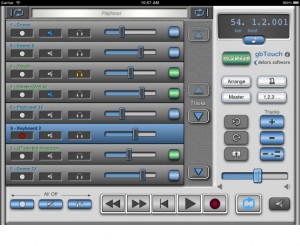
With this release, the controller app offers a number of new features and benefits, including extra capabilities that allow you to know and control exactly where you’re at in your composition. The dynamically adjusting “LCD” display shows a user selectable choice of playhead location or project information, including song tempo, and playhead position and tempo can be changed easily to specific numeric values. On the Track Details screen, individual track volume and pan are now controlled with faders, and their values are displayed. According to the maker of gbTouch 3, graphics have been enhanced and the increased use of icons makes gbTouch more language independent.
You can use gbTouch in the studio, onstage, or anywhere really. In addition to supplementing the use of mouse and keyboard to control GarageBand, gbTouch 3 also serves as a control surface of sorts for GarageBand, making music creation more productive and efficient from anywhere in your studio or music environment. This flexibility is particularly useful in recording situations, Harmony Systems says. The individual track controls — record, mute, solo, and volume — and transport buttons on gbTouch allow you to adjust and evaluate tracks before heading into the mixing session.
What you can do with gbTouch 3:
- Control transport functions (Backward, Forward, Beginning, Play, Record, Cycle)
- Enable / disable record, mute, and solo for each track
- Track names and numbers shown on each track
- Tracks color coded for real and software instruments
- Select current track with one touch
- Access more than eight tracks with the arrow keys
- Adjust volume of individual tracks, and overall with Master Volume
- Adjust pan level for an individual track
- View values for track volume and track pan
- Disable all volume during playback with Volume Mute
- Move the playhead quickly using jog channel strip
- Designate Cycle start and end points
- View LCD display, which dynamically shows playhead location — user selectable measure or time format — or project info (tempo, time signature)
- Change tempo
- Adjust the playhead to a specific bar-beat location
- Adjust the playhead to a specific time based location
- Turn off all track record, mute, and solo attributes
- Show / hide the Arrange View or Master Track
- Enable / disable Metronome and Count-In
- Create a new track, duplicate, or delete a track
- Undo or Redo an action
- Save a GarageBand file
- Adjust Master Echo and Reverb effects
- Manipulate Compressor, Visual EQ, and software instruments’ sound Generator parameters
- Enable / disable effects
- Name of the currently selected track shown on the Track Edit screens
- Set preferences for faders to “jump” on touch
- Select one of three themes (four including GarageBand ’09) at any time to change the look of your app
GbTouch 3 requires the installation of gbLink 3.0, a Mac OS X application (Lion compatible) that provides the ability for gbTouch to communicate with GarageBand using a Wi-Fi network. GbLink is available as a free download at the Delora Web site.
Harmony Systems’ gbTouch 3 is now available for $9.99 from the App Store. Existing gbTouch users may upgrade to gbTouch 3 for free. For more information, visit delora.com.
Geist Expander: Analogue Mayhem
Here’s a new expander we discovered yesterday, promises to give you a lot of organic electro sounds:
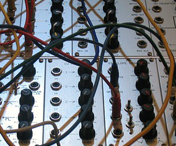
FXpansion is proud to present Analogue Mayhem, a Geist Expander featuring edgy, organic electronic sounds generated almost exclusively with a large analogue modular synthesizer. Its unique character and texture is ready to deploy in Geist’s fast and intuitive sample-sequencing environment – insane sequences, deranged SFX bursts, deep basses, lush chord stabs and multi-sampled synthetic drums which use Geist’s round-robin, velocity layering and FX treatments for expressive depth and sonic variation.
Geist Expander for electronic music
Over 800 WAV samples
Over 180 RX2 loops
5 Full song presets
6 Engine presets
30 Kit presets
71 Pad presets
Anything but vanilla, Analogue Mayhem defies genre categorization and is infused with a refreshing energy and attitude. Its versatile, tasteful material is universally relevant in any music requiring powerful, forward-looking sounds, and begs to be mangled further through Geist’s FX and filters or any device capable of loading 24-bit 44.1khz WAV and RX2 files. Producers of dubstep, techno, electro, hip-hop, ambient, drum & bass and other creative modern styles will find Analogue Mayhem a trip to use.
The full power of the Intellijel µMod
A brief audio and visual demo of the processing capabilities of the Intellijel µMod four quadrant multiplier.
About µMod:
Four quadrant multiplying modulator (aka ring mod) in 4 hp.
Features:
dedicated ac and dc inputs (all four can be used at the same time).
attenuators for x and y input groups.
polarity switches for x and y inputs (positive, negative or both).
a unique ‘q’ control which stands for “quadrant” which allows you to shift the multiplication into positive or negative quadrants.
very low leakage from x input (when q is in center).
changing the q value in fm adds the signal frequencies back into the sum+difference frequencies (typical output of a rigmod) which adds richness to the classic ringmod sound and allows for many variations of bell tones, chimes and mallet-type timbres.
it can be used as a linear vca.
great for waveshaping (especially two synced audio sources).
excellent for cv mangling (use the dc inputs and play with the rectifier switches).
connecting cv sources to the ac inputs results in interesting lag effects.
Korg Kaoss Pad Quad – Introduction In The Studio
James Sajeva from Korg USA takes a tour through the features of Korg’s Kaoss Pad Quad.

Dynamic Effects Processor
Create your own combination of Kaoss effects, and simultaneously control up to four effects using a single fingertip! Introducing the Kaoss Pad Quad; it’s Kaoss control evolved to a whole new level.
Kaoss Pad Quad Highlights
Brilliant, colorful LED touchpad illuminations move in sync with your performance
Control multiple effects in realtime using the intuitive Kaoss X-Y touchpad
Create your own Kaoss combinations and use up to four effects at once
Choose one of five effects from each of four effect groups; a total of 1,295 combinations!
Freeze button holds the effect settings after you release your finger, for dazzling hands-free use
Versatile and highly playable effects control, delivering unimaginable expression
New Looper effects – Forward, Reverse and Slice – add new audio intensity
Mix it up with new DJ emulation Vinyl Break and Ducking Compressor effects
Auto BPM engine detection and Tap Tempo functions keep your Kaoss locked to the beat
Twelve years ago, the first-generation Kaoss Pad exploded onto the DJ/music scene with touchpad-based effect control. Since then, the overwhelming acceptance and popularity of the X-Y touchpad is evident in many Korg products – Kaoss Pad effects, the Kaossilator Series, our padKONTROL and nanoPAD controllers, even the exclusive M3 TouchView™ display – that are now standards in the scene. To this we add the Kaoss Pad Quad, with new effects, functions, and features that truly stand out from the crowd.
In beta: Groove Machine – new groove box instrument plug-in by Maxx Claster
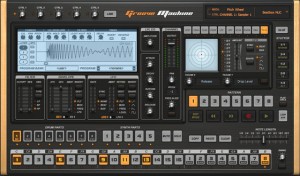
Image-Line has released a beta version of Groove Machine, a groove box instrument plug-in by Maxx Claster.
Groove Machine is a performance-oriented multichannel (drum)sampler, multitimbral hybrid synthesizer, sequencer and last but not least a ‘Groove Box’ inspired by hardware Groove Boxes. Special attention is paid to live performance via MIDI controllers.
Groove Machine features
- Step sequencer with integrated Note Editor driving 8 sampler tracks, 5 synth tracks and 10 performance oriented effects for every track.
- Synthesizer features a hybrid additive, FM & RM design.
- Per step automation with automation graphs.
- Pre-mapped to general MIDI keys.
- Stutter, beat repeat effects module.
- 2 envelopes, 2 LFO’s.
- Multi-mode filter.
Groove Machine beta is currently available to download as a VST plug-in for Windows for registered Image-Line users.
More information: Image-Line
EDEN Vs VEDA:Murder On The Mind
MURDER ON THE MIND
TAKEN FROM THE EDEN ALBUM ELECTRIC!
www.eden-info.com
Reason 6 Micro Tutorial: Pulveriser Demolition
Reason 6 introduces three new creative effect devices: Pulveriser, Alligator, and The Echo. In this micro tutorial we’ll take a look at the Pulveriser. Pulveriser is a sound demolition unit capable of destroying your signal but before you turn those knobs up to eleven, I wanted to show you that Pulveriser also excels at being an audio sweetener. In today’s world of pristine digital recording, meticulously sampled instruments, and quantized MIDI it’s sometimes necessary to add a little color and grit to your otherwise perfect material.
Pulveriser can do that for you. So before you blow up your sound with Pulveriser, take a look at some of the other ways it can make your tracks sound more analog, more beefy, more gritty… more Pulverised!
* vocals on Smorgus Sword by Sebastian Storm
http://www.catenaonline.com/
Alesis IODock Review by Sonic LAB
About the product (Alesis info):
The iO Dock (patent pending) is the first device that enables anyone with an iPad or iPad 2 to create, produce, and perform music with virtually any pro audio gear or instruments. The iO Dock is a universal docking station specifically designed for the iPad and iPad 2, and it gives musicians, recording engineers, and music producers the connectivity they need to create and perform with iPad. Connect all your pro audio gear to virtually any app in the App Store with the iO Dock.
FLEXIBLE FUNCTIONALITY
Songwriters, music producers and performers of all kinds will find that the iO Dock connects the iPad’s powerful processor, touch-screen interface and extensive library of apps to their collection of microphones, instruments, professional speaker and PA systems, MIDI controllers, sound modules, video projectors and much more.
With the iO Dock and an iPad, musicians and producers can record, perform, craft and create music in virtually any situation or location. Built to accommodate all current app-development standards including Core MIDI, the iO Dock is a universal device that bridges your choice of music-creation apps, instruments, and devices.
COMPLETE CONNECTIVITY
The iO Dock provides microphone and instrument users with two combination XLR and 1/4-inch inputs, each with its own gain control and switchable phantom power for condenser microphones. Guitarists and bassists will appreciate the iO Dock’s guitar-direct switch, enabling them to play, perform and record right into amplifier- and effects-modeling apps. Bands can connect outputs from their mixer and easily record their performances and rehearsals or use the iO Dock as a metronome or loop-playback device. Producers can use the iO Dock’s MIDI jacks to sequence external keyboards, samplers, drum machines and synthesizers, or perform using the iO Dock as the sound module and their favorite MIDI-compliant keyboard, drum pad or other controller. An assignable 1/4-inch footswitch input enables remote control of any app-defined function such as stop/start or record. Users can also connect the iO Dock to their Mac or PC using the USB port to send MIDI back and forth for creative, new applications of the iPad and computer used in tandem.
Users can connect the iO Dock’s stereo pair of 1/4-inch main outputs to studio monitors for critical listening, or to PA systems for use in performance settings. They can monitor on headphones, and independently control the levels of the two outputs, each on its own knob. Recording musicians will appreciate the iO Dock’s direct-monitor switch, which enables them to toggle between the incoming and playback signal on their headphones. Rounding out the iO Dock’s output section is a composite video connector, enabling users to employ the iO Dock as a source for video projection behind bands on stage, or for connection to most televisions and computer monitors.
RUGGED RELIABILITY
The iO Dock was built for the real world. Whether you’re keeping it in the safety of the studio or taking it out for recording or performance use in the club or on tour, the iO Dock will not only deliver the connectivity you need for audio applications, but it also serves as a rugged, protective case for the iPad. The iO Dock completely houses the iPad on the bottom and three side surfaces. It also encases the iPad’s screen in a protective bezel on three of its four edges, further shielding the mobile computing device from the potential for damage in punishing environments.
The applications of the iPad for music creation, production, and performance are limited only by your creativity. As an imaginative, cutting-edge music maker, the iO Dock empowers you to seamlessly connect the world of pro audio gear and instruments to the iPad and the massive collection of apps.
Vintage synth exploration – Oberheim OB-SX
Introduction to the OB-SX, a very underated synth that is a hybrid between the OB-X and OB-Xa. The OB-SX shares the voice architecture of the OB-X, but uses the discreet CEM chips later found on the OB-Xa. The OB-SX first appeared in 1980 as a preset/variable version of the OB-X.
A short demo demo of the brass sounds from A1, B1 and C1, using the variable controls. If the sounds in your OB-SX are different to mine, you could have a rare machine, as OB-X users could send in a tape of their favourite sounds to be burned into the OB-SX EPROMs. Also mine will have slightly different tunnings and voice calibrations to yours.
More vids will follow, so I hope this gives you an idea of the sounds and capabilities of this great “little” synth.
This was recorded using the inbuilt mics on the video camera, so please don’t expect pristine 24 bit audio … not yet anyway. Also this is unscripted.Note that the key clattering is normal on machines of this vintage, mine is from1982.
Cheers
Pete
Lo Mount Sound – TASMANIA
Real Scenes: Detroit
You can’t talk about electronic music without mentioning Detroit. That’s why in the second edition of Real Scenes, RA and Bench went to the city which birthed the genre we now call techno.
Detroit has always had a creative streak, due in large part to the boom and subsequent bust of the auto industry. Quite simply, Detroit is a city of extremes, and its music reflects that. These days, Detroit’s importance in the global electronic music scene is often referred to in the past tense. When we visited the city, though, we found a number of artists with their eyes (and ears) firmly set towards the future. After our time in the Motor City, it’s clear to us that Detroit will endure and innovate for years to come.
Visit the feature page on RA: residentadvisor.net/feature.aspx?1382
DATAMASKIN

