
Final Touch – Pink Floyd Maximizer
Final Touch – Maximizer – In this tutorial we introduce you to the Maximizer module in Final Touch for iPad.
Final Touch is a complete audio post production system for iPad. Combining Maximizer, Pre and Post Equalizer, 4-Band Dynamics, Stereo Imager, Reverb and Dithering into one integrated app, it gives your mixes a huge, balanced, polished and professional sound.
Download it on App Store: http://bit.ly/1iW4Bgl
Korg Taktile USB-MIDI Controller walkthrough with Adriano Clemente
Adriano Clemente explains some production techniques and performs on the KORG taktile.
The KORG taktile / TRITON taktile are USB/MIDI controllers equipped with the same great-feeling, semi-weighted keyboard found on Korg’s KingKorg and Krome. Taktiles are loaded with functions that make them fun to use. Of course, the taktile also delivers the functionality expected from a MIDI controller. It provides all of the basic controls such as sliders, switches, and transport controls, all to make Interfacing with your favorite DAWs and plug-ins a seamless experience.
In addition, TRITON taktile adds 512 sounds from the legendary KORG TRITON – KORG’s best-selling Music Workstation. From your desktop to live stage performances, TRITON taktile is a USB MIDI controller that can be trusted in any performance situation.
For more information on the KORG taktile, head over tohttp://www.korg.com
CME Xkey Demo – All you need to know
This is a demo video for the CME X-key USB MIDI controller keyboard.
The MIDI controller works natively on Windows, OSX and iOS and doesn’t require external power. It features pitch bend, modulation, sustain and octave up & down keys as well as 25 velocity sensitive full-size keys, which transmit polyphonic aftertouch. You can configure it via a free software application for Win, Mac OS and iPad.
CME Xkey Website:
http://www.cme-pro.com/xkey.html
MuffWiggler Interviews Noise Engineering
MW Interviews Stephen McCaul of Noise Engineering.
2014 Product Line:
Ataraxic Translatron – LFSR VCO
Basimilus Iteritas – Drum Synthesizer
Zularic Repetetor – Rhythm Sequencer
Sinclastic Empulatrix – Envelope Generator with minimum VCA
Variatic Sequent – Simple Gate Sequencer
Variatic Dilato – CV Expander for VS
Variatic Multium – Gate Expander for VS
Continuus Sequent – Simple CV Sequencer
Roticulum Sequent – Sequent family combiner
Horologic Solum – Simple LFO for sequencer clock
Selena – free synthesizer instrument for Windows
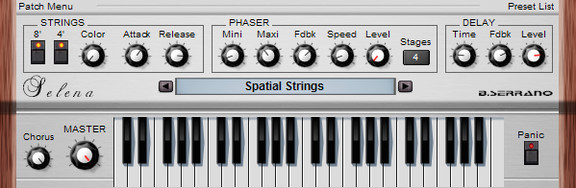
B. Serrano has launched Selena, a free synthesizer instrument for Windows.
Downsized version of Horus.
Just strings, but not only…
Full MIDI learn
32 voices polyphonic
CPU friendly
The plug-in is available for Windows (VST).
Robyn – Be Mine! ( Wasted Youth Mix ) + Do it again
Robyn – Be Mine! ( Wasted Youth Mix ) + this one 
Reason Rack Extensions explored by Erik Hawkins
Erik Hawkins (a.k.a. Erik Hawk) of Berklee Online reviews a few of his favorite Rack Extensions for Reason. Learn more about Erik’s Berklee Online Reason production courses:
Producing Music with Reason: http://bit.ly/1lXBef9
Remixing: http://bit.ly/1jHTxUW
Berkleemusic Blog: http://erikhawkins.berkleemusicblogs.com
Facebook: http://www.facebook.com/erikhawkmusic
Twitter: https://twitter.com/erikhawk
AnaddrSynth – new sound synthesis tool for iOS
Christopher L Anderson has introduced AnaddrSynth, a sound synthesis tool comprised of three configurable oscillators, hi/lo/moving filters, a wah-wah effect, an echo/delay effect, and configurable attack-decay-sustain-release and modulation modules.
The video shows a brief demonstration of the sawtooth and square oscillators in oscillator banks 1 and 2. Some harmonization and filter control is shown, as well.
Modal Pro – new powerful app that allows you to build your own synthesizers
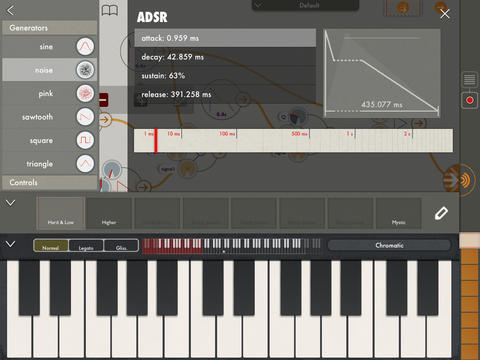


Modal Pro is a powerful app that allows you to build your own synthesizers and effects by connecting various modules together. Inspired by classical modular synthesizers, Modal Pro is nevertheless designed specifically for the iPad with touch controls that allow you to tweak the sound just the way you want it.
More than a tool for building and playing, Modal Pro is also a great learning companion. Each module is documented in detail and an extensive tutorial is included to help even absolute beginners discover the world of synthesizers. Modal Pro allows you to explore the world of sound in your living room, on the train, at school or on stage.
Features:
* Flexible and Intuitive Patching
Modal Pro allows you to connect modules whichever way you want. You can use any module to control any other module. You can even connect a module to itself. You’re not guaranteed to get an interesting sound, or even any sound at all but you’re guaranteed not to break anything. The touch interface allows you to rapidly connect and disconnect modules so that you can easily explore all sonic possibilities.
* Easy-to-Use Touch Controls
Modal Pro features interface elements such as its custom “double sliders” that allow you adjust each detail of the sound intuitively and accurately. Controls are adjusted specifically for each type of parameter.
* Analog Modeled Oscillators
Modal Pro’s oscillator modules are built to emulate the sound of classic analog synthesizer. The traditional waveforms sound rich and warm but because they are modeled rather than sample-based you can modulate them freely, in real-time and at audio rate. Go ahead, build an FM synth with bite, with sawtooths!
* Two Workspaces
Modal Pro features two workspaces where you can build instruments or effects. The “Polyphonic Workspace” is typically where you build instruments, and offers up to 8 voices of polyphony. (Actual polyphony will vary depending on your iPad’s speed and complexity of the instrument.)
The Polyphonic Workspace is connected to the “Monophonic Workspace.” As the name implies, instruments that you build here can only play one sound at a time. This is the perfect place, however, for building effects that process the output of the Polyphonic Workspace.
The two workspaces are entirely separate. You save and load work on these workspaces independently so that you can easily change the effects that are applied to your polyphonic instrument.
*The Preset Slider
The state of an instrument or effect can be saved as a preset. These presets are stored in the “Preset Slider,” which not only allows you to recall these states but also interpolate between them, making fluid and sometimes surprising transitions between presets possible.
*The Keyboard
Modal Pro features a keyboard optimized for the iPad’s screen. The standard chromatic piano keyboard is complemented with many fixed-scale keyboards. Adjustable portamento allows you to slide notes individually.
*Comprehensive Help
Feeling lost? Touch any module and the “Live Help” window will display a detailed description featuring not only an explanation of the module’s features but also advice about how to use it to get great sounds.
Modal Pro also comes with a lengthy tutorial to guide you through every feature, building your own simple synthesizer and effect along the way. In following releases, more tutorials will be added to help you learn the basics of sound design.
[Specifications]
* Modules
– Oscillators
Sine/Square/Triangle/Sawtooth/White Noise/Pink Noise
– Controls
ADSR(Envelope)/Simple Curve
– Modulators
Amplifier/Mixer/Crossfade/Ring Modulator/Sample & Hold
– Effects
Triple Filters/Delay/Lo-Fi
* MIDI Controls
Note/Volume/Preset Control
* Keyboard
Width : 9 octaves(scrollable)
Portamento : 3 presets(None/Legato/Glissando, intermediate value selectable)
Scales : 24
* Outside-App Communication
CoreMIDI, Inter-App Audio, AudioCopy
(Audiobus to be supported in next release)
Korg Volca Bass Hack / Mod – Distortion Knob & VCO Level Knob!
Here Darren Glen demonstrates some of his mods for the Korg Volca Bass, adding a distortion /drive knob which kicks the Volca Bass into an angry growling silver beast, and a VCO Level mod to be able to individually control the level of the VCOs (the original Volca Bass only has VCO on or off option).
DATAMASKIN

