
TB Midi Stuff 2 template for FL Studio 10 (beta)
TB Midi Stuff 2 template for FL Studio 10 (beta).
More info : www.ipadtouches.com
For performance mode, normal mode and controls.
“TB Midi Stuff is a much cheaper App than Lemur.
Version 2 has a lot of new features, so I was able to port my FL Lemur template for Lemur to TB Midi Stuff 2.”
With the template you can “jam” your music and samples in performance mode in Fl Studio 10.8 beta. Pages for controlling FL Studio in normal mode and for controlling with XY pads, sliders and knobs are present in the template.
Mode Machines App Preview. Coming soon!
Mode Machines App is used as a MIDI controller with virtual instruments.
Coming soon!
MIDI Designer iPhone demo – iOS MIDI controller designer
The MIDI Designer app for iPad / iPhone (support coming soon) allows you to design the perfect MIDI controller to fit your needs. This is quick demo of the iPhone version which will be available soon as a free update. What really sets this app apart from the Lemur iOS app is that you can design ON YOUR DEVICE. Lemur does feature the physics engine but I’ve gotten word from the developer that we may see that at some point: http://twitter.com/MIDIDesigner/status/250668991553626112
Help support the iOS Musician blog by purchasing any featured apps you intend on buying via the links below.
MIDI Designer on the App Store: http://bit.ly/MIDIDesignerAS
There’s also a lite version: http://bit.ly/MIDIDesignerLiteAS
iPad trilogy – An Evening with Hindole Majumdar and Kevin Schlei
Somewhat on the ethnic side of things 
‘An Evening with Hindole Majumdar and Kevin Schlei’ was a concert on August 19th, 2012 that explored electronics + tabla. This piece, ‘Idiom,’ is a fully improvised, on-the-spot composition by myself and Hindole. A basic rhythmic pattern forms that he and I use to ground ourselves, and we play off of each other’s accents and phrases.
I am using my iPad instrument TC-11 with three iPads, and Hindole is playing his D tabla set with an extra E dayan. You can find more information about Hindole at his website, sites.google.com/site/hindolemajumdar/, and about TC-11 at bitshapesoftware.com/instruments/tc-11
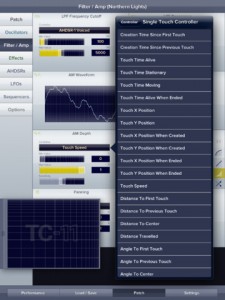
TC-11 is the only fully programmable, professional multi-touch synthesizer for the iPad. Choose from the 96 included presets, or build your own using touch controls, device motion, and on-board modules. Create music with the next evolution of synthesizer control!
iDesignSound App of the Week 12.17.2011
– idesignsound.com
“This thing is ALIVE! TC-11 is really fascinating and I’m having some fun experimenting with it. It is very, very cool!”
– Jordan Rudess, keyboardist, Dream Theater
“TC-11 is making my jaw drop every few minutes; realizing new and increasingly complex routing options. Rating: Essential.”
– Tim Webb, discchord.com
“Creating, routing, configuring, and general tweaking is unbelievably robust and complex. This is a big leap forward in design. A madhouse of sonic possibilities at your touch.”
– David Israel, smitematter.com
FEATURES:
√ 96 built-in presets
√ Unlimited user patches
√ Fully controlled by multi-touch / device motion
√ Built-in recording + AudioCopy
√ 23 modular synthesis objects
√ 22 oscillator waveforms
√ 3 controller modules: AHDSR, LFO, Sequencer
√ Email custom patches to your friends
√ Full display customization
√ Retina graphics
MULTI-TOUCH CONTROL:
There are no on-screen knobs, keys, or sliders to fiddle with; all synthesis is driven by your multi-touch performance. Touch relationships like distances / angles / timings perform all the controller functions. It’s just you and the full screen multi-touch performance area.
EVERY synthesis parameter can be controlled by ANY multi-touch controller. The patch possibilities are limitless!
DEVICE MOTION CONTROL:
Use the iPad’s accelerometer, gyroscope, and even the compass to attack your synthesis patch! Tilt and move the iPad to change any filter, effect, or module. You can create real vibrato by moving the iPad during performance, or change the speed of a sequencer by tilting forward and backward!
SYNTHESIS:
TC-11 has 8 voice polyphony for full, real-time synthesis. The audio engine has been highly optimized to deliver crisp, responsive performance. Choose from 22 oscillator waveforms, 3 oscillator types, 3 filter types, 4 unique effects, amplitude modulation, and panning control.
Fully programmable AHDSR, LFO, and sequencer modules make TC-11 the most capable iOS synthesizer in the world.
Use TC-11 in your band during live performances. Add TC-11 into your laptop orchestra. Experiment and create with the next evolution of synthesizer control!
Download the complete user guide to read more:
http://www.bitshapesoftware.com/instruments/tc-11/tc-11-user-guide-1.5.pdf
Atlantic landing – iFretless bass midi controller on iPad / iPhone
iFretless is a new musical instrument app for iPad / iPhone. In this video you see an iPad jam session, showing how iFretless works as a MIDI controller, sending the notes we play to synthesizer apps running the background on the iPad.
If this video makes you wish you had a copy of iFretless, head on over to the app store: http://itunes.apple.com/us/app/ifretless-bass/id512929963?mt=8
We used several other iPad synthesizer apps as background MIDI synths:
Sunrizer – http://itunes.apple.com/us/app/sunrizer-synth/id443663267?mt=8
(An excellent imitation of a classic analog synthesizer)
BS-16i – http://itunes.apple.com/us/app/bs-16i/id388149926?mt=8
(A soundFont compatible synth. It has great sound if you put great soundfonts in it. We’re using the AKAI-SteinwayIII piano soundfont in this video.)
Fabio Lendrum – Out The Water (LIVE)
Fabio performing Out The Water on an Emulator DVS
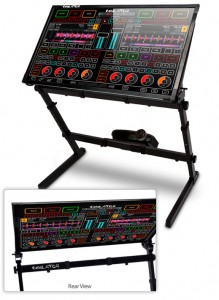
Emulator Dual View System (DVS) is the most revolutionary experience for on-stage performers in the last 30 years! Emulator DVS is the first REAL and USABLE Multi-Touch MIDI Control System that allows the crowd to see exactly what the artist is doing on a huge transparent touch screen. Whether you are a VJ, Lighting Programmer, Controlling Lasers or the DJ, you can use the Emulator DVS to control your software all while the audience watches in awe!
The art of performing on stage is now part of the clubs lightshow, this is the next level in performance!
The Emulator DVS can also be used as a multi-touch podium & presentation tool for meetings, conferences, lectures and any public address situations. Corporate events are made more interactive because the podium is transparent and the audience can see right through it while watching the presenter. Audience attention is increased, presenters feel enlivened with new technology!
What is the backbone of Emulator DVS?
Emulator is multi-touch midi control software for Musicians, DJ’s, Lighting Designers, Video Editors, VJ’s, Radio Broadcast Stations, Recording Studios and much more.
Our patent-pending technology allows you to make a custom multi-touch layout on top of any software you wish to control. Our easy to use control editor gives you unlimited options for how you create your dream midi interface. Emulator really is the best midi controller you will ever own. When new versions of your software come out, you can quickly and easily change your multi-touch controller so your hardware NEVER becomes obsolete (well, unless we invent something that doesn’t require a screen).Emulator Modular & Emulator for Traktor (FT) software come bundled with the DVS hardware.
Emulator for Traktor is a complete multi-touch midi controller software. Emulator for Traktor contains over 130 buttons, knobs and faders covering all common features of the underlying software. Emulator Modular includes a complete set of objects so you can completely custom design your own multi-touch interface with buttons, sliders, circular knobs, jog wheels and even your own custom graphics.
You have NEVER seen a crowd react to DJ equipment like this before.
The reaction is simply incredible.
SketchSynth – A drawable OSC control panel
SketchSynth – A drawable OSC control panel (not to be confused with the SketchSynth 3D available on iOS)
“My final project for Golan Levin’s Interactive Art and Computational Design class at CMU, Spring 2012.
Built with openFrameworks, ofxCv, OSC, and Pure Data.”
More info: golancourses.net/2012spring/05/13/billy-keyes-final-project-sketchsynth/
Behind-the-scenes view: vimeo.com/42053693
Music: ioflow – mnml autmn
Thanks to Golan Levin, the CMU Art Department (Bob Kollar), and Nick Mazurek for lending me equipment for the project and the video. Also, thanks to Kyle McDonald for his excellent ofxCv addon, which makes it incredibly easy to work with OpenCV inside openFrameworks.
Closer look at ControlAble – multitouch controller for Ableton Live
ControlAble is a multitouch controller for Ableton Live. ControlAbles display includes track names, clip names, clip colours, clip playing status, mixer controls, device rack controls, tempo, and transport controls. All controls are mapped automatically so no more need for midi assign.
ControlAble is written in python using the Kivy framework. More information on Kivy can be found here: http://kivy.org/
More information & free download of ControlAble will be available Wednesday 28th March on http://www.multitouchmusic.com
Exploring Soundplane by Madrona Labs
A first look and try of the new instrument by Madrona labs called Soundplane. More info here: http://madronalabs.com/
The Soundplane A is a computer music controller with the sensitivity and feel of an acoustic instrument. It detects a wide range of touches on its walnut playing surface, from a light tickle to a very firm press. The Soundplane A can be configured as either a 150-note keyboard with position and pressure sensing on each key, or as one continuous surface.
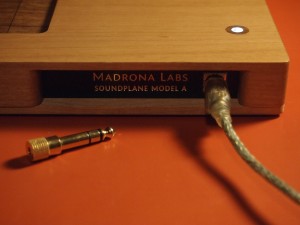
The playing surface is a material custom developed for us, an articulated sheet of walnut veneer bonded to a fiber backing for strength. The case is milled out of alder, a sustainably harvested Northwest hardwood. We have sourced all of the construction locally and test and assemble Soundplanes by hand here in Seattle. The entire instrument is about 28 inches wide by 8 inches deep by 1 inch thick.
Included with the Soundplane is Aalto for Soundplane, a custom, signal-driven version of our patchable software synthesizer. The Soundplane client software can send MIDI and OSC messages to control other software and hardware.
See this Soundplane onesheet PDF for specifications: [3 Mb PDF]
Delora lpTouch – new iPad remote controller for Logic Pro
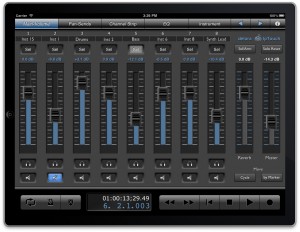
Harmony Systems, Inc. announced the worldwide availability of Delora lpTouch, an iPad application that functions as a remote controller for the Apple Logic Pro application program on a Mac. lpTouch is an intuitive, powerful control surface app optimized for use with Logic. It uses Logic’s built-in Open Sound Control (OSC) control surface support, so all that’s needed is a working Wi-Fi connection between the Mac and iPad.
lpTouch expands the Delora Software line of music controller apps for iOS devices and the Mac, including gbTouch and gbRemote for GarageBand.
Features & Benefits
Adjust track settings, send values, Logic’s EQ, plug-in effects, and software instruments to “dial in” to the right sound. Mute or solo any track to evaluate a mix during playback. Arm one or more tracks for recording. Know where you’re at with the timecode and bar-beat display, and track name and number identification. Access transport controls from any screen.
No more frustrating attempts to make sound setting adjustments with tiny computer screen controls and mouse. lpTouch’s five screens offer large, usable multi-touch faders and rotaries – with values displayed – to easily edit software instruments, insert parameters, EQ settings, or track volume, pan, and send levels.
Pricing & Availability
lpTouch is available for $4.99 (USD) on the iTunes App Store >>
DATAMASKIN

