
Free iPad Control Surface for JP-80
This is a free file I created which you can download by going to jupiter80.music-technology-online.com. This control surface for the iPad adds extra control to your JP-80. The “JP-80 Mixer” runs via the MIDI Touch app which can be found on the iTunes app store.
This control surface for the iPad adds extra control to your JP-80. The “JP-80 Mixer” runs via the MIDI Touchapp which can be found on the iTunes app store. The control surface offers the following control for your JP-80:
1. Global control of Upper, Lower, Solo and Percussion parts.
2. Independent On/Off control of tones for the Upper and Lower parts.
3. Independent control of Cutoff and Resonance for the Upper and Lower parts.
4. Independent Toneblender control for the Upper and Lower parts.
5. Independent Matrix controls of the Cutoff and Resonance for the Upper and Lower Parts.
“To use the control surface, you will need to download MIDI Touch from the iTunes app store and install it on your iPad. Then simply send me an email to request the control surface plug-in and installation instructions. You will also need the Apple Camera Connection Kit in order to connect your iPad to the JP-80 via USB.”
Pulse Surface Controller System
For more information and purchase:
http://www.pulsecontroller.com
Pulse Surface Controller liberates computer-based musicians from conventional input devices of predetermined form factor and layout, allowing the user to turn a surface of various size, orientation and material into an expressive, flexible, reconfigurable MIDI controller.
The Pulse Controller is a hardware / software solution that liberates computer-based musicians and performers from conventional input devices by allowing a surface – i.e. desk, laptop, objects and more – to become a playable MIDI controller. An included piezo microphone coupled with a simple yet powerful software interface converts acoustic impulses into MIDI Note messages for playing your software instruments in an intuitive, responsive and connected manner.
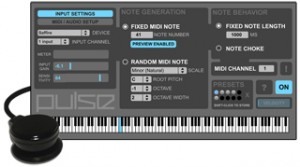
The idea behind Pulse Controller was born out of the belief that as computer-based musicians and performers we should not feel relegated to a grid of small 1×1″ pads or a keyboard to create our rhythms and provide pulse to our music. Controllers once intended to give us the immediacy of playing an instrument often end up feeling more disconnected and distracting. With the Pulse Surface Controller System, controlling percussive instruments has a more visceral, immediate quality, and via a powerful MIDI generator that generates notes in predefined musical scales the user can easily extend into the melodic domain to tap into an inspiring world of happy accidents. Power to the fingers!
System Features:
+ Piezo microphone and powerful software interface
+ Attaches to any surface via integrated suction cup
(velcro strips also provided)
+ Connects to external audio device or built-in audio inputs
(1/4″ and 1/8″)
+ Velocity-sensitive and highly responsive
+ Low-latency performance
+ Compatible with all software that accepts MIDI Note messages
(Cubase, Ableton Live, Pro Tools, VST/AU plug-ins, etc)
+ Generate fixed note or random notes in a selected scale,
with control of octave, octave width, root pitch and 21 Scales
+ Fixed note length and note choke modes
+ Store and recall presets
+ Keyboard shortcuts for quick access to presets and important controls
+ Mac OS 10.5, 10.6, 10.7 compatible
(Windows / Ableton Live users, please contact us about M4L version)
Pulse Surface Controller System
For more information and purchase:
http://www.pulsecontroller.com
Pulse Surface Controller liberates computer-based musicians from conventional input devices of predetermined form factor and layout, allowing the user to turn a surface of various size, orientation and material into an expressive, flexible, reconfigurable MIDI controller.
Pulse Surface Controller. The idea behind Pulse Surface Controller is to liberate computer-based musicians from conventional input devices of predetermined form factor and layout, and allow the user to turn a surface of various size, orientation and material into an expressive, flexible, reconfigurable MIDI controller.
The system includes a wired piezo microphone that can be attached to a surface via the integrated suction cup (or the included velcro strips) and connected to any computer audio input, as well as a standalone software application that converts acoustical impulses from the microphone into velocity-sensitive MIDI data. With the Pulse Surface Controller System, controlling percussive instruments has a more visceral, immediate quality, and via a powerful Melodic Generator that can generate notes in various scales the user can easily extend into the melodic domain to tap into an inspiring world of happy accidents.
The idea behind Pulse Controller was born out of the belief that as computer-based musicians and performers we should not feel relegated to a grid of small 1×1″ pads or a keyboard to create our rhythms and provide pulse to our music. Controllers once intended to give us the immediacy of playing an instrument often end up feeling more disconnected and distracting. With the Pulse Surface Controller System, controlling percussive instruments has a more visceral, immediate quality, and via a powerful MIDI generator that generates notes in predefined musical scales the user can easily extend into the melodic domain to tap into an inspiring world of happy accidents. Power to the fingers!
System Features:
+ Piezo microphone and powerful software interface
+ Attaches to any surface via integrated suction cup
(velcro strips also provided)
+ Connects to external audio device or built-in audio inputs
(1/4″ and 1/8″)
+ Velocity-sensitive and highly responsive
+ Low-latency performance
+ Compatible with all software that accepts MIDI Note messages (Cubase, Ableton Live, Pro Tools, VST plug-ins, etc)
+ Generate fixed note or random notes in a selected scale,
with control of octave, octave width, root pitch and 21 Scales
+ Fixed note length and note choke modes
+ Store and recall presets
+ Keyboard shortcuts for quick access to presets and important controls
+ Mac OS 10.5, 10.6, 10.7 compatible (Windows / Ableton Live users, please contact us about M4L version)
Akai MPC Fly app walkthrough
“We were lucky enough to grab the Akai MPC Fly app developer for a 5 minute walkthrough – something that the PR doesn’t show you.”
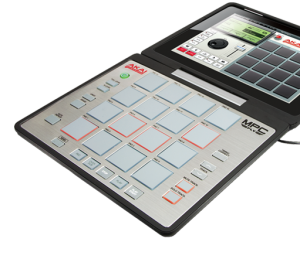
And here’s AKAI’s pitch:
MPC Fly merges unmatched Akai Professional technology with the power of your iPad 2, embodying legendary capabilities that have made the MPC an industry standard like real MPC pads, MPC Note Repeat and MPC Swing. Its multifunctional, double-hinged design gives you the flexibility to produce tracks anywhere, while also acting as a protective case between sessions and giving you total access to your iPad 2 for normal uses.
- Sequence four tracks simultaneously: four-track mixer built in
- Built in sound library of samples and drum kits
- Record and overdub sequences and create and edit your own Programs
- 16-Levels mode: play one sample at 16 levels of attack, velocity, length, and tuning
- Note variation slider allows you to manipulate attack, velocity, length, and tuning as you play
- Built-in effects: delay, bit crusher, master compressor/limiter
- Time correct: 1/8 note – 1/32T with variable Swing setting
- Note Repeat: 1/8 note – 1/32T timing
- Sample using internal mic or line-in and trim and categorize samples
- Sample from your iPod library with turntable interface
- Share on SoundCloud, Facebook or twitter
- Supports WIST, Wireless Sync Start protocol from Korg
- Supports AudioPaste
Emulator KS-1974 hands-on
Joe checks out the Kontrol Surface from SmithsonMartin.
Connect the KS-1974 to your laptop, desktop or any computer to transform them into a powerful and comfortable 22 inch surface with 4 simultaneous touch points. This is perfect for your studio or live performances. KS-1974 is a state-of-the-art DJ, VJ, and Studio Production tool. KS-1974 is the perfect size for any DJ booth or studio desk.
KS-1974 is the newest product from SmithsonMartin, winners of the 2011 DJ Mag Tech Awards: “Most Innovative Product”. Emulator for Traktor and Emulator Modular come bundled with the KS-1974.
Emulator Modular includes a complete set of objects so you can completely custom design your own multi-touch interface with buttons, sliders, circular knobs, jog wheels and even your own custom graphics.
With Emulator Modular you can build your customized multi-touch interface in just minutes. Imagine a custom layout for Traktor, Ableton, Virtual DJ, Mixvibes, Torq, Deckadance, Arkaos, Resolume, and any other MIDI based software. You can share your creations with Emulator community, benefit from the experience and collaboration of other users from our forum. Sharing templates is easy and free, with Emulator Modular, the game has officially changed.
KS-1974 is manufactured with a highly accurate and extremely responsive 4 touch sensor, running at ultra low latency (less 4ms) and completely compatible with Windows 7 & 8 and OSX.
S-1974 is an ultra durable MIDI controller, glass used in the sensors is chemically strengthened to withstand high-volume user interaction and repetitive motion. The system allows continuous usage and will never wear out the faders and of course no more missing buttons.
OP-1 as Control Surface for Reason
Teenage Engineering OP-1 meets Propellerheads Reason in a very short demo of the OP-1 / Reason control surface functionality.
Working with Reason 6.0.2, OP-1 OS #12234 and newer.
http://www.teenageengineering.com/
http://www.propellerheads.se/
NAMM – Kontrol Surface 1974
http://youtu.be/VDdEMezZxek
And here’s the background info:
SmithsonMartin Inc. has done it again. This time it’s called Kontrol Surface 1974.
Launching at NAMM 2012, combine this amazing new controller with the Emulator Modular software and you have the most powerful midi controller on the planet!
Create your own custom multi-touch layouts for ANY midi software;
DJ
Traktor, Virtual DJ, Torq, Mixvibes, Ableton, Serato (with external mixer), ProDJ, MixMeister
Music Production
ProTools, Ableton, Reason, Kore, FL Studio, Sonar, Logic, Acid
Video
Resolume, Arkaos, Grand VJ, PCDJ, Virtual DJ, Serato, Modul8, Mixvibes VFX
Pro Audio
iLive, Cakewalk, ADK, Soundforge, Yamaha PM5D, Digidesign
Lighting
GrandMA, Lightjockey, ShowXpress, Venue Magic
Ableton Live – QuNeo Speaks
First performance with QuNeo controlling sounds in Abelton Live. Pressure is mapped to repeat rate and X and Y control Filter and a Bit Crusher. Lotsa fun – we were fighting over who gets to go next.
Check out our KickStarter Page for more information: http://kck.st/taqBsn
QuNeo is a different species of pad controller for electronic musicians, DJs, VJs and DIY hackers. While it covers all of the functionality of other pad controllers, QuNeo adds the power of touch recognition in other dimensions.
Trigger Pads
16 square pads provide 127 levels of Velocity response. And X-Y location. And continuous pressure. For each pad. Times sixteen.
Rotary Sensors
2 rotary sensors allow you to scrub, trigger, stretch, pinch and play phrases and sound files, manipulate continuous controllers and more . Each rotary sensor measures angle, pressure and distance from the center.
Multi-touch Sliders
9 touch sensitive sliders can be mapped to fader and effects controls. LEDs within each slider act as VU meters or remind you where you were. Multi-touch lets you select a length between two fingers to set stereo locations or filter resonances. Tapping a slider can mute or toggle any track or function.
Switches
The switches are located in smart groupings to select samples, fader banks, and transport controls. Each of the switches can scan up and down through files at speeds variable with your touch. Great for quickly locating that perfect fill or telling your looper you really meant it.
Solid State Logic Releases New Features for Nucleus
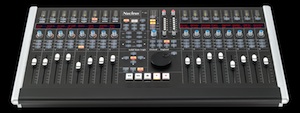
Solid State Logic in Oxford, UK, releases new features for its Nucleus control surface. Nucleus users can now download dedicated DAW control profiles for Ableton Live and Propellerhead Reason, in addition to existing profiles for Pro Tools, Logic, Cubase/Nuendo, and any other DAW applications that support MCU or HUI.
SSL states that OS X Lion is now fully supported for Nucleus, with a revised Java-based Console Browser. The Nucleus soundcard now also supports 64-bit for Mac users.
Sam Counihan, International Sales Manager at Ableton AG, says, “This new template tightly connects the feature sets of both the Nucleus and Ableton Live. Live’s unique and dynamic workflow is brought to life through the Nucleus’ tactile worksurface, and is complimented by the console’s high-end audio interface featuring the same SuperAnalogue technology as found in the company’s flagship Duality and AWS consoles. In other words, bring a laptop with Ableton Live to any studio with an SSL rig and you’re good to go.”
This download contains the latest upgrades for the Nucleus console: Nucleus console software Version 1.5; Nucleus browser V. 1.06; Mac Soundcard driver V. 2.00.05; IpMIDI (latest versions for both Mac and PC).
Additional documentation is available via the Documentation tab on the Nucleus product page.
Registered Nucleus users with a serial number can download the upgrade bundle by clicking on the download link on the Downloads tab of the Nucleus product page.
TB MIDI Stuff – new modular MIDI control surface for iPad
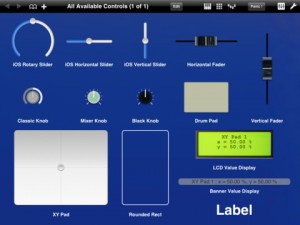
The app lets you create your own pages, or use the built-in MIDI keyboard (with Arpeggiator, modulation wheel, pitch wheel and accelerometer velocity), the built-in Pads controller (with customizable pads banks, accelerometer velocity, transposition, full velocity mode and repeat mode) or the 16 channels MIDI mixer (pan, volume and mute).
The page editor lets you create your own control pages. It contains some useful stuffs like pasteboard, undo manager, multi selection or z-order managment.
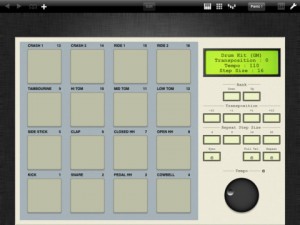
TB MIDI Stuff use CoreMidi : you can use any supported device, like the native WiFi driver or the camera connection kit with an external sound card. Each page can use a different CoreMidi driver.
Controls can use the iPad accelerometer as input (even faders and knobs), in each dimension (X, Y, Z or, for XY Pads, a mix of them).
The application library contains :
- Rotary sliders
- Horizontal sliders
- Vertical sliders
- Horizontal faders (with different colors)
- Vertical faders (with different colors)
- Mixer knobs (with different colors and flavors)
- Drum Pads
- XY Pads
- Value displayers
- Rounded rects
- Labels
Each control can drive simultaneously multiple MIDI messages like Control Change messages (single 7bits and coarse/fine 14bits), RNP/NRPN messages (7 and 14bits), Pitch Bend messages, Program Changes messages, Note On/Off messages.
You can open up to 32 pages simultaneously. You can change pages with three fingers swipe gesture, manage the pages order, open multiple instances of the same page and change the MIDI Out driver or the MIDI Out channel (or both) without entering the editor for each instance.
Swipe shortcuts (1, 2 and 3 fingers) let you access quickly to the MIDI keyboard, the pads controller or the 16 channels mixer.
TB MIDI Stuff contains some demo pages and 7 pads banks. For the pads banks :
- Default Bank
- Drum Kit (GM)
- Fifth
- Major Chords
- Minor Chords
- Simple Chord Generator
- Velocity
DATAMASKIN

