
How cool is this? – Futuristic 3D Music Interface
Blip Shaper Walkthrough
a) creating percussive patterns with monome b) shaping the individual sounds that make up the patterns with multitouch gestures c) recording touchscreen gestures as automation d) storing, duplicating and navigation patterns e) recording the resulting audio to a dynamic buffer f) manipulating the buffer with a multitouch cut-up approach g) visualizing everything with dual screens
more information at subcycle.org and arxi-creative.com
“Combining sophisticated, beautiful visualizations, elegant mode shifts that move from timbre to musical pattern, and two-dimensional and three-dimensional interactions, it’s a complete visualization and interface for live re-composition.”
Le K Live @ Wilde Renate Berlin using 4 iPads with touchAble
The complete controller for Ableton Live
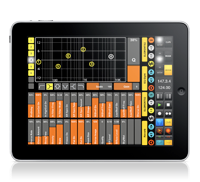
TouchAble version 1.3 was recently released, you can check the changes here >>
Key features:
• Clip Grid
• Mixer
• Devices
• Keys
• Pads
• XYZ-Pad
6 Modules to control every aspect of Ableton Live 8 wirelessly!
How to effectively control Ableton Live 8 TouchAble
TouchAble App for iPad is available through the iTunes App Store http://www.itunes.com/app/touchable
touchAble is an unique iPad app is the first application to give Ableton Live users full control over their digital audio workstation, without the tiresome process of manual midi-mapping. touchAble allows live users to walk away from their computer and perform live from anywhere within Wi-Fi range (using ad-hoc connection or router) while keeping latency at a minimum.
TouchAble App includes 6 advanced modules, Clip grid, Mixer, Devices, Pads, Keys, XY Pad, and 2 commands menu : clips and transport.
TouchAble provides a powerful, intuitive and reliable multitouch control solution for professional use.
TouchAble includes templates for lives plugins and is fully compatible with vsts, audiounits and instruments.
The new update, touchAble 1.3 contains over 30 new features and changes, such as a loop and beatjump section, enabling anything from CDJ style mixes to creative loop manipulation, a completely rebuilt mixer that allows users to modularly choose the controls they need – complemented by the long awaited crossfader. 3 new native templates have been added: Auto Filter, Ping Pong Delay & the very first Instrument – Impulse – and are waiting to be tweaked. The new Settings Menu not only offers a cascade of new control-options – but also simplifies the connection process by adding Bonjour support.
changes / new features:
Clips:
– added Loop menu to clip module. Do loops on the fly – on whole tracks or on already prepared loops. think Traktor looping – Keep loops that you like.
– added keep loop feature which allow you to save the new loop made as new clip.
– Added beatjump / loopjump menu to clip module. Do beatjump / loopjump of a set size in the currently playing clip of a track.
– track header buttons in the clip module now function as ‘jump to active clip’ buttons. For group-tracks they allow to fold and unfold the tracks.
Mixer:
Completely rebuilt mixer:
– added crossfader to mixer
– added A/B control to mixer
– added support for as many sends as you like + name of the send tracks are now displayed.
– added possibility to show as many faders at once as you like – and you can decide which!.
– added the possibility to control return tracks the same way you can control normal tracks
– added “+” mode to fullscreen for double length faders for precision tasks
– added snap mode to mixer
Drums:
– added velocity sensitivity mode to drum pads
Devices:
– Added Impulse native template
– Added Auto Filter native template
– Added Pingpong Delay native template
– Track Header buttons in the Device Selection View will switch Lives view to the device chain of the respective track.
XYPad:
– snapshots will be saved with saved templates of XY pad now
– after morphing / playing / stopping snapshots the dots will not be affected by gravity till touched
General:
– Added support for 4 iPads
– Added possibility to link several ipads and setting their relative positions.
– touchable will prefer a wired connection if available (MyWi etc)
– design & layout changes throughout the app
– added 16 tracks mode
– triple quick taps on relative faders will: bring the fader to max value if it is done on top of the fader, bring the fader to the exact middle value if you tap around the middle part, and bring the fader to 0 value if you tap on the bottom part.
– Finally touchable will connect via bonjour – tests show that almost no setup is needed to connect
New Settings:
Clips:
Lock navigation in Clip grid – On / Off:
-If enabled, clips will start immediately after touching – but you won’t be able to scroll in the clip grid
Slide Clips to launch in Nav Lock Mode – On / Off:
-Makes it possible to slide e.g. a row of clips in different tracks to start them
Devices:
Always Open Device View 8 – On / Off:
-If enabled, devices will always show the FX8 view instead of switching to FX32 for devices with more parameters.
Mixer:
Relative Crossfader – On / Off:
-same as relative faders elsewhere – just for the crossfader
Hide Mutes – On/Off:
-If enabled, mutes are hidden from the view.
Max Shown Controls for 2/4/8/16 tracks mode (0-8, 0 being disabled):
-You can set the maximum amount of controls shown per channel in each of the different sizes. When changing size the mixer will automatically show/hide faders depending on your preference.
General:
Link iPads – On / Off:
–
enables or disables automatic following of secondary ipads.
bugfixes:
– arm / exclusive arm fixed
– numerous fixes for smaller issues / crashes / performance improvements
TouchAble is supported by many professional musicians, performers, djs and composers around the world, who use touchAble on stage or in studio.
How to use Slide Control FS & virtual midi
This is a video who explain how use virtual midi with NLog, MoDrum & BassLine. Virtual midi is very very COOL !!
NLog:
Professional Virtual Analogue Synthesizer supporting Core MIDI, WIST and interfaces from Akai, Alesis, Line6, IK Multimedia & others
::: Demo videos on YouTube channel nlogmusic ::: Check Mac & Audio Unit version in Mac App Store :::
Most versatile iOS synth with professional grade virtual analogue low latency sound engine:
– Play it from on-screen keyboard
– Use MIDI keyboards & controllers via MIDI interfaces
– Connect to your digital audio workstation via MIDI interfaces
– Play NLogSynth from other iOS apps like SoundPrism, polychord or Genome Sequencer via virtual Core MIDI
– Synchronize via Korg’s WIST to other iOS devices running iElectribe, iMS20 or other WIST compatible apps
– Synchronize NLog to beat-oriented apps like MoDrum, Molten or Funkbox running on same device via virtual Core MIDI
– Share patches with NLog Audio Unit Mac version
– Make audio or MIDI recordings on the run and share your files
– Export patches & recordings to iTunes, SoundCloud, Email, WiFi, Beatmaker & Sonoma AudioCopy pasteboards
MoDrum – Synthesis-based Drum Machine for iOS
An 808 style percussion synthesizer that offers pure electronic drum sounds, plenty of editing capabilities, effects, audio sharing, and state of the art MIDI support.
Key Features
Ten real time operating synth modules (no sampled sounds are used): Bass Drum, Snare Drum, Low Tom (∗), Mid Tom (∗), High Tom (∗), Rim Shot, Cowbell (∗), Closed Hi-hat, Open Hi-hat, and Cymbal
Programmable sequencer with 32 steps and global accent pattern
Beat clock with tap tempo and rhythmic shuffle (swing)
MIDI Clock sync/generate, Note in/out (GM drum mapping)
Dotted 8th delay effect unit
Hard knee dynamic range compressor
Tube amp overdrive effect processor
Audio sharing via General Pasteboard, AudioCopy by Sonoma Wire Works, E-Mail or iTunes File Sharing
Universal support for iPod touch, iPhone and iPad
Background Audio/MIDI Processing
Including twenty patterns by DJ/producer Myagi (www.popandlockrecords.com)
More on the eyoControl 1.5 for the iPad
eyoControl is a multi MIDI controller application for the iPad, including control surface and virtual instrument type controllers.
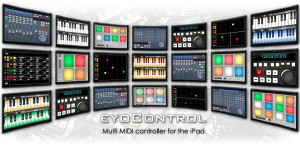
eyoControl lets you control a Mac/Windows DAW (Digital Audio Workstation) software or a MIDI synthesizer from your iPad in various ways, such as a control surface or virtual instrument.
Features:
Surface is a control surface enabling access to various settings of your tracks through faders, knobs and buttons. Surface includes a Mixer and a Panel view, enabling fast access to a large number of tracks.
Transport lets you intuitively control basic playing/recording abilities of your DAW or recorder software in the studio or live environments.
Pad is a MIDI controller with 4,6,8 or 12 programmable, touch-position sensitive pads. Each pad can be assigned a MIDI channel, color… Pad lets you play one or more virtual instruments from your DAW/synthesizer, such as drums or percussions.
Keys is a dual keyboard MIDI controller. Choose among three different key widths per keyboard to best fit your style, assign each keyboard to a different MIDI channel to play two instruments on your DAW/synthesizer in parallel.
mXY is a multi X/Y controller, featuring four independent, highly configurable MIDI X/Y controllers. Assign them to one of the many available MIDI Continuous Controllers to modulate in real time the sounds of your virtual instruments or synthesizer.
Transform your iPad into a touch screen controller for GarageBand
http://youtu.be/pvJrXgovIN0
If you liked Delora gbTouch, wait until you get your hands on gbTouch 3. New from Harmony Systems, Inc., gbTouch 3 is a significant upgrade to the Delora gbTouch iPad music application, which turns an iPad into a touch screen controller for GarageBand.
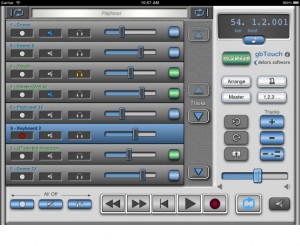
With this release, the controller app offers a number of new features and benefits, including extra capabilities that allow you to know and control exactly where you’re at in your composition. The dynamically adjusting “LCD” display shows a user selectable choice of playhead location or project information, including song tempo, and playhead position and tempo can be changed easily to specific numeric values. On the Track Details screen, individual track volume and pan are now controlled with faders, and their values are displayed. According to the maker of gbTouch 3, graphics have been enhanced and the increased use of icons makes gbTouch more language independent.
You can use gbTouch in the studio, onstage, or anywhere really. In addition to supplementing the use of mouse and keyboard to control GarageBand, gbTouch 3 also serves as a control surface of sorts for GarageBand, making music creation more productive and efficient from anywhere in your studio or music environment. This flexibility is particularly useful in recording situations, Harmony Systems says. The individual track controls — record, mute, solo, and volume — and transport buttons on gbTouch allow you to adjust and evaluate tracks before heading into the mixing session.
What you can do with gbTouch 3:
- Control transport functions (Backward, Forward, Beginning, Play, Record, Cycle)
- Enable / disable record, mute, and solo for each track
- Track names and numbers shown on each track
- Tracks color coded for real and software instruments
- Select current track with one touch
- Access more than eight tracks with the arrow keys
- Adjust volume of individual tracks, and overall with Master Volume
- Adjust pan level for an individual track
- View values for track volume and track pan
- Disable all volume during playback with Volume Mute
- Move the playhead quickly using jog channel strip
- Designate Cycle start and end points
- View LCD display, which dynamically shows playhead location — user selectable measure or time format — or project info (tempo, time signature)
- Change tempo
- Adjust the playhead to a specific bar-beat location
- Adjust the playhead to a specific time based location
- Turn off all track record, mute, and solo attributes
- Show / hide the Arrange View or Master Track
- Enable / disable Metronome and Count-In
- Create a new track, duplicate, or delete a track
- Undo or Redo an action
- Save a GarageBand file
- Adjust Master Echo and Reverb effects
- Manipulate Compressor, Visual EQ, and software instruments’ sound Generator parameters
- Enable / disable effects
- Name of the currently selected track shown on the Track Edit screens
- Set preferences for faders to “jump” on touch
- Select one of three themes (four including GarageBand ’09) at any time to change the look of your app
GbTouch 3 requires the installation of gbLink 3.0, a Mac OS X application (Lion compatible) that provides the ability for gbTouch to communicate with GarageBand using a Wi-Fi network. GbLink is available as a free download at the Delora Web site.
Harmony Systems’ gbTouch 3 is now available for $9.99 from the App Store. Existing gbTouch users may upgrade to gbTouch 3 for free. For more information, visit delora.com.
New user friendly MIDI DAW Control Surface for Logic
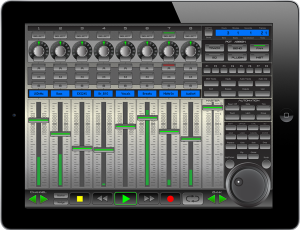
xMix – Logic Edition is an interactive, user friendly MIDI DAW (Digital Audio Workstation) Control Surface specifically designed and optimized for use with Logic Pro 9. No drivers required. Powered by CoreMidi Networking Technology with speeds of almost zero latency, xMix-Logic Edition connects wirelessly and seamlessly interacts with Logic Pro 9. The xMix user interface displays the absolute state of play in Logic Pro direct to your iPad. Giving you the freedom to control your session from anywhere within wifi range, delivering a new sense of control in your studio.
- Unlimited Tracks (in banks of 8)
- 8 Virtual Faders assignable to almost any purpose.
- 8 Virtual Multi-purpose Rotary Pots
- Complete Channel Strip Control over Pans, Solo, Mute, Record arm.
- Full VU db Meter displays for each channel.
- Scribble LCD strip displays name for each highlighted track.
For each channel, with one touch you have the power to access, control and modify the current EQ settings, with a mix of faders and VPots you can infinitely and precisely control each band of EQ.
Once your instrument has been selected xMix auto-configures all controllable parameters to the either the 8 VPots, 8 Faders, or a mix of both. Each control available is noted in the LCD display area so you are always 100% on top of the controls.
Once in Plugin Mode, xMix will offer you access to all the plugins loaded in the channel. As with the Instruments, xMix automatically maps the available functions and parameters to the 8 VPots or faders.
All the important Play, Stop, FF, Rewind, Record and Loop are situated at the bottom of screen. you can also use the scrub wheel to surf from one end of the track to the other.
xMix offer a wide range of extra controls over your Logic session. From automation to general copy pasting xMix has it all available directly from your iPad.
xMix gives you easy control over the views and screens which presented in Logic. Direct from your iPad you can open close the mixer window, select form audio/midi/instruments channels, quickly change to notation mode. Any screen you want to access, with one or maximum 2 touches you are there. No more reaching for the mouse, just touch and go..
Numark iDJ Live – Quick look
This is a short video showing the Numark iDJ Live control surface for use with iDevice apps such as DJAY for iPad by Algoriddm.
iDJ Live is the easiest way to become a DJ with your iPod touch, iPhone or iPad. This iOS-DJ controller is perfect for anyone from Pro DJs to music lovers who have never tried DJing before. The iDJ Live system harnesses the processing power of your iPad, iPod or iPhone and enables you to DJ parties, events and even clubs using the music that is already on your iPod via Algoriddim’s djay or other Core MIDI-enabled apps.
Numark has worked with Algoriddim the makers of the highly popular Djay software to bring support for iDJ Live to Djay for iPad. Mix your iPod music library on a hyper-realistic turntable interface. Perform live, record mixes on-the-go, or enable Automix mode and let djay mix your favorite playlist automatically. With unprecedented ease-of-use and innovative multi-touch mixing features, djay for iPad takes DJing to the next level and offers a unique experience for beginners and professionals alike. Djay is available for purchase from the App store. For more information please click here
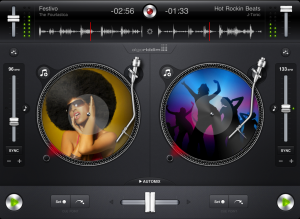
You can mix and scratch your music, including your iTunes Music Libraries using two large performance platters and a central mixer section with a crossfader, buttons and knobs. iDJ Live is laid out in to carefully recreate the two-decks-and-a-mixer setup that professional DJs prefer. Just load your tracks to either Deck A or Deck B, and then control it, cueing up the start point, performing advanced transitions and even scratching.
Let your fingertips do the work
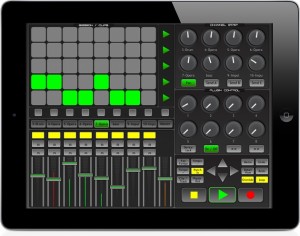
Kiss goodbye to your mouse and keyboard, and let your fingertips do the work with LiveRemote for you iPad, iPod or iPhone. LiveRemote connects to Ableton via CoreMidi networking technology with incredibly low latency of between 1-3ms. Control your session from the comfort of your couch, or whilst walking around the room. LiveRemote gives you direct and precise control over the many Live features.
Mixer:
– Control up to 8 faders at a time + the Master with solo, mute, record also available. *High Resolution Precise meter readings of the audible decibels for each channel.
Clip Launcher:
– Launch clips direct from your device, using the 8*5 matrix. *Launch scenes, or stop them at any time.
– Move around your session easily with the control arrows, the clip launcher will activate any clips that are within the red box highlighted in Live.
Channel Strip: For each channel you have precise and fast control on the pan and upto 3 send channels.
Plugin Control: Simply and easily control the plugins for each selected channel, LiveRemote automaps the available controls of the selected device.
Transport Control: All the necessary transport controls such as Play, Record, Stop ect are implemented for quick, on the fly recording.
LiveRemote is compatible with both Mac and Windows. Price £5.99/$9.99 iPad Version / £3.49/$5.99 iPhone Version and availible in the iTues App store.
For more information please visit there website www.iximix.com
Get the grips with Slide Control for iPad
Slide Control is an iPad music application for musicians. This application makes improvisation easier. You can choose any scale (major, minor, pentatonic, blues …) and slide your finger to play any melody. With Slide Control it does not have bad grades, your movements are in harmony. Easier to play !! Easier to improvise !! Easier to create !! More imagination!!
Features:
★ Very simple application for very simple improvisation
★ Video tutorial Include
★ Many scale for best improvising (major, minor, pentatonic, blues …)
★ Polyphonic Control
★ Choose from 11 different wallpaper
★ Program change/ Bank change
★ All Midi CC support on Y direction
★ 16 Midi channel
★ Quick switch Sustain / Partamento / Legato
★ Quick switch Oct +1
★ MIDI Device support – connect devices via the Camera Connection Kit (near zero latency)
★ Measured latency over WiFi to OS X: 2-5ms
★ Fullscreen
★ Cool Animation 
★ More to come!
DATAMASKIN

