
Duplex Controllerism Explained
Here is a short demonstration on how to use your Novation Launchpad with Renoise 2.6, with a tool called Duplex.
You can learn more about Renoise at http://www.renoise.com
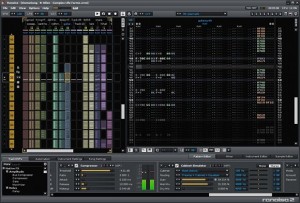
New in this release of Renoise:
- Lua scripting. Customize the app using an elegant, clean, friendly language.
- OSC, MIDI support. Integrated control with Duplex (MIDI/OSC), native Open Sound Control support.
- Extensive hardware support. Maybe you don’t want to write a line of code, ever. You can let someone else do it for you, and reap the rewards. Already, Renoise has native, fully-integrated support for the AlphaTrack, BCF-2000, BCR-2000, KONTROL49, FaderPort, microKONTROL, nanoKONTROL, Launchpad, Remote SL-MKII, Nocturn, Monome, Ohm64, iPad via TouchOSC… all thanks to community support for the new scripting engine.
- Sample autoseek. Absolutely essential to making audio behave in the way it does in linear arrangement tools, the sample will play back from the position in the timeline, rather than from the beginning each time you hit play. (Seems obvious, but it’s part of making Renoise bridge tracker-style apps and more conventional, linear ones.)
- Better performance, compatibility. Tweaked performance on Linux and Mac, expanded file format compatibility, plus 64-bit Linux, DSSI Linux support. Renoise is a reason to run Linux, and Linux a reason to run Renoise, if you hadn’t guessed that yet. No, seriously, you’ll enjoy it.
Using two grid controllers with Renoise, arranging patterns on the fly.
Special thanks to daxton for writing the step sequencer 
Massive DJ Multitouch controller
This is a preview of the Emulator – a giant multitouch MIDI controller, from the Amsterdam Dance Event 2010.
It’s basically a giant rear projection multitouch screen controller for DJing – or an iPad on steroids.
It’s available now in The Netherlands via Soundfreax Amsterdam.
New wireless multi-touch controller for the Kyma/Paca(rana) sound design workstation

Symbolic Sound’s new Kyma Control app for the iPad gives sound designers, musicians, and researchers a new wireless multi-touch controller for the Kyma/Paca(rana) sound design workstation.
Kyma Control bundles four of the most popular Kyma controller-types into one, wireless multi-touch package that includes:
- An auto-mapped, labelled, bi-directional controller/display that mirrors Kyma’s Virtual Control Surface. All of the controls you see on the computer screen are also available on the iPad screen, including the Preset selection and Roll-the-dice options;
- A multi-touch pen/tablet-style controller, tracking as many as 11 fingers with identifying color trails to help you keep track of where your fingers are touching the screen;
- A standard piano-style keyboard with discrete or continuous pitches and an extra dimension for !KeyTimbre control in Kyma;
- A Tonnetz pitch-space keyboard with configurable vertical and horizontal intervals for experimenting with different pitch layouts;
- Plus accelerometer and compass-heading controls. Accelerometers supply both triggers and continuous controls based on acceleration in the X, Y, and Z directions, along with controls corresponding to Pitch, Roll and Yaw. A compass heading control corresponds to the current direction of the iPad and is useful for panning and other directional controls.
Applications
For use in the studio, on stage, in a theatre or performance venue, in an installation, in the lab, at home, or in classroom, Kyma Control frees you from having to sit in front of your computer. Put yourself in the middle of the audience, inside the sound field, and perform your Sounds in an expressive, intuitive manner using multi-touch. Performers can have access to sound controls from the stage or in the recording studio, and voice talent can have access to a silent controller in the voice-over booth. In perception and speech experiments, subjects can use a wireless, silent controller with no mechanical parts, perfect for sound-isolation booths.
Requirements
- Apple iPad
- Symbolic Sound Kyma X.77 (or newer) running on Windows or Mac OS host computer
- Symbolic Sound Paca(rana) Sound Computation Engine
- WiFi connection to a network that is accessible to the Paca(rana) (OR contact Delora software (http://www.delora.com) for information on their PacaConnect application for creating an ad hoc network using the built-in Airport on a Macintosh)
Kyma Control is available from the App Store
Roger Linn describes his new AdrenaLinn Sync 2
This tutorial describes the function and controls of the 4 audio processing blocks in the upper half of the AdrenaLinn Sync v2 control panel.
In the later videos, Linn covers:
- The 5 basic processing blocks in AdrenaLinn Sync v2;
- LFO modulation in AdrenaLinn Sync v2; and
- AdrenaLinn Sync v2’s sequencer modulation.
Logic 9 with iOS control surface
Apple has released an update to Logic 9, version 9.1.2, that supports iOS control surface apps that utilize the OSC protocol.
The video, above, demos how you can now use TouchOSC to turn an iPad into a custom Logic 9 touchscreen control surface.
here’s a quick demo of the new OSC feature with Logic 9.1.2 and TouchOSC on an iPad.
This is really coool! Finally a nice remote on the iPad.
Testing Griid for Ableton on iPad
Ritchie Hawtin, John Acquaviva and a small group called Liine have created an Ableton specific iPad controller called Griid.
Griid is an advanced clip grid interface which allows you to control Ableton Live (running on your desktop or laptop) from your iPad, iPhone or iPod Touch. Using specially developed touch objects and simple gestures, Griid is carefully designed with the performance experience in mind. Finely tuned for rapid navigation, you can enjoy the freedom of playing Live sets of any size with ease. Explicit visual feedback means that you have all the information you need, quite literally at your fingertips. Combined with wireless operation, this means you can perform with Ableton Live without ever needing to look at the computer screen.” – http://liine.net/
NAMM: Akai Synthstation 25 iPhone keyboard
Eric McGregor with Numark, Alesis, and Akai Professional discusses the Akai Synthstation 25 iPhone keyboard control surface at Summer NAMM 2010 in Nashville, TN. Recorded June 19th, 2010.
Controlling Ableton Live through an Ohm 64
Producer/DJ Eliot Lipp discusses and demonstrates how he uses his Livid Instruments OHM 64 MIDI controller to control Ableton Live.
Eliot explains the functionality and layout of his project and controller; as well as his custom effects and tools to add variation and complexity to his music.
After the tutorial there is a section of his live performance from a recent show in Austin, Texas.
The Ohm64 is an adaptable, programmable, and interactive MIDI control surface designed to give you hands-on control over your performance. High-quality sliders, knobs and buttons provide the interface for creative expression, whether you’re mixing samples and synths or DJ’ing a cutting-edge set. Constructed with an aluminum faceplate and a gorgeous body of hand-finished wood, the quality is felt down to your fingertips. All of our controllers are proudly hand crafted and assembled for artists by artists in our Austin, Texas shop.
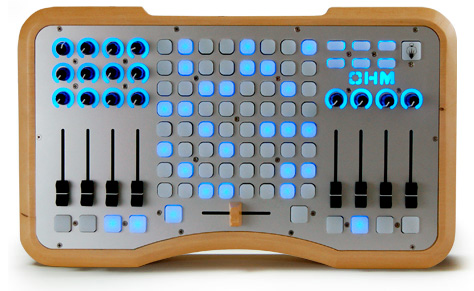
The Ohm64 has bi-directional talkback communication allowing the controller to talk to your software, and software to your device. MIDI messages can be sent to the Ohm64 to light up the buttons for an interactive performance. Completely programable and mappable, the Ohm64 provides a flexible control surface that be used with any software or setup. Completely USB powered means you don’t have to worry about adapters and and power strips, and it is plug and play so no drivers are required.
Turn your iPhone into a hardware MIDI control surface

Line 6 has introduced a new $5.99 app, MIDI Surface (App Store link), that lets you turn your iPhone, or iPod touch into a hardware MIDI control surface.
MIDI Surface works with the Line 6 MIDI Mobilizer, a MIDI adapter that connects to the iPhone or iPod touch.
This is pretty interesting – but adapt this for the iPad and get third-party app support and MIDI Mobilizer could become a new platform for musicians.
Details below.
Control Surfaces:
Keyboard
- Channel
- Velocity
Sliders
- Channel
- Controller (Mod Wheel, Channel Volume, Expression, etc.)
- Low Value
- High Value
Drum Pads
- Channel
- Category (Note On, Controller, Program Change)
- Note
- Note Off (Immediate, Touch Up)
- Velocity
X-Y Control
- Supports up to 4 touches
- Channel
- Controller
- Left Value
- Right Value
Each interface can be configured with detail and you can save Presets for quick recall.
Crazy instruments – the Karlax MIDI controller
Da Fact, a French music instrument company, has introduced Karlax
Karlax is a new type of MIDI controller designed to “re-establish the artist’s body at the heart of the performance.”
The Da Fact Karlax is designed to capture a variety of expressive movements which can be accessed in a simple, intuitive manner.
Da Facts:
Its sensors are fitted to precision mechanics components. The innovative architecture allows pistons, keys, switches, benders, triggers, a rotation axis and an inertial unit (comprising an inclinometer, accelerometer and a 3-axis gyroscope) to be activated separately or simultaneously.
An embedded screen for displaying and editing settings makes it possible to safely leave the computer off stage. With the product comes also a dedicated software compatible with both MAC and PC.
“Karlax pushes the boundaries of language,” says Nils Aziosmanoff, Chairman of LE CUBE, a creative centre devoted entirely to the digital arts. “The creative process is increasingly becoming an experience to savour: we are adopting an exploratory approach to creativity, instead of the previous contemplative, passive approach.”
DATAMASKIN

