As we posted on earlier today here is a new video from AKAI:
http://www.akaiprompc.com
Music by AraabMUZIK, Sean C, and LV
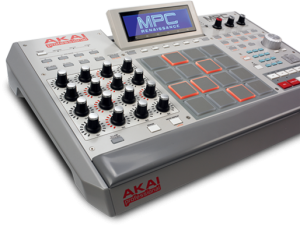
Fusing legendary MPC layout and workflow with the power of your computer. MPC Renaissance is an unrivaled music production instrument.
Find more information at http://www.akaiprompc.com
Fusing Akai Professional’s legendary MPC layout and workflow with the power of your computer, MPC Renaissance is an unrivaled instrument for music production. The new flagship is a fully integrated hardware/software system: MPC Renaissance allows you to create using classic hardware controls and an integrated pop-up display, while it’s exclusive MPC Software empowers you with unprecedented, expandable production capabilities on your Mac or PC.
MPC Renaissance Hardware
Fuses legendary MPC production with the processing power of your computer
Vintage Mode changes output sound character to MPC3000, MPC60 and more
Improv jam using Lemur on an iPad 2, with analog keyboards and USB controllers connected to Ableton Live. Lemur is wirelessly controlling effects on NI’s Massive (synth played on the M-Audio Oxygen 25) and NI’s Kontakt (drums played on the Akai MPD26). The bass is on a Moog Prodigy, and the lead is a DSI MoPho. All loops are recorded live, nothing is pre-recorded.
About Lemur:
Lemur – the legendary multitouch MIDI/OSC controller returns. All these major artists can’t be wrong: Daft Punk. Björk. Nine Inch Nails, Deadmau5. M.I.A., Justice, Hot Chip, Ryuichi Sakamoto, Orbital, Richie Hawtin, The Glitch Mob, Matthew Herbert, Joris Voorn, Stephan Bodzin, Modeselektor, Alva Noto, Richard Devine, Gui Boratto, … you?
Rock solid standard
Major stadium-touring acts use Lemur on stage. The original hardware version was introduced to the public in 2004 and Lemur software now benefits from nearly 10 years of development. These are just two of the reasons Lemur is the name cited when talking about multitouch control.
Control anything
Lemur is a professional iOS controller app that doesn’t cut any corners. It lets you control anything, any way you want. Total flexibility means it can go as deep as you need it to. Lemur can control DJ software, live electronic music performance software, studio production software (DAWs), VJ software, visual synthesis software, stage lighting and more. In fact, any software or hardware that can be controlled by MIDI/OSC can be controlled by Lemur.
A controller unequalled
Lemur has often been imitated but never equalled. The physics engine, which can make faders and balls bounce, is entirely unique: allowing anything from a slight organic feel to absolutely chaotic modulations. Lemur goes deep: it comes with more than twice as many objects as comparable apps. Options for adjusting the look and feel of objects are vast, and connection to your gear is simple.
User Library
Access templates from top artists and the Lemur community. Some of these are actual templates used on stage, others are pure studio or creative tools. Share your own or simply browse the library and download whatever suits your needs.
– Physics
Hated physics at school? Now you’ll love it! The behaviour of many Lemur objects can be affected by powerful and easy to use physical models which can make your controller bounce, rebound and oscillate. Make your controller come alive.
– Scripting
There’s absolutely no need to dive into scripting if you don’t want to. But if you’re the type who likes to get their hands dirty then there’s a powerful scripting engine inside Lemur. Harnessing this power will allow you to build extremely dynamic templates.
– Editor
The Lemur editor, is a cross-platform (OS X/Windows) interface builder. It allows you to create new Lemur templates or edit existing ones. The drag & drop interface makes it easy to use. It allows you to create anything from the simplest set of faders to the most complex groovebox with no hassle.
– Connectivity
Simply connect your iPad/iPhone to your laptop over Wi-Fi and make the connection! Lemur also supports CoreMIDI allowing you to use hardware interfaces such as Alesis’ iO Dock or the iConnectMIDI or class-compliant USB MIDI interfaces (with a camera connection kit). You can even control up to 8 computers from one iPad with Lemur!
This new Lemur app allows you to control DJ software, studio production software (DAWs), live electronic music software, stage lighting, and more – this is no everyday keyboard situation. Any software OR hardware that can otherwise be controlled by OSC/MINI is able to be controlled by this Lemur app. For those of you new to the platform, you’ll be able to access a user library of pre-made templates from top artists and unknowns from the Lemur community – artists from around the world are now sharing their own templates, strengthening the platform by the minute!
You’ve only to connect your iPad OR iPhone to your laptop over Wi-fi to work with a cross-platform (Mac OS X or Windows) interface builder to bring your experience to a whole new level, dragging and dropping with ease as you do so. You’re able to control up to 8 computers from one iPad if you wish, Lemur also supporting CoreMIDI allowing you to use such hardware interfaces as the iConnectMIDI or USB MINI interfaces to your heart’s content. Physics in objects are able to be controlled with physics models, allowing you to bounce, oscillate, and rebound across your tracks — objects including, but not limited to: Fader, Multislider, Range, Multiball, Knob, RingArea, Switches, Pads, Custom Button, and text.
– Physics
Hated physics at school? Now you’ll love it! The behaviour of many Lemur objects can be affected by powerful and easy to use physical models which can make your controller bounce, rebound and oscillate. Make your controller come alive.
– Scripting
There’s absolutely no need to dive into scripting if you don’t want to. But if you’re the type who likes to get their hands dirty then there’s a powerful scripting engine inside Lemur. Harnessing this power will allow you to build extremely dynamic templates.
– Editor
The Lemur editor, is a cross-platform (OS X/Windows) interface builder. It allows you to create new Lemur templates or edit existing ones. The drag & drop interface makes it easy to use. It allows you to create anything from the simplest set of faders to the most complex groovebox with no hassle.
– Connectivity
Simply connect your iPad/iPhone to your laptop over Wi-Fi and make the connection! Lemur also supports CoreMIDI allowing you to use hardware interfaces such as Alesis’ iO Dock or the iConnectMIDI or class-compliant USB MIDI interfaces (with a camera connection kit). You can even control up to 8 computers from one iPad with Lemur!
This app enables you to use your iphone as a 16 pad midi controller with no extra hardware.
Install the app onto your iphone, download the free software (pc/mac/linux) and simply plug your iphone into the MIC socket of your computer!
Always coveted a Jazzmutant Lemur, but could never justify the cost. So I couldn’t pass up the opportunity to work with the iOS app adaptation by liine! This is my first attempt experimenting with the multiball control and physics model to trigger MIDI notes and generate interesting modulation patterns of Malstrom and Echo devices.
Lemur is a professional iOS controller app that doesn’t cut any corners. It lets you control anything, any way you want. Lemur can control DJ software, DAWs, VJ software, visual synthesis software, stage lighting and more. Any software or hardware that can be controlled by MIDI or OSC can be controlled by Lemur.
Major stadium-touring acts such as Bjork, Deadmau5 and Daft Punk use Lemur on stage. The original hardware version was introduced to the public in 2004 and Lemur software now benefits from nearly 10 years of development. These are just two of the reasons Lemur is the name cited when talking about multitouch control.
Demo of the CoreMIDI capabilities of two iOS music apps, FunkBox and Little MIDI Machine, when connected to an iRig MIDI interface. Other instruments used are a Monotribe, Little Phatty, Tattoo drum plugin, Arctic Keys synth app, NLog synth plugin, and Ableton Live. With CoreMIDI your music apps become musical instruments that can interface with the rest of your studio to make music.
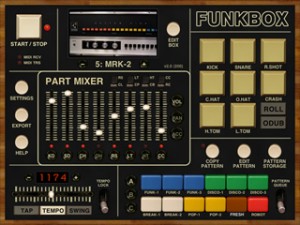
FunkBox is a virtual vintage drum machine app designed to be fun and easy to use. It runs on your iPad, Iphone or iPod Touch.
FunkBox features:
The look and feel of a vintage beatbox
Samples from classic drum machines
Thirty six preset drum patterns
Straightforward x0x style editing
Mix, mute and tap individual parts
Tempo, swing, emphasis, random controls
Audio and MIDI export plus audio copy
Fun, cool looking, and easy to use!
v2.0 JUST RELEASED! Includes more drum machines, sample import, customized boxes, CoreMIDI support, and tons more! FUNK YEAH!
More info: http://blog.dubspot.com/choppertone
Producer, programmer, radio broadcaster, music director and host of Quietmusic, Nick Francis recently stopped by Dubspot NYC for an inspiring interview and intimate live performance and demonstration on his own custom-built MIDI controller The Choppertone along with Ableton Live.
In this exclusive Dubspot video interview, Nick Francis talks about his musical evolution, from listening to rock and pop music of the 1960s and ’70s to delving into the world of jazz, experimental and electronic music (musical instruments and music technology); Francis embraced everything from Tangerine Dream, Kraftwerk, Brian Eno, Herbie Hancock and Weather Report to DJ Shadow, Moby, and Fatboy Slim. He has a strong appreciation for classic American soul and R&B and music of the 1940s and 1950s, but also pays attention to current music and recognizes the efforts of innovative electronic musicians and performers of the 21st century.
With the groundbreaking Lemur controller Jazzmutant have revolutionised the way in which performers can now interact with light, video and sound. The Lemur offers an unrivalled package of intuitive features beneath a futuristic multitouch-sensitive surface, and as result has won fans across the globe including the groundbreaking musicians Richie Hawtin, Björk and Ryuichi Sakamoto.
With the new free version 2 firmware update Jazzmutant are taking the Lemur to another level of control, flexibility and intuitive operation. A host of new object features allows users to really interact with sound and manipulate it in real time like never before. Workflow improvements, scripting additions and other new features allow the controller to be used seamlessly with leading software applications. Ableton Live users, in particular, will benefit from some of the new features.