
Reason – Nektar P4 Controller Preview video
The new dedicated Reason controller from Nektar
Alesis Vortex – the first USB/MIDI keytar controller
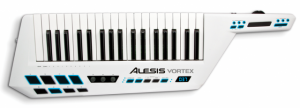
I am personally not very keen on keytars – I think they are quite a silly hybrid between the two and this one is not even a proper synth merely a controller, but for those of you who enjoy these, here’s a brand new one from Alesis featured at the ongoing WNAMM show:
Alesis Vortex, the first USB/MIDI keytar controller.
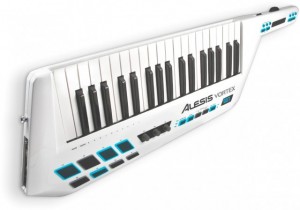
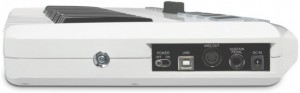
The Vortex offers an extensive array of touch-sensitive keys and velocity-sensitive pads on a pearlescent white body, and octave and pitch controls on its neck.
The Vortex includes features something that they say has never been found on any keytar before: both traditional MIDI and USB MIDI. This should let you use the Vortex with any MIDI hardware or software instruments on Mac, PC, and iPad. The Vortex also comes mapped for popular software synths and DAWs.
The Vortex also features a MIDI-assignable accelerometer – so you can control virtually any parameter by moving the Vortex’s neck: volume swells, amazing pitch bends, vibratos, filter cutoffs and more.
Features:
- The first USB keytar controller—works with all of your software instruments & synths on Mac, PC, & iOS devices
- USB and traditional MIDI jacks for use with virtually any synth, sound module, or other MIDI hardware or software
- Embedded, MIDI-assignable accelerometer for performance parameter control by tilting the neck
- Thumb-controlled volume slider, sustain button and pitch-bend wheel on neck
- Finger-controlled MIDI-assignable touchstrip, sustain, and octave-control buttons on neck
- 37 velocity-sensitive keys with aftertouch for compact, yet complete melodic range
- Eight velocity-sensitive drum pads/sample triggers enable you to create beats or trigger clips
- Large transport & patch-select controls for instant access
- Includes strap; standard guitar strap pegs are compatible with virtually any strap
- Bus powered when USB-connected to Mac or PC; battery compartment for use with MIDI modules and iOS devices
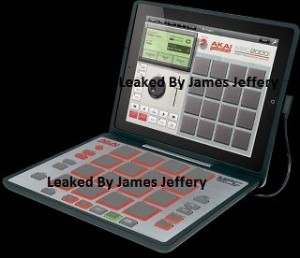
NAMM: New video from AKAI introducing the MPC Fly
As we reported on earlier this week AKAI are soon about to launch the MPC Fly, now we are treated with a new video:
MPC Fly merges unmatched Akai Professional technology with the power of your iPad 2, embodying legendary capabilities that have made the MPC an industry standard like real MPC pads, MPC Note Repeat and MPC Swing. Its multifunctional, double-hinged design gives you the flexibility to produce tracks anywhere, while also acting as a protective case between sessions and giving you total access to your iPad 2 for normal uses. MPC Fly transforms your iPad 2 into a professional beat-making powerhouse.
NAMM: Check out the new Akai Pro MAX49 – Overview demo
And here’s their pitch: MAX49 from Akai Professional places revolutionary MIDI and CV control at your fingertips. With an intuitive layout and included AkaiConnect automatic-mapping software, MAX49 offers an instant, fully immersive experience with your favorite music software and virtually all VST plugins. From its 49 semi-weighted keys and 12 real MPC pads, to its groundbreaking LED touch faders and vintage CV & Gate outputs, MAX49 combines cutting-edge Akai Pro technology with classic capability to give you an unprecedented music-making experience.
Two new videos of AtomoSynth’s KOE plexi glass synth
“Hello this is the Koe mini modular, this time making some percussive and weird sounds.
KOE synth voice and KONEKO midi to CV eurorack modules.”
“Hello, this is the Koe desktop mini modular from AtomoSynth, showing some bass and lead sounds.
Koe synth voice eurorack module and Koneko midi to CV interface module. UMX61 midi controller.”
Background info:
This is the KOE module, it is japanese for “voice” because it is a complete synth voice in just one affordable module, it is 28 HP width and needs +/- 12V power.
Main features:
One VCO with square and ramp wavefoms with depth and tune controls, tune control is a ten turn potentiometer which allows you easily set octave, tune and fine tune with
just one knob.
Noise sourse, it can be set to affect the VCO frequency or it can be mixed with the VCO and audio input.
One LFO with square and triangle waveforms is can be set to affect the VCO frequency or the Filter cut off, it also features an output jack.
High pass and Low pass vactrol based filter with cutoff and resonance/peak control, it also features an input jack to control the cut off frequency.
Two Envelope generators: EG1 with decay control which is set to affect the cut off frequency of the filter and EG2 with attack and release controls, set to affect the volume, it has an output jack and input jack for the incoming gate signal.
Also it features an audio input, it allows process any axternal audio signal with the filter and envelopes.
Nektar Technology Panorama P4 Keyboard Controller Delivers Hands-On Reason Control
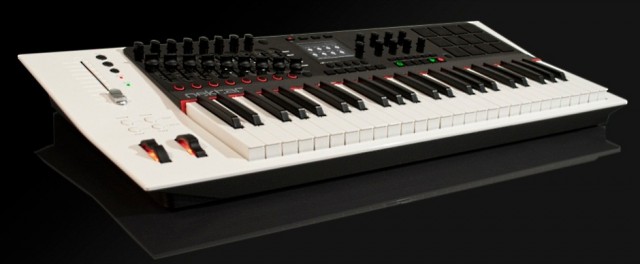
This week at Winter NAMM 2012, Nektar Technology will unveil the new keyboard controller in the most complete version we’ve seen yet; the company even has an anticipated release date of March, 2012.
The Panorama P4 offers the discerning Reason user tactile control and a number of intuitive features that make working with Reason a piece of cake. According to the manufacturer, the established workstation keyboard concepts allow for complete “on device” selecting and editing of sound with direct visual feedback. The keyboard controller is also said to be comfortable and very easy to operate in the studio or during live performances. The front panel is angled, raising important controls so that they are easy to see and reach, as well as providing the ideal viewing angle for reading the centered high-resolution display.
The synth keybed itself has 49 notes, plus a choice of 5 velocity curves (each optimized dynamically but with different response emphasis), monophonic Aftertouch, and a zone function that enables you to program four zones that can be switched on and off during performance.
As for controls, the Panorama P4 has a ton of them — 90 control elements assignable to a MIDI-message. Buttons and pads can be assigned to ASCII messages, allowing for sending shortcut commands to Reason, while 20 preset locations store the assignments of controls for later recall. A preset is linked to a Pad Map, Keyboard Map, and F-Keys Map, so that you can save and load these components independently of the individual presets.
For percussive performances, 12 Velocity- and pressure-sensitive pads are included, which can be programmed using the “Learn Note” function and then saved to any of the 20 Pad Map locations. The Velocity Spread feature spreads 1 note across all 12 pads, each with its own fixed Velocity, which allows for nuanced dynamics. Meanwhile, the Scale-Function assigns each pad to pitches within a defined scale for percussive performances with any sort of keyboard sound, while freely changing intervals or transposing the whole set.
Why you need it – It’s the controller’s dedicated Reason control, of course. The Panorama P4 is said to offer completely transparent and with unlimited access to all areas. Every single Reason device is mapped with parameters and their values clearly visible in the display. Switching between Mixer, Instrument, and Transport mode reconfigures the entire control surface by just pressing one button. Overall, the Panorama P4 was designed to give Reason the feel of hardware.
Panorama P4 Specifications:
- 49-Note Velocity-sensitive keyboard
- Aftertouch
- Weighted synth-style keybed
- Pitch bend and Modulation wheels
- 4 Keyboard function buttons
- 3.5″ High-resolution TFT display
- 16 Encoders
- 9 x 45 mm faders
- 100 mm ALPS motorized fader
- 10 Assignable LED buttons
- 28 Additional assignable buttons
- 12 Pads with Velocity / pressure sensitivity
- 4 LED mode buttons
- 5 Menu buttons under display
- Pads and motorized fader select buttons
- View and mute buttons
- Sustain pedal jack (pedal not included)
- Expression pedal jack (pedal not included)
- USB port for communication with computer
- USB Micro B connector for extra and external power
- Compatible with Mac OS X and Windows XP, Vista, and 7
Nektar Technology plans on shipping the Panorama P4 in March, 2012 for $599.99 (MSRP) or $499.99 (estimated street price). Visit nektartech.com.
Via GW
Mock up teaser of the new Akai MPC Fly
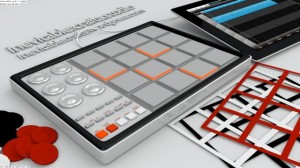
Here’s another image of the still-to-be-announced Akai MPC Fly iPad Music Production Center.
If correct the Akai MPC Fly looks to be an interesting software + hardware Music Production Center for the iPad. You could use the iPad sans controller for mobile beatmaking and then combine it with the MPC Fly hardware in the studio.
The mockup comes via Inevitable Crafts on Facebook, who admittedly put it together in Blender 3D.
Novation Impulse – Full review
Shorn’s back with a look at the new super controller from Novation. With Automap 4.2 integration and semi-weighted keys
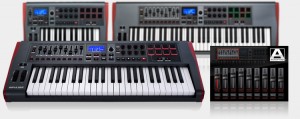
Impulse is a range of professional USB/MIDI controllers. They each have a precision keyboard and a full control surface powered by a brand new version of Novation’s Automap control software – Automap 4 (which makes getting hands-on with your DAW/plug-ins fast and simple). Impulse also has 8 back-lit drum pads which can warp arpeggios, roll beats and launch Live clips.
NAMM – The new Traktor Kontrol X2

Here’s a new NAMM leak from Native Instruments of what have been called the Kontrol X2, a brand new controller from the Traktor team that features a 4×4 grid of true RGB pads. See the full photo above, as well as a nice mockup of the device made by one of a Traktor forum members over one year ago. Perhaps the most important element of introducing this type of controller is noting that Traktor Pro 2 currently doesn’t have any type of sampling capabilities that would make the X2 an effective controller.

This new Traktor version might feature enhanced sampling capabilities, including group loading of samples, the ability to assign colors to samples, cue points and maybe even keys. The original Traktor Kontrol X1 offers control over Traktor’s looping, syncing and effects. It has more of an emphasis on rotary controllers and cue/play controls. The new control looks like it may retain the same basic format as the Kontrol X1, but feature pad controllers. This would make it a nice complement to the original Kontrol and be a lot more useful for beatmaking and for performers that have more a clip-based approach.
Easy MIDI turns your Mac keyboard, trackpad and mouse into a powerful MIDI keyboard controller
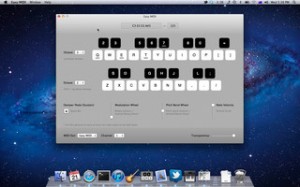
After a year flodded with specific apps targeting the iOS side of the coin – it is nice to see someone taking a stab at improving or updating the controller side of thins for OSX users. Nikolozi Meladze has released Easy MIDI, an app that turns your Mac keyboard, trackpad and mouse into a powerful MIDI keyboard controller. It sends MIDI notes and control messages to any soft synth or DAW such as GarageBand, Logic Pro, Ableton Live, Cubase and Digital Performer. This is very useful when you want to jot down some musical ideas quickly and easily whilst travelling, sitting in a coffee shop or even on your couch at home.
Easy MIDI even allows you to control iPad apps that support CoreMIDI or hardware synth via MIDI interface.
Easy MIDI features
- Send MIDI notes and control messages to any DAW or MIDI driver.
- Notes can be triggered using alphanumeric keys.
- Over 3 octaves under your fingertips.
- Easily change keyboard octave with up/down arrows.
- Visual feedback eliminates the need to look down on your Mac keyboard.
- Sustain on/off can be triggered with a space bar.
- Vertical scroll changes note velocity.
- Pitch bender can be controlled with a pinch zoom gesture or a vertical mouse drag.
- Modulation can be controlled with a rotation gesture or a vertical mouse move.
- Adjustable Easy MIDI window transparency.
Easy MIDI for Mac is available to purchase for $29.99 USD.
DATAMASKIN

