
Controlling a dubstep wobble on your iPad
An experiment using an iPad and the Konkreet Performer app to control dubstep wobble / LFO sounds and drum effects in Traktor 2. Konkreet uses multi-touch technology to the full. Instead of traditional faders and knobs, use multi-touch and gestures to manipulate PERFORMER’s beautiful shapes to dynamically control your computer’s software instruments in real-time.
In the studio, it allows the artist to approach their sound-design routine from a new, inspiring angle: to reconnect to their software instruments and Digital Audio Workstations by using Performer’s revolutionary interface and arriving at sounds and progressions impossible with traditional controllers.
More info:
Download the Traktor 2 and OSCulator template files for free at http://digitaldjtools.net/news/traktor-mapping-for-konkreet-performer-wobbula…
Exploring the Casio PT-82
Here’s a bit of a background on the PT-82. This keyboard from 1986 has many similarities with the Casio VL-Tone 1 and PT-1, but includes a “melody guide” key lighting feature for music teaching (not the keys itself light up but a row of small LEDs above them) and a ROM- Pack music cartridge slot. Unfortunately this instrument is missing the great built-in synthesizer, sequencer and 3 octave switch of the VL-Tone.
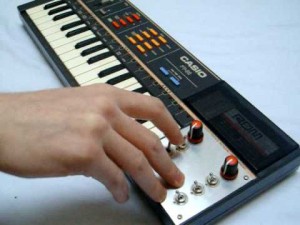
Although the music playback from the ROM- Pack includes wonderful polyphonic accompaniments, the player can play own musics only monophonic with thin and dull sounding blip rhythms. A bit unusual is that this white keyboard has brightly coloured orange and red buttons and red lines while Casio normally preferred pastel colours. Also a red case version of the PT-82 was made. In 1987 it was re-released in grey as Casio PT-87.
The PT-82 was likely intended as a technically simplified successor of the Casio PT-80. The speaker has an unpleasant, loud mid- range resonance. The main voice sounds are the same like with the PT-80, but tend to sound a little thinner and harsher. These sounds resemble much a Casio VL-Tone 1; unfortunately they don’t include the famous “fantasy” sound of the latter.
In this video:
This was my first ever instrument when i was 4 years old. I was wating too long to make something with this! So this is a music track from this and only with this. It has an exeptional meaning for me…
Reverb, delay,some chorus and an octaver for the organ bass. All sounds are presets of the PT-82. No other instrument is responsible for this track.
New hands-on demonstration of the Elektron Octatrack
Very good overview and demo of the Octatrack in action. The Octatrack is an 8 track performance sampler. Recording of sounds is a breeze thanks to the intuitive user interface, but the fun really starts once the samples are inside the machine. All audio content can be heavily processed and radically transformed. Loops do not have to be restricted by tempo or tone and can always stay in sync no matter if they are pitch shifted or if the tempo of the sequencer is changed. The inflexible nature of samples is finally a thing of the past.
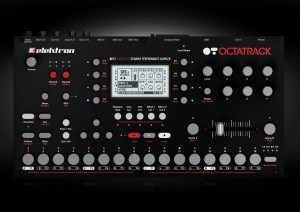
Flex machines offer the most extensive sound manipulation possibilities. A sample used within a Flex machine is loaded to the RAM memory of the Octatrack. From there it can be twisted, stretched, warbled and reassembled in multiple ways. Flex machines are unbeatable sound processors. Thru machines do not sample or play back sounds. Instead they let the Octatrack affect incoming audio with the dual FX blocks. They are very handy in live setups. Static machines are the perfect tool for handling extremely large samples. Samples assigned to Static machines are streamed from the Compact Flash card, thus their size can be in the order of gigabytes. Of course you can time stretch and pitch scale them as needed. Neighbour machines listen to the output of the preceding track. Multiple tracks with Neighbour machines can form extremely powerful effects chains. They can turn the Octatrack into a deluxe effects device.
In this video:
In this video Peter demonstrates some basic features of the Elektron Octatrack utilizing sounds from the Demo mode. More to come!
Specs:
- 8 track internal sequencer
- 8 track MIDI sequencer
- 64 step variable length Tracks
- Unlimited Projects & Sets
- 8 instantly available Arrangements
- 16 instantly available Banks
- 16 instantly available Patterns & fader scenes per bank
- 4 parameter sets per Bank
- 2 effect blocks per track
- 8 Recorders
- 3 LFOs per track
- 1 LFO designer per track
- two 24 bit stereo Inputs
- 24 bit stereo main, cue & headphones Outputs
- >100 db signal to noise ratio
- turbocharged miDI In, Out & THRU
- Assignable infiniumR optical crossfader
- Compact Flash card reader
- 480 mbps USB 2.0 connectivity
- sturdy steel chassis
- rubbery no-slip knobs
- 3 year Elektron warranty
- 2 gB of high quality loops courtesy of Loopmasters come pre-installed on the bundled 4 gb Compact Flash card
Plane sequencer – monome 512, monome 64, monome arc4
In this video:
This video is the version with the voice over and saw cloud / osc calibration routine in the middle restored.
I’ve always loved step sequencers and I see the monome as an opportunity to address some of the grey area between the one knob per function analog step sequencer and step sequencers with memory. The idea is to increase the available note range without sacrificing precision and increase the available sequence length range, without sacrificing direct manipulation and feedback. So, when the arc came around it seemed like a useful navigational tool to manipulate a large plane of data.
I’ve been referring to plane as a platform because there are a number of variations I want to implement using the underlying development. This version is optimized to serve as a control voltage source. As such, it produces a lot of outputs. The top row is step enable/disable which is typically used to fire off envelopes. Plane is generating control voltages directly. There are no intermediate bits of software or virtual instruments in-between plane and the end of the patch cords controlling the modular.
The row underneath it the playback loop ruler. Pressing anywhere in the ruler area moves the playback loop to that location. A chorded gesture changes the loop size. One section of the sequence can be edited while playback is occurring elsewhere.When the loop ruler goes off the visible edge of the grid, it lets you know in which direction the active stuff is happening.
Included is a very nice saw cloud simulation of multiple detuned oscillators with adjustable fatness which you can plug directly into your modular.
Also included is direct, accurate CV control of an oscillator via a closed-loop calibration procedure. Of course, MIDI output is also available.
This version of plane uses scale degrees and passes though my modal scale quantizer, so you can switch scales on the fly. You can also use a MIDI keyboard to transpose.
Or, it can also follow a programmed chord progression score, allowing you to improvise with a step sequencer within the harmonic framework of a lead sheet.
The bottom two encoders on the arc are serving as looping automated CV sources.
You don’t have to use an arc with plane, you can navigate with the mouse or keyboard or powermate. Also, you don’t need a 512 monome. All monome sizes are directly supported and can be hot swapped.
Live + Looptastic HD + grüvtron + WIFI MIDI Sync = Fun!
This is a short preview showing how Soundtrends are adding WIFI MIDI sync capabilities to their Looptastic HD (for iPad) and grüvtron (for iPad/ iPhone/iPod touch) apps. It is using the Apple Core MIDI services found in iOS 4.2 or above.
MPK49 Pads Mod Tutorial -Increase sensitivity and accuracy
AfroDJMac quickly takes you, step by step, through his customization of his prized Akai MPK49. This will increase sensitivity and accuracy. The principles here are the same as the MPD 32 upgrade seen here http://www.youtube.com/watch?v=hZViS288WH4 and here http://www.youtube.com/watch?v=_mI4SutQJpQ. Big thanks to these guys for sharing their knowledge!
In this video, I placed a rectangle of duct tape and then 6 rectangles of painters tape on each pad. The result is a MUCH sturdier feel and more accurate pads. It now feels comparable to an MPC 1000. Highly recommended and easy mod. Totally makes me want to do more finger drumming, Plus you’ll learn something about the insides of your gear!
Ancient sampler using Magnetic Tape
Chamberlin is ancient sampler! It used 1950’s latest technology Magnetic Tape for sound recording (sampling).
It has 8 tracks (Sound Effects, Trumpet, Flute, Cello, Organ, Violin, Female voice, Organ) and has stereo output.
from My synthesizer photo library.
Created using the Stupeflix Youtube App
Audiolung Bruno-6 Sampled Synthesizer Demo
On-the-fly demo of the Audioung Bruno-6 Sample-based Synthesizer. More at audiolung.blogspot.com
This sample-based synth for NI Kontakt (player or full version) uses lossless .WAV samples taken from a vintage analog synthesizer of a similar name (the Roland Juno-6) and uses them as it’s oscillators. Very flexible, from sensible to crazy sounds, some of which you’ll hear in this demo.
Analogue Solutions::Telemark Demo
The new synth from Analogue Solutions – Telemark. I’ve only had it for a couple of days but it’s already made a huge impact on my studio. I don’t know how I’ve got by without having any VCO’s in the past! This thing sounds HUGE.
I decided to make this, my first demo vid, to showcase the Telemark as they aren’t enough demos out there. Keep in mind that I’m only scratching the surface here…
All the sounds you hear in this demo are made on the Telemark. The only FX added were a touch of reverb on the main synth sound.
For more info you can visit: http://www.analoguesolutions.com/
GetLoFi Delay Unit and Piezo Tine Demo
This is a first demo of the newly revised GetLoFi Delay Kit. The kit will be available for purchase from GetLoFi.com/shop. The metal tines are mounted on a piece of wood with a Piezo pick underneath. The signal from the pickup is then routed directly into the LoFi Delay Unit and the output is routed strait to the audio recorder. The only controls on the delay unit are Delay Time and Delay Feedback. Unit turns on when an output cable is inserted. In the demo the unit is operated by an optional 9 Volt Wall supply. The delay itself is based on the PT2399 Digital IC, only bare minimum of components were used to make assembly as simple as possible. No OP-Amps are present in the circuit.
DATAMASKIN

