
Cool looking – EasyQ and EngineersFilter – free effect plug-ins for Windows
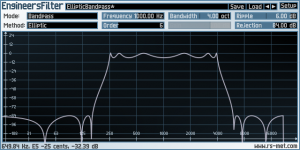
rs-met has released updated versions of EasyQ and EngineersFilter, two free effect plug-ins for Windows.
after some beta testing and bugfixing (thx to all who participated), it’s now done. updated versions for EasyQ and EngineersFilter have been released. for EasyQ, it’s only a maintenence update with a little bugfix related to colorscheme handling.
EngineersFilter now includes two new approximation methods: Bessel and Papoulis. The Bessel design approximates a linear phase response in its passband and the Papoulis design achieves the maximum negative slope at the cutoff frequency when a monotonically decreasing magnitude response is assumed.
EasyQ and EngineersFilter are available as freeware VST plugins for Windows.
More information: rs-met
vst-effect-mm-fx11-filtshiftrev demo
this is a demo of the free vst effect mm fx 11 filtshitrev by MASCHINENMUSIK.
the signal ( a vocal sample ) is divided in 3 band and every band is processed seperately. the fx goes from subtle athmosphere to weird rooms and pitch shifted
echoes.
this vst effect is free and can be downloaded from the MASCHINENMUSIK website.
Sound mangler effect for Windows and Mac

Little Endian has released version 2.4 of SpectrumWorx, a sound mangler effect for Windows and Mac.
This version adds LFO automation support, enhances the GUI with new parameter control: a symmetrical knob, and adds a 50-preset signature bank created by Martin Walker. Both OS versions have also been updated with stability and performance improvements.
“We are extremely pleased that Martin has applied his sound design skills to our latest release,” commented Little Endian CEO Danijel Domazet. “We hope he will be inspired to create even more presets for us in the future.” Says Martin Walker: “SpectrumWorx has been my favourite secret weapon for some time now – I love its extreme sonic transformations. If you’re searching for new sounds, it doesn’t come much better than this!”
SpectrumWorx is available to purchase for Windows and Mac for $119 USD.
More information: Little Endian
The Glue – compressor effect plug-in for Windows and Mac
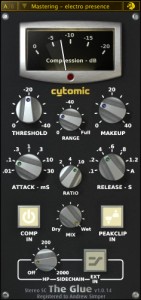
Cytomic has released version 1.1.4 of The Glue , a compressor effect plug-in for Windows and Mac. The Glue is a high quality analog modeled plug-in based on The classic 80′s British big console buss compressor with some additional features. It uses the same high quality algorithms used in circuit simulation packages but optimised for real time use
Cytomic has released version 1.1.4 of The Glue, a compressor effect plug-in for Windows and Mac.
The Glue is a high quality analog modeled plug-in based on The classic 80′s British big console buss compressor with some additional features. It uses the same high quality algorithms used in circuit simulation packages but optimised for real time use. It’s quick and easy to use and has an uncluttered interface.
Changes in The Glue v1.1.4
- New feature: smoothed Threshold, Makeup, Range, Mix, and Sidechain HP controls so no pops, clicks, or zipper noise when adjusted from gui or automated.
- Recent feature: linear phase high quality oversampling to support up to 12 MHz (x256) – note that x2 is recommended for Realtime and x8 is recommended for Render.
- Recent feature: next and previous preset buttons.
- Fixed: removed CPU spikes when drawing the graphical user interface on Mac.
- Fixed: removed CPU spikes on first play, and when switching oversampling amounts.
- Fixed: preset menu not showing with some hosts on PPC.
- Fixed: reduced memory footprint with large oversampling amounts with large host buffer sizes.
- Known issue: you cannot use both the AU and VST version at the same time in hosts that support both (eg: Ableton Live or Studio One).
The Glue is available to purchase for $99 USD. The update is free to all customers.
More information: Cytomic
New VST effect plug-in – the Dub-Expander
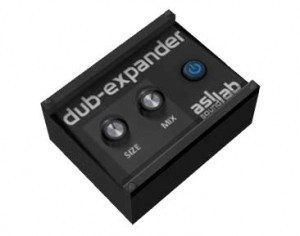
ASL SoundLab has announced a new VST effect plug-in – the Dub-Expander. They tell us that the Dub-Expander adds extra width and depth to whatever sound you run through it.
Pricing and Availability:
Free download.
More information:
Dynamo has been updated

Sinevibes has updated Dynamo to version 1.1.0.
The new version brings the following enhancements:
- New envelope matrix with actual envelope shapes instead of dots.
- XY pad replaced by individual envelope smoothness and effect intensity sliders.
- Command-click or command-drag to set all pattern step levels to the same value.
Dynamo is an AudioUnit effect plug-in that adds complex rhythmic motion to any audio.
At its core is an advanced step sequencer which works as a gate for the incoming signal. The sequencer offers up to 32 steps each with individual level and envelope shape, allowing you to construct modulation patterns of any complexity.
Price: USD 39.00
Visit: Sinevibes
VST Spectrum worx – Little endian
http://www.youtube.com/watch?v=wTfyubr0QMg
VST Spectrum worx – Little endian
SpectrumWorx is a modular effect processor that works exclusively in the frequency domain. Two things make SpectrumWorx vastly different from other effects processors: its ability to manipulate the frequency domain and its modularity.
Working in the frequency domain lets us reach the very heart of the sound. Every single frequency is available for examination and modification. When we say “modular”, we mean modules – individual small, simple (and not so simple!) self-contained boxes (effects), which we can combine, arrange and re-arrange in so many ways – and of course, every arrangement gives us a new and totally different sound. With over fifty modules, there is a nearly infinite number of combinations available. Once the modules are set up – the game isn’t over. Every module has a number of its own controls which can easily be twisted and turned until the last drop of sonic power is squeezed from the input sample. When at last sonic perfection has been achieved, users can save their masterwork as a SpectrumWorx preset file for future use and even share it with friends.
Features:
* Over fifty modules (pitch shifter, classic vocoder, wah-wah, robotizer, wobbler, autotune, reverser, etc.).
* Sophisticated engine optimized for low CPU usage.
* Flexible Preset browser.
* Over 100 presets.
* Highly configurable LFOs.
* External audio support.
* Presets in XML format.
* Detailed User’s Guide.
Korg Launches Kaoss Pad Quad Dynamic Effects Processor

Korg announced that it has begun shipping the new Kaoss Pad Quad (MSRP: $350), which employs new effects, functions and features that let users create their own combination of Kaoss effects with simultaneous control of up to four effects in real-time using a single fingertip on its touchpad. Any audio source can be processed: an MP3 player, a mixing board, an instrument or even vocals via the unit’s mic input. Korg has launched the Kaoss Pad Quad.
Korg announced that it has begun shipping the new Kaoss Pad Quad (MSRP: $350), which employs new effects, functions and features that let users create their own combination of Kaoss effects with simultaneous control of up to four effects in real-time using a single fingertip on its touchpad. Any audio source can be processed: an MP3 player, a mixing board, an instrument or even vocals via the unit’s mic input.
As users tap, slide or move their finger across the X-Y touchpad interface, the effect parameters will change, producing dramatic real-time transformations in the sound. The colorful LED touchpad illuminates in an intense variety of colors, which change depending on the state of the effects, the BPM setting and hand motions on the touchpad.
Designed to be both usable and highly playable as an effect processor, the Kaoss Pad Quad allows the user to simultaneously control up to four effects from the touchpad. Each of the four effect modules – Looper, Modulation, Filter and Delay/Reverb – contains five options (plus a module kill), for a total of 1,295 combinations.
Effects are chosen directly from the front panel for easy access during live performance. By rhythmically adding successive effects, or switching effects on and off as a song progresses, the Kaoss Pad Quad can add variation and development to the structure of any song.
Another feature is the Freeze button, which offers additional versatile control of effects. For each of the four effect modules, Freeze memorizes the position at which the user was last touching the touchpad, effectively “freezing” the state that effect was last in, even after release of the finger. By touching the touchpad again while Freeze is enabled, only the “unfrozen” effects will be controlled.
In addition to more traditional effects (flanger, low/high-pass filter, delay and reverb), the Kaoss Pad Quad offers many new types of effects:
Multi-Mode Looper for looping a part of a song; the number of beats is controlled by the location touched. Three types of looping are provided: the standard Looper, the Rev Looper (Reverse Looper which plays the looped phrase backward) and the Loop Slicer, which divides the phrase and lets the loop-play only a specific portion. Additionally, users can switch between the different looper types by sliding their finger up and down the touchpad as the loop plays, producing new beats.
Vinyl Break turntable effects, which allow users to create all the standard turntable rotation effects, including scratching, slow-down/speed up, stop and more.
Ducking Comp, creating effects of a “ducking compressor,” which has become a staple in music production.
Additionally, the proprietary Auto BPM engine automatically detects the tempo/BPM of the song that’s playing or the audio source. Users can also use the BPM knob to make fine adjustments. Alternatively, the BPM can be set manually using the Tap Tempo function.
More:
Korg Launches Kaoss Pad Quad Dynamic Effects Processor
Free Pitch-Correction plug-in that works as a VST effect
KeroVee is a free Pitch-Correction plug-in that works as a VST effect. It can pitch-detect and retune to specified scales or MIDI notes. ‘Bypass’ and ‘SubTone’ mix are also available.
New in v1.27
- BugFix: In some HOST (especially Audacity), some noise is generated if invoke KeroVee twice or later.
Features:
- Scale Buttons ‘C’ to ‘B’ specify the ‘Allowed’ note.
- Speed: Tuning Speed. Maybe robotic if set to ’100=MAX’.
- TuneTo (If both are enabled the MIDI note gets priority. But scale tuning is effective after notes are “offed”):
– MIDI: Enable Tuning to MIDI notes.
– Scale: Enable Tuning to specified scales by scale buttons. - Calib: Maste1r tuning 430Hz to 450Hz. The default is 440Hz.
- Output:
– Bal LR balance of output.
– Vol Output level. - Mix:
– Bypass Original sound mix level.
– SubTone -1 Octave of tuned sound mix level.
– Tuned Tuned sound mix level.
Visit: g200kg.com
Native Instruments – Absynth SoundScape
Absynth sound design Using the Aetherizer effect.
DATAMASKIN

