
iDensity 1.2 – feature overview
iDensity for iPad brings all the powerful Density/Pulsaret (Mac/Win standalone) Granular Synthesis tools to the world’s most popular tablet. http://www.densitygs.com
iDensity 1.2
– Background Audio
– FX chain: Echo, Ring Modulation, Parametric and High Shelf filters, Reverb and Dynamic Compressor
– Independent Y scrubbing and X scrubbing at the same time for grains density/length
– Time limit of samples removed ( you could load files as big as your free iPad RAM )
– New wavePad pinch gesture ZOOM for long samples
– Sliders and Knobs could switch to Default/Last values
– Fine increment/decrement mode in Sliders and Knobs behavior
– New Rewind button in toolbar for quick jump at the start time position
– Preferences: waveform color and resolution are customizable
– Preferences: Y and second finger step resolution are customizable
– Preferences and last UI state is stored
– Auto load audio after recorded ( on/off )
– Stereo Input audio recorder (if device is stereo)
– Sound File and Snapshots rename
– Quick Help embedded
– Some bugs fixed
Neyrink V Control Pro App For iPad Update 1.5 – Show and Tell
Russ does a show and tell of the new Neyrink V Control Pro 1.5 app for iPad. V-Control Pro provides a fully-featured, multi-touch control surface for Pro Tools, Logic 9, Cubase/Nuendo, and many more DAW’s. V-Control Pro uses WiFi to control transport, editing, and mixing functions. V-Control Pro provides advanced control of sends, automation, groups, auditioning, plug-ins, jog/scrub/shuttle, I/O assignment, and other controls within an easy-to-use interface. V-Control can be used simultaneous with ethernet controllers used by Pro Tools.
He demonstrates the new V-Window which allows control of plug-ins and other windows in your DAW from your iPad over wifi.
Seline Ultimate – iPad music app – Teaser
Here’s a teaser for a new iPad synth with quite an intriguing and colorful user interface.
Using the “overdub” function in the all-new Seline Ultimate, to create a track in less than a minute. MIDI is also recorded, so you can take what you’ve created straight into the studio!
Free iPad Control Surface for JP-80
This is a free file I created which you can download by going to jupiter80.music-technology-online.com. This control surface for the iPad adds extra control to your JP-80. The “JP-80 Mixer” runs via the MIDI Touch app which can be found on the iTunes app store.
This control surface for the iPad adds extra control to your JP-80. The “JP-80 Mixer” runs via the MIDI Touchapp which can be found on the iTunes app store. The control surface offers the following control for your JP-80:
1. Global control of Upper, Lower, Solo and Percussion parts.
2. Independent On/Off control of tones for the Upper and Lower parts.
3. Independent control of Cutoff and Resonance for the Upper and Lower parts.
4. Independent Toneblender control for the Upper and Lower parts.
5. Independent Matrix controls of the Cutoff and Resonance for the Upper and Lower Parts.
“To use the control surface, you will need to download MIDI Touch from the iTunes app store and install it on your iPad. Then simply send me an email to request the control surface plug-in and installation instructions. You will also need the Apple Camera Connection Kit in order to connect your iPad to the JP-80 via USB.”
“WILD NIGHTS” – Techno using Rebirth on iPad
Back to the old school music with Propellerhead Rebirth on Ipad : made this new song Wild Nights (Techno / dance), while in the train with my Ipad2.
Just enjoying to play with this nice little application and hope to see reason coming!
Introduction to Stochastik Drum Programming
This is a brief introduction to Stochastik Drum Programming using the Stochastik Drum Machine for iPad. It shows you how you can use probability to enhance your step sequencing so you won’t have any boring loops in your drum tracks.
Stochastik is a full-featured Drum Machine with one outstanding difference. And many killer features. Unlike any other drum machine, Stochastik lets you set a probability that a note will trigger for each of the steps in your pattern.
Once you add chance into the mix, you can generate thousands of unique variations automatically, in the time it takes to sequence two bars. It’s as easy as programming a loop but it generates a dynamic track: no more boring loops! Hundreds of high-quality samples are included, from classic analog drum machines of the past to pristine acoustic jazz and rock kits. Plus, you can import your own samples through iTunes File Sharing, Dropbox or email.
Create an awesome kit, pattern or song and you can easily share and collaborate with your friends through email, iTunes File Sharing or the Dropbox iPad app.
The Grain Science iPad synth has been updated with Chorus and new synth options
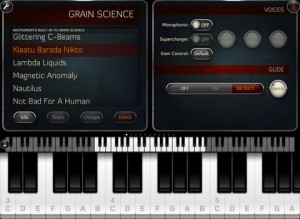
Wooji Juice has updated Grain Science , its software synth for the iPad, adding a new chorus effect and additional synth options.
Grain Science is ‘built on similar principles of granular synthesis, but is vastly more powerful’, according to Wooji Juice. Unlike many “experimental” granular apps, Grain Science combines it with traditional synthesis techniques to make a hybrid synthesiser.
Here’s what’s new in Grain Science 1.2:
- New: Chorus FX unit
- New: Pulse Width Modulation blend mode
- New: Wave list shows a count of how many instruments use each wave
- New: More musician-friendly BPM system, goes up to 180bpm with 1/4, 1/8, 1/16 and 1/32 options (old system can still be selected)
- New: Multiple-octave chord arpeggiation
- New: Swipe to delete unwanted audio from wave & audio import lists
- New: “Reed” built-in wave
- New: 6 additional built-in instruments
- New: Tube Resonance Bass can be programmed. Note: It can bite! Slow, gentle programs are recommended, unless you want artefacts!
- New: UI improvement — swap FX units by dragging them around by their names
- New: Setting to choose whether recording is hold-to-record or tap-to-start/tap-to-stop
- New: Mini VU meter on recording button during recording (or, in hold-to-record mode, tap to toggle on/off)
- New: Cropping selections now snap to zero-crossings for smoother results
- Improved: Easier to see when a cropping selection is about to begin
- Improved: Avoids “popping” while installing/uninstalling FX units
- Improved: Slightly more useful naming for newly-created instruments
- Fix: Crash bug when mapping certain kinds of parameter in otherwise-unmodified instruments
- Fix: Issue with reverb resetting itself after re-opening Grain Science
- Fix: Control Mapper shows the same names for Tube Resonance parameters as on their FX dials
- Fix: Issue with Control Mapper Auto-Reset not always auto-resetting to the correct value
- Fix: Issue with Single-Shot grain mode
DM1 The Drum Machine V2.0 – Music app for iPad
Here’s some good news – the popular DM1 drum machine for the iPad has been updated to version 2.0:
Fingerlab is very happy to announce its biggest update for DM1 with version 2.0. DM1 now comes with 2 new super cool tools “The Randomizer” and “The Automation” for instant and fun beat making. Patterns are now also expandable to 32 Steps for extra creativity. We have added 24 new drum kits. As well as AudioCopy, WIST synchronisation between two iPads, MIDI In and more cool features. Yes, it is a big update!
Check the full list below of the new features:
✔ “The Randomizer” – a new exciting tool to unleash the creative potential of the Mixer step by step. Just press ‘Go” and have fun!
✔ “The Automation Panel” for a precise and intuitive control of any Mixer parameter over time. Powerful and easy.
✔ 16 or 32 Steps per patterns. Even more complex beats.
✔ 24 New Drum Kits for a total of 64 Drum Kits.
✔ WIST synchronisation technology by Korg for syncing 2 iPads together.
✔ Reversed sounds. Long-Tap the Play button on any track of the Mixer to reverse the sound.
✔ AudioCopy on exporting
✔ Colored Song Patterns
✔ New help screens with tips & tricks
Please check our videos to find out about these new exciting features.
http://www.fingerlab.net/website/Fingerlab/DM1.html
iPad Music App: mobileRhythm mR-7070
A quick tutorial on getting started with this app. Styled on the early 80s drum machines, such as the Roland TR-909 and TR707, this is a useful app for creating quick beats.
Universal – works on iPad, iPhone and iPod touch devices.
16 drum sounds – with all the beats on a large grid display makes creating amazing rhythms easy.
Individual level fader- for each class of drum sound – kick, snare, toms, hats, cymbals, percussion and accent.
Scale switch – For complicated rhythms and interesting beats, 16, 16T, 32 and 32T.
Adjust tempo – From 40-240 BPM, precision display of tempo to 0.1 bpm accuracy
CoreMIDI compatible- including midi clock output for rock solid sync to other equipment.
Orphion and the Moog Voyager Touch Surface
Playing the Orphion iPad app through a Moog MF-102 Ring Modulator and MF-104Z Analog Delay. Moogerfooger parameters are controlled with the Moog Voyager Touch Surface CV outputs. Learn more at www.experimentalsynth.com
DATAMASKIN

