
Gorillaz new iPad album is out for free download

Gorillaz have released their iPad album, The Fall, as a free download for members of their fan club.
Gorillaz used a variety of iPad music software to recorde The Fall:
- Speak It!
- SoundyThingie
- Mugician
- Solo Synth
- Synth
- Funk Box
- Gliss
- AmpliTube
- Xenon
- iElectribe
- BS-16i
- M3000 HD
- Cleartune
- iOrgel HD
- Olsynth
- StudioMiniXI
- BassLine
- Harmonizer
- Dub Siren Pro
- Moog Filtatron
The Fall is available as a free download to members of Gorillaz’ fan club. You can also sign up to listen to it for free at their site. A physical release is planned for early 2011.
Recording audio on iPad with Behringer U-control UCA222
Testing the cheap and compact audio interface UCA222 for recording audio on iPad. Even with the power limitations of iOS 4.2 for external devices the UCA222 works nice with the Camera Connection Kit. No external power supply needed. It’s a nice solution for recording in stereo keeping the mobility.
For this video I used the Multitrack Daw app and a Korg Microx. The demo song is an excerpt of Renaissance’s Can You Understand (Ashes are burning, 1973).
More about Mobile Music and Music Apps on www.musicapps.com.br
So what is the Audioprom really?
Audioprom is an audio sequencer and live performance application for the iPad.
“We just launched Audioprom, a super intuitive audio sequencer app for the iPad. Audioprom doesn’t look or feel like other iPad sequencers out there because it doesn’t simulate popular physical interfaces from 90’s drum machines. We built it from the ground up for the multitouch screen.
It’s been a labor of love. We built it because we wanted it for ourselves and now we hope others might like it enough to buy it so we get to keep working on it.
We posted some how-to and demo videos at audioprom.cwandt.com.
We are CW&T, a Brooklyn based art and design duo. We make hard and soft things for fun and to feed ourselves. This is our first go at an iPad app. cwandt.com”
You can find more info and videos on http://audioprom.cwandt.com/
The 1st iPad album released
UK-based electronic musician Mark Jenkins has notified us about what he thinks is to be the world’s first all-iPad CD, The iPad Album. Taking up the fight with Gorillaz I presume then 
Jenkins is London-based musician and the author of the book Analog Synthesizers. The iPad Album, a retro analog Berlin School work, was released on October 9th and is available on Groove.nl.
The video above comes from his launch performance of The iPad Album at the E-Live Festival.
Tracks:
- Pulsator [5:30]
- Resurgence [6:40]
- Matrisequencer [5:20]
- Tangential [4:30]
- Schwarzenider [5:35]
- Sequencefried [6:28]
- Wavecycle [3:41]
- Micronicised [5:26]
Comparing the two best DJ Apps for the iPad
Here is a nice ten minute comparison of the current two best DJ Apps for the iPad. I’ve got both and I think djay from Algoriddim is the winner. It’s very close to being something I would use out in a club. Check out my recent posts on djay: djay for ipad and djay and tangerine.
“This movie compares two current DJ apps for the iPad – djay from Algoriddim and Sonorasaurus Rex from Pajamahouse.” – Rob Jones
In the App Store: djay and Sonorasaurus Rex
MIDI controller for Network MIDI and USB MIDI
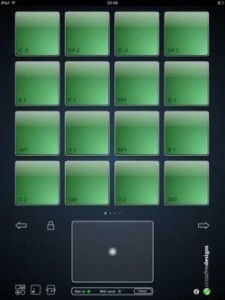
Crossfire Designs has introduced MidiPadz Lite (App Store link) – a simple MIDI controller for Network MIDI and USB MIDI that lets you trigger notes with its drum pads.
An X/Y-pad and a gravity controller, controlled by the iPad’s rotation, allow you to send MIDI slider parameters as well.
Features:
- Supports USB MIDI over iPad Camera Adapter
- Supports network MIDI over WiFi
- Touch sensitive drum pads (depends on vertical position and two-finger tap for full velocity, user-changeable)
- Four pages with 16 drum pads each
- Drum pad notes adjustable (tap on pad note symbol on bottom left, after that drag finger on pad up/down to change its note)
- One X/Y controller (big pad on bottom)
- Gravity controller (rotational axis of the iPad; Tap on rotation symbol on bottom left to activate, MIDI send light blinks every time you change the iPad’s rotation)
- All controllers can change their MIDI controller number
- Rotational- and scoll-lock for drum pad module (tap lock symbol)
MidiPadz Lite is a free download. A commercial version is scheduled to be released in January.
Free. Full version will be released in January.
via Sonic State, Crossfire Designs
Only iPad controller that lets you seamlessly edit Ableton Live MIDI clips
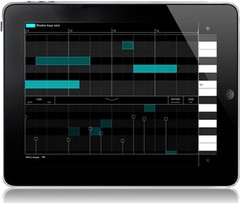
Liine has announced the Cliip module for Gridd, the only iPad controller that lets you seamlessly edit Ableton Live MIDI clips.
A world-first in controllers, Cliip allows you to create and edit MIDI clips with your fingertips using an elegant touch-enabled piano roll.
Cliip makes editing MIDI clips a truly live, musical experience. The piano roll is now an instrument too. Paint notes onto the smooth zoomable grid. Use intuitive multitouch gestures to edit note length and velocity – no need to LEARN it, just FEEL it. Snap/Fine and Percussive/Melodic modes and the powerful Duplicate function will help you unleash your creativity. Use in the studio to effortlessly create that killer hook or get personal with your audience and truly create music in front of them.
The Cliip module is initially available only when running on iPad. Cliip will run on iPhone and iPod Touch too in the next update.
Cliip features
- Piano roll with zoomable keyboard and timeline.
- iPercussive mode for short notes and Melodic mode with two finger note length gesture.
- Snap and fine modes. Snap note position (or note end) to the grid, or use fine mode to add some groove.
- Drag up the velocity lane and add dynamics to your music.
- Copy and paste functions allow you to copy the contents of one clip to another.
- Duplicate function allows you to duplicate and extend the current loop (e.g. to copy a loop 4 times so that you can add a variation on the 4th loop).
- Clear all.
- Remotely create new MIDI clip.
Cliip is included in Griid Pro, currently priced at $16.99 USD / 13.99 EUR until February 28, 2011 (regular $24.99 USD / 19.99 EUR). Cliip is available for Griid users as an “In App Purchase” (requires Griid v1.10).
More information: Liine / Griid
The disco is always with you!

BitDisco is a playful music app for the iPad. It’s specially designed so that anyone can easily play great-sounding tunes, whether you’re the least musical person, or a seasoned professional.
We’ve achieved this simplicity by creating a grid-like interface. Simply tap or trace your finger over the iPad’s screen to create stunning sounds. There’s no need to memorise complex scales as some of the lesser used notes have been removed to make playing easier. You can even select from a range of sounds, tones and backing beats to start a disco in your bedroom!
Awaken your inner musician! Download BitDisco from the App Store now.

Playing with Mugician for iPad
Via mvpadrini
Playing with the amazing app Mugician for iPad. Please notice that the App Store build of Mugician has pressure sense disabled. I will make new videos when my technique is better
More about Music Apps and Mobile Music on www.musicapps.com.br
Tocando com o ótimo app Mugician para iPad. Importante dizer que a versão do Mugician que está na App Store não tem sensibilidade à pressão. Farei novos vídeos assim que minha técnica estiver melhor
Mais sobre apps musicais e música móvel no www.musicapps.com.br
KORG adds MIDI in from external devices to iMS20
Version 1.1.0 of the Korg iMS-20 synthesizer app for iPad nows supports MIDI in from external devices. The synth and the drum machine can now be played from other MIDI devices!
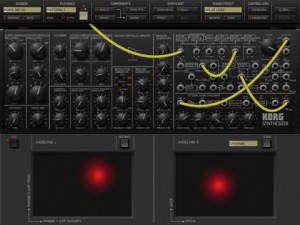
MS-20 Synth and Drum machine can be played by external MIDI devices (via Apple iPad Camera Connection Kit)
Hardware MIDI support is one of the most requested features we’ve heard for iMS-20. The update alls brings improved compatibility with iOS 4.2 and other minor updates.
DATAMASKIN

