
iPhone & YouTube Undiscovered Talents MashUp
Here’s a good example on how to put your iPhone up for a test – music wise
“I came across some impressive singers on YouTube and wondered how it would sound like if I overlay their singing with music that has been made using only my iPhone”
The app is called Songineer http://bit.ly/u8xekg

Songineer – Instant Composer brings on the latest trend in mobile music creation – short, inspiring music pieces that can be created literally in seconds and shared with your friends right away.
There is simply nothing between you and the countless billions of awesome melodies, laid out on five pre-defined layers: beat, bass, keys, lead and atmo. Four 32-step patterns can hold a massive amount of thrilling polyphonic motives and cutting solos, enriched with on-board send FX: Tape Delay and Grand Stereo Reverb. The simple, thumb-oriented structure of the interface is the icing on the cake for anyone willing to make music without any tedious hassle.
Songineer is a unique scale-based sequencer, bundled with 30 original scales, which make the search for that perfect note combination a complete breeze. The innovative DNA Keyboard leaves no chance for any bad-sounding notes, and in connection with the big piano roll-style sequencer window it provides excellent quantized loop-recording and editing possibilities. Since the scales can be changed on the fly and the sequencer data is independend from the scales, the workflow process is highly addictive and gives fantastic results.
Manual input of the beat patterns is easy, but leave it to the extremely powerful Beat Randomizer, which is capable of producing of more than 256,000,000 cool-sounding rhythms. The beats make use of a dedicated beatpad keyboard with fixed drumkits and have their own LP/HP filter. It takes only a couple of taps to export the whole track to a MIDI file for using the freshly-generated ideas in studio work later on. Among other export options are .WAV, .M4A and multi-track dry .WAV.
Songineer comes with 20 great-sounding instruments and 5 modern drumkits, but you can extend your arsenal with 60 more instruments and 15 drumkits, available in 5 packs from the bundled sound shop. The carefully-selected samples come from the best hardware synths and drum-machines and blend perfectly with the latest-generation Amidio’s CrystalClear audio engine. Audio and MIDI sharing are carried out through the new audio hosting service PlayMe.cc, created especially for mobile music apps. The URL to your track can be posted on Facebook or Twitter right from Songineer’s main menu without any unnecessary steps.
Songineer – Instant Composer is a fresh approach to creating true mobile music, a source of endless inspiration and a really addictive short music track generator. Whenever you’re a travelling musician or just looking forward to throw in some cool melodies, you’ll love the error-forgiving simplicity and user-friendly beauty of Songineer.
FEATURES
+ Unique Scale-Based Sequencer
+ 4 Polyphonic Instrument Layers
+ 8-Channel Stereo Drum Machine
+ Beat Randomizer! You don’t have to create beats manually.
+ Extremely fast and simple workflow
+ 20 Instruments, 5 Drumkits
+ Advanced Polyphonic CrystalClear Sound Engine
+ DNA Keyboard
+ In-App Sound Shop with 5 Instrument/Drumkit Packs
+ Ouput to .WAV, .M4A, .MID. multitrack .WAV
+ One-tap Audio & MIDI sharing online via PlayMe.cc
+ Built-in extensive help guide
iKaossilator GONG MOOD
“Some extra blurry shooting of some loop created with iKaossilator reminding me to the good old GONG sounds”
Whether it reminds you of GONG sounds as well, remains to be seen, especially if you read the following definition of GONG sounds – but perhaps the author refers to something else 😉
Gongs are broadly of three types. Suspended gongs are more or less flat, circular discs of metal suspended vertically by means of a cord passed through holes near to the top rim. Bossed or nipple gongs have a raised centre boss and are often suspended and played horizontally. Bowl gongs are bowl-shaped, and rest on cushions and belong more to bells than gongs. Gongs are made mainly from bronze or brass but there are many other alloys in use.
Gongs produce two distinct types of sound. A gong with a substantially flat surface vibrates in multiple modes, giving a “crash” rather than a tuned note. This category of gong is sometimes called a tam-tam to distinguish it from the bossed gongs that give a tuned note. In Indonesian gamelan ensembles, some bossed gongs are deliberately made to generate in addition a beat note in the range from about 1 to 5 Hz. The use of the term “gong” for both these types of instrument is common.
iOS – SoundMashine and an Addictive microSynth
Simple and basic, but serves its purpose
SoundMashine granular synthesis based sound sampler and sequencer app for iphone 4 ipad 2, sound sequencer
SoundMashine is a granular synthesis based sound sampling and sequencing instrument.
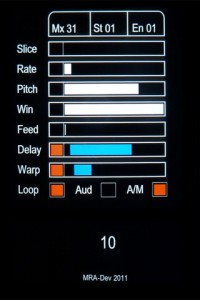
Fully utilising touch gestures to provide a fast and easy to use compositional tool. The app records sound using the devices built-in microphone, then divides the sound into slices which are then automatically assigned to each of the 16 screen tiles. Each tile has its own set of parameters allowing you to adjust window size, playback rate, pitch, feedback, delay and delay modulation, all of which are easily set by the swipe of a finger. Each parameter listed can also be randomised between a set of assignable values. Using the sequencer function patterns of tiles can be recorded and played back at different speeds, again using simple touch gestures.
With its flexibility for working with sound at different pitches, rates and sequencer speeds, SoundMashine lends itself well to a variety of compositional paradigms, from beat based through to drone or noise based music forms.
Combines the synthesis power of Addictive Synth with an easy to use 4 track loop recorder. It was never so easy to create beautiful sounds and driving loops.
The unique dynamic wavetable synthesis allows you to explore an unprecedented wide range of sonic territory. From acid loops, crystal clear percussions, realistic human choirs to complex musical soundscapes nothing seems impossible with only a handful parameters to tweak.
Motivation test on the iKaossilator
Nice demo of the iKaossilator in action
Free cool ambient iPhone music app – Fuji Leaves
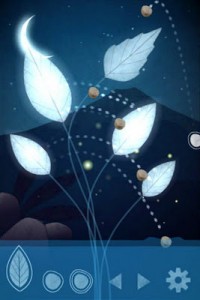
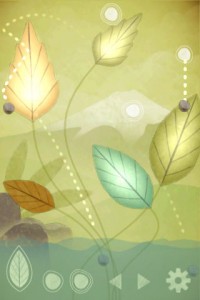
Fuji Leaves is an interactive music application where you use leaves and falling stones to create music. When a stone hits a leaf, the leaf produces a sound. Different sounds play depending on how the stone hits the leaf. You can move, rotate and scale leaves in a near infinite amount of combinations, each combination resulting in a unique sound everytime.
The goal with the game is for you to relax and play it in the way you enjoy the most. Try it out!
Features
- Create songs using leaves and falling stones
- Add and remove leaves and stone creators as you please
- Move, rotate and pinch leaves and stone creators in a near infinite amount of combinations
- Undo & redo your actions
- Save & load the songs you make
- Share them with your friends through facebook connect
- Easily download your friends’ songs
Funny percussion app for iPhone
Useless I know, but still 
Omeletis an egg shaker for iPhone and iPod touch. Its developers, Pattern & Noise say that, using high-precision motion data from the accelerometer Omelet is able to respond realistically to every movement – from the slightest roll to the quickest shake.
Omelet also comes with two original built-in effects that can be used individually or together.
- Muis a unique resonating effect capable of generating a diverse range of evocative sounds and textures. Its rich yet subtle tones vary from scratchy, wood-like sounds to eerie metallic ringing sounds reminiscent of Tibetan singing bowls.
- Blue Room follows in the tradition of classic 60s echo chamber effects – simulating anything from tight corridors to huge cavernous spaces. Go easy for a softer sound while jamming along with your iPod, or crank it up and be transported to soundscapes from another world.
Omelet Features
- Volume and mute controls
- Automatic locking in portrait orientation to prevent accidental changes while playing
- Multitasking support for jamming with your iPod
- Two tailor-made sample banks
- One to maximize volume while playing through the built-in speakers
- Another with greater dynamic range while playing through the headphone jack
- Optimized for iPhone 4, iPhone 3GS, iPod touch (3rd & 4th generation)
Pricing and Availability:
$1.99 / £1.49
More information:
KORG iKaossilator for iPhone : Preview
Available on the App Store : http://bit.ly/nNlZeE
More info : http://www.korg.co.jp/Product/Dance/iKaossilator/
Here’s what KORG Japan is writing about the product (Googlish):
Palm-sized synthesizer KAOSSILATOR breathed new wind musical instrument industry, has emerged as a long-awaited iPhone app! Familiar interface simply by touching the touch pad that can be played, of course, with the new sequencer with loop at will make tracks and live performances. Biyakana also provides sparkling visual effects enliven the play, KAOSSILATOR is a whole new “iKaossilator for iPhone” reborn as.
Trace your finger on the screen, or hit, a synthesizer can play freely or simply rubbing.
Groove representing the visual effects in conjunction with the play.
150 built-in sounds of every leading dance music.
Features set scale / key anyone can play without removing the pitch.
Easily make a loop sequencer track up to five parts.
The DJ can also be like a live performance and real-time control loop.
Wireless Sync app and play instruments such as function iELECTRIBE WIST.
TNRi – iPHONE vs iPAD – WIRELESS JAM SESSION – David and Goliath by The Great Pyramids
Here’s what’s happening: 10 minute zoom lens IDM Ambient session – like an evolving world map? This is another example of synching two TNRi apps through the internet. We also used Kaoss pads to add additional interesting effects. My iPad was used with the Alesis IO dock for greater output sound quality and MIDI out to synch my Kaoss pad 3, but all sync between the TNRi apps was through wireless internet. We are planning a concert with 4 players – are you up to it?
On the 16 × 16 grid of buttons, basically, the horizontal direction is time, and the vertical direction is pitch.By laying sounds on these buttons, you can combine rhythms and melodies to produce music. A button will glow when its sound is produced. The movements of the glowing lights produce a visual performance.
TNR-i can produce 16 types of sounds at the same time (16 layers), and it can remember up to 16 song patterns produced using those sounds (16 blocks). By switching between song patterns in real time, you can produce a rich variety of musical expressions.
There are six different types of performance modes that you can select for each layer. You can make elaborate music by combining different modes. In score mode, the most fundamental of the modes, you can arrange sounds horizontally (temporally) and vertically (by pitch). In the exciting random mode, the sounds that you arrange are not just played in order—the melody and rhythm constantly change as twists are added. In draw mode, you can perform music by tracing your finger across the buttons as if drawing a picture. In bounce mode, the glowing lights are like bouncing balls that produce sound when they fall. In push mode, you can continuously change the sound as you perform. In solo mode, which is fun for solo performances, you can easily adjust the speed of repetition and the pitch.
Loop Music Video for the iPhone
Featured instruments in this video:
Pocket Guitar :
http://podmap.net/pocketguitar/
Funk Box :
http://syntheticbits.com/funkbox.html
iXylophone :
http://www.ipadboardgaming.com/ixylophone/
Virtuoso :
http://www.peterbmusic.com/
Bebot :
http://www.normalware.com/
Siri – let’s talk demo
Well it is going to be interesting to see when we have the first electronic instrument based on Siri, perhaps some augmented audio experience, vocoder effects, loop this section on track 5, voice sampling or…
Stay tuned
Siri on iPhone 4S lets you use your voice to send messages, schedule meetings, place phone calls, and more. Ask Siri to do things just by talking the way you talk. Siri understands what you say, knows what you mean, and even talks back. Siri is so easy to use and does so much, you’ll keep finding more and more ways to use it.
DATAMASKIN

