
Checking out Drum Machine Legends iPhone App
To download Drum Machine Legends from iTunes go to:
http://itunes.apple.com/us/app/drum-machine-legends/id526646477?ls=1&mt=8
or visit:
http://www.onegloveapps.com
Directed By: Bryan O’Connell
Music produced by Oligee using DML
Drum Machine Legends brings you six kits from the most legendary drum machines of all time. The Lin Drum, SP1200, TR 808, Obrhm DX, MPC 60 and the TR 707.
DML is easy to use for full production with sounds that One Glove Apps has handpicked and processed to get the most out of their original machines. Quantize your beats, mix, choose tempo and layer sounds from different kits. One Glove has also added some new original sounds for the sampler kits (MPC and SP1200). Save your beats, share, and email as wav files. It’s simple to set your loop length, tempo and quantize your beats. Just open up Drum Machine Legends and begin producing now
Music iPhone App: Wobbl Dubstep imachine
Music iPhone/iPad app demo of Wobbl Dubstep imachine. 9 pre assigned bass wobbles and 6 loops.
Turn on a loop and wobble! Very simple and hopefully a future update will add more variation. Importing loops would be good too!
Download the app from the itunes store:
http://itunes.apple.com/app/wobbl-dubstep-imachine/id501749933?mt=8
triqtraq – jam sequencer for iphone
triqtraq is the ultimate jam sequencer for electronic music producers or DJs who want to make music on the go, or improvise live…
While it lets you create great sounding musical ideas with ease, triqtraq offers many surprising musical features that will please even the most experienced beat creators.
triqtraq is available from the App Store now.
http://itunes.apple.com/app/triqtraq-jam-sequencer/id488578848?mt=8
For more information visit http://www.triqtraq.com
Features:
create musical patterns fast and intuitively, by programming live or by using the ‘step edit’-feature
automate parameters like pitch, filter, delay, decay and level in real-time
change samples or sample kits on-the-fly while jamming
edit multiple tracks simultaneously
store up to 16 patterns and 32 samples per session
specify the length of a sequence per track, or set the automation length for each parameter individually
switch seamlessly between patterns
use the loop range feature to create poly-rhythmic sequences
use sounds from the 350+ factory sample library
import your own sounds via iTunes file sharing
Playing Monnix synth app over modulars
Description from chrisjeffs.com/monnix :
“This live performance synthesizer uses three points of touch to control the distribution of up to 16 harmonics, allowing for unique sound effects.
Movements can be played back in the Replay page and the pitch altered by tilting the device forward. The Sample & Hold screen freezes the partials according to the selected tempo. FM ratio, jitter and envelope parameters can be set in the remaining pages, allowing for a wide variety of sonic mayhem.”
CASSINI – Polyphonic Synthesizer for iPhone (v1.0.0)
Here are some details:
CASSINI Polyphonic Synthesizer
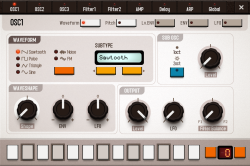
– 3 Oscillators plus 1 Sub-Osc
– Sawtooth, Pulse(PWM), Triangle, Sine, Noise, FM
– Waveshape Modulation
– Oscillator Sync
– Ring Modulation
– 2 Filters
– LP24, LP18, LP12, LP6, BP, HP
– AMP
– Overdrive
– 3 Band EQ
– Auto Pan
– 9 Envelope Generators
– DAHDSR(Delay, Attack, Hold, Decay, Sustain, Release)
– Velocity, Keyboard Tracking
– 6 LFOs
– Sawtooth, Pulse, Triangle, Random, 16 Step Sequence
– Waveshape Modulation
– Envelope(AD/AR)
– Modulation Delay
– Delay Time: 1-2000ms / Tempo Sync
– Delay Time Modulation
– Filtered Stereo Delay
– Resonant Filter (LP, BP, HP)
– Filter Modulation
– Programable Polyphonic Arpeggiator
– Scale/Chord Remapper
– CoreMIDI
– Recorder
– Audio Copy (Compatible with INTUA BeatMaker, Apple GarageBand and so on.)
– Export wav file via iTunes File Sharing
The recording time is limited to 3 minutes.
Propellerhead Software – Closer look at Figure
This iPhone app is like a mini-Reason. The combination of super-bright screen in a dark room freaked out my camera, but the description and audio get the point across.
iPhone’s SIRI plays the piano
SIRI plays a YAMAHA Disklavier WIRELESSLY via WIFI & Airplay, complete with moving keys in full expression and moving pedals. Presented by the inventor of SmartKEY for Disklavier, Craig Knudsen.
Take a standard MIDI songfile and convert it to an audio file (while maintaining the MIDI data). The songfile is then sent wirelessly via WiFi to an Apple Airport Express (which is mounted underneath a Yamaha Disklavier reproducing piano. The audio output of the Airport Express is then connected to the analog MIDI inputs of the Disklavier, using a standard audio cable.
Then, you simply ask Siri to play your favorite song from your iTunes library, and Siri responds immediately, by making the Disklavier’s keys and pedal move up and down, recreating the performance, including full orchestration.
The result is nothing short of magical.
ShakeMidi: A Wireless MIDI App Like No Other
Background data: ★ ShakeMidi is probably one of the most advanced, feature-packed iPhone midi apps available. Do you know why? ★
☆ ShakeMidi is an accelerometer-enabled MIDI controller that turns your iPhone into a professional, high performance MIDI instrument. Move or shake your device to send notes over WiFi, at an unbelievable ★0ms latency★! Originally conceived to be used by dancers playing live music, ShakeMidi goes beyond live performances, providing a solid MIDI controller that you can use in your everyday music creation. This iPhone MIDI app will surely help artists find new and exciting ways of creating rhythm, both on and off the stage. The MIDI interface gives you all the freedom you need to create. Playing the notes any way you want allows for endless combinations.
FEATURE HIGHLIGHTS
✓ Built-in Quantization allows you to keep a perfect beat, no matter what. If turned on, notes snap to the nearest beat position, allowing for a flawless performance.
✓ 0ms latency. Absolutely stunning, never-seen-before 0ms latency over WiFi. Don’t believe us? Take it for a spin!
✓ Made from the ground up for the accelerometer: tilt, shake and rattle your device as you play your music!
✓ Fully compatible with Ableton Live, Cubase, GarageBand, Logic and other MIDI-capable DAWs
✓ Customize the note duration, tone, pitch and velocity using the in-app dashboard as you find your own rhythm
If you are serious about making music, you cannot miss ShakeMidi. Test it today and learn why it’s an iPhone MIDI app you’ll want to keep coming back to.
Learn more about us at: www.shakemidi.com
How to make a Hihat via re-sampling
Nanoloop comes without sample-kits or pre-set instruments, you have to build all sounds from scratch. This little tutorial shows how to create a hihat-like sound by re-sampling the internal synth.
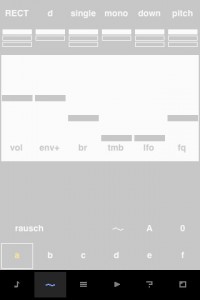
iPhone application:
Nanoloop for iPhone combines sequencer, synthesizer and sampler in one package. It provides all functions for creating electronic music from scratch.
Features:
– Straight, minimalistic graphical interface
– Pattern-based stepsequencer
– 6 channels, each can be synth or sampler
– Song editor with loop function
– Synth with envelope, filter, lfo etc
– Sample on the fly
– Re-sampling
– Save function
– Sample-import via e-mail
– Copy & paste of samples
– File management via iTunes
– WAV-export
– Export to clipboard
– Send and receive projects via e-mail
Six example projects are included.
Sequencer
Built from ground up and specifically optimised for touchscreens, nanoloop’s stepsequencer is very fast and simple to use.
Synth
The simple but powerful synthesizer allows to create a great bandwidth of sounds, including beats, noises, basses and pads. Available synthesis types are:
– rectangular wave with filter
– FM
– LFSR noise generator
Each synth channel is two-voice polyphonic and an additional stereo effect can be applied.
Sampler
Short samples can not just be used in a drum-machine style, but also be pitched and played as notes.
Samples can be recorded via microphone (iPhone only), headset microphone (iPhone, iPod touch 2nd gen only) and from nanoloop’s own sound output.
Monotron loves iPhone
Here’s what’s going on:
Messing around with my Korg Monotron plugged into various iPhone apps. Not trying to play anything musical!
* First I used T-Pain to autotune it. Great fun and makes the Monotron surprisingly playable.
* Next comes Voice Band. Turn your analog Monotron into a sampled synth. Wait, that is an odd idea…
* Then into Moog’s awesome Filtatron for some filtering and delay.
* RJDJ next. I couldn’t believe just how incredible this was! I intend to spend much time tripping away to that.
* Finally, just for fun, vocoding into iVoxel. Sound is a bit distorted – my bad. But with some twiddling you can make your Monotron polyphonic (of sorts!)
Sound quality isn’t great as I’m having sound card issues and this is my first video. So pops, crackles and sync issues are down to the video, not the apps.
Enjoy having fun with your Monotron and a couple of dollars worth of iPhone apps!
DATAMASKIN

