
Dragonfly – New Sylenth1 Soundset Released!

Dragonfly is a brand-new patchset for LennarDigital Sylenth1 created by Sonic Elements and distributed by Nucleus SoundLab
Dragonfly takes advantage of Sylenth1’s two tiered VA structure to redefine what is possible with this analog inspired scream machine. It contains patches with naturally evolving synthetic timbres.
Inside Dragonfly there are a wide range of styles and genres contained in this bank. You’ll find subtle textures and timbres, hands-up style leads and bass, pulsating rhythmic bliss, ambient and gothic tones, and searing trance patches from beyond the cosmos. Details:
- 164 presets for Lennar Digital’s Sylenth1
- Compatible with Sylenth1 v2.2 PC/Mac
- Modwheel, Aftertouch, and Velocity mapped on every preset
- Emphasis on creating new and unheard of sounds with this VA monster
- Emphasis on creating sounds that build-up & decay naturally.
Listen to what Dragonfly offers by downloading the MP3 demos below. There is also a free demo bank available for download.
Full Song Demo by Jewbei
Preset Demo by Jay Yaskin
Feel like drawing or painting your music?
HighC is a graphical music creation tool. It is a synthesizer, a sequencer and a mixer. Its goal is to make music composition as simple and direct as sketching.
An entertaining and educational tool…
No music experience needed: create stunning soundscapes and crazy ringtones in a matter of minutes. Learn acoustics, music theory and audio synthesis with a gentle, graphic approach.
that meets demanding professional needs
Master advanced synthesis techniques: FM, ring mod, additive, granular, and much more. No complex dashboards of knobs, dials and connectors with unpredictable effects. No programming. Just draw to unleash your creativity!

Changes in HighC v2.75
- Printing functionality, enabling export to PDF file format.
- Overview shows the cursor in all views during playback.
- Set the default pitch of imported sound samples (to correct potential pitch detection algorithm errors).
- Tune the sampled audio files.
- Audio file import in the FLAC format. FLAC is a lossless audio compression format that saves about 2/3rds of the original file size.
- Distribution reduced from 16 to 10Mb.
Happy midsummer everyone!

Btw do not forget to check out some nice new Refills over at Propellerheads, some nice free stuff to spice up your next song with >>
Cheers Ola
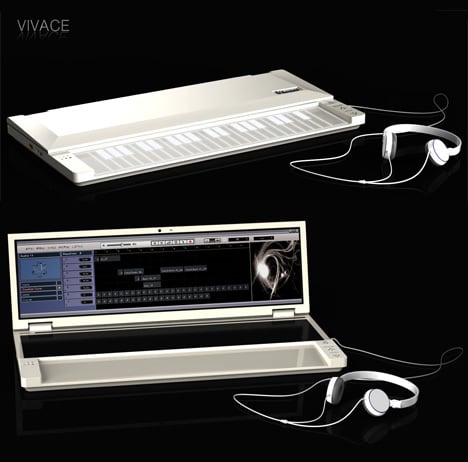
The next generation personal studio
When the Nano suite from KORG came I thought this was it in terms of a portable studio, but I soon learned that this is just the beginning of things, check this out!!

Vivace is a solution that looks to be more integrated than anything I have seen before. Designed by Young-Shin Lee and Hae-Jin Jung, it looks something like a musical laptop: a slimline device that offers a touch-sensitive musical keyboard and fold-out touchscreen display. Vivace is a concept product at the moment and ‘specs’ are thin on the ground, but you can clearly see octave up/down buttons to the right of the keyboard, and we can only assume that audio I/O is built-in.
Designers: Young-Shin Lee & Hae-Jin Jung
Can you do anything but love Felix's machines

Felix’s Machines are music making sculptures. They were constructed in his bedroom and exist to facilitate music by translating rhythmic audio structures into a three-dimensional visual show.
They function as musical instruments as well as kinetic sculptures. The Machines are a performance device, but can be well suited to act as an art installation, theatre accompaniment, or standalone sculpture.
The Machines invite an audience to share the experience of their creator. He aims to exploit the complexity found behind the workings of most digital music and present it as a more accessible equivalent. These Machines do not intend to match human potential. Instead they exist to test the advantages of mechanical instruments alone.
Check out the video below >>
[vimeo http://vimeo.com/3570989]
Body language sound
Yet another weekend approaching fast 
On several blogs I have recently visited I have seen the question on how to create so called Body Language Sound which can be found e.g. with MANDY and similar artists – I am not sure I want to dig further in this, MANDY isn’t really my bag as frequent readers of my posts probably already have figured out, hehe
Anyhow I found this good tutorial on how to get to grips with BLS in Ableton. In this Ableton Live tutorial, DJ Gustavo Bravetti demonstrates how to create the sound of M.A.N.D.Y vs Booka Shade’s Body Language.
[youtube=http://www.youtube.com/watch?v=aBZal5xa0wc&feature=player_embedded]
Cheers all
iDrum for iPhone
making beats is fun. for everyone!
iDrum® is the addictive app that lets you create your own beats, even if you have no musical experience! Start with iDrum’s selection of amazing kits and patterns, then customize them to make them your own. Build beats layer by layer by tapping the touch screen or create music with simple shapes and color combinations that let you visualize the rhythm. Probably the coolest thing about iDrum for iPhone is that it integrates with the iZotope’s iDrum for the PC or Mac so you can share samples and take kits on the road. Take me there >>
[youtube=http://www.youtube.com/watch?v=gthWJ5T3rag]
| what is it? | ||||
 |
||||
|
 |
|
the fun and simple way to make music on your iPhone or iPod touch
|
|
|
||||
|
|
|
customize patterns to create your own unique beats
|
|
|
||||
|
|
|
includes extensive library of amazing sounds
|
|
|
||||
|
|
|
take control of the rhythm of every drum sound and sample
|
|
|
||||
|
|
|
tap the touch screen to play and record your own musical patterns
|
|
|
||||
|
|
|
easily turn your beats into ringtones for your iPhone!*
|
|
|
||||
|
|
|
share kits with the original iDrum for Mac and PC and take your own custom kits and samples on the road
|
|
Choosing the right MIDI keyboard
Summary: Essential things to think about before buying a MIDI controller keyboard, Personal Keyboard or Digital Piano
- Number of keys?
- 49 key controllers are excellent for entering music and basic or intermediate keyboard learning. They don’t require a lot of space and are quite inexpensive. They will certainly take you up to Grade 3 standard without any problem
- Larger keyboards are essential if you plan on learning advanced piano techniques or are used to playing on a full size keyboard
- For composing and sequencing, maybe the number of keys are not so important as the availability of a range of controllers such as knobs and sliders to get more hands-on control of the software control panels
- Controller or keyboard or piano?
- A controller doesn’t create any sound on it’s own – it uses the sounds in your computer or sound module. The advantages of controllers are their price and the fact that you can upgrade the sound card without having to buy a new keyboard
- A personal keyboard doesn’t require a computer or sound module to create sound. Some will also include speakers. Keyboards are generally more expensive than controllers, but they can be used as an instrument on their own.
- If you really want to play the piano, and have it available without turning on the computer, then a digital piano is also a great option. They all come equipped with MIDI ports to connect up to your PC. The only disadvantage might be the physical set up you can achieve as digital pianos are larger than keyboards, which may make it tricky to site them right next to your computer workstation.
- Touch sensitive or weighted action?
- Touch sensitive keyboards will play louder or softer according to the velocity of your playing (how hard you play)
- Weighted action keyboards imitate the action of a real piano – these keyboards are usually heavier and more expensive. Choose a weighted action keyboard if you want to be as close to real piano action as possible
Key take aways:
The wide range of available keyboard controllers pretty much ensures you’ll be able to find one that meets your needs. You just need to take a little time to ask the following questions, which will help define what you want or need:
What’s your application?
• If live performance is your focus, you’ll want to consider sturdiness and reliability (many controllers are almost entirely made of plastic), along with your preferred action and key count.
• For a club DJ, who often must work in cramped quarters, a compact unit will work best. Remember, the controller still needs plenty of knobs and sliders to control your software parameters!
• If you do a lot of recording in bed (or on a plane, in a car, etc.) portability counts. Also consider whether your controller can run on bus power (usually USB), which can be convenient – you won’t need another power adapter.
How many keys?
Limited space on your desktop or in your live rig? You need a compact controller, with 25 or 37 keys. If you want a piano-style experience go for an 88-key controller. Other options include 61 keys (that’s five octaves) and 76 keys.
What type of action?
Action should be appropriate to your application. If you need piano-style realism, get a weighted action. Semi-weighted keyboards appeal to many players, offering a nice balance between resistance and springiness. Synth-action keyboards are often perceived as easier to play for non-keyboardists, and can also be more economical.
How many/what type of knobs, sliders, and buttons?
What will you control? Synths? Effects? Software? Do you prefer sliders, knobs, or both?
What computer and sound module connectivity do you need?
Do you need USB connection to a computer? Almost all of today’s controllers have a USB MIDI connector. Many include a 5-pin MIDI connector as well, so you can connect an external sound module to your controller.
Do you need a built-in audio interface?
If you want an all-in-one MIDI and audio solution, then select one of the controllers that include an audio interface.
Keyboard Action Types
A vital quality of any keyboard controller is the keyboard action – the manner in which the key responds to playing. You, the player, need to feel comfortable using the controller, whether live on stage or in your songwriting or recording studio. Don’t underestimate the impact of having a less-than-ideal keyboard on your creativity and productivity! The type of action you prefer is usually determined mostly by what you are accustomed to, and also by the particular style of music that you play, which may call for one type of action over another. You can choose from three basic keyboard action types:
|
Weighted Hammer Action Many controllers have 88-note keyboards that replicate the mechanical action of a conventional piano keyboard. This is difficult to do because a controller has no strings or hammers. Manufacturers use different methods of applying weights and springs to mimic a piano’s action. Others add a hammer action to more closely replicate a true piano “feel.” For example, the CME UF8 employs a weighted piano-action keyboard with four different velocity curves so you can choose the most comfortable feel. If your primary instrument is piano, or if you compose a lot of piano-oriented music, the realism of a weighted hammer-action keyboard might be ideal for you. |
|
|
Semi-weighted Action Similar to a weighted action, but with less key resistance and a slightly springier release, semi-weighted actions are popular with some players. If you don’t need realistic piano response but don’t care for spring-loaded synth actions (see below), try a semi-weighted keyboard. The M-Audio Axiom 61 is a controller with a semi-weighted action and MIDI trigger pads, rotary encoders, and sliders. |
|
|
Synth Action A synth-action keyboard, on the other hand, feels more like an electronic organ. The spring-loaded keys are light and capable of being moved very quickly. They also tend to return to their resting position much more quickly. This can be an important advantage when trying to play very fast parts such as lead lines or fast arpeggios. Many keyboard controllers, such as the economical Korg K49 come with synth-action keys. Synth-action keys are perfect for musicians who aren’t pianists by nature, such as guitarists wanting to add MIDI functionality to their setup. |


DATAMASKIN

