
More candy from KORG
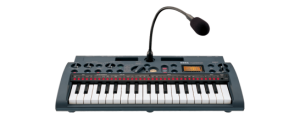
Korg has released a free sample library for the microSampler – the microSAMPLER: Bonus Sample Pack Second (.zip):
microSAMPLER: Bonus Sample Pack Second Edition keeps the inspiration coming! Seven additional banks of ready-mapped material including loops, one-shots, and chromatically playable samples. Check out the new ElecTribe ESX/EMX banks, plus three awesome banks from acclaimed Japanese artists Jet Daisuke, Denkitribe, and Yasushi.K, and more.
The original Korg microSampler bonus sample pack is also available (.zip).
And perhaps while you’re at it get one of these 
ARP Odyssey – a journey on Mars
Cool video from a live performance, very space ambient
Synthesizer live performance (excerpt) by Bruno Ender Lee; ARP Odyssey Mk III, Moog Little Phatty Stage II & Roland JP-8000. Friday, November 12. 2010 in Goldau (SZ) as supporting act to Bruno Stanek’s “Flugjahre zum Mond
http://www.youtube.com/watch?v=OPr5Rsb8MDk
Haplome demo teaser
Here,s a short teaser of Haplome, now in version 1.5 – an open source multimedia interface for the iPhone, iPod touch and iPad.
Haplome is based on the monome and is compatible with applications designed to be used with a monome.
Haplome is currently under review, and will be available for free worldwide on the iOS app store once it is approved. The source of haplome is also available for download and modification on GitHub.
Multi-touch control surface for Pro Tools
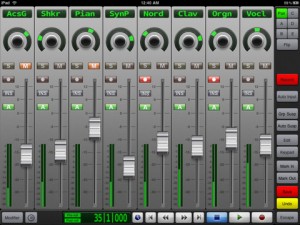
V-Control Pro (App Store link) is a $49.99 iPad app that provides a fully-featured, multi-touch control surface for Pro Tools on a Mac and soon for Windows.
V-Control Pro uses WiFi to control transport, editing, and mixing functions with Pro Tools 9, HD, or LE. V-Control Pro provides advanced control of sends, automation, groups, auditioning, plug-ins, scrub/shuttle, I/O assignment, and other controls within an easy-to-use interface.
Features:
- Large, touch-sensitive moving faders
- Solo, mute, record, and pan controls
- Flip mode send editing
- Scrub / shuttle control
- Automation mode controls and display
- Automation and group suspend buttons
- Automation and group status display
- Automation write enable controls
- Plug-in editing
- Input monitoring switch
- Big counter display
- Save and Undo buttons
- Pre-roll / Post-roll buttons
- I/O assignment
- Zoom presets
- Window display controls
- Keypad popover provides access to many Pro Tools features
AtomoSynth
Boutique synthesizer manufacturer AtomoSynth have announced that they plan to release the Krakken again.
Here’s a teaser image for the AtomoSynth Krakken keyboard, which is ‘coming soon’.
Jam with the monophonic synthesizer Kraftzwerg
Via traumaduo
“A 4 Voice!!!-Jam with the monophonic synthesizer Kraftzwerg
4 “Midi to CV”-Tracks were used for controlling the 3 Oscillators individually.
The 1st Midi-Track controls the Frequency of Oscillator 1 and sends the appropriate Trigger Signal to Envelope 1. Env. 1 is connected with the Filter.
The 2nd Midi-Track contains also Frequency- and Trigger-Signals. But this ones controls Osc. 2.
Osc 2 is connected to the VCA who is controlled by the Envelope 2.
This produces the higher Percussive Effects.
The 3rd Midi-Track sends the Frequency (Pitch) to Osc. 3.
Because the Kraftzwerg has not more Envelopes or Mixers left, Osc. 3
is modulated by the Autofilter of Ableton Live with a Sample&Hold.
This Midi-Track plays the lower Bassline.
The 4th Midi Track contains very short Frequency-Voltages for Osc. 3. This Notes plays the higher Melody.
Due to the fact that Osc. 3 is processed by a Reverb and a Delay and the Pitch changements are very short, you got the impression of hearing a duophonic Melody sorting out from Oscillator 3!
Also a separate Midi Track was recorded with CC-Datas from the Kaosspad.
The Kaosspad is processing OSC 1 and 2 from the Kraftzwerg nearly like a random-processor.
I added also some connections from both LFO’s to the Oscillator 1 and 2.”
Cheeze Machine – a free VST plug
Cheeze Machine is free VST plug-in for PC and Mac (AU).
“Cheeze Machine emulates the classic string ensemble sound, made popular by such classic synths as the Crumar Performer or the Arp Solina.”
Cheeze Machine Features
- This little synth generates sound by feeding a simple, saw-like waveform, into a chorus ensemble emulator, a 6-stages phaser, and a Reverb
- Up to 32 notes polyphony, with the same note stealing algorithm as EP-Station
- Fully midi-controlled
- Supports Doepfer Pocket Control midi controller
- Available with 2 different GUI’s
Visit: BigTick
Note: In order to download Cheeze Machine plug-in you have to register.
StudioBLADE and iKeyDOCK
Austin-based startup Music Computing has announced their new line of keyboard workstations.
The StudioBLADE and iKeyDOCK are complete, portable production stations, which either include a built-in Windows 7 64-bit PC with touch-screen and DAW software and virtual software instruments, or a docking system for any PC/Mac notebook.
- The StudioBLADE series are complete music production workstations powered by Intel processors and 64-bit Windows 7, and each model ships with a studio package with DAW (digital audio workstation), virtual instruments, mastering effects, and utilities to customize the exclusive ControlDAW MIDI control surface.
- iKeyDOCK keyboard workstations are designed to be compatible with both Windows and Mac notebooks. The iKeyDOCK provides a dockable solution for any notebook; simply plug-in and start playing.
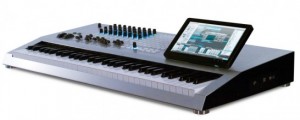
A combination of hands-on control begins with the tilt and telescoping 10.1-inch touch panel (more than twice the size of most workstation screens), the 61-key synth action, or 88-key weighted piano action keyboard; and ControlDAW interactive knobs, buttons, and sliders, managed by GeoMIDI mapping software.
The large 64-button grid control surface, in addition to knobs and sliders, is a tool for musicians using grid-style programs like Ableton Live, or classic drum pad boxes like the Akai MPC. Music Computing’s TriggerGrid sample trigger player for drum pads turns the grid surface into a 64-pad virtual percussion instrument.
Each StudioBLADE also includes Studio One Pro from Presonus, a DAW solution with virtual instruments and mastering FX, plus 10GB of sounds. Music Computing’s included SonicSource VSTi soft-synth contains thousands of sound presets providing an 8GB starting point for both analog and digital textures.
“The StudioBLADE is one of the most powerful keyboard instruments ever built,” said company CEO, Victor Wong. Wong previously headed keyboard workstation maker Open Labs.
Pricing starts at $2599 (US/SRP) for the 61-key Intel Core2 base configuration with 24/48 audio, 2 combo XLR and 1/4-inch mic inputs with phantom power, 2 balanced outs, and headphone jack. Optional upgrades include 24/96 audio and 8 inputs, more RAM, and internal hard drives, to suit the user’s needs.
MotionCommand – a line of massive touchscreen controllers
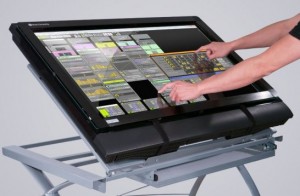
Music Computing has introduced MotionCommand – a line of massive touchscreen controllers designed for music and media.
Music Computing is an Austin-based startup headed by Victor Wong, who previously headed Open Labs.
Currently, the company has four MotionCOMMAND multi-touchscreen products available: ClearView, LCD, Rack and WorkCenter.
There are two versions – one driven by an HD video projector designed for live performance that is transparent on both sides; and one driven by an HD LCD television for studio use. Standard sizes are 32-inch and 42-inch, but special order versions up to 200-inches diagonally are also available.
Options include multi-touchscreen controllers integrated into a control console complete with Music Computing’s computer DAW (digital audio workstation) computer core and audio interface.
“MotionCOMMAND touchscreen products provide people with the ability to work in a more natural state leading to increased efficiency, better control over software interfaces and the elimination of having to map software controls to hardware controllers,” says Wong.
The controllers are compatible Windows and Mac OS. Prices for standard configurations range from $1,499 to $2,299 (U.S. MSRP).
Via ST
The sound of robby – weekend fun
The look at Robby, the most famous robot, in “Engineering a Sci-Fi Icon”
http://www.youtube.com/watch?v=I9c5_fH_JsA
Have a great weekend
DATAMASKIN

