
Japanese video import featuring the KORG Monotribe in action
SyncKontrol For Monotribe, demonstrates how Korg sees the Monotribe fitting into the iOS ecosystem. The video is in Japanese, but it’s pretty easy to understand, even without knowing the language.
SyncKontrol lets you use an iOS device as a digital control app for the Monotribe, starting and stopping the Monotribe sequencer and controlling playback speed. What makes SyncKontrol interesting, though, is that it supports wireless syncing, which is demonstrated in the video by syncing the analog Monotribe to Korg’s iElectribe virtual drum machine.
For musicians that are already using iOS, SyncKontrol looks like it will let the Monotribe fit into a thriving mobile music platform.
Free VST: TubeOhm 16 Step Sequencer
FREE VERSION A-T and STEPPER OUT NOW on TubeOhm.com
First prev from a free step sequencer. The free version contains velo, hold, shuffle, 16 steps, master pitch +/- 2 OCT 2x keyboard trigger modi.
We are working on a polyphonic version too.( but not for free)
Features:
external audio trigger, 16 steps, max 24 voices poly, 2x MIDI CC send.
For vintage hard core synth fans – sounds of the KORG MS10
The MS-10 is a cool & classic analog synth known for its great bass and percussive sounds. It was released by Korg in 1978 as an entry-level, simple monophonic single-VCO analog synthesizer. With the authentic look of a mini-modular its single VCO is patchable using standard 1/4 inch patch cords to the VCF and VCA. It really is a powerful little mono-synth with plenty of knobs and a compact 32-note keyboard. It is CV/Gate controllable. A very cool feature is its external input to filter which allows you to filter external sound sources! Following the MS-10 came the double-oscillator version, the MS-20.
In this video:
Korg MS-10 demo
all sounds including drums from the MS10
Sound Cells app – Midi Clock Sync demo
Sound Cells is an interactive generative music app. Just touch the matrix to create some moving cells and see them interact with each other and generate sound in realtime. If a cell hits the wall, it creates a sound. If a cell ends up in the same location as another one, they change directions. You can remove cells by touching them or by hitting the cell removing button.
The app comes with the 2 different sounds, which can be controlled in realtime for very expressive effects.
Also the app can generate MIDI output, so you can hook up a midi capable instrument for endless possibilities.
On the newest version, it is possible to choose the scale that the app will use, the tempo and the key. This allows the app to be able to become a performance tool, where it can play along different musical settings.
This is a universal app and on the iPad, it will use the full available resolution for a rich visual experience.
This app is inspired by the web app Otomata at http://www.earslap.com/projectslab/otomata, which also has a iOS version in the works, so make sure to keep an eye for it.
In this video:
This is a demo of the new Midi Clock sync feature that I’ll be adding to it soon. In this video, the Drum Machine (Korg ER-1) is sending the clock signal to Sound Cells. In turn, Sound Cell, is sending midi note data to the DSI Tetr4 synth to make sound.
The app can be found in here:
http://ow.ly/5azwj
Challenge: Guess the song # 2 – any ideas :-)

Time for a new challenge in guess the song.
This week you are up for a slightly different challenge, the song is a collaboration between two continents – Europe and Asia. The song sample comes from a maxi-single dating back to the new wave era. Your job is to mention the two featured artists who made this song, the name of the song AND as a bonus you need to mention in which two bands are these to guys most famous of being part of.
Leave your replys in the comments section, and the answer will soon be revealed 
Secret song 2 by Stereoklang Produktion
Closest answer so far:
The voice is clearly David Sylvian or is it Brian Ferry’s little brother? And Davids long time asian partner has been Sakamoto but some how it doesn’t feel like Ruichi. Those sax parts could be Karn but it also resembles similar sax riffs from solo works by another YMO member, Takahashi.
Into space with NASA and Nine Inch Nails
For all you space fans out there
I truly enjoy outer space. It’s absolutely amazing that we now have the ability to send instruments out into the void of the universe to observe all sorts of interesting things. Asteroids! Moons! Planets! Dark matter! This is the perfect opportunity for a Carl Sagan quote:
“Somewhere, something incredible is waiting to be known.”
The footage in this little film was captured by the hardworking men and women at NASA with the Cassini Imaging Science System. If you’re interested in learning more about Cassini and the on-going Cassini Solstice Mission, check it out at NASA’s website:
saturn.jpl.nasa.gov/science/index.cfm
How to add multitouch capability to your preferred software
Emulator Modular, add multitouch capability to your preferred software!! (coming soon)
Track ID: “Dusty” by David Jones (Starlight Unlimited), courtesy of Plus 39 Group.
Emulator Modular, www.smithsonmartin.com
Here is a background based on the existing version:
Emulator is the most revolutionary experience for DJ’s in the last 30 years!, is the first REAL and USABLE Multi-Touch DJ System that allows the crowd to see exactly what the DJ is doing on a huge transparent touch screen.
The art of DJ’ing is now part of the clubs lightshow, this is the next level in DJ performance!
Emulator is the first native multi-touch software for windows 7, this makes it possible to convert even a simple Tablet PC into a powerful multi-touch midi controller.
A version specifically for Mac OSX is currently under development.
Is ready to use and does not require any special programming or configuration, follow the basic set up instructions and you are ready to play within 5 minutes.
Emulator is the only MIDI controller that can show all the information needed on one single screen.
Our patented technology gives the user a ”heads-up” display of all tracks and information.
Supports multiple controller layouts, covering the most important DJ’ing software on the market.
Versions for Ableton, Serato and Virtual DJ are in development.
The Traktor Pro version is available now.
Is a complete multi-touch MIDI controller, for example, the Traktor version has more than 130 MIDI buttons, knobs and sliders covering all common features of Traktor Pro and more!!!
Emulator Multi-Touch System has an extreme low latency, with our touchscreen units the latency is only 7ms, this results in fast real time touch points, without the fear of false touchs or ghost points.
Is fully upgradable, buying the Emulator software or any of our multi-touch packages, you receive lifetime product software upgrades with direct support from our private support forum.
Software use low CPU resources, all graphics in Emulator are accelerated by hardware, our graphical engine guarantees low cpu usage.
Emulator is the most durable midi controller available, touch screens support extremely hard usage, the continuous usage will never deteriorate the sliders, knobs or buttons.
“Acid Tracks” in 5 mins Redux
“What you hear is the TR-707. TR-727 and the TB-303. As per the original everything is drenched in reverb and I added a very slight tube distortion on the TB-303 since on the original recording it sounds a little driven.”
The electronic Swiss army knife for iPad gets a massive upgrade
Audioforge has done a major update on heir app reforge for iPad. Edit the wave form directly just by touching it. Set selections to cut, copy and paste within files or even paste from another file. Set the selection to trim unwanted parts of your audio off and more.
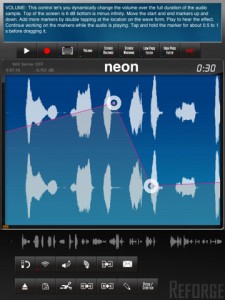
Automate volume changes for fade in effects or remove unwanted clicks. Adjust stereo balance and set it to the far left channel for the beginning of the track continuously transferring over to the right channel for the end. Add stereo widening effects or bring it all to together to make is sound mono. Add high pass and low pass effects to start an intro, simulate a telephone conversation or just distort your sound. Use control markers to automate the effect levels. Add as many markers as you need by double tapping on the waveform. Move them around to generate the changes to the effect you need.
New in Version 2.0
Complete rework of Reforge.
New audio engine
New Audiocopy and paste version (1.2.1)
New design
Stereo recording
Import podcasts and other long (over 3h) audio files for further processing
Portrait mode contains a help screen that explains each function in detail. Start using Reforge in portrait mode and every button you touch will be explained. Once you feel more comfortable with using Reforge, flip to landscape mode where you have more area to view and interact with the wave form.

Import mp3, im4, aif files directly from emails into Reforge. If you receive an email with an attached mp3 file on your iPad, tap and hold the mp3 representation in the email app until the menu appears and then tap “open in Reforge” This feature enables you to receive mp3, aif and im4 files via email directly on your iPad and audiocopy them over into StudioTrack for further mixing. Use the iTunes FileSharing to upload your mp3, im4, aif and wav files. Use the built in wifi server to upload music in mp3, im4, wav, aif format. Use Audiocopy and Audiopaste (V1.2.1 with 12 file history and support for the General Pasteboard) to exchange music with other apps that support it. This enables you to interact with apps like Fourtrack as well as Beatmaker. Import your music directly from your iPod library on your device, that includes podcasts.
Available through itunes. More info and specs at http://www.reforge.info/Site…
Akai MFC42 Analogue Filter Demo
The MFC42 is a true analog filter module designed by Akai for their MPC-series gear. However, you can use it to process any sound source since it has basic 1/4″ inputs and outputs and MIDI! It has genuine analog filters for that warmer tone with Lowpass, Highpass, Bandpass, and Notch filter types. It consists of a MONO filter section and STEREO filter section. The MONO section offers 2-, 4-, and 8-pole filter slopes. The STEREO section offers 2- and 4-pole filter slopes. The MONO 8-pole slope utilizes the whole filter circuitry so the STEREO section is not active. Likewise, the MONO section is inactive when the STEREO section is in 4-pole mode. But when both sections are used simultaneously, they can be linked so that the MONO filter’s control knobs control both MONO and STEREO sections. The link can also be inverted so the two sections sweep in opposite directions.
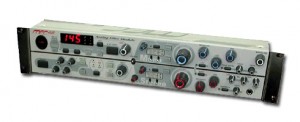
Other features include one ADSR envelope for the filter’s contour. This envelope can be triggered by MIDI and Trigger button, but not by audio unfortunately. The LFO is essential to bringing this filter to life! It has four waveforms including sawtooth, square, triangle and random. It can be synced to MIDI clock and can modulate to 16th, 8th, 1/4, 1/2, whole, double-whole, and triplet notes in tempo with your MPC (or MIDI) sequences! Or use the “Tap” button to tap in the tempo in real-time. A large numeric display shows the current tempo and there’s also an EQ on-board for global sonic fine-tuning. Effects include a very harsh (in a good way) Distortion and stereo analog Phase Shifter. The ins-and-outs consist of three 1/4″ inputs (mono/stereo), stereo phono (RCA) inputs, stereo 1/4″ outputs, stereo phono (RCA) outputs, and MIDI in, out and through. All pertinent knobs and buttons can send and receive MIDI control.
In this video:
This is a brief overview of the features and functionality of the Akai MFC42 Analogue Filter Module. For this demo I have used a simple disco loop backed by some TR-909 drums and I have tried to cover all the functions of the unit while keeping the video as brief as possible. As I am sure you will have gathered by the end of this video the MFC42 has almost endless configuration possibilities to produce a huge array of filtering effects and I have only touched upon these possibilities in this video.
For those interested the Loop comes from the Akai S900 seen just below the MFC42, the drums are from a Roland TR-909 (with the exception of the hand clap which is from the TR-707 (because my 909 clap needs repairing)). Everything is sequenced with the Akai ASQ10 and the whole mix is liberally compressed by an Alesis 3630 for that ’99 Montmartre sound.
DATAMASKIN

