
Mobile particles (AVAILABLE on AppStore)
This application provides an unique way to enter inside the digital artist protofuse’s world.
Protofuse proposes an unique iOS application providing visuals & audio.
It includes an EXCLUSIVE 13 minutes Ambient track which makes you relax, zen and quiet.
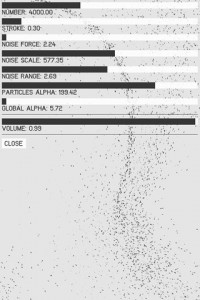
This minimal music application offers an amazing way to enter inside the world of this digital artist by listening an original 13′ track and by watching these strange particles clouds moving, grouping themselves, focusing in one or more point on the screen.
You can change 7 parameters in order to modify the global behavior.
This application is an unique experience inside the ambient & electronica minimal music world of Protofuse aka Julien Bayle
Available NOW on App Store : http://itunes.apple.com/us/app/mobile-particles/id509804829?mt=8
Thicket 3.11 – quick preview
This video shows what’s new in Thicket 3.11: iPhone support, Grass, Remember and Cut Whispers modes…
Thicket is an audiovisual playground that allows anyone to create beautiful sounds and pictures from simple finger touches. For users of all ages, this generative art and sound app immerses you in song-like audiovisual pieces called modes. When “playing” a mode, you both react to and create the music and graphics that you experience. Each mode is its own art generator, interactive toy, musical instrument, even performance tool depending on how you use it. And with new modes to be developed and released every few months, Thicket functions an expandable platform in the exciting new genre of handheld interactive art.
Features:
– Control visuals and sound simultaneously with touch and gesture
– comes loaded with one free mode, Sinemorph!
– watch demos of each mode performed by the creators of the app
– gestural control system: switch modes with a simple swipe of your finger
– child lock: removes menu and interface for uninterrupted fun.
– screen capture: seamlessly capture snapshots of your favorite moments and share them with friends.
– custom video out options on supported devices via apple HDMI connector, VGA connector, or wirelessly via Airplay
-Universal app: works on iPad, iPhone and iPod touch
Thicket functions an expandable platform in the exciting new genre of handheld interactive art.
http://apps.intervalstudios.com/thicket/
Introducing the Orphion
Orphion is a dynamic velocity touch playable sounds and manipulation app
The Orphion is a new percussion instrument, which will be ported to the iPad / iPhone. The video shows a prototype in which the iPad is used only as a remote control of a laptop, but the whole should be converted into a native app, so everyone can download in the App Store.
In order to provide potential developers with an advance can I need this budget.
_______________________
UPDATE:
Hi! The App is allready finished by now: You can get it on the app store here:
http://itunes.apple.com/en/app/orphion/id495465097
iOS VOCODER App “VOICE SYNTH”
字幕ONでご覧ください。
ブログ記事: iPhone / iPadで使える最新ボコーダー VOICE SYNTH
http://gajetdaisuke.com/archives/12120_121230.php
Googlish:
Please use the subtitles ON.
Blog: the latest VOICE SYNTH vocoder use in iPhone / iPad
Audiotool Sketch Tutorial
Luke explains the basics of Audiotool Sketch in this video.
Out now in the Android Market: https://market.android.com/details?id=de.despudelskern.application.audiotools…
Audiotool Sketch allows you to sequence sounds using emulations of three different classic devices. Make some beats with one of the drum machines and then move onto the bassline. Once you have finished building your sequences navigate to the overview and start switching up the patterns, add some delay or change the tempo, all in real time.
Each device includes the full range of parameters which would have been found on the original machines, this coupled with the multi-touch functionality makes it possible for the user to really control each device’s output signal. Audiotool Sketch is built around the same audio engine as Audiotool and outputs full power audio.
Melodizer – Teaser demonstration
“A very brief teaser for my next iOS sound app.”
Damien has recently also released the WaveShaper app:
Video of the WaveShaper app for iPad in action. Load sounds into the app, tweak the effect in real-time, record your performance, share on SoundCloud. It’s great for sound design or just messing around. More info at http://waveshaperapp.com or head straight to iTunes http://itunes.com/app/waveshaper
Major update to NanoStudio
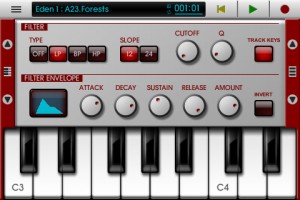
Blip Interactive has announced a big update to NanoStudio, adding iPad support and more.
Here’s what’s new in NanoStudio 1.3 (Universal):
Features:
- Universal iPad version
- Free desktop version now supports window sizing
- Added extra musical scales to keyboard
- Increased size limit for a single sample to 32MB
- Ability to slide the keyboard by fractions of a note
- Mixer mute/solo
- Improved bottom range of mixer volume faders
- Double tap on mixer channel title to go to instrument
- Double tap on ‘centre zero’ knobs to return to centre
- Added ability to tap song position on status bar to toggle between bars and hours/minutes
- Added indicator to main menu to show the last selected instrument
- Update to latest Akai SynthStation library
- Added ‘Mix audio with other apps’ option to allow iTunes music background play (iOS)
- Added buffer latency settings (iOS)
- Automatic normalization is now optional after sampling or resampling
- Added an ‘add effect’ button to empty effects slots
- Changed TRG behaviour to allow drags across pads
- Added load/save effects chain to the effects select dialogue
- Song editor – vertical zoom
- Song editor – mute/solo buttons can be swiped vertically
- Song editor – added MIDI activity indicators to each track
- Song editor – parts on muted tracks are shown in grey
- MIDI file and .nsp file export dialogues now have a ‘show file’ button (Windows/OS X)
Bugfixes:
- Buzzing sound on Eden ring mod when phase was non-zero
- TRG-16′s ‘auto BPM’ function was sometimes inaccurate
- Possible fix for OS X not enumerating some MIDI input devices
Electronic instruments – Gravilux for Android
http://snibbe.com/store/gravilux
Gravilux lets you draw with stars: it’s a combination of painting, animation, art, science, and gaming. As you touch Gravilux’s screen, gravity draws simulated stars to your fingertips. You can tease and twist the particles into galaxies, or explode them like a supernova. You can color stars by their speed, change the strength of gravity, number of stars, their color, and even enable antigravity. Multiple fingers and multiple people can touch the screen at once, collaborating or competing. Gravilux was first released as a work of interactive art by Scott Snibbe Studio that was only available in galleries and museums. Now it’s available as an Android application.
“Apps like Gravilux awaken an ‘Avatar’-like sensitivity to electricity in the body, power in the palms and general connectedness.” – NY Times
“Every once in a while, an app will come along that has no practical application whatsoever but is just SO COOL that you have to have it! Gravilux is that sort of app.” –iphoneapplicationlist.com
“Of the millions of apps out there, none quite capitalize on the sheer fun and beauty of interactivity the way that Scott Snibbe’s do.” –CoolHunting
Mixmo DJ Promo video
Teaser for a new DJ app for iPad – Mixmo DJ Pro Promo Video
Please bare with me with the horrible techno tune  >> shit it really sucks
“Special thanks to: Paul Veth & Parc Breda”
DXi FM synthesizer version 3.1.0 on iPad
DXi is a FM synthesizer application inspired by 80’s most popular synthesizer. Enjoy making music and creating sound by FM synthesis engine easily.
The movie show you the new great features about DXi version 3.1.0.
Please visit the URL for more information: http://itunes.apple.com/app/dxi-fm-synthesizer/id370138065?mt=8
FM synthesizer is still popular among many people by its unique tone. We carefully selected parameters from original synthesizer so you will be enjoy editing tone with them easily. You need to know some technique to tweak the tone, but you will be able to get DXi’s special tone and effects while having some fun!
Creating sound effects is another idea to enjoy DXi.
We loaded 16 step loop sequencer as a bonus feature!
If you remember the days of FM synthesizers, try creating the tone you remember from them.
If you have no experience with any FM synthesizer, we are sure you will be enjoying the unique tone world!
* 4 operators FM synthesizer
* Anti-ailiased oscillator
* 8 algorithms
* Envelope, frequency (Ratio or Fixed) can be set each operators.
* Feedback control on operator number 4.
* 2 master effects (LPF with Resonance and Delay)
* Import/Export function to save the tone you created. (URL schema text string format)
* Audio recording function. And you can transport recorded audio file, .wav, onto Mac/PC via iTunes file sharing.
* Clipboard audio sharing support. You can export recorded waveform to other application via clipboard. It’s compatible with Intua’s clipboard.
* Supports external MIDI keyboards via Core MIDI USB adapters. iPad users can use Camera Connection Kit. And iPhone/iPod touch users can use Yamaha i-MX1.
About the original – Yamaha DX7:
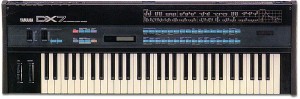
One of the most popular digital synths ever was the DX7 from Yamaha, released in 1983. It featured a whole new type of synthesis called FM (Frequency Modulation). It certainly is not analog and it is difficult to program but can result in some excellent sounds! It is difficult because it is non-analog and thus, a whole new set of parameters are available for tweaking, many of which seemed counter-intuitive and unfamiliar. And programming had to be accomplished via membrane buttons, one data slider and a small LCD screen.
Still the sounds it shipped with and that many users did manage to create were more complex and unique than anything before it. Percussive and metallic but thick as analog at times, the DX-7 was known for generating unique sounds still popular to this day. The DX-7 was also a truly affordable programmable synth when it was first released. Almost every keyboardist bought one at the time making the DX-7 one of the best selling synths of all time! It also came with MIDI which was brand new at the time – Sequential had already released the first MIDI synth, the Prophet 600. Roland had just released the JX-3P with very basic MIDI implementation, and wouldn’t get around to adding full MIDI for another year with the Juno-106, and it would be three years before Roland can counter the popularity of the DX7 with a digital synth of their own, the D-50.
DATAMASKIN

