
Review: Beat Shuffler
“I roused myself from a Turkey-induced-coma to bring you this timely review, so please forgive all the “uhh”s. Beat Shuffler is a beat juggling app for the iPad that makes loop mashing pretty fun and easy. ”
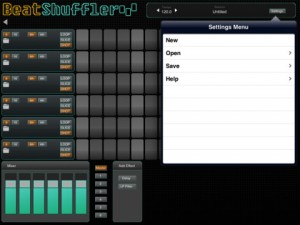
Beatshuffler is a music app that slices loops and allows you to trigger those slices, always on time. It is a great beat sketching tool where almost everything sounds interesting, since the slice triggering always falls on the beat. At its core, it is inspired by the mlrv app, for the Monome and other grid devices.
It features:
– 6 tracks for loops.
– Ability to import WAV and MP3 files.
– iOS File Sharing import for exchanging files with the app.
– A mixer.
– A master channel with effects.
– A separate channel for each of the tracks, with effects.
– Available effects: Delay and Low Pass Filter.
Among the upcoming features are Audio Clipboard support, to import loops from other apps and an expanded loop library.
TB MIDI Stuff – new modular MIDI control surface for iPad
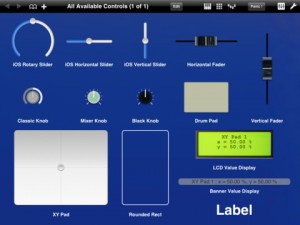
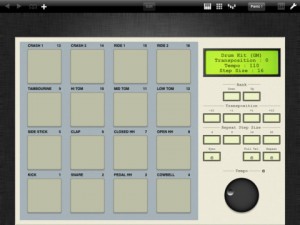
The app lets you create your own pages, or use the built-in MIDI keyboard (with Arpeggiator, modulation wheel, pitch wheel and accelerometer velocity), the built-in Pads controller (with customizable pads banks, accelerometer velocity, transposition, full velocity mode and repeat mode) or the 16 channels MIDI mixer (pan, volume and mute).
The page editor lets you create your own control pages. It contains some useful stuffs like pasteboard, undo manager, multi selection or z-order managment.
TB MIDI Stuff use CoreMidi : you can use any supported device, like the native WiFi driver or the camera connection kit with an external sound card. Each page can use a different CoreMidi driver.
Controls can use the iPad accelerometer as input (even faders and knobs), in each dimension (X, Y, Z or, for XY Pads, a mix of them).
The application library contains :
- Rotary sliders
- Horizontal sliders
- Vertical sliders
- Horizontal faders (with different colors)
- Vertical faders (with different colors)
- Mixer knobs (with different colors and flavors)
- Drum Pads
- XY Pads
- Value displayers
- Rounded rects
- Labels
Each control can drive simultaneously multiple MIDI messages like Control Change messages (single 7bits and coarse/fine 14bits), RNP/NRPN messages (7 and 14bits), Pitch Bend messages, Program Changes messages, Note On/Off messages.
You can open up to 32 pages simultaneously. You can change pages with three fingers swipe gesture, manage the pages order, open multiple instances of the same page and change the MIDI Out driver or the MIDI Out channel (or both) without entering the editor for each instance.
Swipe shortcuts (1, 2 and 3 fingers) let you access quickly to the MIDI keyboard, the pads controller or the 16 channels mixer.
TB MIDI Stuff contains some demo pages and 7 pads banks. For the pads banks :
- Default Bank
- Drum Kit (GM)
- Fifth
- Major Chords
- Minor Chords
- Simple Chord Generator
- Velocity
PixelWave with MIDI In
Experimental synth for iOS.
http://www.warmplace.ru/soft/ios/
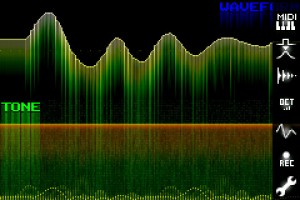
PixelWave is an experimental synth with old school pixel interface.
Key features:
• multitouch arpeggiator;
• it is possible to draw waveform and play it at the same time;
• recording;
• export to WAV (via iTunes File Sharing);
• copy to pasteboard;
• nine predefined waveforms;
• changeable number of octaves (from 2 to 6);
• Low-Pass filter (smoothing);
• MIDI IN support.
A couple of nice iPad app walkthroughs
76 Synthesizer demo
http://youtu.be/icefGnEehJ0
iKaossilator demo
Soundprism demo
Curtis UI Study – exploration
Curtis – Turns any recording into a totally unique synthesizer! Curtis uses an unusual hybrid of wavetable and granular synthesis to create tones and timbres quite apart from the standard FM or subtractive synthesis fare. Add this app to your arsenal to create sounds you simply cannot squeeze out of any other synth, no matter how much you’ve twiddled its knobs.
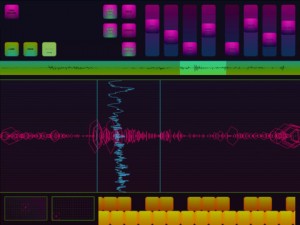
Granular synthesis works by combining many tiny grains of sound from an existing recording, creating new sounds with the texture of the original, now with endless temporal possibilities. Play the sound forward, backward, or even at a single point!
Unlike scratching a record, pitch doesn’t depend on how quickly you move through the recording. Try with spoken word, singing, synths. Mangle your recordings or create soft, gentle textures! If scratching is your thing, Curtis now also includes a scratch mode, letting you shred your recordings turntablist style.
About:
The Strange Agency designs and builds sites and software. We focus on apps for mobile devices, and we make everything from rich media banners to heavily trafficked websites to small music-making robots. We love open-source, standards-compliant, platform-spanning code.
The Sonic Adventure Game
The Sonic Adventure Game
featuring Hans Zimmer
From the makers of the 4 million download smash hit “Inception the App” comes the incredible new sonic adventure game “Dimensions”. This unique augmented sound gaming experience transports you to amazing new dimensions using your reality as the interface. With an array of exhilarating new sound effects and stunning use of sensor input the gameplay sets new standards for alternate reality games.
Available in the App Store Fall 2011.
Sonified translates what your video camera sees into sound in real time
Here’s a new app that sounds/looks pretty interesting:
Sonified translates what your video camera sees into sound in real time. Record onto QuickTime movies. The sonifying video camera for the iPhone and iPad.
Hear what your video camera sees

Sonified takes real time visual information from your iPhone/iPad video camera and uses it to mix 16 stereo tracks of CD quality music in real time, translating what your video camera sees into sound. A real time instrument, Sonified uses your iPhone/iPad’s video camera to translate qualities of light and color into music, a process called “sonification”. Using Sonified allows the iPhone and iPad user to connect vision and sound in new ways, creating video and soundtrack at the same time. Record Sonified QuickTime movies with CD quality audio and share with friends and other Sonified users.
Specifications:
Real time mixing of audio based off of brightness and or color values.
16 different ways to combine sounds and visual response.
4 Sonified “instruments”, each with its own unique way of mixing sound based off of visual information: mixing sound based off of brightness, based off of color, based off of both brightness and color simultaneously, or based off of brightness and color proportioned towards color.
A total of 64 stereo tracks of sound in four separate Sonified “scenes” all in 44.1 kHz 16-bit CD quality audio.
Extremely responsive, with close to zero-latency between what your camera sees and what you hear.
Record video and CD quality sound simultaneously onto QuickTime movies and save on your iPhone or iPad.
Intuitive, with an easy to use interface.
Designed for use with headphones.
VocaLive for iPad: the first professional vocal processor for iOS!
I guess how professional it is remains to be seen, if you have tried it feel free to leave your comments.
VocaLive for iPad now available in the iTunes App Store! VocaLive for iPad takes an already powerful vocal processing app that has become a favorite on the iPhone® and iPod touch® and makes it even more powerful. The iPad version adds a fourth effect slot to the signal processing chain, and two of those effect slots can hold the specific “vocal effects” compared to just one vocal effect per chain on the iPhone version. The preset browser is also available in the main window of the interface making loading and saving VocaLive presets even easier. The Favorites section has been expanded from 4 to 40 in the iPad version utilizing a new bank button. Favorites put presets right in the bottom panel on large, accessible buttons for immediate loading of the artist’s most-used settings.
VocaLive includes 5 Vocal Effects — Pitch Fix (for tuning correction or stylized quantization FX), Choir (a 3-part harmonizer), Morph (an X-Y pitch and formant shifter that changes the tonal quality of the voice from subtle deepening to radical gender bending) Double (Double effect gets unlocked by registering) and De-Esser — along with 7 Studio Effects — Reverb, Delay, Parametric EQ, Compressor, Chorus, Phazer and Envelope Filter — that together create the perfect vocal processing solution.
VocaLive for iPad features:
- Real time vocal processor + recording app
- 4-processor vocal effects chain
- 12 professional studio quality vocal effects
- Single track recorder expandable to a full 8-track recording studio with master effects section, available for purchase in the in-app Shop
- Import and play songs to be used as backing tracks directly from your music library or computer
- Voice Cancel feature lets you create sing-along backing tracks by removing the vocal track from existing recordings
- 50 presets included with 4 Favorites for fast recall
- Includes metronome and vocal warm-up tools
- Low-latency for real time vocal processing
More information: http://www.ikmultimedia.com/vocaliveipad and http://www.ikmultimedia.com/irigmic
Check out Rytmik Retrobits
Rytmik Retrobits is an application for creating rhythmical and melodic themes and for composing whole songs. Its user interface blends the fast and well-arranged interface of classic drum machines with flexible pattern interface of popular trackers and with modern sound library. It contains more than 180 carefully selected authentic retro sound samples of electronic drums, percussions, bass, melodic instruments and effects from 8-bit and 16-bit computers and classic consoles.
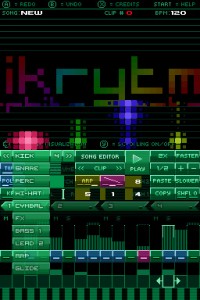
With Rytmik Retrobits you can quickly and easily create the basic building stone – an audio clip. It consists of musical notations for up to four instruments that you may transpose, select their location in the stereo field, and modify their volume, reverse, shuffle (rhythm twist) and polyphony (with extended polyphony handling), chorus/widening stereo effect, echo and arpeggiator. You may arbitrarily combine up to 128 such clips in four tracks and create complex pieces of music. Moreover, you have a collection of 10 pre-made compositions at your disposal from which you may quickly compose your own pieces.
Available in the Nintendo DS shop
iPad App – i505 Drum Machine
Demo of the i505 app that emulates the Roland TR-505 drum machine.
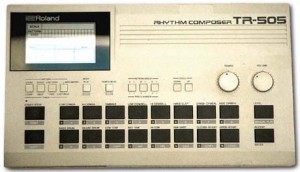
A cheap (budget) drum machine. It features 16 drum tones which unfortunately, are only mediocre samples. Its memory contains 48 patterns and 6 songs. Unlike its TR cousins it does not have individual drum tone outputs. There is no drum tone editing capability either. It does however feature extensive MIDI implementation, even the pads will transmit MIDI data. The 505 works well with a computer and sequencer or as a stand alone drum machine. It is extremely basic and unexciting but does make a good starter or play-along drum machine.
DATAMASKIN

