
Here’s a new interesting iPad App: Arpeggionome
“Demo of Arpeggionome, an amazing app for generating arpeggios. Lots of customisation. Lack of midi the only downside, which I hope the developers will be including in a future release.”
Loop Twister (for iPhone & iPad)
Loop Twister is the most advanced and intuitive beat-remixing app.
It turns your iPad and iPhone into a creative and powerful machine designed for playing and realtime processing of musical loops.
Easy to use, loaded with 64 fresh sounding loops and quality DSP effects gives you endless possibilities of new making sounds for using in your own beats or just for playing and having fun.
Enjoy a range of cutting-edge studio loops made by Marcin Cichy, co-founder of “Skalpel” music act that released several Eps and albums on famous Ninja Tune label. Marcin currently works as music producer and mastering engineer at PlugAudioMastering.
Download it from the AppStore :
http://itunes.apple.com/gb/app/loop-twister/id505408920?mt=8
Forss – Ecclesia App Preview: Church-Inspired Electronic Music
Ecclesia App coming 2nd of May.
See more at http://forssmusic.com
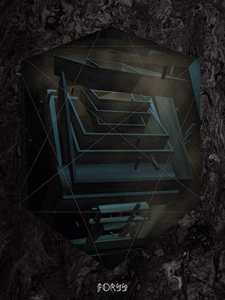
Swedish-born artist and technologist Eric Wahlforss has been busy. His album is an app, appropriately for someone who is the co-founder and CTO of SoundCloud. Recordings of strings, choirs, organs and ambient noise from church concerts which have been cut up into fragments and rearranged into a new mosaic of music, and recordings of wooden, stone and metal objects which make up the beats and percussion. These are the plosive, rhythmical noises that provide the link between the traditional to modern electronica.
The live show premieres May 2 in Berlin at Berghain/Panorama Bar, with the app out the same day. The album itself releases on June 12.
New free app lets you create audio time-lapses

phonoLapse is a free desktop app for Mac and Windows that lets you create audio time-lapses.
The software records slices of audio and compiles them into an audio file, much like time-lapse photography. You can control the length of the audio slices and the interval between samples.
It’s available to download at the soundplusdesign site.
“This time lapse follows 24 hours of my life. I wrote a Max/MSP patch to capture a 100ms slice of sound and a frame from my webcam every 144 seconds.
I call it time lapse phonography because the focus is on sound, not on the visuals. I added the visuals because I find it interesting to see and hear the space rather than just hear it.”
Loop Twister for iOS – audio demo
Loop Twister is an interactive sample player that allows the real-time mixing and processing loops on your iPhone and iPad.And here’s there pitch:
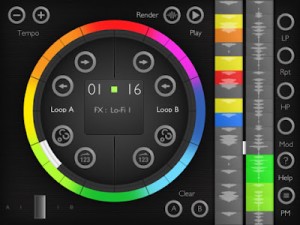
Loop Twister is the most advanced and intuitive beat-remixing app. It turns your iPad and iPhone into a creative and powerful machine designed for playing and realtime processing of musical loops. Easy to use, loaded with 64 fresh sounding loops and quality DSP effects gives you endless possibilities of new making sounds for using in your own beats or just for playing and having fun.
Enjoy a range of cutting-edge studio loops made by Marcin Cichy, co-founder of “Skalpel” music act that released several Eps and albums on famous Ninja Tune label. Marcin currently works as music producer and mastering engineer at PlugAudioMastering.
KEY FEATURES
☯ Simple, easy to use and intuitive interface. It looks exactly the same on both iPhone and iPad.
☯ 8 high-quality DSP effects including LP & stereo HP filters, pitch bender, foldback distortion and bass booster/ring modulator, LO-FI resampler and more.
☯ 2 banks of factory loops ( 32 loops each) -great source of samples for electro house, dubstep, grime and hip hop tracks including drums, percussions baselines and chiptune sounds.
☯ 16-step programmable sequencer for adding effects to loops with optional randomization.
☯ Pattern manager for saving and loading sequencer settings.
☯ Built-in wav rendered that allows to record your own loops and export them for using in other music apps on your iPhone, iPad or a computer. Loop Twister supports Audio Pasteboard and iTunes file sharing.
☯ Import of custom loops for playing, processing and mixing with factory sounds.
☯ Fast and accurate crossfader.
☯ Tempo range : 60 – 240 BPM.
☯ Built-In help and a comprehensive user manual (available online).
☯ Universal app.
Check out the new Paint2Sound app
“Paint2Sound is a neat little free application for converting any .jpg or .bmp image or any picture you care to draw/paint, into a soundscape. Each pixel row represents a frequency band. The application synthesizes sine waves for each pixel row with an instantaneous amplitude determined by the brightness of each pixel in the pixel row, and then sums together all the sine waves. There is user control over various parameters like sample rate, sound duration, how frequencies are distributed across the pixel rows and the overall level in the mix of each sine wave. Can never have enough wacky sound sources I say…”
Propellerhead Software – Closer look at Figure
This iPhone app is like a mini-Reason. The combination of super-bright screen in a dark room freaked out my camera, but the description and audio get the point across.
Cycler Looper – new powerful set of looping tools
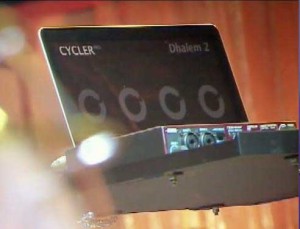
A pre-release version of Cycler Looper has been announced. Its makers tell us that the software has been created to support all aspects of sound performances (playback, looping, remixing) and gives musicians a simple yet extremely powerful set of looping tools. Here’s their press release wih all the details:
Cycler Looper software gives musicians a simple yet extremely powerful set of looping tools. Created to support all aspects of sound performances (playback, looping, remixing), it can be learned in one hour, and does not require expertise in digital audio. Nicolas Lacoumette, a musician who designed award-winning audio software like the GURU rhythm system and the Krishna synthesizer, is behind this bold new product. Cycler Looper excels by providing musicians with an extraordinary sense of freedom, far surpassing other computer-based solutions. Users create their own personalized loop station (like a turbocharged RC-50), with clear, engaging on-screen visual feedback. Refined and field tested at numerous live shows, Cycler Looper speeds and facilitates the set-up and sound check. It eliminates trouble-prone connections between the sound board and the stage and automatically sets levels for all recorded loops. A built-in playlist system automatically manages loading, sequencing and fades while eliminating the risk of computer-related operational errors. It comes with a full range of standard looping functions. In addition, users can explore the musical potential of a particularly comprehensive suite of new functions: double, half, infinite undo/redo, resample, as well as full control over loop time. Cycler Looper’s effects are specifically designed to solve problems that occur in live performance situations. Its practical library of stock effects, executable in real time with a single command, can be augmented with modular user-defined effects. A brilliant innovation, Cycler Looper’s “temporal effects” modify a loop’s timebase, yielding effects like slowdown, repeat, scratch, reverse and time stretch. In brief, Cycler Looper is an instinctive creative tool that enhances the pleasure of performing live, while freeing the user from technological constraints.
Summary of Cycler Looper’s main features
- Easy installation
- Quick learning curve
- Reliable and stable (Cycler Looper is a closed system, like Reason)
- Synchronized multi-user support
- Lightning fast project loading
- Efficient user interface
- Clear, elegant on-screen feedback
- Very rapid set-up for live shows
- Reduces overall equipment requirements (cables, preamps, mixers…)
Technical Features
- 8 loopers et 8 players per user
- Auto Level correction on Record
- Internal Playlist system with various crossfade modes
- MIDI Board adaptive to any controller brand
- Advanced looping functions
- Peak detection on first loop (Perfect Match)
- Free looping time, or adaptive to music (from 16th to 16 bars)
- Easy and accurate Global latency detection
- 16 ins (stéréo/mono), 16 outs (stéréo/mono) manager
- Odd signatures
- Basic and graphical side chain compression effect system
- Base Effects : Delay, Resonnant Filter (hpf/bpf/lpf), Overdrive, Flanger/Chorus,Phaser, Reverb, Volume/pan/mute, Ring/Amp Modulator, Bit/Samplerate reduction, compressor, Sample/Loop Player
- Base Time Effects :Incarn, Reverse, Smooth, speed up, speed down, time stretch.
- Modular and programmable effects
- Send/Return
Minimum system requirement :
Mac or PC, Audio sound card. MIDI controller is welcome, but Cycler Looper also supports keyboard assignation.
Pricing and Availability:
Free download.
More information:
Propellerhead unveils it all – Rack Extensions and Figure App Technology Preview
Here’s the background details:
We couldn’t hold back anymore. We were too excited about what we’ve got in the works that we flew down to the Musikmesse Convention in Frankfurt, invited a room full of our friends in the press and development community, and lifted the curtain on some groundbreaking new technology we’re working on.
In this presentation we’ll introduce you to Figure, our new mobile adaptation of actual Reason devices running on your phone and Rack Extensions, our new technology which will allow third party developers to create fully functional Reason rack devices complete with CV, cable routing, combinator patch creation, and everything else that makes Reason so versatile and creative.
To learn more and to find out about getting started with our SDK, visit: http://www.propellerheads.se
Ethero 2 Live Demo
Ethero is the iPhone’s answer to the etherophone, or Theremin as it’s better known. The Theremin is one of the earliest electronic instruments ever created and it’s now famous for it’s signature eerie sound.
The traditional Theremin is usually controlled without any physical contact, with the player using each hand to control both the pitch and the volume of the sound. Ethero works in a slightly different way, but it still attempts to emulate the real instrument! Ethero takes the amount of light coming into the device’s camera and translates it into a sound frequency. So, waving your hand or another object in front of the device camera will change the pitch of the sound. The more light coming into the camera, the higher the pitch. To control the volume of the sound, simply touch the screen of the iphone and move it up and down the screen.
“This is just a quick demo of Ethero 2 running live on my iPad 2.
The video shows a couple of the preset scales in the app. The synth sounds are from the Moog Animoog which is running in background-audio mode and being controlled via virtual MIDI ports.
Ethero 2 will run on iPhone 3GS, iPhone 4, iPhone 4S and iPad 2.
MIDI is sent over virtual ports, WIFI and via the Camera Connection Kit. Of course, your mileage will vary with the use of virtual MIDI ports as there’s quite a lot of processing going on. It works best on the iPhone 4S and iPad 2 (and I guess ‘the new iPad’, but I can’t test that… yet!) “
DATAMASKIN

