
AmpliTube for iPad, the mobile effects processing app, has been updated
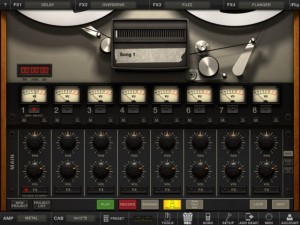
IK Multimedia has updated AmpliTube for iPad, its mobile effects processing app.
AmpliTube for iPad puts a guitar/bass rig at your fingertips, with 4 stompbox effects amp-head, cabinet and microphone. Choose from 11 built-in stompbox effects (delay, fuzz, overdrive, wah, envelope filter, chorus, flanger, phaser, octave, noise filter + distortion once registered), 5 amps (clean, crunch, lead, metal, bass) with full controls, 5 speaker cabinets and 2 microphones (dynamic and condenser).
AmpliTube for iPad 2.5 adds:
- Slash gear models available for in-app purchase
- New Mixer/Recorder section with loop points, visual metronome, tap tempo
- Digital audio in/out support
- MIDI support
- Audio Copy/Paste
- Retina display support
- Restore In-App purchases
- New export via SoundCloud and FTP
AmpliTube For iPad is $19.99 in the App Store.
Free DJ app for iPad
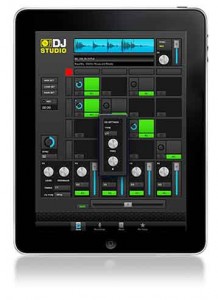
Rocudo has released DJ Studio, a free app for the iPad which they say is built to help you find and release your Inner DJ.
A spokesperson told Sonic State, “The idea is simple: we built a powerful DJ App which requires no skill to use and we packed it full of great Loops & Samples from top Artists & DJs. Then we folded in some advanced features and premium content options which you can unlock at your own pace.”
Features
- Browse builit-in library of Loop & Samples and drop onto your 4×4 Deck
- Tap Pads to play – auto-sync means you’re always on the Beat
- Manipulate Level, Mute and FX Send for each Pad
- Mixer provides Level/Mute, EQ and FX Send on 4 independent channels
- Delay FX Unit provided will autoset its parameters to match Tempo
- Save your Sets and Record your Live Performances
- Absolutely no experience required
Pricing and Availability:
Free
More information:
New features explained – Symphonix Evolution 1.90
This video explains some of the new features in our Symphonix Evolution iPad app. Symphonix Evolution makes it easy to enter music notation, edit MIDI files and work with external MIDI devices through a suitable interface. With wavetable synthesis and audio quality that rivals dedicated synth keyboards, Symphonix Evolution is perfect for taking your music on the road!
New features covered are the advanced MIDI settings, piano/instrument finger positions and the arpeggiator.
Check out http://www.vinclaro.com.au/ios/symphonix/symphonix.htm for more information or our blog at http://vinclaro.blogspot.com
New iPad apps: Strange Attractor and Voco
Strange Attractor is a truly novel sound generator based on chaos theory. The outcome of PhD research, it uses a feedback system to process and generate sound. Unlike conventional synthesis techniques, sounds emerge in surprising and unexpected ways, almost having a life of their own. By moving your finger on the screen, you can navigate through a space of evolving sounds, that build-up, pulsate, and decay. Sound input through the microphone or headphone socket can be processed into fractal textures, or will trigger and control oscillations.
Voco is a touch controlled phase vocoder. Sounds can be manipulated by touching the screen, and played like like an instrument. Time is represented on the horizontal axis, and pitch on the vertical. The yellow bars display the sounds intensity. Sounds can be sampled through the microphone or headphone socket, or loaded via iTunes. There are also features to constrain the pitch to different scales, and to glide the playing point around the screen to make rhythmic loops.
Official Noisemusick Demo
The noisemusick app is a collection of three controllable synthesizers that generate interesting chaotic sounds. Have fun creating sonic bedlam, exploring weird soundscapes, or use it to great effect in your live performances and recordings. It’s squonky electric fun for the whole family!
MTribe (MIDI editor and control surface for the Korg Monotribe)
Background details:
Editor and Control Surface for the Korg Monotribe.
MTribe is available at: http://www.fabriziopoce.com/MTribe.html
Requires a MIDI mod (such as http://amazingmachines.com.br/store.html or any similar midi mod)
Feature list:
– MIDI IN/OUT for all MIDI supported features in a practical GUI.
– New: Presets (load/save for storing and recalling presets!)
– New: Key Tracking. In real time pitch modulates LFO intensity / VCF cutoff.
– New: LFO as second oscillator, auto tuned based on harmonics schemes.
– New: Glide emulation and finer pitch bending (more precisely than raw MIDI)
– New: XY Pad for two parameters at once (with reset and spring mode)
– New: (optional) note off removal (to remove gate clicks) and velocity off/on.
– Moreover: simple, but useful, presets editing (copy, paste and name preset)
– Moreover: preset randomizer for each section (VCA, LFO, modulation, glide)
– Supports MIDI learn for the GUI through extra MIDI input (standalone).
– Supports Ableton Live MIDI learn and envelopes in the Max for Live version
– Integration: if you do not use Ableton Live / Max for Live, you can still integrate the MTribe standalone with your DAW using MIDI (IAC bus on Mac / MIDI Yoke on Windows)
Notes: standalone does not requires any additional software to run.
Only Ableton Live device version requires Max for Live.
News: the additional devices used in this video (StepSequencer64 and PatDrummer) are now available at http://www.fabriziopoce.com/download.html
Hπ Instruments Microsynth: New Synthesizer App For Mac
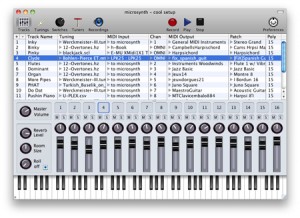
Make some microtonal music on your Mac with Hπ Instruments Microsynth, a polyphonic multi-timbral microtonal synthesizer application (standalone). It’s now available in two versions: the multi-timbral version and the mono-timbral (single-track) version dubbed Microsynth-mini.
Both are Mac OS X SoundFont synthesizers for microtonal music, supporting seven types of tuning files, instant retuning, audio file recording, routing to and from standard MIDI hardware controllers, and sequencing and notation software such as Sibelius and Finale. Overall, Microsynth is designed to give you total control of tuning in your music.
The tuning features are the same in both Microsynth and Microsynth-mini. There are 16 independent tracks, each with tuning, MIDI I/O, SoundFont, and patch selection. Check out all the synth features, below.
Microsynth features:
- Unlimited tunings, any key to any pitch
- Individual tuning per track
- Supports MTS real-time Sysex messages
- Supports .scl .tun .hz .csv .mtx .gly and .tonex tuning files
- Supports single channel tuning tables of 128 tones
- Supports OMNI-channel tuning tables of 2048 tones
- Allows real-time transposition and remapping of scales
- Unlimited user-defined MIDI CC tuning switches and tuners
- Supports pitch bending of microtonal pitches
- Comes with GM / GS sound set
- Built in reverb
- Loads .sf2 SoundFonts
- Unlimited MIDI connections
- One virtual MIDI input and output
- Records WAV audio files
- Loads and saves scenes
- Multiple Undo
The Hπ Instruments Microsynth synth for Mac (standalone) is available for $19.99. Microsynth-mini (single-track) is half as much, at $9.99. For more information, go to the company’s Web site at h-pi.com.
PIXITRACKER App – iPhone / iPad ChipTune Maker! – First Look
Chip Music Maker is a “Power Up” for your iPhone or iPad! Fun, Easy to Use, and authentic 8 / 16 bit sounds
No time to delve into the big and serious music apps?
PixiTracker is what you need! It is a simple and fun tool to quickly create musical sketches or chip tunes. Without requiring a lot of musical knowledge!
Features:
* high quality 16bit sampler and pattern based sequencer (tracker);
* unlimited number of patterns;
* several packs with unique sounds;
* MIDI keyboard support;
* mic/line-in recording;
* Wi-Fi export/import;
* export to WAV;
* audio copy/paste;
* iTunes File Sharing;
* true warm pixel interface!
KymaControl Kyma iPad Controller App
Pad app for controlling symbolic sound corporation’s Kyma sound design software for Mac. http://ipadloops.com/kyma-controller-app-for-ipad/
Kyma Control is the Swiss-army-knife of controllers for the Kyma Sound Design Workstation, providing four of the most popular Kyma controller-modes in one, wireless multi-touch package: a bi-directional mirror of Kyma’s Virtual Control Surface, a multi-touch pen/tablet controller, a standard and a Tonnetz keyboard, accelerometer controls, and compass heading for using direction as a control.
For use in the studio, on stage, in the lab, at home, or in classroom, Kyma Control frees you from having to sit in front of your laptop; put yourself inside the sound field and perform your Sounds in an expressive, intuitive manner using your hands and gestures.
What’s New in Version 1.1.1
This version adds support for two dimensional faders, and buttons and switches with distinct on and off labels. The standard and Tonnetz keyboards are now on separate tabs, the keyboard range indicator now includes keyboard rounding mode selector, and the Volume control faders are now longer. This version is compatible with iOS 5.
FEATURES
• Auto-mapping, bi-directional multi-touch mirroring of Kyma’s Virtual Control Surface (VCS)
• Pen/tablet surface tracking as many as 11 fingers with color trails to help you track finger position
• A keyboard for sending !KeyDown and either continuous or discrete values for !KeyPitch & !KeyTimbre
• A Tonnetz pitch-space with configurable vertical and horizontal intervals
• Pitches can be rounded to equal tempered pitch, rounded only on !KeyDown and continuously variable after that, or, in Strum-mode, triggered when your finger passes by the key
• Trigger or control Sounds with the iPad’s accelerometer measurements in the X, Y, Z directions, as well as controls corresponding with Pitch, Roll and Yaw
• Compass heading from the iPad’s magnetometer tells you which way the iPad is pointing so you can use it for panning and other controlsREQUIREMENTS
• iPad
• Symbolic Sound Kyma X.77 (or newer) with Paca(rana) Sound Computation Engine
• WiFi connection to network accessible to the Paca(rana)KymaControl is available for $14.99

Quasar: new multitasking behavior for iOS Music Apps
“Trying a new Tweak for the jailbroken iPad called Quasar. It is great for playing more than one music app in the same screen at the same time and also for changing the behavior of some apps working together.”
Here’s one more demo:
Enjoy
DATAMASKIN

