
Video demonstration of the SoundPrism 2.o
An introduction to SoundPrism 2.0
Available now! http://soundprism.com/
Features
* connects to your favorite DAW or hardware synth
* … via WiFi (iPhone, iPod touch or iPad) or USB (iPad only)
* allows individual control of multiple instruments at the same time
* support for non-diatonic scales (iPad only)
* turns your iOS device into a wireless 3D MIDI controller
What can you do with it?
* Create harmonies easily in any key
* Build loops graphically
* Compose effortlessly
* Experience new ways to control your Synth’s parameters while playing!
* Check out our interactive manual to find out more!
Truly experimental: Tim Thompson’s Space Palette
Tim Thompson, caught at the West Coast Controllerism Championship, discusses his unique Kinect music controller, the Space Palette.
Thompson’s MultiMultiTouchTouch is built with these components:
- Microsoft Kinect (with power supply)
- KeyKit which is Tim’s own programming language and graphical environment for MIDI
- Cinder Open Source SDK
- Open Source Computer Vision (OpenCV)
- Open Sound Control (OSC)
- Python, used to implement a GUI for parameter control
- HP Laptop running Windows 7
- A wood frame for calibration (wood frame is not required once the frames have been calibrated).
The raw output of this controller is OSC messages formatted using the TUIO (multitouch) standard format. Parameters of the software can be controlled with JSON-formatted messages.
You can get more info on Thompson and his unique controllers at his site.
Touchable controlling Ableton Live w/ XYZ control
Jook Music presents a Killrkat live remix of the song “Alley Creeper” on the new Touchable iPad Ableton Live controller app. Killrkat are an innovative electronic duo trailblazing the newest of music production and performance techniques to bring danse floors to height of raw energy and power. For more information visit facebook.com/Killrkat
Feature overview:
NEW XYZ Pad module:
- •Up to 4 Dots at once – each with their own X, Y & Z Parameters.
- •Choose the dots X, Y & Z Parameters from All of Lives Mixer & Device.
- •Easy parameter assignments through the config menu.
- •Set direction & force of gravity and bouncing mode individually for each dot.
- •Record the dots movements – loop, reverse or cut them till they fit your needs.
- •Play them back as automations – quantized and in complete sync with Ableton Live.
- •Save automations and parameter assignments to the database within touchAble and exchange them with other iPads and Users via iTunes.
- •Save snapshots of the dots positions: Hold, Stop & Morphing mode.
- •Set morphing length & which of the are dots affected by snapshots.
NEW ‘Snap’ mode:
- •You can activate the Snap mode per device with the ‘snap’ button in the Menu to the right.
- •If enabled, the control elements will snap back to their original value once you lift your finger.
- •To change the original value of the parameters: disable Snap mode – tweak the device to your needs and enable Snap mode again to jump back to these values at the end of your touches.
Device Module:
- •The Control elements on the FX8 & FX32 View now switch their behavior & style depending on the parameter they control.
- •Possible styles are: Toggle, Multitoggle, Fader & centered Fader.
- •This will work with Lives devices & all M4L Devices.
The Poly-Ana Controller Flagship
This thing is the ‘monster synth’ of MIDI controllers. It offers 136 Knobs, 78 switches, 4 Doepfer MIDI Interfaces , a touchscreen, 4 Octave Keyboard & Mod & Pitchwheels. In this video you get a short overview of the dimension and functions of the Poly-Ana Controller for Admiral Qualitys VST/Au Instrument.

The Controller has two Front Panels to control all the parameters of the VST Instrument. The upper and the lower Front Panel. The upper Front Panel contains the 3 Oscillators Section, the 2 Filter Section, the 2 LFO and 2 AMP Section.
The lower Front Panel contains on the left side, the 3 Envelopes, in the middle a 8“ Touchscreen and on the right side the 2 Modulation Mixer and the 2 Sample and Holds. Also the Controller will have a 4 Octave Keyboard with Pitch and ModWheel. The Touchscreen which shows the VST Instrument is primarily use for switching, load and save the presets. The controller will has about 211 Parameters. So i need 4 Midi Interfaces to control this Plugin.
Do you want to be a true Wireless DJ ?
The check this iPad app out!
iPad touch controller for DJs, works wirelessly with Traktor Pro or anything else, easy to set up

Multi-touch mixer and decks
Faders, EQ, headphone and playback controls, needle search and pitch bend — it’s all there.
Magic Stripes for pitch bending and direct manipulation
We have a better idea than simulating a jog dial: Magic Stripes. One finger for pitch bending, two for ultra-precise tempo adjustment.
Plug & Play iPad Editors for Vintage & Software synths
http://youtu.be/Cf_Cdbfhtdc
Background:
Leveraging 2 years of experience in designing GUI for control surface and 25+ years of experience in designing synthesizers sounds, we are bringing the best of those experiences to the iPad with iControlMIDI for Moog Memorymoog LAMM, namely iMemorymoog.
iControlMIDI is a UI Friendly and Workflow Efficient Solution that let you control your MIDI machines and software, simply from your iPad.
iControlMIDI is Plug & Play (actually there is nothing to plug!).
In 3-clicks on your Mac or couple of clicks on your PC, you are up and running…
iControlMIDI uses your:
• iPad with WiFi connectivity
• WiFi router (like an AirPort)
• [MAC] MacOS / Utilities / AudioMIDISetup / Network (MIDI Network Sessions)
• [PC] rtpMIDI and Apple Bonjour
iControlMIDI let you control all MIDI controllable parameters.
Parameter Name and Value displayed on iControlMIDI UI are the same as the ones displayed on your synth if you were to program it from its control panel!
iControlMIDI offers 4-Controls per Parameter:
• Slider: full range parameter value adjustment for a ‘coarse’ workflow
• + button: precise +1 parameter value adjustment for a ‘fine’ workflow
• – button: precise -1 parameter value adjustment for a ‘fine’ workflow
• Parameter default value button: default parameter value for a faster workflow
iControlMIDI is a Workflow Efficient Solution as it offers UI Consistent Synth Functions, for example, the VCF functions are grouped on the same iControlMIDI Page.
iControlMIDI integrates with your DAW. Real-time parameters adjustments triggered on iControlMIDI can be recorded and playback on your DAW.
iControlMIDI is a Zero [Mac] and Low [PC] Dependencies Solution; iControlMIDI relies on iOS 4.2 CoreMIDI and MacOS CoreMIDI frameworks is 100% MIDI, 100% iOS and 100% MacOS compatible and:
• Does not require to pay for additional software or have additional software installed on your Mac; requires to download rtpMIDI and Apple Bonjour on your PC
• Does not require to pay for additional hardware
• Does not require to do message mapping
• Does not require to design a UI on your Mac or PC and upload/sync it on your iPad
• Does not require to design a UI on your iPad.
With iControlMIDI, we are offering you to be immediately operational, so you can focus on your music (not on the IT/MIDI part of it!) and unleash your creativity.
iControlMIDI is designed by Electronic Musicians for Electronic Musicians.
In this video:
iControlMIDI. Plug & Play iPad Editors for Vintage & Software synths.
iMemorymoog for Moog Memorymoog LAMM
Site: http://www.icontrolmididesign.com/
App Store: http://itunes.apple.com/app/imemorymoog/id428843212?mt=8
How to control your GarageBand set up from afar
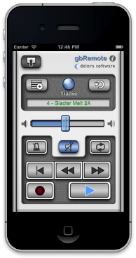
Control Apple GarageBand from afar with the Delora gbRemote app from Harmony Systems. Available for iPhone and iPod Touch, gbRemote functions as a remote controller for the GarageBand music-creation program for Mac.
GbRemote emulates GarageBand’s most frequently used transport functions — Play, Record, Back, Forward, Beginning, and Loop — plus other important functions like Master Volume control and Mute. You can view all tracks in a song, select a new current track, and change individual mute and solo track attributes, all while away from the confines of your computer, mouse, and keyboard. All controls are sized for easy touch accuracy and visibility. What’s more, gbRemote automatically adjusts its layout for best viewing and functionality in both landscape and portrait orientations. In Portrait mode, all controls can be accessed with one hand.
In addition to supplementing the use of mouse and keyboard to control GarageBand, gbRemote also serves as a control surface for GarageBand. According to Harmony Systems, the app makes music creation more productive and allows you to control GarageBand from anywhere in the studio within Wi-Fi coverage.
GbRemote requires the installation of gbLink 2.0.1, a free OS X application that allows gbRemote to communicate with GarageBand using a Wi-Fi network.
What you can do with Delora gbRemote:
- Control transport functions (Backward, Forward, Beginning, Play, Record, Cycle)
- View all tracks in your song
- Enable / disable mute and solo for each track
- Adjust overall Master Volume
- Disable all volume during playback with Mute
- Current track’s name is displayed and color coded by type
- Select a new current track
- Enable / disable Metronome
- Create a new track
- Undo an action
- Save a GarageBand file
- Supports installations of gbLink on multiple computers
Requirements:
- iPhone or iPod Touch running iOS 4.2 or greater
- Apple GarageBand ’11 or ’09 application installed on your Mac
- gbLink 2.0.1, Delora Software’s free OS X application
- Wi-Fi access to same computer where gbLink is installed
- iPhone / iPod Touch Bluetooth must be set to Off during a gbRemote session to ensure reliable communications with GarageBand
The gbRemote app is available for $2.99 from the App Store. For more details, visit delora.com.
Playing virtual instruments live with intendo Wii controllers
Organised by composer Ondrej Pochyly, with funding from the National Arts Council and sponsored by Time+Space, The Exeter Classical Music Event will take place on 2nd July 2011 in the courtyard of Exeter Castle, Devon.
For computer musicians, Ondrej Pochyly´s performance of his ´Requiem for the Lost´ will no doubt prove to be one of the most interesting events of the day as he conducts an entirely ´virtual´ orchestra using Nintendo Wii remotes to control the tempo and dynamics.
See how he has created the Requiem and which virtual instruments he has used in this video including Cinesamples VOXOS and Vienna Symphonic Library products…
More information about the event can be found at:
http://www.timespace.com/events
WiFi controller: Instrumental for iPad – Triangulum Nebula
Instrumental’s Generic surfaces provide a great deal of flexibility, allowing you to configure control panels suitable for all sorts of virtual devices. The modular panel system allows you to quickly reconfigure an entire surface, and the labelled control system frees you from worrying about MIDI messages.
The modular panels used by the Generic surfaces are the same ones used by the other, more musical surfaces, except there are more of them.
Controls can be labelled in three ways:
- Control labels and display ranges can be customised per preset
- A MIDI Control Map that specifies the MIDI parameters for every available control. You can create a MIDI Control Map that defines the messages supported by each device you own, and label them there.
- MIDI SYSEX Message. Plugins for DAW packages can send the labels and text readouts for all controls via MIDI SYSEX messages. This allows the controls to be accurately labelled even when controls are being dynamically remapped. (Currently this is only available for Propellerhead’s Reason & Record)
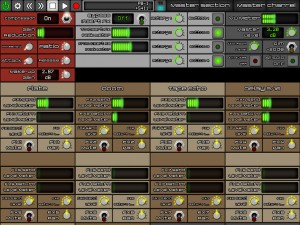
In this video:
Instrumental is a Wi-Fi MIDI Control surface for iPad.
This video shows it in action controlling Propellerhead’s Reason & Record.
See quantumclockwork.net for more information.
MIdi Fighter Pro Controllers in action
The brand new line of Midi Fighter Pro controllers. These hand built instruments are designed to take your controllerism skills to the next level and last a lifetime. Each design is built around a specific work flow of a famous artist with matching mappings for their software of choice. The first two controllers (designed for Traktor Pro by Ean Golden) are intended to tear apart decks and turn your DJ software into a musical instrument.
- Two dedicated controllerism layouts for specifc workflows
- Customizable button colors express personal style or convey functions
- Bus powered + plug and play compliant for both Macs and PCs
- 16, spring loaded arcade buttons play like a dream
- Jaw-dropping mappings come ready to rock
- Bright blue LEDs provide clear feedback form the software
- The 4 X 4 grid is easy to memorize and play like an instrument
If you are looking for a less expensive option, check out our Midi Fighter Classic line.
More info:
Every MIdi-Fighter comes with :
- High-quality USB cable
- Midi-Fighter sticker
- 16 Genuine Sanwa buttons from Japan
- Hand-numbered and assembled in San Francisco
- Signed certificate of authenticity
Some key hardware features
- Steel chasis is built to take a beating
- Center locating hole allows to controller to be placed on a turntable
- Four heavy duty rubber feet grip any surface and strongly resist sliding
- High-quality knobs and faders are waiting to be grabbed and played hard
- Four dedicated bank/preset buttons
- High performance spring-loaded buttons will last a lifetime
- Matte acrylic top sheet is silky smooth, resists finger prints and is a joy to play on
DATAMASKIN

