
ExtraSlice sneak preview!
Coming soon to iPhone!
LIKE us on Facebook to get notified when it drops!
http://www.facebook.com/TheStrangeAgency
Juggle beats, chop, screw, shuffle, dice and slice with the second iteration of our critically acclaimed Slice series. ExtraSlice is the future of the DJ experience.
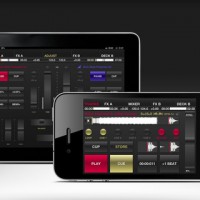
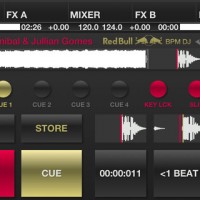
Red Bull BPM DJ Update 2.0 for iPhone and iPad
BPM DJ offers the 21st century digital equivalent of a professional DJ setup with 2 decks, 2 effect engines and a mixer. A high quality tool with focus on performance, low latency, usability and stability, designed for the real club’s DJ booth.
Official Website: http://redbullbpm.com
Facebook: http://facebook.com/redbullbpm
In this video we present the 2.0 version of the Red Bull BPM DJ app. The most notable changes include advanced technical as well as social features. DJ Julien Chaptal takes you by the hand, and explains Key Lock functionality, Slip Mode, improved tracklists, adjustable BPM Information and more high-tech coolness. Also, be sure to check out the all-new Deck Shark feature to hide your peak-time favourites from trainspotters.
Specification:
Output modes for hardware mixer:
– Classic Club to use 2 iOS devices as separate decks, connected to your mixer. They sync the current BPM wirelessly.
– Double Deck to use one device, connected to your mixer. Audio left is deck A, right is deck B.
Output modes for the Split Cable Adapter (check djplayer.net to buy):
– Split Cable. Audio left is master, right is pre-listening.
– Ballroom. Same as before, but full stereo when PFL buttons are off.
Output modes with 2 independent stereo outputs:
– Home mode: audio out is pre-listening, master is transmitted to our MasterOut app over the network.
– Club Master: audio out is master, pre-listening is transmitted to MasterOut. A special design for ultra-low latency DJ monitoring.
Deck:
– 8 gapless cue/loop points (6 on iPhone and iPod touch), play like a sampler. Modify on-the-fly, while playback/loop goes.
– Vinyl Vision or waveform display, touch to jump (beat and block aligned).
– Pitch control (±4, ±8, ±16 and ±100%), fine adjust, adjustable pitch bend strength. Key lock in the ±16 range.
– Reverse play with slip mode for lengths below 16 beats.
– BPM sync, automatic bpm and beatgrid detection.
Mixer:
– Crossfader with 3 curves and attached morph filters.
– For each channel: fader, gain, low/mid/high ±6 db adjust eq, low/mid/high mixing eq from -96 to 0 db (isolator), hidden cutoff switches.
– Punch control for channel faders and cross (in/out).
– Calibrated channel and master VU meters (with peak hold off/fade/run), balance.
– Pre-listening: master/PFL ratio, headphone volume. Split or stereo PFL (in Home or Club Master mode).
– EQ reset on track load (do nothing, or reset all, or reset mid/high and cut bass).
– Gain set on track load (do nothing, reset to 0 or auto to loudness).
Effects:
– Adjust effect parameters with touch or accelerometer.
– Gapless auto or bounce looping, from 128 beats to 1/256 beat (including triolic 3/4, 1/3 values on iPad).
– Slip mode for looping.
– Temp pitch control, beat snap and reloop.
– BPM-based echo, reverb, lo-fi, flanger, highpass, lowpass, bandpass, notch and peak.
– Sharp or smooth echo/reverb release, beatcounter.
Tracks:
– Mass analyze of selected tracks.
– Convenient track search with textual search/filter.
– Sort by playlist, artist, title, comment, BPM or natural (“iTunes order”).
– Automatic marker shows if a track was played in the last 4 hours. Manual marker on/off for each track.
– Serato and Traktor metadata support (BPM and cue points/loops).
– The internal standard SQLite db keeps all bpm and cue points even if a track is removed from the device, with import/export.
Other:
– Automatically or manually post track information and camera images to Twitter.
– Day or night background. Manual or automatic according to your location’s sunrise/sunset.
– iPad only: CPU meter, sunrise and sunset display, live camera background.
– Audio buffer size, from 512 to 128.
Deckadance Mobile for the iPad
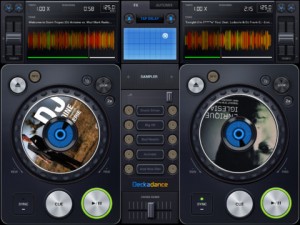
Image Line has released Deckadance Mobile for the iPad:
Load music from your iTunes library and mix, scratch or loop up a storm.
When you are ready to kick back, use the automix feature and let Deckadance mix up your playlists for you.
Key Features:
- Beat detection and autosync – Tap the SYNC button on a deck to sync its tempo to that of the opposite deck.
- Left / Right deck faders & Tempo control with nudge – Individual deck volume faders and X-fader.
- Cue points – Add up to 4 cue points per-track per-deck. Select CUES from the mode window. Tap Rec and a cue memory slot to save the current playback cursor position. Alternatively, with the track stopped press the CUE button to set a cue point. When playing the CUE button jumps back to the cue point and pauses.
- Automix – Select the AUTOMIX tab and music source to hear your selected music automixed.
- Equalizer – From the EQ mode window adjust Low, Mid and High equalization.
- Waveform view – Inspect beat alignment from the WAV mode window.
- Loop – After Deckadance mobile automatically detects the beat, from the mode window select 32 to 1/32nd beat loops and tap the Loop button on the deck to engage.
- Sampler – 5 assignable sampler slots per deck. Play from included sample libraries from the mode window.
- Play effects – From the mode window hold Stutter, Turntable, Censor, Break or (back)Spin to add the effect.
- X/Y effects – From the FX tab choose Ring-Mod, Lo-Pass, Hi-Pass or Tap-Delay effects and control them from the X/Y pad.
Deckadance Mobile is $3.99 in the App Store.
Free DJ app for iPad
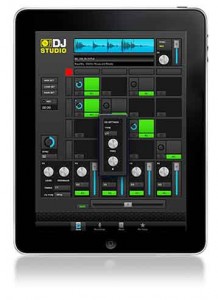
Rocudo has released DJ Studio, a free app for the iPad which they say is built to help you find and release your Inner DJ.
A spokesperson told Sonic State, “The idea is simple: we built a powerful DJ App which requires no skill to use and we packed it full of great Loops & Samples from top Artists & DJs. Then we folded in some advanced features and premium content options which you can unlock at your own pace.”
Features
- Browse builit-in library of Loop & Samples and drop onto your 4×4 Deck
- Tap Pads to play – auto-sync means you’re always on the Beat
- Manipulate Level, Mute and FX Send for each Pad
- Mixer provides Level/Mute, EQ and FX Send on 4 independent channels
- Delay FX Unit provided will autoset its parameters to match Tempo
- Save your Sets and Record your Live Performances
- Absolutely no experience required
Pricing and Availability:
Free
More information:
Remix Set™ Preparation: Basics
Native gives a tour of their recently released Remix Set:
Remix Sets are the way to organize your remix content. This tutorial will show you how to get, store and use audio content for your Remix Sets. See how to capture audio on the fly from your DJ set, assign colors on the F1 controller to your samples, and how to export and import a Remix Set.
Understanding the Traktor Remix Deck™
This video is a great introduction to the incredible potential of the new Remix Decks. Get an instant overview of storing and triggering loops and one-shots via the F1, and how to create and use Remix Sets.
New DJ controller: 4TRACKTRIGGER – featuring DJ RASP
Check out the video above to see DJ RASP mash it up on this brand new controller:
After the successful launch of our “4midiloop”-Mix Controller it is now time to introduce the latest hardware for sophisticated DJ’s.
What you’re witnessing is the continual visual collaboration between DJ RASP [UK DMC & IDA Champion DJ] & GJIGGY [DA MAN ON DA CAM] again pushing the boundaries and technology with yet another “WORLD’S FIRST & EXCLUSIVE” DJ HARDWARE HD PROMO.
“4TrackTrigger” the Traktor-Weapon made by the German Faderfox and the Swiss Glanzmann Digital DJ Solutions.
A compact and uncompromising 4 Deck Controller, specifically designed for Traktor Pro 2.5 in the external mixer mode.
This new instrument is designed with passion for detail and is handmade in Switzerland / Germany. It is the ultimate instrument made by professionals for professionals. It comes with extensive details and a lot of new control features 150 buttons in different colours and sizes to trigger hot cues, to start samples and to activate effects. 6 displays and 172 LED’s for loop length, loop recorder and master clock. 17 encoder for quick access to functions like browse, seek loop-size and loop-move which are a must for a modern digital DJ. 2 additional pedal connections rear sided to control every effect parameter on the fly.
Everything is fitted into an ergonomically and functional aluminium case, powered by Faderfox!
Available mid June, further information will follow shortly…
…PURE BEATS, & CONTROLLERISM to my dope V & A edits, grading & mastering.
Peace All.
All-in-one DIY DJ Controller workstation
Background info:
Here is an awesome computer mod that I have been working on for the last four months. I built this computer mod to appeal to DJ’s and music artists. I call it DJ SOUND CONTROL or DSC for short.
I made it as compact as possible, but not too small that you could not be comfortable performing a set. I added a powerpack that allows true portability, giving you a full hour of power without plugging it in.
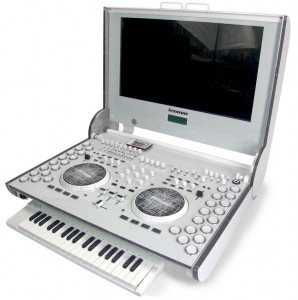
With the 23″ touch screen the performance can now include finger gestures and multitouch controls. Crazy RGB backlit panels makes sure your party keeps hoppin’ through the night. Cutting edge DJ hardware, like the Midifighter that has been customized to put super fresh effects right at the fingertips of both your right and left hands, will make this a musical game changer. Built in Meeblip digital synth controlled by the optional slide out keyboard will let you rip off an amazing bass solo or dub step routine.
On board effects from the Alesis NanoVerb give you instant overall expression of the multiple outs. And the meat and potatoes customized Numark Mixtrack gives you all the standards that every DJ needs to stylize their set. With tough Lexan custom CNC machined panels and high strength aluminum frame this box is ready to travel around the world with you no matter where and how you perform.
See Blarsky’s site for more info!
triqtraq – jam sequencer for iphone
triqtraq is the ultimate jam sequencer for electronic music producers or DJs who want to make music on the go, or improvise live…
While it lets you create great sounding musical ideas with ease, triqtraq offers many surprising musical features that will please even the most experienced beat creators.
triqtraq is available from the App Store now.
http://itunes.apple.com/app/triqtraq-jam-sequencer/id488578848?mt=8
For more information visit http://www.triqtraq.com
Features:
create musical patterns fast and intuitively, by programming live or by using the ‘step edit’-feature
automate parameters like pitch, filter, delay, decay and level in real-time
change samples or sample kits on-the-fly while jamming
edit multiple tracks simultaneously
store up to 16 patterns and 32 samples per session
specify the length of a sequence per track, or set the automation length for each parameter individually
switch seamlessly between patterns
use the loop range feature to create poly-rhythmic sequences
use sounds from the 350+ factory sample library
import your own sounds via iTunes file sharing
DJ Shakey with VoltAxe Controller + Ableton
Background info:
More info: http://bit.ly/KYEIv6
As part of an ongoing tradition here at Dubspot, students perform a live set in front of their instructors and peers during the final week of our Ableton Live Program Level 6. Ableton Certified Trainer and Dubspot instructor DJ Kiva invites musician, DJ, and controllerist Julie Covello, better known as DJ Shakey of NYC’s Warper Party for an innovative and compelling performance in which she utilizes her custom Ableton Live controller the VoltAxe. The Voltaxe encompasses a few other controllers into one to fit her desired goal of breaking the barrier between performer and audience and deliver a dynamic and interactive performance. The VoltAxe is comprised of Novation Launchpad, two USB MIDI controlers from Korg NanoSeries2, Kensington Expert Pro Turbo Trackball Mouse, custom eyepiece, and foam board and custom cabling power.
DATAMASKIN

