
iYM2151 synth for iPad – first impressions
Here are the background details:
“I bought iYM2151, the FM synth for iPad. this is my first music with iYM2151, sequencing w/o reading manual, w/ only preset sounds. Its SEQ is very easy for KORG M01 users.
http://www.detune.co.jp/detune/iym2151”
The world’s first FM synthesis music workstation app,iYM2151.
80’s game and computer sound is back!
YM2151, aka OPM is a single-chip FM synthesis implementation, an eight-channel four-operator sound chip. it was used in many 80’s arcade games and home computers.iYM2151 is the The world’s first FM synthesis music workstation app using YM2151 simulator engine for iApp.
[iYM2151 for iPad]
-uses YM2151 simulator engine for iApp
-4 operators per 8 Algorithms
-8 voices
-3 software LFOs
-max 99scenes (1scene with 64 steps)
-easy FM edit mode
-MML mode : programable huge FM parameters in every steps
-DUMP mode : realtime all FM operator parameters viewer
-song data file sharing and mail attachment
-good old days 80’s design user interface
iYM2151 iPad App Simulator of YAMAHA YM2151 FM Synthesizer
Detune has released iYM2151, a new iPad music app that they describe as ‘the world’s first FM synthesis music workstation’.
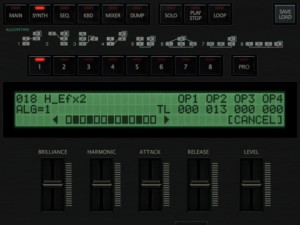
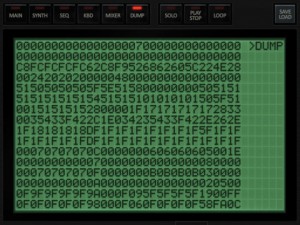
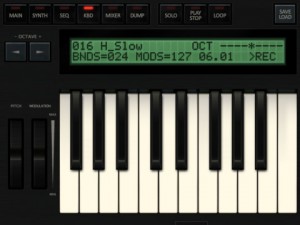
Here’s what they have to say about iYM2151:
YM2151, aka OPM, is a single-chip FM synthesis implementation, an eight-channel four-operator sound chip. it was used in many 80′s arcade games and home computers.
iYM2151 is the The world’s first FM synthesis music workstation app, using YM2151 simulator engine for iApp.
iYM2151 not only tries to recreate the 80′s FM sound, but it also recreates the experience of working with an 80′s FM interface.
Features:
- uses YM2151 simulator engine for iApp
- 4 operators per 8 Algorithms
- 8 voices
- 3 software LFOs
- max 99 scenes (1scene with 64 steps)
- easy FM edit mode
- MML mode : programable huge FM parameters in every steps
- DUMP mode : realtime all FM operator parameters viewer
- song data file sharing and mail attachment
- 80′s design user interface
Guitar Sounscapes with Ebow & csGrain
Background information:
A brief collection of 3 improvised soundscapes and patches on CSGrain for iPad with my guitar and an Ebow. Don’t expect superb playing skills as the guitar is not my main instrument. Also sorry for the ground noise and artifacts, this was recorded on the fly. The audio chain is: guitar to Lexicon Omega to iPad, then processed by csGrain and the audio output goes back to the Omega and this to Sonar on the PC thru the EMU 1820m.
I’ve included the camcorder mic sound on the last patch (from minute 5:03 to 6:30 ) because I loved the sound generated by the collision of strings with the ebow while vibrating and found it fitting pretty well with the soundscape. I hope you like it.
KymaControl Kyma iPad Controller App
Pad app for controlling symbolic sound corporation’s Kyma sound design software for Mac. http://ipadloops.com/kyma-controller-app-for-ipad/
Kyma Control is the Swiss-army-knife of controllers for the Kyma Sound Design Workstation, providing four of the most popular Kyma controller-modes in one, wireless multi-touch package: a bi-directional mirror of Kyma’s Virtual Control Surface, a multi-touch pen/tablet controller, a standard and a Tonnetz keyboard, accelerometer controls, and compass heading for using direction as a control.
For use in the studio, on stage, in the lab, at home, or in classroom, Kyma Control frees you from having to sit in front of your laptop; put yourself inside the sound field and perform your Sounds in an expressive, intuitive manner using your hands and gestures.
What’s New in Version 1.1.1
This version adds support for two dimensional faders, and buttons and switches with distinct on and off labels. The standard and Tonnetz keyboards are now on separate tabs, the keyboard range indicator now includes keyboard rounding mode selector, and the Volume control faders are now longer. This version is compatible with iOS 5.
FEATURES
• Auto-mapping, bi-directional multi-touch mirroring of Kyma’s Virtual Control Surface (VCS)
• Pen/tablet surface tracking as many as 11 fingers with color trails to help you track finger position
• A keyboard for sending !KeyDown and either continuous or discrete values for !KeyPitch & !KeyTimbre
• A Tonnetz pitch-space with configurable vertical and horizontal intervals
• Pitches can be rounded to equal tempered pitch, rounded only on !KeyDown and continuously variable after that, or, in Strum-mode, triggered when your finger passes by the key
• Trigger or control Sounds with the iPad’s accelerometer measurements in the X, Y, Z directions, as well as controls corresponding with Pitch, Roll and Yaw
• Compass heading from the iPad’s magnetometer tells you which way the iPad is pointing so you can use it for panning and other controlsREQUIREMENTS
• iPad
• Symbolic Sound Kyma X.77 (or newer) with Paca(rana) Sound Computation Engine
• WiFi connection to network accessible to the Paca(rana)KymaControl is available for $14.99

Quasar: new multitasking behavior for iOS Music Apps
“Trying a new Tweak for the jailbroken iPad called Quasar. It is great for playing more than one music app in the same screen at the same time and also for changing the behavior of some apps working together.”
Here’s one more demo:
Enjoy
Teaser: CrossDJ for iPad
http://youtu.be/kMLcvU_P48c
HDMI Cable used for video capture only, not required in normal conditions
MixVibes is proud to present the most exciting DJing application they have ever made: CrossDJ for iPad. MixVibes brings you a comprehensive iPad DJing experience with a user friendly yet professional and feature rich layout. This application allows all DJs to enjoy performing quality sounding mixes on an iPad.
Here’s a new interesting iPad App: Arpeggionome
“Demo of Arpeggionome, an amazing app for generating arpeggios. Lots of customisation. Lack of midi the only downside, which I hope the developers will be including in a future release.”
Orphion – Pad layouts tutorial
How to setup pad layouts for a performance
Orphion is a musical instrument with a unique sound between string instrument and percussion. Everyone can play expressive, wonderful sounds and easy or virtuosic melodies on it just by moving fingers on virtual pads.
Get Orphion here:
orphion.de
Become a Fan on Facebook:
facebook.com/Orphion
or follow on Twitter:
twitter.com/#!/OrphionApp
Check out the Droner for iPad
Welcome to The Droner, experimental noise & drone station for iPad. On the left, you can see the routing schematics of the synthesizer. Be careful, you don’t have a classic or a regular machine in your hands. Indeed, it can produces very unique and strange sounds textures and you have to learn to handle it.

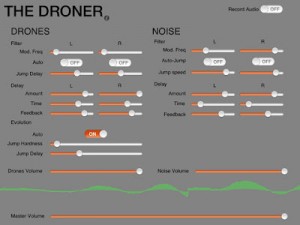
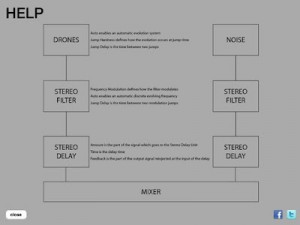
You have to use it with earphones or to use a line input on your sound-system in order to render the best results.
You can record while playing with it. The PCM file will be saved in the document folder of The Droner application on your iPad. You use iTunes to manage the files in this folder to backup them on your computer, or remove them.
Teaser for the soon-to-be-released interactive granular sampler for iPad
A “grain cloud” may be added to the screen under the current mouse position with the press of a key. This cloud has an internal timing system that triggers individual grain voices in sequence. The user has control over the number of grain voices in a cloud, the overlap of these grains, the duration, the pitch, the window/envelope, and the extent of random motion in the XY plane. By selecting a cloud and moving it over a rectangle, the sound contained in the rectangle will be sampled at the relative position of each grain voice as it is triggered. By moving the cloud in along the dimension of the rectangle that is orthogonal to the time dimension, the amplitude of the resulting grain bursts changes.
We will provide more details on this as soon as we have them
Enjoy for now 
DATAMASKIN

