
New features explained – Symphonix Evolution 1.90
This video explains some of the new features in our Symphonix Evolution iPad app. Symphonix Evolution makes it easy to enter music notation, edit MIDI files and work with external MIDI devices through a suitable interface. With wavetable synthesis and audio quality that rivals dedicated synth keyboards, Symphonix Evolution is perfect for taking your music on the road!
New features covered are the advanced MIDI settings, piano/instrument finger positions and the arpeggiator.
Check out http://www.vinclaro.com.au/ios/symphonix/symphonix.htm for more information or our blog at http://vinclaro.blogspot.com
DAW-control – Predator template for Lemur on iOS
A glimpse of the Hands On feature in the dawcontrol – Predator template for Lemur on iOS.
More info: http://dawcontrol.com/product/predator/
Predator is our most advanced Lemur template to date. It is created with the same care and understanding of user needs as all our templates but it just “feels” like there is more to it. We believe that it has something to do with the sound, Predator just sounds awesome!
The template also has beautiful pop-up menus with waveforms, sync modes and more. Instead of dragging a fader in search of the correct value you simply press a button and up comes a menu and you click a button with the option you want.
Hands on is great when you want to control several things at one once. It gives you 4 knobs and an X/Y-pad. All knobs can target a different controller, select it by clicking on the name under the knob. The X/Y-pad has two selectable controllers, one for the X-axis and one for the Y-axis, both selectable directly under the pad itself.
New iPad apps: Strange Attractor and Voco
Strange Attractor is a truly novel sound generator based on chaos theory. The outcome of PhD research, it uses a feedback system to process and generate sound. Unlike conventional synthesis techniques, sounds emerge in surprising and unexpected ways, almost having a life of their own. By moving your finger on the screen, you can navigate through a space of evolving sounds, that build-up, pulsate, and decay. Sound input through the microphone or headphone socket can be processed into fractal textures, or will trigger and control oscillations.
Voco is a touch controlled phase vocoder. Sounds can be manipulated by touching the screen, and played like like an instrument. Time is represented on the horizontal axis, and pitch on the vertical. The yellow bars display the sounds intensity. Sounds can be sampled through the microphone or headphone socket, or loaded via iTunes. There are also features to constrain the pitch to different scales, and to glide the playing point around the screen to make rhythmic loops.
Music iPhone App: Wobbl Dubstep imachine
Music iPhone/iPad app demo of Wobbl Dubstep imachine. 9 pre assigned bass wobbles and 6 loops.
Turn on a loop and wobble! Very simple and hopefully a future update will add more variation. Importing loops would be good too!
Download the app from the itunes store:
http://itunes.apple.com/app/wobbl-dubstep-imachine/id501749933?mt=8
iPad Experiment Controlling Sunrizer Synthesizer from TNRi
Here’s a new feature from Mark Mosher 
Background details:
In this video I’m experimenting with using an TNRi to drive the Sunrizer synth which is running in the background.
I’ve used the physical Tenori-On W for over two years. I prefer to run use it as a controller and run racks for virtual instruments running in Ableton Live or to turn external hardware rather than using it’s internal synth engine. So naturally, after getting TNRi for my iPad I wanted to replicate the same idea.
Luckily, certain synths such as the wonderful Sunrizer (http://beepstreet.com/) can remain running in the background allowing you to switch over to a controller app such as TNRi.
This video shows all this in action. Here is the setup:
1) Start Sunrizer and find or create a patch to your liking
2) In the top-right of Sunrizer is a button labelled ‘BCK”. Click it and it will start blinking yellow.
3) Click the Home button on your iPad
4) Start TNRi
5) Launch the menu by clicking the status window above the play button
6) Select “Preferences Menu” and turn “Local Control” to “Off”.
That’s it, now all the MIDI gets pumped through to the background app.
dlab releases APG Composer – free iPad synth
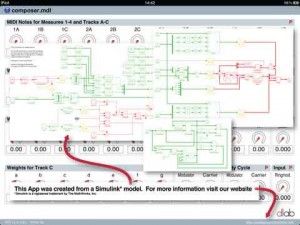
dlab has released APG Composer, which they describe as an app that combines a 3-voice FM synthesizer with an implementation of the Logique Analogique sequencer, which triggers notes when a weighted sum of different signals exceeds a threshold.
Pricing and Availability:
Free.
More information:
Update: SoundPrism 2.5 – new features
An overview over all the new features in SoundPrism and SoundPrism Pro 2.5
- connects to your favorite DAW or hardware synth
- … via WiFi (iPhone, iPod touch or iPad) or USB (iPad only)
- allows individual control of multiple instruments at the same time
- support for non-diatonic scales (iPad only)
- turns your iOS device into a wireless 3D MIDI controller
SoundPrism is available as a free download for iPhone and iPad. http://soundprism.com
Akai Pro SynthStation49 – Overview and walk through
Here’s the pitch form Akai:
SynthStation49 is the most advanced, intuitive music controller designed specifically for use with the iPad and is the first true iPad performance tool for musicians. Working seamlessly with Akai Professional’s heralded SynthStation software, SynthStation49 provides unparalleled music creation capabilities, including direct in-app MIDI recording from its velocity-sensitive keyboard, nine MPC-style drum pads and array of transport controls. In addition to its integration with the SynthStation app, SynthStation49 is also completely iOS CoreMIDI compatible, making it instantly compatible with dozens of music apps already in the App Store and hundreds more on the way.
http://www.akaipro.com/synthstation49
Additional information:
Dock, power and position the iPad perfectly using the adjustable-angled cradle, or establish commanding control over your favorite computer software using SynthStation49‘s USB/MIDI port. Professional ¼” outputs and extreme portability ensure you’ll be able to take your sequences straight to the stage at a moments notice.
SynthStation49 is the only full-featured, professional keyboard controller allowing direct MIDI performance recording onto an iPad. Bridging Akai Professional’s popular MPK controllers with the previously released SynthStation25, SynthStation49 provides immense software control with forty-nine, full-size velocity-sensitive keys, nine backlit MPC-style drum pads and full transport buttons. An adjustable-angled dock for iPad allows the user to easily slide their tablet into the SynthStation49’s cradle and position the screen to their preference.
SynthStation49’s keyboard, pitch/modulation wheels and sustain pedal input provide great feel and the essential controls for musicians and producers to compose, record and perform. The nine drum pads of SynthStation49 give users immediate, intuitive beat-creation capabilities over the 50 classic and modern kits available within the SynthStation software. Program, Sequence, Song select and Transport buttons also provide quick navigation to the SynthStation App’s most used components for a seamless, efficient workflow.
SynthStation49 also contains a stereo pair of professional ¼” TRS outputs with volume knob for easy connecting to other pro audio equipment on stage or in the studio. A headphone output also lets users practice and compose in private. The SynthStation49’s USB port can be connected directly to a Mac or PC computer to receive power in addition to transmitting MIDI to and from music software – a great way to turn the SynthStation App or other CoreMIDI compatible App into a sound module. You can even use SynthStation49 as a traditional USB MIDI controller with your computer – no iPad required!
AkaiConnect SDK allows third-party developers to take advantage of all the professional controls and capabilities of Akai Pro’s SynthStation49 keyboard controller and incorporate support for those controls within their iPad applications. Software developers interested in creating programs compatible with SynthStation49 can submit an application now at SynthStationApp.com.
Guitar Sounscapes with Ebow & csGrain
More info on the video below:
A brief collection of 3 improvised soundscapes and patches on CSGrain for iPad with my guitar and an Ebow. Don’t expect superb playing skills as the guitar is not my main instrument. Also sorry for the ground noise and artifacts, this was recorded on the fly. The audio chain is: guitar to Lexicon Omega to iPad, then processed by csGrain and the audio output goes back to the Omega and this to Sonar on the PC thru the EMU 1820m.
I’ve included the camcorder mic sound on the last patch (from minute 5:03 to 6:30 ) because I loved the sound generated by the collision of strings with the ebow while vibrating and found it fitting pretty well with the soundscape. I hope you like it.
Korg iKaossilator Live Beat Making
Live Beat Making with Ipad Music App “Korg iKaossilator” by DJ Galactic : “I used my Apple Ipad2 and iKaossilator to make this little beat (House / Dance) from scratch and mix it live. I enjoyed playing around with this music application.”
Official Website
http://www.djgalactic.com
DATAMASKIN

