
Tic Tac Beatz Electro – Electro music sequencer for iPad
Tic Tac Beats Electro is half drum machine, half music sequencer, designed specifically for electro style music.

Features:
- 4 Dedicated drum tracks,
- 1 Dedicated bass track, 1 synth track,
- 1 chord(pad or hit) track and an effect track
- 1 LFO modulates pitch on three tracks(V1.1)
- LFO syncs to beat, can adjust depth, speed and trigger for envelope effect.
- Adjust the note of each step on each track covering 2 octaves
- Adjust the sound on each step on the effect track
- 6 Pattern locations that store everything
- A “STEP” offset button for a skip effect
- Mute tracks, BPM and volume control
Tic Tac Beatz Electro is available now for $2.99 in the App Store.
Experimental stuff: The Infinite Music Machine
An immersive digital journey into the analog world of Juju & Jordash.
On the 24th of February 2012 at Berlin’s Feed Soundspace, Juju and Jordash gave a live improvised performance, accompanied by artist Paul Skawinski’s liquid projections. The application takes their muliple layers of analog recordings and randomly combines them to produce an infinite music machine. An experiment on continuing randomness in the analog and digital domains.
Features
– Randomly auto generates music derived from Juju & Jordash’s live performance.
– Liquid visuals by Paul Skawinski.
– Randomize the audio and visuals using the randomize button.
– Set the length of time the machine generates audio and visuals: one minute to ∞
Free DJ app for iPad
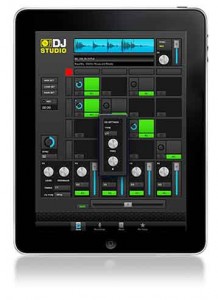
Rocudo has released DJ Studio, a free app for the iPad which they say is built to help you find and release your Inner DJ.
A spokesperson told Sonic State, “The idea is simple: we built a powerful DJ App which requires no skill to use and we packed it full of great Loops & Samples from top Artists & DJs. Then we folded in some advanced features and premium content options which you can unlock at your own pace.”
Features
- Browse builit-in library of Loop & Samples and drop onto your 4×4 Deck
- Tap Pads to play – auto-sync means you’re always on the Beat
- Manipulate Level, Mute and FX Send for each Pad
- Mixer provides Level/Mute, EQ and FX Send on 4 independent channels
- Delay FX Unit provided will autoset its parameters to match Tempo
- Save your Sets and Record your Live Performances
- Absolutely no experience required
Pricing and Availability:
Free
More information:
Concerto for iPad and Orchestra
Here a few moments from the Concerto for iPad Orchestra by Ned McGowan, performed by Keiko Shichijo on the iPad with the Sinfonia Rotterdam, conducted by Conrad van Alphen. This work is the 2nd in the Rotterdam Concerto series initiated by the Doelen and Sinfonia Rotterdam.
Some info about the piece: http://www.youtube.com/watch?v=rLMqQc1t80w
Starting Work on an iPad Lemur Template for Moog Phatty Series
My Boulder friend Mark Mosher has released this nice video featuring the Lemur for the Moog:
I’ve started work on an iPad Lemur template for my Moog Slim Phatty. This is a very early version of what I have ultimately planned but the video does show early control with physics as well as bi-directional synch. I’m programming the Lemur via Wifi, the Lemur is attached to the Phatty via the camera kit and straight into the USB port. I also have a Novation Remote SL hooked up via MIDI to play notes on the Phatty. You can also use WiFi via a host like Ableton live to control the Phatty.
In this version of the template, Filter controls are in red. There is an XY for Cutoff and Res with physics controls for Friction, Attraction and Speed. I can also lock the control on the X and Y Axis. To the right Filter EG amount with filter envelopes. Under that Filter Overload.
Next are Arpeggiator controls that are normally hidden under-the-hood in the Advanced Menu. So I can directly control Arp on, Latch, Clock Div, and Arp Octave. To the right of this a little note trigger button.
Lastly I have an Amp Envelope in Blue. Unlike from the front panel of the Phatty, Lemur allows me to control more than one parameter at the same time, like Cutoff and Res, or all the segments of a an envelope.
Making a beat in a few seconds with WerkBench
“Making a quick beat with two drums and a speaking toy. Get WerkBench for the iPad here: http://bit.ly/L6jhd9“
WerkBench is a new kind of beatbox that is part loop pedal, part drum machine, and 100% beat-making magic. Turn any sound into amazing music! WerkBench’s unique power comes from two live-sampling step sequencers that record sounds directly into 16 step patterns, allowing you to build fresh beats in seconds!
WerkBench features:
–“Fancy Controls” (pitch, lowpass filters, envelopes, and more!)
–Edit pitch and levels independently for each step!
–Funky lo-fi tape echo for spacey effects with a sweet real-time visualizer.
–Save and load loops.
–Export loops and recordings via Audio Copy, iTunes file sharing, and email.
–MIDI sync and MIDI trigger modes.
Modular and iPad: bengeseek-desktop
Here’s a nice demo of a Buchla working together with an iPad:
testing out little midi machine iPad sequencer with my buchla
see http://myblogitsfullofstars.blogspot.co.uk/ for more
Live Electro Fun: Blade Runner theme with Octatrack, Tetra and iPad
Background information:
Having fun with my favorite movie theme from Blade Runner (by Vangelis) and some funky electro beats. Direct live recording: Octatrack with 808 Samples and a Tetra analog synth + Sunrizer synth app on an iPad. Reverb from TC Electronic. Text: “Electrical Stimulation” 
More music on: http://www.soundcloud.com/thomas-kress
Teaser – Genome MIDI remix pads
Demo of the ‘Remix pads’ coming in version 1.1.0
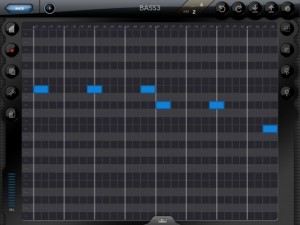
White Noise Software has announced an update to Genome MIDI Sequencer, its software sequencer for the iPad. Here’s what’s new in Genome MIDI Sequencer 1.1.0:
- Fixes for playhead visual positioning issues
- ‘Create’ option for Grooves (create a groove template from a pattern, such as recorded MIDI notes).
- Remix Pads
- File management – Delete, email, Open in… (for opening files in other apps including Dropbox)
- Improvements to Zooming – Zooming in and out should work a little better now in general. When zoomed out, the view now smoothly zooms in instead of abruptly zooming
- New zoom mode. In additioned to the standard ‘fixed’ zoom (where X and Y scale is locked together), there’s an ‘advanced’ mode that lets you zoom X and Y are independently zoomable.
- OMAC App Fast switch – This allows you to quickly switch between compatible apps (not every app supports this yet) via a menu in Genome. The button for this is on the sequencer page.
- Important Change: Genome’s virtual port is no longer ‘on’ by default. You have to enable it via the config menu. The reason for this is that this is a frequent point of confusion for users. Having a virtual port can lead to issues where apps get connected twice (resulting in doubled tempos and other weird cases). It’s only necessary for Genome to have a virtual MIDI port when other apps don’t have one of their own. Only a few apps _don’t_ have virtual ports (such as Animoog), but for the majority of apps you won’t need it on.
- Bugfixes and stability improvements
Not in 1.1.0 but being worked on:
- MIDI Learn (for binding controllers to Patterns and Song steps) – I had wanted to get this in 1.1.0, but there are important bug fixes that need to get out now. This will be one of the first things I implement for the next update.
TABLETOP – now in its 3rd generation
quick look @ ‘Tabletop’ via a 3rd generation iPad. great workstation / creative outlet for music-making in iOS. base-version comes with a significant amount of devices. if other big-name synth / plug-ins were invited to submit devices to this, it would definitely have potential to explode.
DATAMASKIN

