
TC-11 Multi-Touch Synthesizer – Performance Demo
TC-11 is a fully programable multi-touch synthesizer for the iPad. This video demos some of the 64 included presets, and shows the multi-touch performance and device motion control.
TC-11 uses multi-touch control like no other app. The relationships between touches are controllers that drive synthesis. Since TC-11 is fully programable, any touch controller can change any synthesis parameter.
More videos will be uploaded soon! Stay tuned for a full feature tour, editing demo, and tips on programming your own TC-11 patches.
For more information, visit www.bitshapesoftware.com.
Rock mate is out – at a bargain price $0.99

★ RELEASE SPECIAL PRICE FOR A LIMITED TIME !!! (From 14 to 21 december 2011) ★
LET’S ROCK TOGETHER
Rockmate is a breakthrough music creation app. It turns your iPad into a complete music studio easy and super fun to use.
You can compose, record and play songs with up to 4 Rock players on one single iPad. Rockmate is easy to play with smart chords progressions, sounds great with separated guitar effects and in-house produced audio samples and is also fully customizable with multiple drums and keyboard styles.
Rockmate is ready to rock !
Your guitars are always well tuned, no need to carry your drum kit or to patch your keyboard. A smart metronome and a real-time looper will assist you in composing and recording your songs. Share your songs by email or iTunes sharing folders.
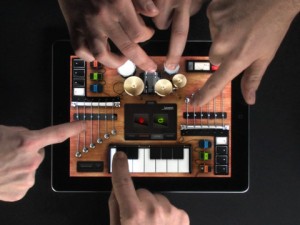
Specifications
- Realistic design and animations
- High-quality samples
- 4 players on one single iPad
- Realtime looper
- Smart metronome
- Mixer with level and pan controls
- Realtime Fx (distortion, multiFX, powerchord)
- Chords progression customizable
- Create your own chords
- Save your styles (Chords progression, FX, Drum, keyboard style…)
- Export: .wav or .aac
- Sharing: iTunes sharing folder and Email.
- Airplay
Lemur and NanoStudio
Presented by Gaz Williams and Nick Batt
This new Lemur app allows you to control DJ software, studio production software (DAWs), live electronic music software, stage lighting, and more – this is no everyday keyboard situation. Any software OR hardware that can otherwise be controlled by OSC/MINI is able to be controlled by this Lemur app. For those of you new to the platform, you’ll be able to access a user library of pre-made templates from top artists and unknowns from the Lemur community – artists from around the world are now sharing their own templates, strengthening the platform by the minute!
You’ve only to connect your iPad OR iPhone to your laptop over Wi-fi to work with a cross-platform (Mac OS X or Windows) interface builder to bring your experience to a whole new level, dragging and dropping with ease as you do so. You’re able to control up to 8 computers from one iPad if you wish, Lemur also supporting CoreMIDI allowing you to use such hardware interfaces as the iConnectMIDI or USB MINI interfaces to your heart’s content. Physics in objects are able to be controlled with physics models, allowing you to bounce, oscillate, and rebound across your tracks — objects including, but not limited to: Fader, Multislider, Range, Multiball, Knob, RingArea, Switches, Pads, Custom Button, and text.

SPECIFICATIONS
– Objects
Fader; Multislider, Range; Multiball; Knob; RingArea; Switches; Pads; Custom Button; Container; Breakpoint; Leds; LemurMenu; Monitor; SignalScope; SurfaceLCD; Text
– Physics
Hated physics at school? Now you’ll love it! The behaviour of many Lemur objects can be affected by powerful and easy to use physical models which can make your controller bounce, rebound and oscillate. Make your controller come alive.
– Scripting
There’s absolutely no need to dive into scripting if you don’t want to. But if you’re the type who likes to get their hands dirty then there’s a powerful scripting engine inside Lemur. Harnessing this power will allow you to build extremely dynamic templates.
– Editor
The Lemur editor, is a cross-platform (OS X/Windows) interface builder. It allows you to create new Lemur templates or edit existing ones. The drag & drop interface makes it easy to use. It allows you to create anything from the simplest set of faders to the most complex groovebox with no hassle.
– Connectivity
Simply connect your iPad/iPhone to your laptop over Wi-Fi and make the connection! Lemur also supports CoreMIDI allowing you to use hardware interfaces such as Alesis’ iO Dock or the iConnectMIDI or class-compliant USB MIDI interfaces (with a camera connection kit). You can even control up to 8 computers from one iPad with Lemur!
PHYSYNTH has been released
PHYSYNTH turns your iPad or iPad 2 into a piece of real vintage synth hardware.
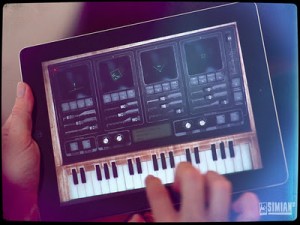
Powered by next-generation 3D graphics technologies, it is a stunning, beautiful device that will enable you to weave beautiful, fluid ‘Soundscapes’.
PHYSYNTH uses a state-of-the-art physics engine to trigger sounds using four real simulators, you charge physical objects with sound and collide them with other objects to trigger them. It is an entirely new way of creating music, a natural and fluid way to express yourself with a wide range of beautiful, realistic instruments.
FEATURES:
- Custom shaders especially designed for iPad2 and the beautiful high definition full-3D interface pushes the limits of what your device can do.
- iPad 1 owners are not left out, Physynth was designed to take full advantage of everything the device has to offer.
- Layer your sounds with Four-track Soundscaping.
- Jam with Realtime melody or rhythm over-dubbing.
- The physics-triggered sample engine with user-adjustable parameters means endless scenarios.
- Enjoy a wide range of beautiful sounding instruments with more coming in regular updates.
- Express yourself with full mixing control including full stereo panning, volume and digital special effects.
- Vintage hardware design with groundbreaking 3D tilt camera, stunning lighting and unbelievable next-gen graphics make Physynth the app to show your friends.
- Melody-mode to allow the user to play Physynth instruments like a traditional keyboard or drum pad.
- Headphones are recommended for full stereo immersion and realtime panning.
The app is priced at $2.99.
FL Studio Mobile | 1.3 What’s New
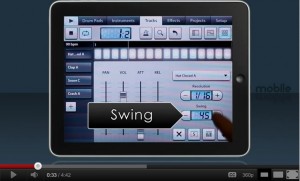
Here’s a teaser from Image Line
Physynth testing
“One of our testers having a go with a couple of Soundscape ideas in Physynth.”
Physynth turns your iPad or iPad 2 into a piece of real vintage synth hardware. Use the state-of-the-arts physics engine to explore organic, evolving, fluid music.With a vintage hardware design, groundbreaking 3D tilt camera, stunning lighting and unbelievable next-gen graphics push the iPad and iPad 2 to their very limits.

Physynth by Simian² (an amalgam of ‘physics’ and ‘synthesizer’) heralds a landmark moment in music creativity, combining cutting-edge user-created physics with an AAA quality game graphics engine for unparalleled immersion, Physynth brings traditional music applications out of the stone age and sets the bar very high for all other creativity apps to be judged. Created as a live experimental instrument and musician’s sketchpad, Physynth enables the musician to toy with new concepts, melodies, rhythms and unexpected aural pleasures using the power of physics and experimental design in an organic, fluid manner.
Physynth features a beautiful hand-crafted real 3D music hardware with custom shaders tailored especially for iPad and iPad2, Physynth really is vintage hardware in the palm of your hand. A labour of love and effort, Simian² have brought something that can only be experienced first-hand, into your hands.
FEATURES
– Four-track Soundscaping.
– Vintage hardware design with groundbreaking 3D tilt-camera, lighting and next-gen graphics.
– Realtime melody or rhythm over-dub.
– Physics-triggered sample engine with useradjustable parameters.
– A wide range of beautiful sounding instruments.
– Realtime mixing with pan and volume control.
– Realtime Reverb and Chorus digital special effects.
– Melody-Mode to allow use as a traditional musical keyboard.
New Korg WIST tutorial
In this tutorial, we’ll use Korg WIST to synchronize playback on one iPad running BeatMaker 2 and another iPad running Korg iMS20.
You can sync iPads, iPhones and iPod Touch’s seamlessly with apps that support this technology.
See the full list or WIST-enabled apps, plus user guides at: http://www.korguser.net/wist
WIST is a trademark and software of KORG INC.
BeatMaker 2:
APP STORE LINK: http://itunes.apple.com/us/app/beatmaker-2/id417020234?mt=8
And for those of you who do not have a clue of what WIST is:
WIST (Wireless Sync-Start Technology) is Korg’s innovative technology which allows for wireless sync-start between two WIST-compatible apps on two iPads and/or iPhones located near each other. You can now sync with your friend’s device to create a dynamic live performance using two compatible apps. The setup process is very simple and easy. Just enable the WIST function on each app to connect to another, and set the Master and the Slave. The two devices will be connected via Bluetooh, so you can play anywhere without 3G or a Wi-Fi network. The initial iPad or iPhone will be treated as the Master for sync-start, sync-stop and tempo. The second device will Slave to the Master settings. You’ll be synchronized and ready to jam!
Lemur iPad app – first attempt at controlling Reason 6
Background data:
Always coveted a Jazzmutant Lemur, but could never justify the cost. So I couldn’t pass up the opportunity to work with the iOS app adaptation by liine! This is my first attempt experimenting with the multiball control and physics model to trigger MIDI notes and generate interesting modulation patterns of Malstrom and Echo devices.
Geo Synthesizer and SampleTank together
“Thanks to the app MidiBridge I was able to control SampleTank via my app Geo Synthesizer on my Ipad. A winning combination indeed!”
Geo Synthesizer is a musical instrument and MIDI controller. A collaboration of Wizdom Music’s Jordan Rudess and Kevin Chartier (MorphWiz, SampleWiz) and Rob Fielding (Mugician), Geo Synthesizer is an incredibly expressive musical instrument specifically created for a multitouch surface.
SampleTank is the first professional quality sound and groove module that puts hundreds of world-class instruments and patterns in your pocket. You can play SampleTank instruments on stage with the iRig MIDI (www.irigmidi.com) interface and a keyboard or pad controller just as you would with a regular sound or synthesizer module, or you can use the built-in tools to create inspiring professional sounding music on the go.
Featuring the Physynth for iPad
And here are the details:
PHYSYNTH turns your iPad or iPad 2 into a piece of real vintage synth hardware.
Powered by next-generation 3D graphics technologies, it is a stunning, beautiful device that will enable you to weave beautiful, fluid ‘Soundscapes’.
PHYSYNTH uses a state-of-the-art physics engine to trigger sounds using four real simulators, you charge physical objects with sound and collide them with other objects to trigger them. It is an entirely new way of creating music, a natural and fluid way to express yourself with a wide range of beautiful, realistic instruments.
FEATURES:
• Custom shaders especially designed for iPad2 and the beautiful high definition full-3D interface pushes the limits of what your device can do.
• iPad 1 owners are not left out, Physynth was designed to take full advantage of everything the device has to offer.
• Layer your sounds with Four-track Soundscaping.
• Jam with Realtime melody or rhythm over-dubbing.
• The physics-triggered sample engine with user-adjustable parameters means endless scenarios.
• Enjoy a wide range of beautiful sounding instruments with more coming in regular updates.
• Express yourself with full mixing control including full stereo panning, volume and digital special effects.
• Vintage hardware design with groundbreaking 3D tilt camera, stunning lighting and unbelievable next-gen graphics make Physynth the app to show your friends.
• Melody-mode to allow the user to play Physynth instruments like a traditional keyboard or drum pad.
• Headphones are recommended for full stereo immersion and realtime panning.
ESSENTIAL LINKS:
• View the TV advert now at: physynth.com
• Crafted by Simian Squared: simian2.com
DATAMASKIN

