
Everyone Can Play Music #9: iMS-20 – Part 4
“This lesson is all about pots and pans. I demonstrate some basic tricks to cleaning up a mix with a little panning, and then get into some basic automation for lively panning.”
iMS-20 is available on iTunes:
Major update to NanoStudio
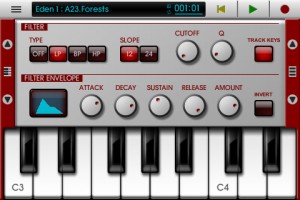
Blip Interactive has announced a big update to NanoStudio, adding iPad support and more.
Here’s what’s new in NanoStudio 1.3 (Universal):
Features:
- Universal iPad version
- Free desktop version now supports window sizing
- Added extra musical scales to keyboard
- Increased size limit for a single sample to 32MB
- Ability to slide the keyboard by fractions of a note
- Mixer mute/solo
- Improved bottom range of mixer volume faders
- Double tap on mixer channel title to go to instrument
- Double tap on ‘centre zero’ knobs to return to centre
- Added ability to tap song position on status bar to toggle between bars and hours/minutes
- Added indicator to main menu to show the last selected instrument
- Update to latest Akai SynthStation library
- Added ‘Mix audio with other apps’ option to allow iTunes music background play (iOS)
- Added buffer latency settings (iOS)
- Automatic normalization is now optional after sampling or resampling
- Added an ‘add effect’ button to empty effects slots
- Changed TRG behaviour to allow drags across pads
- Added load/save effects chain to the effects select dialogue
- Song editor – vertical zoom
- Song editor – mute/solo buttons can be swiped vertically
- Song editor – added MIDI activity indicators to each track
- Song editor – parts on muted tracks are shown in grey
- MIDI file and .nsp file export dialogues now have a ‘show file’ button (Windows/OS X)
Bugfixes:
- Buzzing sound on Eden ring mod when phase was non-zero
- TRG-16′s ‘auto BPM’ function was sometimes inaccurate
- Possible fix for OS X not enumerating some MIDI input devices
iKaossilator Version 2.0: New Features
Here’s an update to our previous post on the new iKaossilator: Korg’s iKaossilator app gets some great new upgrades with Version 2.0, including iPad native support, Audio Export, file sharing via SoundCloud, and more. Best of all, it’s free to existing iKaossilator owners!
http://www.korg.com/ikaossilator
Mixmo DJ Promo video
Teaser for a new DJ app for iPad – Mixmo DJ Pro Promo Video
Please bare with me with the horrible techno tune  >> shit it really sucks
“Special thanks to: Paul Veth & Parc Breda”
Alchemy Mobile iPad DB73
http://youtu.be/RfcXjlG2HPc
3:00 min demo video of Camel Audio’s Alchemy Mobile FREE synth for iPad. All sounds from Alchemy Mobile. Sounds triggered internally or from external MIDI keyboard (via iRig MIDI interface).
Description:
Turn your iPhone/iPad into a powerful synthesizer! Alchemy Mobile includes everything from evolving soundscapes and fat bases to lush pads and pulsing arpeggios. This is the iOS version of Camel Audio’s award-winning Alchemy synth – the leading sample manipulation synthesizer which can be heard on thousands of records and films by world-class artists.
Discover an almost limitless palette of sounds using the unique remix pad to morph between sound variations. 16 controls including cutoff, resonance, ADSR and effects parameters are specially selected for each preset to make tweaking sounds to fit your music easier than ever.
The Alchemy Mobile interface was designed with ease of use in mind. The mini keyboard features scalable keys and one touch major and minor chords so even the clumsiest fingers can play along with friends. You can also plug in an external Core MIDI keyboard.
Using Alchemy with other apps like NanoStudio and Garageband is easy, thanks to the included loop player. Simply paste a loop from your sequencer into Alchemy, hit record, and play in your killer bass part, and then paste the resulting loop back into the sequencer.
Want to know why Alchemy Mobile has such amazing sounds which can change so drastically with a tap of the remix pad? The performance controls and remix pad are linked to the most powerful synthesis engine on iOS. Alchemy’s VA synth, sampler and granular and additive resynthesis, combined with almost unlimited modulation sources, effects and a flexible arpeggiator are used to power this expressive way of creating new sounds for your music.
You can expand Alchemy Mobile with a wide range of sound libraries such as BigTone, Cinematic and Arp Dimensions from world class sound designers. The libraries each contain 50 sounds (400 variations) and are available as in-app purchases.
Phaedra iPad Sequencer First Look…
Last week we got a teaser of the upcoming Phaedra iPad sequencer, now the developers gives us some more details:
This is a quick overview of the highlights of Phaedra, the “analog” style four-channel MIDI sequencer for iPads, coming soon from NaughtyPanther.
In this video, Phaedra is driving a DSI TETR4, a Doepfer modular synth, a Korg Monotribe, and an Eventide Space and TimeWorks. No DAW is used in the sequencing. Everything is being clocked from Phaedra.
DXi FM synthesizer version 3.1.0 on iPad
DXi is a FM synthesizer application inspired by 80’s most popular synthesizer. Enjoy making music and creating sound by FM synthesis engine easily.
The movie show you the new great features about DXi version 3.1.0.
Please visit the URL for more information: http://itunes.apple.com/app/dxi-fm-synthesizer/id370138065?mt=8
FM synthesizer is still popular among many people by its unique tone. We carefully selected parameters from original synthesizer so you will be enjoy editing tone with them easily. You need to know some technique to tweak the tone, but you will be able to get DXi’s special tone and effects while having some fun!
Creating sound effects is another idea to enjoy DXi.
We loaded 16 step loop sequencer as a bonus feature!
If you remember the days of FM synthesizers, try creating the tone you remember from them.
If you have no experience with any FM synthesizer, we are sure you will be enjoying the unique tone world!
* 4 operators FM synthesizer
* Anti-ailiased oscillator
* 8 algorithms
* Envelope, frequency (Ratio or Fixed) can be set each operators.
* Feedback control on operator number 4.
* 2 master effects (LPF with Resonance and Delay)
* Import/Export function to save the tone you created. (URL schema text string format)
* Audio recording function. And you can transport recorded audio file, .wav, onto Mac/PC via iTunes file sharing.
* Clipboard audio sharing support. You can export recorded waveform to other application via clipboard. It’s compatible with Intua’s clipboard.
* Supports external MIDI keyboards via Core MIDI USB adapters. iPad users can use Camera Connection Kit. And iPhone/iPod touch users can use Yamaha i-MX1.
About the original – Yamaha DX7:
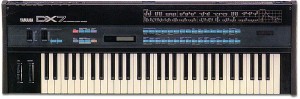
One of the most popular digital synths ever was the DX7 from Yamaha, released in 1983. It featured a whole new type of synthesis called FM (Frequency Modulation). It certainly is not analog and it is difficult to program but can result in some excellent sounds! It is difficult because it is non-analog and thus, a whole new set of parameters are available for tweaking, many of which seemed counter-intuitive and unfamiliar. And programming had to be accomplished via membrane buttons, one data slider and a small LCD screen.
Still the sounds it shipped with and that many users did manage to create were more complex and unique than anything before it. Percussive and metallic but thick as analog at times, the DX-7 was known for generating unique sounds still popular to this day. The DX-7 was also a truly affordable programmable synth when it was first released. Almost every keyboardist bought one at the time making the DX-7 one of the best selling synths of all time! It also came with MIDI which was brand new at the time – Sequential had already released the first MIDI synth, the Prophet 600. Roland had just released the JX-3P with very basic MIDI implementation, and wouldn’t get around to adding full MIDI for another year with the Juno-106, and it would be three years before Roland can counter the popularity of the DX7 with a digital synth of their own, the D-50.
Taking a closer look at the Mixr 1.1 Update – Sample Pad
http://youtu.be/q64JYj3SOXc
Featuring a 9-Pad Sampler and a completely redesigned UI, Mixr 1.1 makes it easy to add that extra layer of awesome to your mixes! Check out the all-new 1.1 video on youtube and check out the full list of features and improvements on our blog. Think adding a wicked sampler pad to your decks is going to cost you big time? Wrong! Mixr 1.1 is a free update for existing users. Just our way of saying thanks to our users for all the incredible support over the past two months.
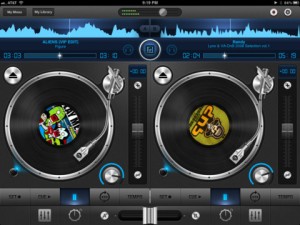
Description:
Mixr was designed to capture and redefine the mobile DJ experience.
Mixr delivers a rich feature set designed for mobile DJ’s. You can pitch, tap to tempo, scratch, multi-cue and mix with precision. You can manage your iPod library with the revolutionary Crate Manager. Make crates with the touch of your finger in the drag-n-drop interface, you have complete control over your mixes. Featuring high quality DSP effects, you can add Delay and Reverb to your mixes to add that extra punch to your sets. Supporting mono split audio output, you can monitor pre-cueing with your headphones for live performances. Record your mixes and play them back in a sleek player. Recording a mix automatically creates playlists! Turn your iPad into the best mobile DJ Turntable Studio, with Mixr.
Features
Interface
✓ Dual Multi-Touch Turntables
✓ Audio Waveforms
✓ Multi Cue Loops
✓ Tempo
✓ Equalizer
✓ Effects
✓ Quick Loader
✓ Double-Tap Slider Reset
✓ Manual Crossfader
✓ Crate Manager
✓ Settings
✓ My Library
✓ My Mixes
✓ Recorded Mix Player
✓ LCD Track: Artist, Song/Album. Elapsed/Remaining Time.
Audio
✓ Tap to Tempo
✓ Tempo control (+/- increments)
✓ Pitch-Bend (6%, 12%, 25%)
✓ 4-band equalizer (-24 dB to +6 dB)
✓ 3 Manual Loops
✓ High Fidelity Vinyl Scratching
✓ Ultra-low latency
Music Library
✓ Direct iPod library access
✓ Quick track load popover
✓ Browser by play list, songs, artist, genre
✓ AAC, AIFF, WAV, MP3
✓ Create, delete & rename Crates
General
✓ Pre-cueing thorough headphones (Mono Split)
✓ Advanced recording
✓ Auto track listings
✓ Auto-saving (cues, crates, bpm, waveforms)
✓ Fully optmized for iOS 5
Tips & Tricks
★ Crossfader: Use the A and B buttons to perform a smooth auto crossfade
★ Library: You can rearrange crates and tracks in wiggle mode
★ Sliders & Faders: Tap any where to instantly change values
★ Mixr Academy: Watch training tutorial videos to sharpen your DJ skills at http://mixrdj.com/academy
For more information, please visit: www.mixrdj.com
For news and updates, please follow us on Twitter: www.twitter.com/ipadmixr
Review: Beat Shuffler
“I roused myself from a Turkey-induced-coma to bring you this timely review, so please forgive all the “uhh”s. Beat Shuffler is a beat juggling app for the iPad that makes loop mashing pretty fun and easy. ”
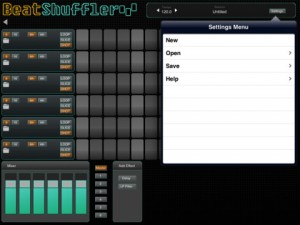
Beatshuffler is a music app that slices loops and allows you to trigger those slices, always on time. It is a great beat sketching tool where almost everything sounds interesting, since the slice triggering always falls on the beat. At its core, it is inspired by the mlrv app, for the Monome and other grid devices.
It features:
– 6 tracks for loops.
– Ability to import WAV and MP3 files.
– iOS File Sharing import for exchanging files with the app.
– A mixer.
– A master channel with effects.
– A separate channel for each of the tracks, with effects.
– Available effects: Delay and Low Pass Filter.
Among the upcoming features are Audio Clipboard support, to import loops from other apps and an expanded loop library.
iPad Music App Demo: Synthtastic
Here’s a nice demo of the experimental app Synthtastic, which actually I also downloaded a couple of weeks ago and it is really fun to play around with and creating ambient synthish sounds
“Demo of Synthtastic. A great sounding app that needs an update to get rid of the constant crashing. Works on Iphone as well.”
NOTE: For me it hasn´t crashed any time yet
DATAMASKIN

