
MuTheremin iPad App Demo
The following demonstrates MuTheremin iPad App version 1.0. It’s a multi-touch theremin inspired synth and it’s free.
Pros: Free, Multi-Touch,cool lights
Cons: It’s buggy. You will hear clicks and noise. I used an Alesis IO dock for audio. Also tried it though headphones. Same problem.
More info here http://ipadloops.com/free-mutheremin-ipad-app/
Free S4 Rhythm Composer for iPad
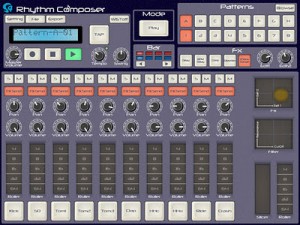
This app is a beatbox allows you to compose and play 64 beat patterns.
You can also record the patterns.
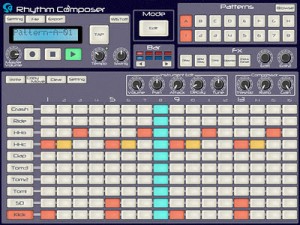
S4-Rhythm composer is a beatbox allows you to compose 64 beat patterns.
To check all beat patterns in a bar immediately, use the large screen of iPad.
Use various Effect Functions while playing a beat; you can enjoy the beatbox as you play the beat actually.
The beat patterns can be exported as WAV files. You can use the files on various DAWs by importing them into PC via iTunes.
Functions
– 10 PCM sound sources (Kick, Snare, Tom1, Tom2, Tom3, HandClap, HHopen, HHclose, Ride, Crash)
– Tempo (40-280 bpm), Tap Tempo, Swing, Groove functions
– Step Sequencer (up to 64 steps)
– Various Part Effect functions (Compressor, Roller)
– Various Master Effect functions (Delay, BPM Delay, Compressor, Distortion, Chorus/Flanger, LPF, Slicer, Roller)
– Audio Export function
– Real-Time Recoding function
– Wireless Sync-Start Technology (WIST) is supported
S4-Rhythm Composer is an app only for iPad; NOT for iPhone/iPod Touch.
Noisepad – new drum machine for the iPad
Get the Noisepad app for iPad now!! Available on the Appstore http://itunes.com/app/noisepad
Noisepad is a new drum machine app for the iPad. It lets you make beats, load up your own samples and sequence them and add effects.
Features:
- Sound effects: Pitch . Delay . Phase . Cut-off . Reverb . Crush
- Slider double tap: reset the effect to the off position
- Soundbanks: samples & beats are organized into multiple sets
- Cut: each sample cuts previous sample
- L/R: switch the orientation to suit left or right handed
- Tap: tap for the tempo of your effects
- Volume: set the Noisepad volume separately from the device volume
- Effects Dry / Wet: set effect strength from 0 to 100%
- Audio output: output meter
- In-App shop: download the latest samples from your favorite artists
- Background music: play a track in iTunes and make some noise on the same device
- Custom soundbank: upload your own samples using iTunes*
- Supported sound formats: (.CAF / .WAV / .MP3 audio files, 22khz / 44khz / 48khz, stereo / mono ).
No mention is made of MIDI support.
NoisePad is currently $2.99 in the App Store. If you’ve used Noisepad, leave a comment with your thoughts on it.
Grain Science — Quick Overview
A quick tour of our new iPad synthesiser, in which I make a lot of strange loud noises.
The intro tune was created in Grain Science itself by using the built in performance recorder on each track, and sending them to our Hokusai Audio Editor for mixing and mastering.
Grain Science is out now in the App Store: http://itunes.apple.com/app/id487233637
For more info: http://www.wooji-juice.com/products/grain-science/index.html
Grain Science is based on the principles of granular synthesis: taking audio (a waveform/sample), tearing it into tiny pieces (the “grains”), and then putting them back together.
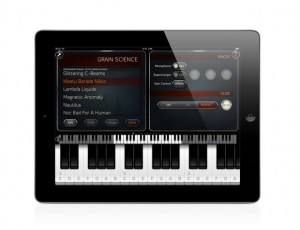
You can use it like a traditional sampler, by telling it to put the pieces back together exactly how it found them. You can use it like a traditional analogue synthesiser, by using sawtooth, sine or other basic waveforms as the source material — after the grain synthesis is done, you still have a variety of sophisticated tools to pass your sound through, before it hits the speakers or recording.
Of course, you can also go to places that neither a sampler nor an analogue synth can dream of going! With grain synthesis, the sound can be exactly as it started, or completely unrecognisable, or anywhere in between. The ability to create entirely new sounds that still, somehow, retain some of the essential qualities of the original, is one of the things that makes granular synthesis so interesting.
Not only that, but Grain Science offers two grain units per voice. Because you can control the mix between them — either manually, or programmed to change over time according to your needs — you can create layered, morphing or rich, complex modulated sounds (as you can also use the second grain unit to amplitude-modulate the first). You can also get direct control of the grain unit scrubbing, allowing you to “grainbend” live to create truly wild audio!
Rheyne – Lemur Jam
Improv jam using Lemur on an iPad 2, with analog keyboards and USB controllers connected to Ableton Live. Lemur is wirelessly controlling effects on NI’s Massive (synth played on the M-Audio Oxygen 25) and NI’s Kontakt (drums played on the Akai MPD26). The bass is on a Moog Prodigy, and the lead is a DSI MoPho. All loops are recorded live, nothing is pre-recorded.
About Lemur:
Lemur – the legendary multitouch MIDI/OSC controller returns. All these major artists can’t be wrong: Daft Punk. Björk. Nine Inch Nails, Deadmau5. M.I.A., Justice, Hot Chip, Ryuichi Sakamoto, Orbital, Richie Hawtin, The Glitch Mob, Matthew Herbert, Joris Voorn, Stephan Bodzin, Modeselektor, Alva Noto, Richard Devine, Gui Boratto, … you?
Rock solid standard
Major stadium-touring acts use Lemur on stage. The original hardware version was introduced to the public in 2004 and Lemur software now benefits from nearly 10 years of development. These are just two of the reasons Lemur is the name cited when talking about multitouch control.
Control anything
Lemur is a professional iOS controller app that doesn’t cut any corners. It lets you control anything, any way you want. Total flexibility means it can go as deep as you need it to. Lemur can control DJ software, live electronic music performance software, studio production software (DAWs), VJ software, visual synthesis software, stage lighting and more. In fact, any software or hardware that can be controlled by MIDI/OSC can be controlled by Lemur.
A controller unequalled
Lemur has often been imitated but never equalled. The physics engine, which can make faders and balls bounce, is entirely unique: allowing anything from a slight organic feel to absolutely chaotic modulations. Lemur goes deep: it comes with more than twice as many objects as comparable apps. Options for adjusting the look and feel of objects are vast, and connection to your gear is simple.
User Library
Access templates from top artists and the Lemur community. Some of these are actual templates used on stage, others are pure studio or creative tools. Share your own or simply browse the library and download whatever suits your needs.
SPECIFICATIONS
– Objects
Fader; Multislider, Range; Multiball; Knob; RingArea; Switches; Pads; Custom Button; Container; Breakpoint; Leds; LemurMenu; Monitor; SignalScope; SurfaceLCD; Text
– Physics
Hated physics at school? Now you’ll love it! The behaviour of many Lemur objects can be affected by powerful and easy to use physical models which can make your controller bounce, rebound and oscillate. Make your controller come alive.
– Scripting
There’s absolutely no need to dive into scripting if you don’t want to. But if you’re the type who likes to get their hands dirty then there’s a powerful scripting engine inside Lemur. Harnessing this power will allow you to build extremely dynamic templates.
– Editor
The Lemur editor, is a cross-platform (OS X/Windows) interface builder. It allows you to create new Lemur templates or edit existing ones. The drag & drop interface makes it easy to use. It allows you to create anything from the simplest set of faders to the most complex groovebox with no hassle.
– Connectivity
Simply connect your iPad/iPhone to your laptop over Wi-Fi and make the connection! Lemur also supports CoreMIDI allowing you to use hardware interfaces such as Alesis’ iO Dock or the iConnectMIDI or class-compliant USB MIDI interfaces (with a camera connection kit). You can even control up to 8 computers from one iPad with Lemur!
Rhythm Studio Updated With New Gemini Synthesizer
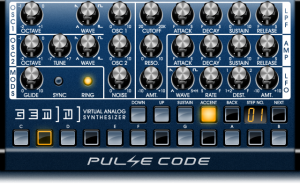
Pulse Code has updated Rhythm Studio, adding a new virtual analog synth and more.
Here’s what’s new in Rhythm Studio 1.05:
- Gemini Synthesizer included – 2 oscillators modeling analog waveforms – 24db resonant filter – oscillator sync – ring modulation.
- New FX, including:
- Phaser
- D-Verb
- S-Verb
- Amp Distortion
- 2 band Equalizer
- Auto Filter
- Improved navigation with a zoom button and panning which snaps to each device.
- Full multi-touch enabled. Now you can control and move as many knobs and switches as you like!
- Optimizations and bug fixes.
Rhythm Studio is a virtual studio app for iOS. It’s currently $.99 in the App Store. Additional devices are available as in-app purchases.
Nebula brings real-time granular synthesis to the iPad
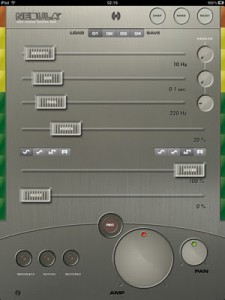
Nebula brings real-time granular synthesis to the iPad, including glissons and grainlets. Granulation can be performed on several prototypal waveforms (sines, triangles, squares, noise) and morphing can be applied between them.
It is possible to store presets and interpolate among them using a single finger through the gesture mode (activable by the provided button or simply by going to landscape mode). You can also save and load banks of presets and share them to your friends through iTunes, using the App page.
In the motion mode, it is possible to control some parameter of the synthesis in a physical manner by simply moving the iPad in your hands. Finally, all the produced sounds can be recorded and exported to your favourite platform: the recorded sounds will be found in iTunes under the App page.
The app is priced at $4.99.
Building nice grooves in SampleTank
SampleTank® 1.1 is a universal app for iPhone, iPod touch and iPad that gives you the power to quickly build grooves with its enhanced PADS interface and 4-track MIDI recorder with unlimited overdubbing. The familiar drum machine-style interface lets you lay down beats easily with adjustable quantize values that you can change on the fly as well loop record and a click track that you can turn on and off at will. Put a drum kit on part A, a bass on part B, a piano on part C, sound FX on part D … anything you like! You can export your recording as a stereo audio AAC file via E-Mail or iTunes File Sharing to use it in another app like AmpliTube or VocaLive or a computer DAW like Logic or Pro Tools. You can also export a .MID standard MIDI file. SampleTank 1.1 is a free update for all existing users and is available in the App Store. Check it out today!
http://ikmultimedia.com/sampletankipad/features/
Review of the new Physynth
Physynth is a great example of an experimental music app; offering the control you need to make meaningful experiments with predictable outcomes.
Physynth is available now on iTunes: http://goo.gl/VGxL4
PHYSYNTH turns your iPad or iPad 2 into a beautiful unique vintage instrument. Powered by next-generation 3D graphics technologies, it is a stunning, beautiful device that will enable you to weave beautiful, fluid ‘Soundscapes’. PHYSYNTH is something you’ll want to tinker with, it’s that sketchpad you have lying around for when you feel creative. Re-live the golden years of experimental hardware and indie invention.
PHYSYNTH uses a state-of-the-art physics engine to trigger sounds using four real simulators, you charge physical objects with sound and collide them with other objects to trigger them. It is an entirely new way of creating music, a natural and fluid way to express yourself with a wide range of beautiful, realistic instruments.
• Physynth is suitable for anyone to pick up and begin exploring their hidden talent for music, beginner and pro alike.
• Physynth is designed for entertainment and enjoyment, creativity and experimentation.
• Physynth is a “Generative Synth” which synthesises sounds from collisions. It is not designed like a normal synth, instead Physynth is something new!
• Don’t forget to read about updates coming, including coreMIDI and many more Instruments. More information below after the features!
• Introductory sale now on for only a few days.
• Regular updates FREE. NO Ads and NO in app purchases.
FEATURES:
• Custom shaders especially designed for iPad2 and the beautiful high definition full-3D interface pushes the limits of what your device can do.
• iPad 1 owners are not left out, Physynth was designed to take full advantage of everything the device has to offer.
• Layer your sounds with Four-track Soundscaping.
• Jam with Realtime melody or rhythm over-dubbing.
• The physics-triggered sample engine with user-adjustable parameters means endless scenarios.
• Enjoy a wide range of beautiful sounding instruments with more coming in regular updates.
• Express yourself with full mixing control including full stereo panning, volume and digital special effects.
• Vintage hardware design with groundbreaking 3D tilt camera, stunning lighting and unbelievable next-gen graphics make Physynth the app to show your friends.
• Melody-mode to allow the user to play Physynth instruments like a traditional keyboard or drum pad.
• Headphones are recommended for full stereo immersion and realtime panning.
New Classic Drum Machine for iPhone and iPad
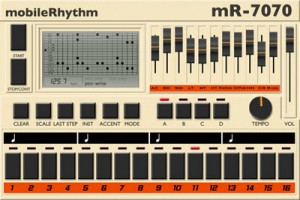
mobileRhythm mR-7070 – Classic Drum Machine for iPhone and iPad. Universal App with an unmistakable 1980’s look and sound.
Features:
- MIDI in, out and MIDI clock out
- Precise tempo control with digital readout.
- 4×16 banks for pattern storage.
- Individual faders for each drum sound.
- Multiple beat divisions for crazy time signatures with adjustable last step.
- Rock solid timing.
- Grid-view pattern display.
- ..And much more.
The hardware drum machines and beatboxes from the 1980’s have defined musical genres from House, Acid, Hip-Hop, right up to and including the latest Dub-step, Grime and other electronic music beats.
The mR-7070 works just like the original beatboxes, and anyone who is a fan of music will instantly recognise the classic sounds it produces.
Its easy to program even complicated beats and with plenty of storage space to store your creations.
MIDI setting are in the iOS settings app, and will work with any “CORE MIDI” interface.
The app is priced at $5.99.
DATAMASKIN

