
Teaser for the Genome MIDI Sequencer
Genome MIDI Sequencer for the iPad, in action.
Genome MIDI Sequencer (GMS) is a pattern based MIDI sequencer. It’s simply the best app on the iPad for controlling all your MIDI gear. You can sequence single patterns or an entire 16 track song. GMS is fun, easy and portable. Whether you want to make music from the couch, a hotel room or on stage, GMS is the right tool for the job. It is great for people looking to try an alternate studio setup, searching for a compact sequencer to bring to band practice or those who just want to find a way to ditch the bulky laptop. GMS easily syncs your drum machines and arpeggiators by sending and receiving MIDI clock messages. General MIDI files are easily exported and imported for integration with desktop apps. GMS is compatible with the Line6 MIDI Mobilizer and any interfaces that support CoreMIDI using the Camera Connection Kit or Network MIDI. Network MIDI allows you to send events to your Mac Desktop or to other iOS devices and apps.
Badlion’s Garage Synth for the iPad and iPhone
Here’s a little demonstration of the various sounds and features of Badlion’s Garage Synth. It is a universal app for both the iPad and the iPhone and costs $0.99.
“With Badlion’s Garage Synth anyone can be a musician. Just pick a beat and play some tunes over it, add some effects and you already have a hot track to listen to. Selectable keyboard – flash & rainbow / basic minimal. 48 beats – changeable volume and tempo. 8 samples – 4 octaves. 44 fx – loop or stop (once) functions. Tilt – you can pitch notes by tilting the phone.” – itunes.apple.com/the-badlions…
808 emulation for iPad
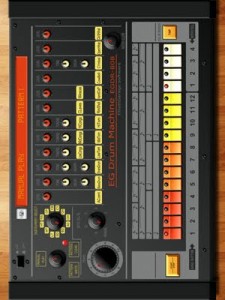
ElliottGarage presents EGDR808, a drum machine that emulates the vintage hardware from the 80’s.
Its realistic and clear interface recalls the analog machine from the past, for all the vintage fanatics.
You can play with the rythm presets included or you can create your own pattern.
Features:
– Interface like the real drum machine from the 80’s
– 16 steps sequencer
– 12 programmable rythm patterns and 4 fills patterns
– Auto fill in every 2, 4, 8, 12 or 16 pattern
– Save the pattern you’ve created and play your songs
Transform your iPad into a touch screen controller for GarageBand
http://youtu.be/pvJrXgovIN0
If you liked Delora gbTouch, wait until you get your hands on gbTouch 3. New from Harmony Systems, Inc., gbTouch 3 is a significant upgrade to the Delora gbTouch iPad music application, which turns an iPad into a touch screen controller for GarageBand.
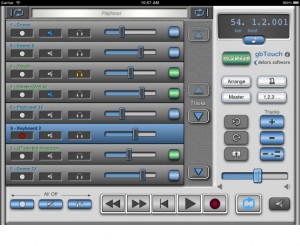
With this release, the controller app offers a number of new features and benefits, including extra capabilities that allow you to know and control exactly where you’re at in your composition. The dynamically adjusting “LCD” display shows a user selectable choice of playhead location or project information, including song tempo, and playhead position and tempo can be changed easily to specific numeric values. On the Track Details screen, individual track volume and pan are now controlled with faders, and their values are displayed. According to the maker of gbTouch 3, graphics have been enhanced and the increased use of icons makes gbTouch more language independent.
You can use gbTouch in the studio, onstage, or anywhere really. In addition to supplementing the use of mouse and keyboard to control GarageBand, gbTouch 3 also serves as a control surface of sorts for GarageBand, making music creation more productive and efficient from anywhere in your studio or music environment. This flexibility is particularly useful in recording situations, Harmony Systems says. The individual track controls — record, mute, solo, and volume — and transport buttons on gbTouch allow you to adjust and evaluate tracks before heading into the mixing session.
What you can do with gbTouch 3:
- Control transport functions (Backward, Forward, Beginning, Play, Record, Cycle)
- Enable / disable record, mute, and solo for each track
- Track names and numbers shown on each track
- Tracks color coded for real and software instruments
- Select current track with one touch
- Access more than eight tracks with the arrow keys
- Adjust volume of individual tracks, and overall with Master Volume
- Adjust pan level for an individual track
- View values for track volume and track pan
- Disable all volume during playback with Volume Mute
- Move the playhead quickly using jog channel strip
- Designate Cycle start and end points
- View LCD display, which dynamically shows playhead location — user selectable measure or time format — or project info (tempo, time signature)
- Change tempo
- Adjust the playhead to a specific bar-beat location
- Adjust the playhead to a specific time based location
- Turn off all track record, mute, and solo attributes
- Show / hide the Arrange View or Master Track
- Enable / disable Metronome and Count-In
- Create a new track, duplicate, or delete a track
- Undo or Redo an action
- Save a GarageBand file
- Adjust Master Echo and Reverb effects
- Manipulate Compressor, Visual EQ, and software instruments’ sound Generator parameters
- Enable / disable effects
- Name of the currently selected track shown on the Track Edit screens
- Set preferences for faders to “jump” on touch
- Select one of three themes (four including GarageBand ’09) at any time to change the look of your app
GbTouch 3 requires the installation of gbLink 3.0, a Mac OS X application (Lion compatible) that provides the ability for gbTouch to communicate with GarageBand using a Wi-Fi network. GbLink is available as a free download at the Delora Web site.
Harmony Systems’ gbTouch 3 is now available for $9.99 from the App Store. Existing gbTouch users may upgrade to gbTouch 3 for free. For more information, visit delora.com.
Alesis IODock Review by Sonic LAB
About the product (Alesis info):
The iO Dock (patent pending) is the first device that enables anyone with an iPad or iPad 2 to create, produce, and perform music with virtually any pro audio gear or instruments. The iO Dock is a universal docking station specifically designed for the iPad and iPad 2, and it gives musicians, recording engineers, and music producers the connectivity they need to create and perform with iPad. Connect all your pro audio gear to virtually any app in the App Store with the iO Dock.
FLEXIBLE FUNCTIONALITY
Songwriters, music producers and performers of all kinds will find that the iO Dock connects the iPad’s powerful processor, touch-screen interface and extensive library of apps to their collection of microphones, instruments, professional speaker and PA systems, MIDI controllers, sound modules, video projectors and much more.
With the iO Dock and an iPad, musicians and producers can record, perform, craft and create music in virtually any situation or location. Built to accommodate all current app-development standards including Core MIDI, the iO Dock is a universal device that bridges your choice of music-creation apps, instruments, and devices.
COMPLETE CONNECTIVITY
The iO Dock provides microphone and instrument users with two combination XLR and 1/4-inch inputs, each with its own gain control and switchable phantom power for condenser microphones. Guitarists and bassists will appreciate the iO Dock’s guitar-direct switch, enabling them to play, perform and record right into amplifier- and effects-modeling apps. Bands can connect outputs from their mixer and easily record their performances and rehearsals or use the iO Dock as a metronome or loop-playback device. Producers can use the iO Dock’s MIDI jacks to sequence external keyboards, samplers, drum machines and synthesizers, or perform using the iO Dock as the sound module and their favorite MIDI-compliant keyboard, drum pad or other controller. An assignable 1/4-inch footswitch input enables remote control of any app-defined function such as stop/start or record. Users can also connect the iO Dock to their Mac or PC using the USB port to send MIDI back and forth for creative, new applications of the iPad and computer used in tandem.
Users can connect the iO Dock’s stereo pair of 1/4-inch main outputs to studio monitors for critical listening, or to PA systems for use in performance settings. They can monitor on headphones, and independently control the levels of the two outputs, each on its own knob. Recording musicians will appreciate the iO Dock’s direct-monitor switch, which enables them to toggle between the incoming and playback signal on their headphones. Rounding out the iO Dock’s output section is a composite video connector, enabling users to employ the iO Dock as a source for video projection behind bands on stage, or for connection to most televisions and computer monitors.
RUGGED RELIABILITY
The iO Dock was built for the real world. Whether you’re keeping it in the safety of the studio or taking it out for recording or performance use in the club or on tour, the iO Dock will not only deliver the connectivity you need for audio applications, but it also serves as a rugged, protective case for the iPad. The iO Dock completely houses the iPad on the bottom and three side surfaces. It also encases the iPad’s screen in a protective bezel on three of its four edges, further shielding the mobile computing device from the potential for damage in punishing environments.
The applications of the iPad for music creation, production, and performance are limited only by your creativity. As an imaginative, cutting-edge music maker, the iO Dock empowers you to seamlessly connect the world of pro audio gear and instruments to the iPad and the massive collection of apps.
Twisted KP has been released – OSC Converter for Konkreet Labs Performer
Twisted Tools has released Twisted KP, an advanced OSC converter for Konkreet Labs Performer application for the iPad. It allows you to easily connect Performer to a variety of devices, both inside and outside of your computer. Twisted KP converts performer messages to MIDI, *Control Voltage and Reaktor IC Sends, and in any combination.
Simply put, Twisted KP is the bridge between Konkreet Labs Performer and your music software and hardware, allowing you to quickly control almost anything, anywhere.Twisted KP is a dedicated OSC converter for Konkreet Labs Performer application for the iPad. It allows you to easily connect Performer to a variety of devices, both inside and outside of your computer. Twisted KP converts performer messages to MIDI, *Control Voltage and Reaktor IC Sends, and in any combination.
How it works:
1) Konkreet Labs Performer sends OSC messages to Twisted KP, which runs in Native Instruments’ Reaktor standalone mode.
2) Twisted KP receives the messages and provides an easy-to-use interface to convert them to MIDI, analogue control voltage or internal Reaktor messages, called IC sends.
3) You can then route MIDI anywhere out of Reaktor using its virtual MIDI out port, send control voltage out a dc-coupled audio interface to analogue modular synths and/or use an IC SEND menu to instantly select a Reaktor parameter as a destination, via a simple drop down menu.
Features:
Converts Performer messages to MIDI, *Control Voltage or Reaktor IC Sends.
Fast, intuitive and powerful interface.
Presets for NI Maschine, Kore, Moog Voyager, Access Virus and more.
Demo versions and presets for Twisted Tools devices.
Musical scales to play KP in key and create chord clusters.
Bypass entire nodes and/or individual messages.
Message range adjustment.
Message value inversion.
Gate mode.
Quantized note lengths.
Quick Start setup guide within Reaktor.
Price:
$9
Technical Requirements:
Reaktor 5.6.0
iPad
Konkreet Labs Performer (http://konkreetlabs.com/)
*Control Voltage requires a dc-coupled audio interface. Consult your interface manufacturer’s guide to find out if it supports sending control voltage using its outputs before attempting use.
New user friendly MIDI DAW Control Surface for Logic
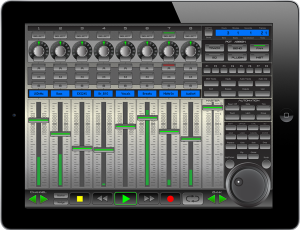
xMix – Logic Edition is an interactive, user friendly MIDI DAW (Digital Audio Workstation) Control Surface specifically designed and optimized for use with Logic Pro 9. No drivers required. Powered by CoreMidi Networking Technology with speeds of almost zero latency, xMix-Logic Edition connects wirelessly and seamlessly interacts with Logic Pro 9. The xMix user interface displays the absolute state of play in Logic Pro direct to your iPad. Giving you the freedom to control your session from anywhere within wifi range, delivering a new sense of control in your studio.
- Unlimited Tracks (in banks of 8)
- 8 Virtual Faders assignable to almost any purpose.
- 8 Virtual Multi-purpose Rotary Pots
- Complete Channel Strip Control over Pans, Solo, Mute, Record arm.
- Full VU db Meter displays for each channel.
- Scribble LCD strip displays name for each highlighted track.
For each channel, with one touch you have the power to access, control and modify the current EQ settings, with a mix of faders and VPots you can infinitely and precisely control each band of EQ.
Once your instrument has been selected xMix auto-configures all controllable parameters to the either the 8 VPots, 8 Faders, or a mix of both. Each control available is noted in the LCD display area so you are always 100% on top of the controls.
Once in Plugin Mode, xMix will offer you access to all the plugins loaded in the channel. As with the Instruments, xMix automatically maps the available functions and parameters to the 8 VPots or faders.
All the important Play, Stop, FF, Rewind, Record and Loop are situated at the bottom of screen. you can also use the scrub wheel to surf from one end of the track to the other.
xMix offer a wide range of extra controls over your Logic session. From automation to general copy pasting xMix has it all available directly from your iPad.
xMix gives you easy control over the views and screens which presented in Logic. Direct from your iPad you can open close the mixer window, select form audio/midi/instruments channels, quickly change to notation mode. Any screen you want to access, with one or maximum 2 touches you are there. No more reaching for the mouse, just touch and go..
In perfect harmony – Buchla and iPad MidiMe App
Background information:
I am using the Apple camera connector and the MAudio Uno to connect to the Buchla midi port from the iPad. The left XY pad is controlling the symmetry and timbre of the 261e. The right XY pad is controlling the waveshape of the mod osc, the morph of the 259e, and the panning of the 259e. I am playing a mix of the 261e mod and principle oscillators with the keyboard. Delay is from the Korg KP3.
Rhythm Studio Browser and Workspace
http://youtu.be/zsekwcLgXxQ
How to turn your iPad into a virtual studio
Rhythm Studio is a workspace style app with a studio of realistic electronic music instruments. It is a universal app available on all current iOS hardware.
Rhythm Studio balances advanced features by using an easy to understand interface resembling real instruments. This means that one button does one thing just like it would with real hardware. Knobs turn, switches slide, and buttons press. You won’t get lost in abstract interfaces or design. Rhythm Studio is the next best thing to having the real hardware.
Rhythm Studio includes a full 808 drum machine, 303 synthesizer, sample based synthesizer, XY style control pad, and mixer with FX.
Rhythm Studio has three ways of creating music.
- Manually program the drum machine and synthesizers like the original hardware.
- Use the Control Pad to play the drum machine or synthesizers live.
- Create randomized patterns based on the key and scale of the song.
Tabletop -new iPad music making app
Retronyms has announced a new iPad music making app called Tabletop, which it describes as a modular audio environment
The idea is that you’re given a range of devices – keyboard, sampler, mixer, sequencer, effects etc – that can be connected up to form a complete iPad music making studio. Currently, you get nine of the 15 available devices as standard, with others being available as in-app purchases (more are in development).
Today Retronyms, makers of iOS apps DopplerPad, ReBirth, Recorder and Synth, released Tabletop, a modular audio environment app for iPad. Tabletop is the first app built for iPad featuring audio devices that users can mix and match. These devices emulate hardware found in tabletop DJ and producer setups: instruments, samplers, effects, mixers, sequencers, turntables, and more. One simply drags the desired device to the tabletop surface and wires it up to a mixer as they would with real-world hardware.
Tabletop is built exclusively for the iPad to be expressive, playable and fun. Both professional artists and those with no knowledge of music production can jump right in and start sketching out ideas or composing entire songs. Electronic musician Paul Salva says, “It took no time at all for me to acclimate. I had literally never touched Tabletop before, and within minutes I had some crazy stuff rocking.” To answer any questions about how the app or any of its devices function, Tabletop comes with a built-in user guide.
The full Tabletop press release is below, and the app itself is available now from the App Store for £2.99 (this is the 9-device ‘launch bundle’ price).
DATAMASKIN

