
Sunrizer on iPad – Sinevibes bank demo
This is a showcase of some of the patches from the Sinevibes bank for Sunrizer. You can download the bank for free over here: http://www.beepstreet.com/horizon
Sunrizer synth (previously known as ‘Horizon synth’) is a virtual analog synthesizer that takes the definition of iOs synthesizer to the next level. Thanks to carefully designed architecture and heavy usage of coprocessor it blurs the boundaries between iOs and hardware synthesizers. Sunrizer was built to perform and works perfectly with any MIDI keyboard or sequencer. A lot of research has been done in order to achieve unheard warmth and clarity.
The meaning of my “Life”
Headphones recommended.
Recorded on a hill near Siena, Tuscany, Italy.
Music composed and played by Gianni Proietti a.k.a. Gattobus using Teenage Engineering OP-1 and Curtis for iPad
Deep Street has released Sunrizer XS synthesizer
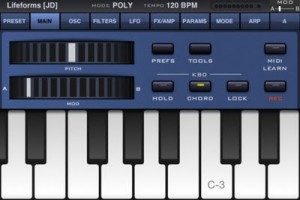
Sunrizer XS synth is a virtual analog synthesizer that takes the definition of iOs synthesizer to the next level.
Thanks to carefully designed architecture and heavy usage of coprocessor it blurs the boundaries between iOs and hardware synthesizers.
Sunrizer XS was built to perform and works perfectly with any MIDI keyboard or sequencer. A lot of research has been done in order to achieve unheard warmth and clarity.
*** The app requires at least iPhone 3GS or iPod Touch 3rd gen. iPhone4 or iPod Touch 4rd gen. recommended for full polyphony ***
*** Introductory price -50% off. ***
HIGHLIGHTS
· True SuperSaw sound emulation, first found in the legendary Roland JP-8000 synthesizer. SuperSaw is a layered waveform consisting of multiple saw waves which are detuned to create an extremely full and epic sound. It’s possible to use 2 supersaw oscillators per voice · Polyphony: 7 voices on iPhone 4, 3 voices on iPhone 3GS
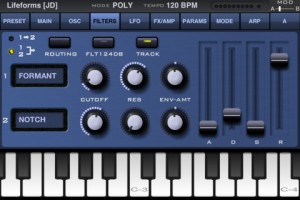
· Two independent filters per voice with configurable routing. You can select between various filter types including classic resonant LP,HP,BP,Notch and less common like Comb and Formant.
· The Morph Group function lets you continuously morph of up to 30 parameters in a sound (including effects), using only the modulation wheel.
· Full support for CoreMidi, MIDI mapping with learn function
OSCILLATORS
· 2 warm-sounding analog modelled oscillators per voice + 2 sub-oscillators (except SuperSaw). Available waveforms: Saw, PWM pulse,Triangle, SuperSaw.
· Oscillator 2 hard-sync and configurable routing
· Osc-mix, ring modulator
· White noise oscillator
FLEXIBLE MULTI FILTERS
· Two independent filters per voice with configurable routing. You can select between various filter types including: resonant LP,HP,BP,Notch, Comb and Formant.
· Configurable routing: serial or parallel with bypass option.
· ADSR envelope, keyboard tracking and full LFO control
MODULATION
· Two LFOs per voice. It’s possible to assign each LFO to almost any parameter. 3 LFO running modes: trigger, 1 shot, global. 6 waveforms, phase and fade-in knobs
· The Morph Group function lets you continuously morph of up to 30 parameters in a sound (including effects), using only the modulation wheel.
· Two Modulation ADSR Envelopes for amplitude and filters cutoff
· Pitch and modulation wheels
EFFECTS
· A number of effects are built in: distortion, chorus, equalizer, stereo delay. All parameters can be modulated using mod-wheel.
ARPEGGIATOR
· Sunrizer XS incorporates very powerful programmable arpeggiator. You should think of it more like a small step sequencer.
OTHER FEATURES
· Over 200 presets, ability to share cutom banks via email
· 7 voices polyphony
· Playback modes: poly, solo, arp
· Built-in recorder supporting AudioCopy and iTunes file sharing.
· Supports CoreMidi. MIDI key velocity can affect up to 3 parameters.
· Configurable piano keyboard size
· Hold button allows you to to keep notes sustaining until you play new notes.
· With Chord Memory function you can play the chord by only pressing single keys.
· Tube soft saturation on output
More on the eyoControl 1.5 for the iPad
eyoControl is a multi MIDI controller application for the iPad, including control surface and virtual instrument type controllers.
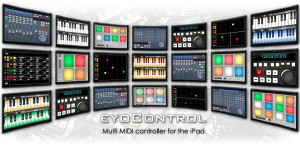
eyoControl lets you control a Mac/Windows DAW (Digital Audio Workstation) software or a MIDI synthesizer from your iPad in various ways, such as a control surface or virtual instrument.
Features:
Surface is a control surface enabling access to various settings of your tracks through faders, knobs and buttons. Surface includes a Mixer and a Panel view, enabling fast access to a large number of tracks.
Transport lets you intuitively control basic playing/recording abilities of your DAW or recorder software in the studio or live environments.
Pad is a MIDI controller with 4,6,8 or 12 programmable, touch-position sensitive pads. Each pad can be assigned a MIDI channel, color… Pad lets you play one or more virtual instruments from your DAW/synthesizer, such as drums or percussions.
Keys is a dual keyboard MIDI controller. Choose among three different key widths per keyboard to best fit your style, assign each keyboard to a different MIDI channel to play two instruments on your DAW/synthesizer in parallel.
mXY is a multi X/Y controller, featuring four independent, highly configurable MIDI X/Y controllers. Assign them to one of the many available MIDI Continuous Controllers to modulate in real time the sounds of your virtual instruments or synthesizer.
Really nice free sound bank for the Sunrizer synth
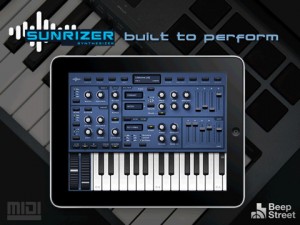
Beep Street has released a free sound bank for Sunrizer synth, featuring sounds by Artemiy Pavlov .
To install it:
- Open Sunrizer on your iPad;
- Open Safari on your iPad;
- Click this link (or browse to http://www.beepstreet.com/Sinevibes.srb);
- Select ‘Open in Sunrizer’ & click yes when you see the install prompt; and
- Enjoy the goodness.
About the synth:
Sunrizer synth (previously known as ‘Horizon synth’) is a virtual analog synthesizer that takes the definition of iOs synthesizer to the next level. Thanks to carefully designed architecture and heavy usage of coprocessor it blurs the boundaries between iOs and hardware synthesizers. Sunrizer was built to perform and works perfectly with any MIDI keyboard or sequencer. A lot of research has been done in order to achieve unheard warmth and clarity.
Highlights
True SuperSaw sound emulation, first found in the legendary Roland JP-8000 synthesizer. SuperSaw is a layered waveform consisting of multiple saw waves which are detuned to create an extremely full and epic sound. It’s possible to use 2 supersaw oscillators per voice * 7 polyphony = 98 saw oscillators playing the same time!
Two independent filters per voice with configurable routing. You can select between various filter types including classic resonant LP,HP,BP,Notch and less common like Comb and Formant. The Morph Group function lets you continuously morph of up to 30 parameters in a sound (including effects), using only the modulation wheel.
Oscillators
2 warm-sounding analog modelled oscillators per voice + 2 sub-oscillators (except SuperSaw). Available waveforms: Saw, PWM pulse,Triangle, SuperSaw.
Oscillator 2 hard-sync and configurable routing. Osc-mix, ring modulator. White noise oscillator.
Flexible multi filters
Two independent filters per voice with configurable routing. You can select between various filter types including: resonant LP,HP,BP,Notch, Comb and Formant. Configurable routing: serial or parallel with bypass option. ADSR envelope, keyboard tracking and full LFO control.
Modulation
Two LFOs per voice. It’s possible to assing each LFO to almost any parameter. 3 LFO running modes: trigger, 1 shot, global. 6 waveforms, phase and fade-in knobs. The Morph Group function lets you continuously morph of up to 30 parameters in a sound (including effects), using only the modulation wheel. Two Modulation ADSR Envelopes for amplitude and filters cutoff. Pitch and modulation wheels.
Effects
A number of effects are built in: distortion, chorus, equalizer, stereo delay. All parameters can be modulated using mod-wheel.
New synth for Rhythm Studio
New instruments and effects are beginning to appear for the Rhythm Studio for iPad, here’s a snap shot of a new synth they are launching:
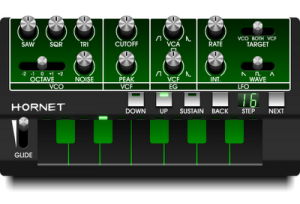
“Here is the first synth we are adding to Rhythm Studio. The first of many. It is a subtractive synth with design inspired by the EDP WASP and Korg Monotribe. It will have a ribbon style keyboard. The oscillator produces three waveforms simultaneously, along with noise. The controls were kept as simple as possible while still giving you loads of sonic possibilities.
Look out for the Hornet in the first major update of Rhythm Studio (coming soon).
More specialized synths are on the way!”
The future of iOS music continued
This is a preview of an upcoming polychord release. In this video, we’re using polychord (BETA) as a MIDI keyboard for nLog Pro (BETA) — all on one iPad, all without any cables. App makers are starting to work together to make all of your iOS music apps play nicely with each other through virtual MIDI. This is still experimental, and it will be a little while until app makers optimize their apps for multitasking, and enable virtual MIDI. It’s very exciting and clearly the future of iOS music making.
If you are a developer, get involved with the open music app group: groups.google.com/group/open-music-app-collaboration
Genome MIDI sequencer goes modular
Using the Genome Midi sequencer for the iPad to sequence a modular synthesizer. The ipad is sending midi out thru the Alesis iDock to the Encore Expressionist for midi to cv conversion for the modular. The Metasonix D1000 is receiving its triggers from the 4MS Rotating Clock Divider clocked by ch 5 of the Genome app. Recorded into Ableton Live in one take.
The virtual studio for iPad – Rhythm Studio – is being updated
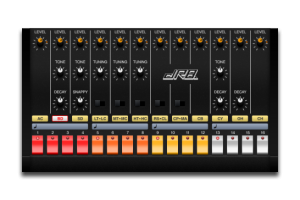
Pulse Code has announced plans for the next version of Rhythm Studio – a virtual studio for the iPad.
New Features in R3:
- Optimized Mixer that fits on one screen. The mixer has been optimized to fit on one screen which allows for better control but also gives us more workspace.
- 4 Audio Devices! That is right, with the smaller mixer the XYP Control Pad mkii has been moved which gives us one more slot to add a device!
- User selectable devices. In SETTINGS view you can change out the devices for your song. Do you want 4 x TB3 synthesizers just because? Well you can!
- Paste your song to the Intua Audio Paste clipboard to share between other apps! I exported the demo songs and sucessfully imported it into Garage Band of the iPad. http://support.apple.com/kb/HT4622
- Linear Control. In SETTINGS view you can change from Rotation control to Linear control. Thanks everyone for your feedback!
- Email Support. A button within the app will email us directly to give us feedback or ask for help.
- Email Song Session File. Share your masterpiece with your friends! (Audio in a future update)
- Song File Lock. This will prevent your song from being deleted or modified. Great for songs you want to share or just jam over.
New Devices in R3:
- Improved 4 Channel Mixer with controls that fit on one screen. The Effect Units have also been combined to make it more streamlined and simple to use.
- Improved XYP Control Pad. The new Control Pad mkii has a wider control surface that makes it easier to use.
- DR-9 Drum Machine. Perfect Four on the Floor drum machine to make those banging beats! Also includes flam to hit those 32nd notes.
- Gate Audio Insert Effect. The Gate Effect slices up the audio and takes it to another dimension.
“The only thing we need to do is build our new virtual analog subtractive synthesizer called: “The Hornet”. The Hornet will be a ribbon style synth. We’ll post the specs as soon as they are set.”
New drum machine for the iPad
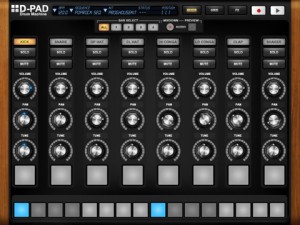
MyElectronica has introduced a new iPad drum machine – D-Pad:
D-Pad is an old-school style Drum Machine exclusively made for the iPad. It brings you a simple and easy to use instrument to create drum rhythms in an instant. With D-Pad, you are able to create new sequences, play with patterns, have a full overview of the drum track and add up to 7 effects in real-time. D-Pad includes many kits, from old machines to new up-to- date styles. D-Pad has a build-in 4 bars sequencer as well as a live mode. Last but not least, D-Pad natively comes with audio export.
Specifications:
- 8 track Sequencer (bpm from 40 to 240)
- 4 bars: sequenced play mode, single bar edit, copy and paste between bars
- Swing feature
- Live pad mode with recording capability (length up to 32 bars or 64 seconds)
- Volume, pan and tune adjustment for each individual track
- Manage your sequence through the sequence menu
- Kit selection menu
- Mixer view, Sequencer Grid view and Effect Rack view
- 7 effects: Reverb, compressor, Filter LPHP, Delay, Bitcrusher, Phaser and 3 band EQ
- Audio Mix-down to reuse your tracks in other audio applications (Wav files)
- Info screen (touch the logo) with parameters modifications (mix-down and swing)
Unfortunately, MIDI support is currently missing in action for D-Pad. The developer says MIDI sync and export are under developement.
D-Pad is $4.99 in the App Store. Details below.
D-Pad comes with 3 different sections: the mixer, the grid and the effect rack.
The Mixer offers you:
- To individually change the Volume, the Pan and the Tune of each track
- To play each track in live mode with dedicated pads, where changes and effects also apply
- To record in live mode with a quantize functionality
The Grid allows you:
- To have a full overview of the rhythm you are creating
- To quickly assign events to each track with the multi-touch enable. Just swipe the pads with your fingers.
- To easily identify when one or more tracks are in solo
The Effect view allows you:
- To control which effect is applied on the whole track
- To set each single parameters of each effect. Here again, the multi -touch enable allows you to modify many parameters at the same time.
D-Pad also comes with the great audio Mix-down feature: create a rhythm (with the sequencer or with the live mode) and record it. The corresponding audio file is stored in the document folder of the D-Pad Application.
Currently under development
- Midi export
- Mid sync
- More effects
DATAMASKIN

