
Brian Eno – Remiix International Feel
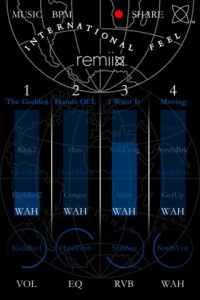
Here’s a quick demo of the new interactive record for iPad/iPhone from International Feel available from Sept 27 2011. Featuring BPM & key matched tracks from Locussolus (DJ Harvey), Rocha, Hungry Ghost, Bubble Club & Coyote, it gives you the chance to make your own version of these tracks, or make a completely new track out of the component parts of all/any of them.
Buy Remiix International Feel on iTunes:
http://itunes.apple.com/us/app/remiix-international-feel/id463813127
Product description:
To help celebrate their two year anniversary, remix the Balearic sounds of the mysterious label from Uruguay: International Feel. Combine instrumental loops, playful vocals, slo-mo drum & percussion loops and mercury infused basslines, straight from the shores of Vesuvius.
Remiix International Feel is an interactive record, a 2011 version of Brian Eno’s ‘Generative Music’. You mean you’re still listening to the same record over and over again?! It’s also a perfect DJ tool, containing six tracks (and their component parts) from the label’s roster, presented in an interactive format. The songs are all automatically beat-matched and repitched in key.
The range of sounds is tantalising, especially considering you can really isolate and pick out your favorite combinations. Some standouts include the bassline from “Next To You” – a long loop that turns around with syncopated leaps in the melody, the vocals from “Moving” – smooth house/disco loops that could add a sensual flavor to any mix, or the epic guitars from “Illuminations” – sitting comfortably between disco and early prog rock.
Remiix International Feel includes effects specially tailored to suit the sounds from the label. The first, RVB, simulates early analog plate reverb effects. The other is called the WAH and it lets you add subtle or drastic Leslie rotating speaker effects. You’ll recognise the sound as a throwback to the time of 70s disco and electric pianos.
Over the past 12 months International Feel has released tracks and remixes by DJ Harvey, Daniele Baldelli, Still Going, Greg Wilson, Joakim, Quiet Village and many others, as well as breaking new artists like Rocha and Hungry Ghost. This year has also seen acclaimed album releases from Gatto Fritto and DJ Harvey’s Locussolus project (from which two tracks are included on this version of Remiix).
Says label boss Mark B: “International Feel is based in Punta Del Este on Uruguay’s Atlantic Coast. The label came into existence to create a home for open minded music heads driven by 100% passion and perfection in everything we do. Whether it be the music itself or the vinyl cut… the artwork or the remixes, we strive to create pieces of music and artwork that play with expectations, never drop the quality and become desirable and collectable items of timeless beauty.”
Tracklist:
Hungry Ghost – Illuminations
Bubble Club – The Goddess
Rocha – Hands Of Love
Locussolus – Next To You
Coyote – Moving
Locussolus – I Want It
Alchemy Mobile – new iPad synth from Camel Audio
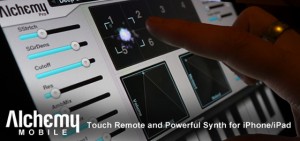
Mobile includes everything from evolving soundscapes and fat bases to lush pads and pulsing arpeggios, and is available for free from the iTunes App store. This is the iOS version of Camel Audio’s award-winning Mac/PC Alchemy synth – the leading sample manipulation synthesizer which can be heard on thousands of records and films by world-class artists. With the Pro Upgrade, you can remotely control Alchemy or the free Alchemy Player on your desktop computer. This is the first iPhone App to offer a dedicated touch remote feature for a desktop synth! Easy one touch access to the remix pad and preset selection means you’ll spend more time getting inspired and less time reaching for your mouse.
Alchemy Mobile Free features
- Remix pad to morph between sound variations and create your own sound.
- 16 performance controls so you can easily tweak sounds to fit your music.
- Most powerful iOS synthesis engine with VA, sampler, granular and additive resynthesis.
- External MIDI keyboard support.
- Loop player with 25 drum loops included.
- Copy and paste support for easy integration with sequencers.
- iPad native version included.
- Built in keyboard with scalable keys.
- One touch major and minor chords.
- 25 sounds with 25 more free when you register.
- Add on sound libraries available as in-app purchases.
Alchemy Mobile Pro features
- Remote control of Alchemy or free Alchemy Player on your desktop computer.
- Free download of Mobile version (if available) of desktop sound libraries you own.
- 125 sounds.
- 50 loops.
Alchemy Mobile Free is now available for iPhone/iPad. The Alchemy Mobile Pro Upgrade is available for iPhone/iPad for $19.99 USD / 15.99 EUR / £13.99 GBP. The Pro Upgrade is available as in-app purchase from the free version.
Check out the new iPad synth – Slynthy
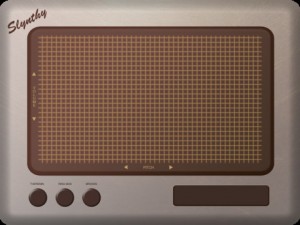
Developer Mitchell Cichocki has released Slynthy, a basic X/Y pad synth for the iPad.
It has three settings:
- Classic theremin like sound
- Ring Modulator
- Broken
No advanced features or MIDI – but Slynthy is priced at $.99 in the App Store.
Real-Time Granular Synthesis Meets iPad

ApeSoft iDensity is designed for asynchronous sound file granulation, offering iPad users a genuine granular playground able to generate a wide range of effects, from common to downright weird. These effects include time / pitch shifting, time / pitch jittering, intricate textures, grain fountain / pulverizer, recording and manipulation of buffers, complex scrub pad exploration, dynamic envelope shaping, and many more.
As apeSoft notes, iDensity for iPad will give you all the basic and advanced tools you need to manipulate sound in subtle and surprising ways. All these features are packed in an optimized, user-friendly, visually sharp interface that is easy to access when improvising live, composing in a studio, or sound designing at home and on the go.
The iDensity app allows you to record audio directly with your iPad mic and load up to nine built-in sound samples or add your own WAV, AIFF, CAF, MP3, M4A or MP3 files via iTunes. Moreover, iDensity makes it possible to record the stereo output (of granulation) into the documents folder while scrubbing in the wavepad or moving granulation parameters in real-time. The mixdown / audio results can then be synchronized with iTunes.
iDensity features at a glance:
- Nine built-in sound samples
- Record audio directly with iPad mic
- Add WAV, AIFF, CAF, MP3, M4A, or MP3 files via iTunes
- Capture audio output — up to eight shapes for the grain envelope
- Record the granulation audio output
- WavePad zoom selection — wavePad scrub
- WavePad peak normalize, and more
For more information on the iDenisty app for iPad, visit the iTunes App Store or the app’s dedicated Web site, densitygs.com.
How to use Slide Control FS & virtual midi
This is a video who explain how use virtual midi with NLog, MoDrum & BassLine. Virtual midi is very very COOL !!
NLog:
Professional Virtual Analogue Synthesizer supporting Core MIDI, WIST and interfaces from Akai, Alesis, Line6, IK Multimedia & others
::: Demo videos on YouTube channel nlogmusic ::: Check Mac & Audio Unit version in Mac App Store :::
Most versatile iOS synth with professional grade virtual analogue low latency sound engine:
– Play it from on-screen keyboard
– Use MIDI keyboards & controllers via MIDI interfaces
– Connect to your digital audio workstation via MIDI interfaces
– Play NLogSynth from other iOS apps like SoundPrism, polychord or Genome Sequencer via virtual Core MIDI
– Synchronize via Korg’s WIST to other iOS devices running iElectribe, iMS20 or other WIST compatible apps
– Synchronize NLog to beat-oriented apps like MoDrum, Molten or Funkbox running on same device via virtual Core MIDI
– Share patches with NLog Audio Unit Mac version
– Make audio or MIDI recordings on the run and share your files
– Export patches & recordings to iTunes, SoundCloud, Email, WiFi, Beatmaker & Sonoma AudioCopy pasteboards
MoDrum – Synthesis-based Drum Machine for iOS
An 808 style percussion synthesizer that offers pure electronic drum sounds, plenty of editing capabilities, effects, audio sharing, and state of the art MIDI support.
Key Features
Ten real time operating synth modules (no sampled sounds are used): Bass Drum, Snare Drum, Low Tom (∗), Mid Tom (∗), High Tom (∗), Rim Shot, Cowbell (∗), Closed Hi-hat, Open Hi-hat, and Cymbal
Programmable sequencer with 32 steps and global accent pattern
Beat clock with tap tempo and rhythmic shuffle (swing)
MIDI Clock sync/generate, Note in/out (GM drum mapping)
Dotted 8th delay effect unit
Hard knee dynamic range compressor
Tube amp overdrive effect processor
Audio sharing via General Pasteboard, AudioCopy by Sonoma Wire Works, E-Mail or iTunes File Sharing
Universal support for iPod touch, iPhone and iPad
Background Audio/MIDI Processing
Including twenty patterns by DJ/producer Myagi (www.popandlockrecords.com)
iDensity granular synthesis for iPad
apeSoft has introduced iDensity, an iPad app that brings all the powerful Density/Pulsaret (Mac/Win standalone) Granular Synthesis tools to the tablet space. iDensity is a new real-time software designed for asynchronous sound file granulation, a genuine granular playground able to generate a wide range of usual and not so usual effects: time/pitch shifting, time/pitch jittering, intricate textures, grain fountain/pulverizer, recording and manipulation of buffers, complex scrub pad exploration, dynamic envelope shape and many more. iDensity for iPad will give you all the basic and advanced tools you need to manipulate sound in subtle and surprising ways. All these features are packed in an optimized, user-friendly, visually sharp interface that is easy to access when fast-improvising live, composing in a studio, or sound designing at home and on the go! You will have the power, freedom, and flexibility to create like never before – on your iPad! iDensity allows you to record audio directly with your iPad mic and load up to nine built-in sound sample or add your own WAV, AIFF, CAF, MP3, M4A or MP3 files via iTunes.
With iDensity it is possible to record the stereo output (of granulation) into the documents folder while scrubbing in the wavepad or moving granulation parameters in real-time. The mixdown/audio results can then be syncronized with/in iTunes.
iDensity features
- Nine built-in sound samples.
- Record audio directly with iPad mic.
- Add WAV, AIFF, CAF, MP3, M4A or MP3 files via iTunes.
- Capture audio output- up to eight shapes for the grain envelope.
- Record the granulation audio output.
- WavePad zoom selection- wavePad scrub.
- WavePad peak normalize- etc.
iDenisty for iPad will be available from the iTunes App Store soon.
More information: iDensity
Here’s a new analog treat for your iPad

Fermion–much like a true classic hardware analog synthesizer–makes all synthesis parameters concurrently visible, available and tweak-able, for greater real-time performance control.
For playing hard core dance and techno, nothing beats the classic sound of a monophonic synth. Easily create and play sounds like a classic Moog or or a Roland TB-303.
Features
* Monophonic— plays one note at a time l]
* Oscillator Module
* Dual oscillators
* Square, Triangle, Sawtooth, Reverse Sawtooth waves
* Octave selector, supporting 5 octaves
* Glide between notes (Lag Processor)
* Oscillator fine tune (more than one full octave)
* Oscillator sync
* Low Pass Filter Module
* Modulation module
* Tremelo/Wave
* Vibrato/Pitch
* Filter
* Envelope Generator module
* Supports ADSR (Attack, Decay, Sustain, Release)
* Volume
* Filter (amount of low pass filter)
* Arpeggio
Fermion is a based on the open source project Mobilsynth by Allen Porter. Developers are encouraged to visit the website and contribute. For more information about the Mobilsynth, visit http://code.google.com/p/mobilesynth/”
Demonstration of the Yamaha Voice Editor Essential
Voice Editor Essential is a simple Core MIDI iPad editor application to edit parameters in Yamaha synthesizers.
The editor focuses on detailed editing of insert effects, system effects, arpeggiator and EQ that are frequently modified and can take advantage of the iPad’s large graphic display. In addition to that, you can control parameters like EG or cutoff in real-time by using fader control or XY Pad. Some essential global parameters including tap tempo and volume control are also included.
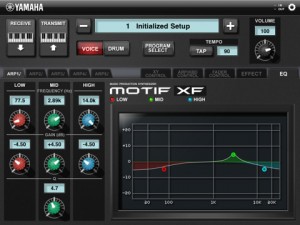
*Yamaha MOTIF XF offers you WiFi connectivity which enables wireless control.
Compatible model : MOTIF XF
Features
Effect Mode
・In effect mode you can select and edit Insert effects, the System effects and the routing and sends and returns for all the effects in a Voice.
EQ Mode
・You can edit the MOTIF XF’s Voice EQ and store different EQ setting for each of 50 Templates.
・you can adjust the Mid Bang EQ setting by pinching the band
Live Transmission
Played live on Korg EMX, Access Virus Snow, Micron MIDI’d to IPad running Sunrizer. Korg for drums, Virus for Bass and leads, IPad \ Sunrizer for Pads, FutureRetro for Acid.
Featured gear: The micron is an eight-voice analog-modeling synthesizer. Despite its small size, you’ll be impressed with the micron’s big sound. Whether you use a synth to accompany you on stage or in the studio, and whether you prefer to work with the hundreds of preset Alesis sounds or create your own, the micron is the perfect companion. The micron also contains a powerful sequencing section with phrase, step, and drum sequencing, an arpeggiator, and stereo effects. The micron has two multi-mode filters, three envelope generators, and two LFOs: the full spectrum of synthesis components for shaping and creating sonorities and textures. For stage and studio-ready quality, the microne has 24-bit audio outputs and inputs via balanced connections.
Each of the micron’s voices contains two filters, and each filter can be one of the following different types, each with its own character and sonic flavor: Bypass, Low Pass: ob 2-pole, tb 3-pole, mg 4-pole, rp 4-pole, jp 4-pole, al 8-pole; Band Pass: ob 2-pole, al 6-pole, octave dual, band limit; High Pass: ob 2-pole, op 4-pole; three Vocal Formants, four Comb Filters, Phase Warp, Frequency, Resonance, Key Tracking, Envelope Amount, Offset, and Absolute. Each of the micron’s voices contains two LFOs, each of which offers rate, depth, shape, and tempo sync; and three envelopes: Amp Envelope, Filter Envelope, and Pitch/Modulation Envelope.
iPad powered MONOTRON
Background info:
iPad1 16g WiFi Camera Connection Kit
powering korg monotron via USB
ipad is running
Jasuto modular synthesizer
http://www.jasuto.com
signal path :
audio from bleeplabs Nebulophone
http://bleeplabs.com/nebulophone/
into korg montron filter
out from monotron
into AmpliTube®, iRig™
http://www.ikmultimedia.com/irig/features/
then into ipad
Jasuto providing synthesizer bass and reverb/delay FX to line input
DATAMASKIN

