
New Rhythm studio demo
“Messing around with the Rhythm Studio app for the iPad. Checking out some of the new devices from the recent update.” Rhythm Studio balances advanced features by using an easy to understand interface resembling real instruments. This means that one button does one thing just like it would with real hardware. Knobs turn, switches slide, and buttons press. You won’t get lost in abstract interfaces or design. Rhythm Studio is the next best thing to having the real hardware.
All the details about Arctic Keys
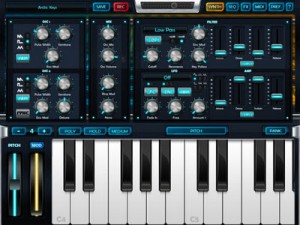
Here is the complete spec for the newly released iPad synth that we have posted about earlier last week:
Arctic Keys is a virtual analog synthesizer. With a classic dual-oscillator subtractive synthesis design that gives you the sound creation flexibility we all know and love. With an easy to use user interface that just wants to be tweaked. The result is a truly professional instrument with an audio quality that rivals that of hardware synthesizers.
TWEAK
With all the synthesizer parameters immediately available on one page, you get instant feedback as you tweak. The two LFOs each have three modulation destinations. Each LFO may also be free running or sync’ed to tempo and the timing rate adjusted. The modulation matrix allows for deep routing between the Mod Wheel, aftertouch and 16 x 4 analog-style gated step-sequencer. Quickly change pages to edit effects and sequences.
PERFORM
The classic arpeggiator is complimented by the 16 x 4 gated step-sequencer. Play a note to trigger the sequencer. Step through a sequence to play short melodic lines or let it modulate the synthesizer. The different key gating options may be used to change how the sequence is triggered. Each of the 4 tracks has an assignable modulation destination and loop point. Along with traditional Pitch and Mod Wheels, adjust the velocity by tapping along the length of the key from top to bottom. Change the key mode to mono for retro lead lines. Adjust the size of the keyboard to suite your style or use a gesture to scroll through the octaves. Place the keyboard into Pitch mode and use multi-touch gestures to bend individual notes, while sliding up and down the keys to add aftertouch.
SHARE
The live phrase recorder lets you save your performances as 44.1KHz 16-bit WAV files and as a Standard MIDI File. The MIDI File includes all the knob’s control change information along with the notes you play. Use Sonoma AudioCopy or Intua Audio Sharing to paste recorded audio directly into other apps. From within Arctic Keys, e-mail the patches you make, then open them directly and save into your patch library. Or share them with Wi-Fi and iTunes File Sharing.
SPECIFICATION
- Synthesis: analog modelling
- Polyphony: up to 4 voices
- Oscillators: 2 per voice, alias free, saw, triangle and square with pulse width, hard sync, ring mod, noise generator
- Filter: 1 multi-mode resonating filter with 4 filter types
- Envelopes: filter and amp ADSR envelopes
- Modulation: 2 LFOs with multiple wave shapes, sample and hold, 3 routable destinations per LFO, independently sync-able
- Effects: master effect processors: 3-band EQ, Distortion, Chorus, Stereo Delay
- Arpeggiator: classic arpeggiator with octave shift, MIDI-sync-able
- Sequencer: 16 x 4 gated step sequencer with multiple modulation destinations, MIDI-sync-able
- Keyboard: glissando, scroll, multi-touch poly pitch bend and aftertouch
FEATURES
- KORG Wireless-Sync Start Technology (WIST)
- Sonoma AudioCopy
- MIDI Learn
- Live phrase recorder with audio and MIDI export
- File and patch sharing via iTunes File Sharing, e-mail and Wi-Fi
- Supports external MIDI in and out via CoreMIDI Networking and USB with the Camera Connection Kit
- Audio background operation
- Virtual MIDI Ports
- Open Music App Collaboration compliant
The app is priced at just $4.99

Arctic Keys App Review
Featuring Arctic Keys for iPad
Arctic Keys is a synthesizer for Apple iPad.
Music: Carl Helder
All sounds: Arctic Keys
Drums: Molten Drum Machine
Get the Garageband project featuring the music in the video
http://dl.dropbox.com/u/33525372/ArcticKeys-PromoTrack.zip
Arctic Keys has several outstanding features. The first is alias free oscillators with the analog modelling DSP, so no samples are used and no digital artefacts are present. This works great on say a flute patch which can be played at very low key registers all the way to the top of the keyboard without breaking up with that digital whistle you sometimes here in other synths. So this gives a great quality to the audio synthesis, like e.g a Nord Lead.
Secondly we have a step sequencer that can modulate many parameters on the synth. It’s more like a Tetra than a typical dual-oscillator subtractive synth. Plus classic arpeggiator and master effects.
Thirdly we have full CoreMIDI support, MIDI Learn, phrase recording with Sonoma AudioCopy export, wav export, MIDI file export, sharing via e-mail and wi-fi as well as iTunes. All with an attractive easy to use user interface. I’m really excited by it and I hope you will be too!
RGBSOUND PRO
Only Rgbsound Pro sounds were used for the music of this video.
No effects were added (except of last 5 seconds).
By tapping the colors you play sounds and you launch infinite electronic loops, by shaking the device you change your music pattern. If you have an Ipad you can use the screen-saver mode to project a colored mixture of visual effets on a screen, for example while you’re playing as DJ in a club. RGBSOUND is simple, fast and intuitive; create your groove and surprise yourself!
★HOW TO PLAY★
✔single tap to play a sound
✔double tap to start a loop
✔swipe up/down on a button to accelerate/decelerate a loop
✔single long press to show volume/pitch controls
✔use the direction square buttons to change the sound table
✔shake the device to change the set of sounds in each tables
✔press the central rotating button to show the control mask where there are the master pitch and general bpm sliders, a central reset square button, and square buttons to save tracks
IK Multimedia presents SampleTank – Grooves in Action
Here you find a good demo on how to get that groove going on the Sampletank: SampleTank® for for iPhone/iPod touch is the mobile version of IK’s SampleTank for Mac and PC, the leading virtual sound workstation for the studio, now available for your favorite iOS mobile device and designed for live performance. It is a 4-part multi-timbral instrument with a sound set of over 900 MB of samples for over 400 acoustic, electric and electronic instruments (including a selection of the best workstation sounds from SampleTank, orchestral sounds from Miroslav Philharmonik and synths sounds from SampleMoog) plus a selection of over 900 melodic and rhythmic patterns that span every musical genre. SampleTank for iOS brings the power of the most popular computer sound module — which has appeared in thousands of award winning records from world-class artists — to your iOS device.
http://www.ikmultimedia.com/irigmidi/moreinfo/sampletank.php
http://www.ikmultimedia.com/irigmidi/moreinfo/sampletank.php
Mixr Tutorials: Using Waveforms and Create
http://youtu.be/DHkioGtWuvI
iPad DJ App Mixr training tutorial on using waves. http:// www.mixrdj.com
http://youtu.be/UsouxhnBs0U
iPad DJ App Mixr training tutorial on using the Crate Manager.
http://youtu.be/EU2kfUKdr3Q
New Standard in Mobile DJ
Sunrizer + SoundPrism Pro Expression Tutorial
How to use the accelerometer based expression feature of SoundPrism Pro to control Sunrizer Synth for iPad
More info here:
SoundPrism Pro is available at http://soundprism.com/pro
Get Sunrizer here: http://beepstreet.com/
You can find the SoundPrism Expression Tutorial here: http://soundprismhowto.com/howto2/index.php?show=expression
Version 1.4 of SoundPrism Pro turns your iOS device into a 3D MIDI controller. Watch the following video for setup instructions. (Please note that since SoundPrism Pro version 2.2 the expression menu is now located within the preferences menu).
SoundPrism Pro 1.4 now supports Accelerometer Input.
This video explains what that means and how to use it.
SoundPrism Pro turns your iOS device into a wireless 3D MIDI controller.
Kinetic – Played live Korg EMX, IPad Sunrizer, IPad ModAxis, FutureRetro Revolution
Cool video featuring a lot of blinking lights, blips and machines in action, enjoy 
Korg EMX sequencing IPad Sunrizer for Pads, IPad also used to provide spacey effects with ModAxis app. Acid is on the FutureRetro Revolution.
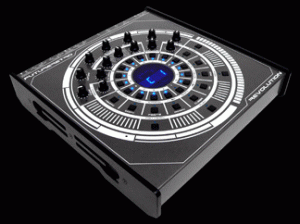
“The Revolution is our latest concept synthesizer with an intuitive interface that we feel most accurately represents the principles of time and music. From ancient sundials to modern day analog clocks, time has been represented as the circle, a cycle which never ends. Time itself is nothing more than our perception of the revolution of planets as they journey through their celestial orbit. It is this motion that we call time that can be measured, divided, and arranged to provide the foundation of music. This circular cyclic theme can furthermore be found throughout music in everything from song structure and repeating rhythms to the fundamentals of sound itself, being the sine wave. With this understanding we must conclude that music is cyclic and should so be represented in its natural form.
And so it is…the Revolution, a true analog monophonic synthesizer with an easy to use step-based digital sequencer, analog and DSP effects processing, and various interfacing for controlling MIDI, CV/Gate, and Din Sync devices.
Continuing in our tradition of building quality products, this unit is housed in a rugged aluminum chassis with aluminum side panels, a high contrast white on gun metal grey finish for superior viewing of controls in dark environments, and bright blue LEDs all around.”
Tabletop Demo: Sarah Nixey “The Homecoming (Microfilm Tabletop Remix)”
A re-creation of Microfilm’s tech house remix of Sarah Nixey’s single “The Homecoming” on Retronyms’ iPad app Tabletop. All music is played and sequenced by Microfilm using Tabletop on iPad 1. Ms. Nixey’s lead vocal has additional fx in the mp3 that’s playing on the SpinBack turntable. Also, there are 2 custom Gridlok samples (windchimes and backing vocal sample) which have external fx baked into them.

Retronyms has updated Tabletop, its virtual studio for the iPad.
New devices in Tabletop 1.1:
- Compressor
- Limiter
- Expander
- Bit Crusher
- Splitter
- High-pass Filter
Tabletop is a modular virtual studio that comes with a variety of devices, including a pad sampler, matrix synthesizer, mixer, turntable, low-pass filter and more. Additional devices are available as in-app purchases.
for more information on Tabletop visit: www.retronyms.com
Slide Control Demo by Matt Hooper
Having a blast with Slide Control App on iPad 1st gen.
Slide Control is an iPad music application for musicians. This application makes improvisation easier. You can choose any scale (major, minor, pentatonic, blues …) and slide your finger to play any melody. With Slide Control it does not have bad grades, your movements are in harmony. Easier to play !! Easier to improvise !! Easier to create !! More imagination!!
Features:
★ Very simple application for very simple improvisation
★ Video tutorial Include
★ Video community page (you can send your video)
★ Many scale for best improvising (major, minor, pentatonic, blues …)
★ Polyphonic Control
★ Support of virtual midi for communicate with other musical apps
★ Choose from 60 different wallpaper (thanks to robert handline)
★ Program change/ Bank change
★ All Midi CC support on Y direction
★ 16 Midi channel
★ Quick switch Sustain / Partamento / Legato
★ Quick switch Oct +1
★ Pitch Bend
★ Glissendo in Midi !! (Exclusive function)
★ Switch mod
★ Velocity capable
★ Panic button
★ MIDI Device support – connect devices via the Camera Connection Kit (near zero latency)
★ Measured latency over WiFi to OS X: 2-5ms
★ Fullscreen
★ Cool Animation
★ More to come!
Slide Control is an Midi controller. NO SOUND is generate by the ipad. You must have a virtual synth or hardware midi instrument for use Slide Control.
DATAMASKIN

