
Urban Grooves with SampleTank for iPhone / iPod touch and iRig MIDI
SampleTank® for iPhone / iPod touch is your key to R&B and urban groove construction and performance anytime and everywhere. With over 400 instruments and 900 patterns, you can create the perfect beat, the perfect groove, the perfect lead for modern R&B, classic Hip Hop, old school funk … any style you can think of. The power of SampleTank is now in your iPhone / iPod touch. Check it out today!
http://www.ikmultimedia.com/irigmidi/moreinfo/sampletank.php
Donut the 2D looper – Loading Files demo
New version of Donut the two-dimensional looper for iPad featuring file loading.
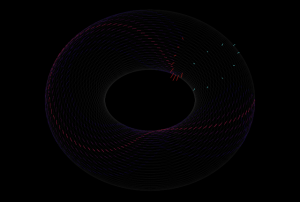
Inspired by the IBM tape loop machine, Donut is the latest release from The Strange Agency. This sound sequencer is a strange one, like the old IBM machine, it makes time two-dimensional by first creating a three dimensional loop and two dimensional sound. It does this by first looping a linear track, then multiplying it into stacks and finally taking the loop stack, and wrapping it itself into a loop, just as the original linear recording is looped.

You use Donut by recording sound into (or through) it, and playing the recorded sound back. You control the playback and recording heads with a 2d vector for each, determining the rate at which the head steps through the loop and loop of loops.
There are still quite a lot of sample points in there and therefore the 2d surface can be very sparse. Imagine if we recorded on the Donut in one direction, but played back in a perpendicular direction. We would only hit one sample of the recording amidst a loop of silence. Thus, Donut can create extremely sparse soundscapes.To make the soundscapes denser, Donut lets your record and play sound with multiple heads (or, using a synthesizer term, voices). These heads can be spread out across the loop surface in both dimensions, creating some awesome temporal effects.
Korg iKaossilator: First Look and Review
Ean Golden reviews the Korg iKaossilator app for iPads and iPhones. It’s the normal Kaossilator, but cheaper and on your iOS device!
Learn more at http://www.djtechtools.com/2011/10/18/ikaossilator-for-ip…
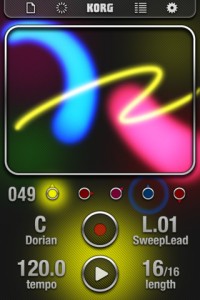
iKaossilator for iPhone Highlights :
● Play sounds by simply stroking, tapping, or rubbing the screen with your finger
● Bold Visual Effects move along with your performance and add excitement
● 150 diverse built-in sounds cover any style of dance music
● Scale/Key settings allow anyone to perform with musical precision
● Easily create tracks with the loop sequencer using up to five parts
● Control loops in real time for DJ-Style live performances
● WIST capability allows wireless sync-start with other apps such as the iELECTRIBE
☐ Perform Using A Single Finger
iKaossilator uses the unique X-Y interface made famous by Korg’s entire Kaoss Line, including the original hand-held KAOSSILATOR. Create melodies and phrases simply by stroking, tapping, or rubbing the touch screen with your finger; no musical knowledge is required.
☐ Bright, Colorful Visual Effects
iKaossilator is also focused on its graphic design, which shows up beautifully on the iPhone’s high-quality display. The visual effects on the iPhone’s display move along with your performance and add excitement. These bold, colorful graphics provide an exciting performance experience.
☐ 150 Diverse Sounds Covering Many Musical Styles
Use the 150 built-in sounds to perform and produce a broad range of dance music styles including hip-hop, house, techno, dubstep, nu-disco, and electro. Enjoy the synth leads and synth bass sounds you expect from a synthesizer, as well as acoustic sounds that simulate piano or guitar chords, even the popular sound effects used by DJs. The drum sounds let you play and manipulate various patterns simply by moving your finger.
☐ Loop Sequencer
The built-in loop sequencer lets you layer up to five musical parts. To create a track, simply assign a loop such as synth, bass, chords, sound effects, or drums to each part. Fifty loops created by professional musicians are built-in to help you get started quickly. In addition to its track-making capabilities, this loop sequencer is also a great feature for live performance. The Mix Play feature makes it easy to enjoy live remixing; you can switch seamlessly to another loop or extract a specific part from another loop while the playback continues.
iPad App – DXi FM Synthesizer Demo
Short demo of some of the sonic features of this FM app by Takashi Mizuhiki. DXi brings FM to your iPad, but it’s closer to the DX27 than the legendary DX7. There are four operators rather than six and polyphony is reduced from 16 to three, from what we can tell. DXi also offers a neat 16-step sequencer and an effective XY performance pad, to mix operators and patterns in real time.
Description
DXi is a FM synthesizer application inspired by 80’s most popular FM synthesizer. You will enjoy creating sounds as well as playing music with this application.
FM synthesizer is still popular among many people by its unique tone. We carefully selected parameters from original synthesizer so you will be enjoy editing tone with them easily. You need to know some technique to tweak the tone, but you will be able to get DXi’s special tone and effects while having some fun!
Creating sound effects is another idea to enjoy DXi.
We loaded 16 step loop sequencer as a bonus feature!
If you remember the days of FM synthesizers, try creating the tone you remember from them.
If you have no experience with any FM synthesizer, we are sure you will be enjoying the unique tone world!
* 4 operators FM synthesizer
* Anti-ailiased oscillator
* 8 algorithms
* Envelope, frequency (Ratio or Fixed) can be set each operators.
* Feedback control on operator number 4.
* 2 master effects (LPF with Resonance and Delay)
* Import/Export function to save the tone you created. (URL schema text string format)
* Audio recording function. And you can transport recorded audio file, .wav, onto Mac/PC via iTunes file sharing.
* Clipboard audio sharing support. You can export recorded waveform to other application via clipboard. It’s compatible with Intua’s clipboard.
* Supports external MIDI keyboards via Core MIDI USB adapters. iPad users can use Camera Connection Kit. And iPhone/iPod touch users can use Yamaha i-MX1.
nnoiz Papp testing animoog
nnoiz Papp testing animoog with TUNESIA´s UPRISING playback
Animoog does not need any further introductions by now, but in case you’ve missed it – here’s some highlights:
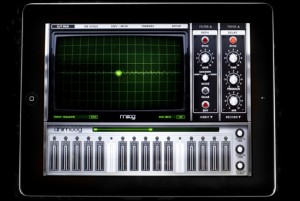
Animoog, powered by Moog’s new Anisotropic Synth Engine (ASE), is the first professional polyphonic synthesizer designed for the iPad. ASE allows you to dynamically move through an X/Y space of unique timbres to create a constantly evolving and expressive soundscape. Animoog captures the vast sonic vocabulary of Moog synthesizers and applies it to the modern touch surface paradigm, enabling you to quickly sculpt incredibly fluid and dynamic sounds that live, breathe, and evolve as you play them. Visually captivating and sonically immersive, Animoog brings iPad based music production to the next level. Whether you are new to synthesis or a professional, Animoog’s unique user interface gives you the power to easily create a visually vibrant and sonically rich universe. It is the ultimate tool for total creative expression! Animoog’s diverse library of timbres is derived from analog waveforms captured from classic Moog oscillators, both vintage and modern, and run through a boutique’s worth of high-end outboard and analog signal processors. These include modular synth panels, Moogerfooger pedals and more.
· Anisotropic Synth Engine (ASE) – An exciting new Moog technology that allows the user to move dynamically through an X/Y space of unique timbres to create an expressive and constantly evolving soundscape.
· Timbre page – Assemble unique sounds in the X/Y space from timbres of a wide variety of vintage and modern Moog synthesizers and pedals Note: this is NOT simple sample playback.
· Polyphonic Modulation – Simply slide your fingers to control multiple modulation parameters in Animoog right from the keys.
· Polyphonic Pitch Shifting – Easily manipulate the exact pitch of each note in a chord by rotating or sliding your fingers.
· Delay Module – A classic analog style ping pong delay.
· Thick Module – From bit crushing to unison voice detuning and drive, this module adds depth, edge and character to Animoog’s already massive sound palette.
· Moog Filter – The classic four-pole Moog ladder filter with High Pass, Low Pass and Band Pass modes.
· Record Module – Record your performance and overdub new layers, or play along live. Transfer recordings between Animoog and any other apps which support AudioCopy/AudioPaste
· Path Module – Direct ASE through Animoog’s X/Y space to create new expressive and shifting sounds that will blow your mind!
· Orbit Module – Control the rate of orbit in the X/Y space around the path you created for subtle to insane voice manipulation.
· Flexible Modulation Matrix – Amp,Filter and Mod Envelopes, LFO with infinitely variable wave shapes and sync, and four super flexible and assignable modulation slots.
· MIDI in/out – Use your LittlePhatty or any other MIDI controller to control Animoog.
Sunrizer on iPad – Sinevibes bank update
A few sound examples from the updated Sinevibes bank for Sunrizer, which now comes with 40 patches. To get this bank, make sure you got the latest update of this app, and you’ll find it in the “web library”. Oh yes, make sure to check out Sinevibes products too: http://www.sinevibes.com/
Short info on the Sunrizer:
Sunrizer synth (previously known as ‘Horizon synth’) is a virtual analog synthesizer that takes the definition of iOs synthesizer to the next level. Thanks to carefully designed architecture and heavy usage of coprocessor it blurs the boundaries between iOs and hardware synthesizers. Sunrizer was built to perform and works perfectly with any MIDI keyboard or sequencer. A lot of research has been done in order to achieve unheard warmth and clarity.
Highlights
- True SuperSaw sound emulation, first found in the legendary Roland JP-8000 synthesizer. SuperSaw is a layered waveform consisting of multiple saw waves which are detuned to create an extremely full and epic sound. It’s possible to use 2 supersaw oscillators per voice * 7 polyphony = 98 saw oscillators playing the same time!
- Two independent filters per voice with configurable routing. You can select between various filter types including classic resonant LP,HP,BP,Notch and less common like Comb and Formant.
- The Morph Group function lets you continuously morph of up to 30 parameters in a sound (including effects), using only the modulation wheel.
Small Steps on SynthX 2
http://vimeo.com/30688078
>> One of my very first steps on the awesome SynthX from Wayoutware on my iPad 2. I’ts the first synth I love to play without MIDI keyboard.
Built using Way Out Ware’s award winning virtual analog technology and heavily optimized for the iOS operating system, SynthX delivers a great looking and sounding analog experience to the iPad. A mathematically modeled synthesizer, SynthX contains no samples. As a result, it is very small in size, yet it has an extremely large and professionally design sound library. An effects chain including distortion, flanger, delay and limiter are included. Additionally, a separate identical effects chain is provided to process an external signal connected to the iPad’s audio input. SynthX has been designed from the beginning for the iPad and multi-touch. It has a comprehensive MIDI implementation using CoreMIDI including MIDI Note send and receive and MIDI Beat Clock LFO sync. You can also record your performances within SynthX and use Sonoma Wireworks AudioCopy to share your performance with other iPad apps. It also supports iTunes file sharing which allows you to drag your performances in full quality into your favorite digital audio workstation.
Moog’s iPad synth finally released – Animoog
A Tour of Animoog from Moog Music on Vimeo.

Moog’s highly anticipated Animmog has reached the stores and it sure looks like a real treat for synth fans. If you have downloaded it and tried make sure to leave your comments or send us your links to Youtube reviews that you have made.
“Animoog, powered by Moog’s new Anisotropic Synth Engine (ASE), is the first professional polyphonic synthesizer designed exclusively for the iPad. ASE allows you to move dynamically through an X/Y space of unique timbres to create a constantly evolving and expressive soundscape.
Animoog captures the vast sonic vocabulary of Moog synthesizers and applies it to the modern touch surface paradigm, enabling you to quickly sculpt incredibly fluid and dynamic sounds that live, breathe, and evolve as you play them.
Visually captivating and sonically immersive, Animoog brings iPad based music production to the next level. Whether you are new to synthesis or a professional, Animoog’s unique user interface gives you the power to easily create a visually vibrant and sonically rich universe. It is the ultimate tool for total creative expression!

Animoog’s diverse library of timbres is derived from analog waveforms captured from classic Moog oscillators, both vintage and modern, and run through a boutique’s worth of high-end outboard and analog signal processors. These include modular synth panels, Moogerfooger pedals and more.
Animoog is the newest innovation in creative tools from Moog Music, the legendary electronic musical instrument company founded by Bob Moog in Asheville, NC.
We want as many people as possible to experience Animoog. We have decided to make Animoog available for thirty days at the introductory price of $.99. Regular price $29.99.
Key Features:
• Anisotropic Synth Engine (ASE) – An exciting new Moog technology that allows the user to move dynamically through an X/Y space of unique timbres to create an expressive and constantly evolving soundscape.
• Timbre page – Assemble unique sounds in the X/Y space from timbres of a wide variety of vintage and modern Moog synthesizers and pedals. Note: this is NOT simple sample playback.
• Polyphonic Modulation – Simply slide your fingers to control multiple modulation parameters in Animoog right from the keys.
• Polyphonic Pitch Shifting – Easily manipulate the exact pitch of each note in a chord by rotating or sliding your fingers.
• Delay Module – A classic analog style ping pong delay.
• Thick Module – From bit crushing to unison voice detuning and drive, this module adds depth, edge and character to Animoog’s already massive sound palette.
• Moog Filter – The classic four-pole Moog ladder filter with High Pass, Low Pass and Band Pass modes.
• Record Module – Record your performance and overdub new layers, or play along live. Transfer recordings between Animoog and any other apps which support AudioCopy/AudioPaste
• Path Module – Direct ASE through Animoog’s X/Y space to create new expressive and shifting sounds that will blow your mind!
• Orbit Module – Control the rate of orbit in the X/Y space around the path you created for subtle to insane voice manipulation.
• Flexible Modulation Matrix – Amp, Filter and Mod Envelopes, LFO with infinitely variable wave shapes and sync, and four super flexible and assignable modulation slots.
• MIDI in/out – Use your Little Phatty or any other MIDI controller to control Animoog.”
Enjoy 
meta.DJ drumtron
The video reveals a bit more about the new drumtron drum machine in meta.DJ, the new iPad DJ software from Sound Trends.
Drumtron lets you layer the groove on a voice-by-voice basis, with each voice (kicks, snares, hihats, etc.) having 4 different energy/density levels. Now you can easily build the drums dynamically in response to how you want your Set to match the dance floor.
TNRi – iPHONE vs iPAD – WIRELESS JAM SESSION – David and Goliath by The Great Pyramids
Here’s what’s happening: 10 minute zoom lens IDM Ambient session – like an evolving world map? This is another example of synching two TNRi apps through the internet. We also used Kaoss pads to add additional interesting effects. My iPad was used with the Alesis IO dock for greater output sound quality and MIDI out to synch my Kaoss pad 3, but all sync between the TNRi apps was through wireless internet. We are planning a concert with 4 players – are you up to it?
On the 16 × 16 grid of buttons, basically, the horizontal direction is time, and the vertical direction is pitch.By laying sounds on these buttons, you can combine rhythms and melodies to produce music. A button will glow when its sound is produced. The movements of the glowing lights produce a visual performance.
TNR-i can produce 16 types of sounds at the same time (16 layers), and it can remember up to 16 song patterns produced using those sounds (16 blocks). By switching between song patterns in real time, you can produce a rich variety of musical expressions.
There are six different types of performance modes that you can select for each layer. You can make elaborate music by combining different modes. In score mode, the most fundamental of the modes, you can arrange sounds horizontally (temporally) and vertically (by pitch). In the exciting random mode, the sounds that you arrange are not just played in order—the melody and rhythm constantly change as twists are added. In draw mode, you can perform music by tracing your finger across the buttons as if drawing a picture. In bounce mode, the glowing lights are like bouncing balls that produce sound when they fall. In push mode, you can continuously change the sound as you perform. In solo mode, which is fun for solo performances, you can easily adjust the speed of repetition and the pitch.
DATAMASKIN

