
The One Man iPad Band
Ingredients: one iPad, a cool dude, and a green screen. Everything you hear was recorded with an iPad. Apps used: garageband and thumb jam
Background info on Thumb Jam:
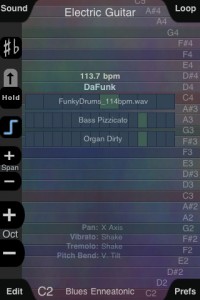
ThumbJam is a powerful musical performance experience. You get over 30 high-quality real instruments multi-sampled exclusively for this app. Hundreds of included scales allow you to effortlessly play in any style from rock to classical, whether you are a musical novice or a seasoned professional.
—====—
Jordan Rudess, the world-renowned keyboardist for Dream Theater says:
“ThumbJam stands at the very top of the overcrowded music app world. The sounds included absolutely rival those found in pro instruments and making music on the app is a total joy. The only problem I have with this app is that I did not make it myself! Luckily, I’m able to work with the developer and offer a few good feature ideas as well as some choice sounds from my personal collection!”
Two signature sounds from Jordan are featured in the application!
—======—-
Even if you’ve only played air guitar, ThumbJam lets you sound like a pro. Pick an instrument and jam — with all the scales to choose from you’ll never hit a wrong note. The high quality instrument samples will make you sound like you just skipped years of music lessons.
For the performing musician, this app is awesome for soloing on an instrument you didn’t bring along. Play in any key, any style — go from a string ensemble to a wailing guitar. ThumbJam was developed and tested by musicians to feel and sound like a real instrument. You’ll be surprised at how expressive it can be, make sure to check out the videos and audio at thumbjam.com. ThumbJam makes use of tilt and shake to add vibrato, tremolo, note bends, and volume swells for more realistic and expressive results. It supports up to five simultaneous touches and up to 16 voice polyphony. Delay and lush stereo reverb add depth to the sound. Put on your headphones or plug in to your home stereo and prepare to be blown away. Build your own loops from the ground up or import your favorites and jam from there. Layer as many loops as you want, with different instruments for each. Export your loops as audio files or Ardour DAW sessions via WiFi. Copy and paste audio from other apps using Sonoma Wire Works AudioCopy/Paste as well the general pasteboard used by BeatMaker.
Want to jam with your friends? ThumbJam lets you broadcast tempo, key, and scale to other nearby devices via Bluetooth so you can play together live. Even better, you can use it as a MIDI or OSC controller over WiFi to control software instruments on your computer! The app includes a huge variety of scales, from western to eastern. Save your favorites for quick access. You can even import new scales in the Scala format for complete flexibility. You can also record your own samples using a built-in or attached microphone and play them instantly. Create your own presets with different settings, scales and keys based on the existing instruments. You can even import samples from other apps using audio copy and paste!
Included instruments:
+ Cello, Violin, Viola
+ Upright Bass (plucked and bowed)
+ Several drumkits
+ Darabukka
+ Djembe
+ Electric Guitar
+ Electric Bass
+ Trumpet
+ Trombone
+ Tenor Sax
+ Flute
+ Low Whistle
+ Acoustic Guitar
+ Hammered Dulcimer
+ Mandolin
+ Cittern
+ Grand Piano
+ Drawbar Organ (2 types)
+ Rhodes
+ Pipe Organ
+ Synth Strings
+ Synth Choir
+ Theremin
+ Sawtooth Waveform
+ Sine Waveform
+ Triangle Waveform
And from Jordan Rudess:
+ JR Zendrix
+ JR Smooth Steel
Teaser pic for upcoming new synth for Rhythm Studio
Gemini Synthesizer

Details so far:
The most versatile synth created for Rhythm Studio so far…
2 Analog style oscillators
Oscillator 2 >> 1 sync
Oscillator 2 >> 1 ring modulation
Oscillator tune in +/-7 semitone range
24 db/octave resonant ladder filter
Full ADSR envelopes for filter and amp
LFO
________________________
Rhythm Studio balances advanced music making features by using an easy to understand interface resembling real instruments. This means that one button does one thing just like it would with real hardware. Knobs turn, switches slide, and buttons press. You won’t get lost in abstract interfaces, menus, or design.
Imagine having a studio of rare vintage synths and drum machines in the palm of your hand. Beautifully rendered synthesizers make seeing the app as enjoyable as hearing it. Rhythm Studio is the next best thing to having the real hardware.
Rhythm Studio allows you to make music the way you want to by giving you three different ways to create your song.
1. Use the step sequencer like the real hardware.
2. Use the Control Pad to play the synths live.
3. Instantly create a random pattern.
=====
FEATURES
– Dynamic workspace full of awesome audio gear
– Intuitive pinch and tap navigation
– Robust pattern and song sequencer
– 3 easy methods to making your songs
– Recreation of classic drum machines
– Recreation of classic synthesizers
– Mixer
– FX
– X/Y style control pad
Teaser pics of the new Rockmate for iPad

Fingerlab is bringing the amazing new app called Rockmate to the app store soon. “We have developed Rockmate with the intention of delivering the best realtime rock music performance environment for iPad. Your guitars are always well tuned, no need to carry your drum-set or to patch your keyboard. A smart metronome and a realtime looper will help you to compose and record your songs and demos. Share your recording by mail, Facebook or iTunes sharing folders.”
Here are the features:
- Realistic design and animations
- High quality samples*
- 4 players available in one single iPad
- Realtime Looper with unlimited undo
- Metronome with light and custom sounds
- Mixer with level and pan control
- Realtime Fx (distortion, multiFX, powerchord)
- Chords progression customizable (select 2X4 chords from 160)
- Guitar open tuning
- Save your styles (Chords progression, FX, Drum, keyboard style…)
- Audio Background
- Export: .wav or .aac
- Sharing: iTunes sharing folder, Facebook and Email.
iOS – SoundMashine and an Addictive microSynth
Simple and basic, but serves its purpose
SoundMashine granular synthesis based sound sampler and sequencer app for iphone 4 ipad 2, sound sequencer
SoundMashine is a granular synthesis based sound sampling and sequencing instrument.
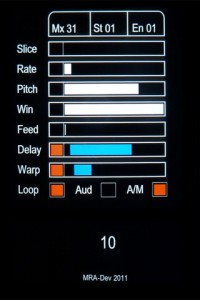
Fully utilising touch gestures to provide a fast and easy to use compositional tool. The app records sound using the devices built-in microphone, then divides the sound into slices which are then automatically assigned to each of the 16 screen tiles. Each tile has its own set of parameters allowing you to adjust window size, playback rate, pitch, feedback, delay and delay modulation, all of which are easily set by the swipe of a finger. Each parameter listed can also be randomised between a set of assignable values. Using the sequencer function patterns of tiles can be recorded and played back at different speeds, again using simple touch gestures.
With its flexibility for working with sound at different pitches, rates and sequencer speeds, SoundMashine lends itself well to a variety of compositional paradigms, from beat based through to drone or noise based music forms.
Combines the synthesis power of Addictive Synth with an easy to use 4 track loop recorder. It was never so easy to create beautiful sounds and driving loops.
The unique dynamic wavetable synthesis allows you to explore an unprecedented wide range of sonic territory. From acid loops, crystal clear percussions, realistic human choirs to complex musical soundscapes nothing seems impossible with only a handful parameters to tweak.
iPad – DM1 The Drum Machine Demo
“Demo of the various drum machines the DM1 utilises for its sounds. I basically use a simple pattern to audition the drum machines.”
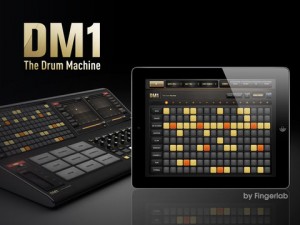
DM1 is an advanced vintage Drum Machine. It turns your iPad into a fun and creative beat making machine.
Easy and fast to use, loaded with 40 superb electronic drum kits and beautiful hyper-realistic graphics, DM1 has been designed for a lot of instant fun.
As electronic musicians ourselves, we, at Fingerlab, have developed DM1 with the intention of delivering the perfect mix between fun playability and powerful sonic capacities. We always keep in mind the importance of a beautiful design with the right balance of powerful abilities while avoiding clumsy, overbusy interfaces.
Check our 40 electronic drum kits. 18 classic vintage drum kits plus 22 in-house produced electronic kits, edited and mastered at Fingerlab professional studio.
DM1 offers 5 main sections:
1 – THE STEP SEQUENCER frees your imagination with a smart use of the multi-touch screen. Just turn on and off steps in your sequence with the tip of your fingers to create cool beats, or unexpected rhythms!
2 – THE DRUM PADS simply lets you play and record the beat that tickles your fingers. No need to be a first-class drummer, automatic quantize does the work for you.
3 – THE MIXER for quick and subtle sound mixing of your drum kits. Featuring settings for volume, pitch, sample length, custom drum kit element for each channel, mute and solo mode.
4 – THE FX TRACKPADS a creative duo of FX trackpads to distort, modulate and transform your beats. The effects include: Overdrive, Delay, Phaser, Texturizer, Robotizer, Filter and Compressor.
5 – THE SONG COMPOSER allows you to quickly make a song with the beat patterns you have created. Just drag and drop the patterns onto the timeline. Fast and easy.
Specifications:
✔ Graphic design by Jonas Eriksson
✔ Smart ergonomy for fast creativity and fun
✔ 40 vintage and produced drum kits, mastered at in-house Fingerlab Sound Studios
✔ Mixer page with pitch, length and level rotary controls, pan controls, and custom drum kit per channel
✔ Extra fast drum kit loading
✔ Playable pattern selection for extra creativity
✔ 9 Big Drum pads, quantized recording and MPC-like Repeat touch-stripe
✔ Step Sequencer with multi-touch matrix
✔ Duo FX Trackpads for real-time sonic destruction and multi-FX
✔ Mode song with intuitive editing
✔ High-quality export to email or iTunes shared folder
✔ Audio background mode
In development:
✔ WIST
✔ AudioCopy export
✔ Samples import
✔ MIDI
Addictive microSynth
Combines the synthesis power of Addictive Synth with an easy to use 4 track loop recorder.
It was never so easy to create beautiful sounds and driving loops.
The unique dynamic wavetable synthesis allows you to explore an unprecedented
wide range of sonic territory. From acid loops, crystal clear percussions, realistic
human choirs to complex musical soundscapes nothing seems impossible
with only a handful parameters to tweak.
Via virsyn
Double Trouble (Rhythm Studio on iPad)
Background information:
Another little number made with Rhythm Studio. I’m still figuring out how to make a good video of the iPad (it can be hard), but I’m getting better. Enjoy!
SYNTH STATION – Hip Hop / Electro / Dubstep Mash-up
Second demo of the Akai Synth Station focusing on Hip Hop / Electro / Dubstep Mash-up
“More MPC features for your iPhone or iPad! I will walk you through making a beat that combines features of Hip Hop, Electro and DubStep.”
SynthStation transforms iPad, iPhone or iPod touch into a portable music production studio for mobile music creation. SynthStation gives you three powerful synthesizers for creating and modifying sonic textures used for melodies, chords, and bass lines. Built around Akai Professional’s history in synthesis and drawing on the newest MINIAK synth, SynthStation sounds great and offers wide-ranging sonic flexibility with its virtual analog synthesis.
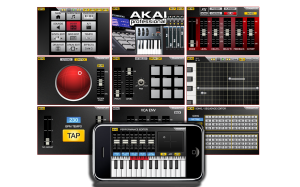
From the moment you start SynthStation, you’ll know your way around. It is jam-packed with tools to help you create music with the convenience of your touch screen and each section works the way you work. With SynthStation, you can create and save sequences and complete songs. The app contains three different three-oscillator synths and a range of drum kits you can sequence and mix right in the SynthStation. For creating melodic and accompaniment parts, the SynthStation contains an arpeggiator with preset patterns, built-in effects and filters, and an XY touch control interface for expressive control of key parameters.
- Three virtual-analog synthesizers, each with three oscillators
- Over 50 drum kits
- Create melodic and accompaniment parts using the sequencer and arpeggiator
- Effects engine with Chorus, Delay, Flanger and Delay
- Assignable XY MOD with touch XY pad control to set motion
- Compatible with SynthStation25 hardware
- Unlimited creativity with effects and real-time controls
Animoog versus the real thing
Here’s a good bass check up from one who I believe knows what he’s talking about when it comes to comparing real Moogs to softies:
Animoog Taurus bass impression, compared with “Taurus” presets from the Moog Little Phatty, and Arturia Minimoog V. $1 vs. $1300 vs. $200.
First thing I worked on with the Moog Animoog iPad app, was programming a passable Taurus-type bass sound(two saws, octave apart, detuned slightly). There is mojo coming from both the Little Phatty and Arturia Minimoog that I couldn’t capture, but I feel like this’ll do a pretty good job in a pinch.
To program the sound, this is what I found:
1. Build off of a static saw Timbre. “StaticFatSaw1” is good. Putting a “Sine” wave, or “OctaveSaw” in the Timbre slot next to it gives some good variation moving around on the X/Y pad.
2. The key for me to getting the vibe in the right ballpark was forcing the synth into mono operation, and using the “Detune” control to separate the saw into two separate octaves. This can be accomplished in two ways I’ve found:
-(preferable) “Unison” set to “4”, “Detune” set to approximately “8”, and ONLY use the Left audio output from the iPad(I used the “tip” side only of a stereo 1/8″ TRS to dual mono 1/4″ TS cable, coming out of the headphone jack)
– “Unison” set to “2”, and “Detune” very slightly under “10”. This’ll sound alright coming out of the iPad speaker, but is less flexible, and would be difficult to perform with.
3. all Orbit, Path, Delay settings to “0”
4. approx. fiter settings: Drive “10”, Env. “0”, Freq “5.3”, Res. “1” – maxing out the filter “Drive” seemed to be a key to getting the right amount of “spit” in the sound with the filter wide open.
5. approx. Thick settings: Crush “0”, Drive “2.5”
6. I zeroed out all Mods, except for one, that makes the poly-pressure open up the filter freq:
– Source off, amount “0”
– Control poly-pressure, amount “+33”
– Destination: filter-freq
7. Setting the KB scale to “Chromatic” with “Mono” and “Legato” makes the on screen keyboard act as I would expect. “Cor” at “10”, “Glide” around 45%.
All three Synths recorded straight into Steinberg MR816csx. Levels adjusted slightly, no additional post processing.
Smart TNRi iPad glitch experiment
This is a nice experiment by VJFranzK, I believe I know what is going on here, but can you figure it out?
“Can you figure it out? This strange track uses a nonstandard technique to produce sonic glitches at several points through the song. Hint: It’s not changing the tempo ( which I only do at the very end. ) I think I am the first to discover, or film this trick on YouTube? It’s called a Valse because it ( at least begins ) in 12 beat timing.
Sorry my hands are blocking the view in some parts, but I can’t exactly make them transparent 😉 This requires multiple fingers to do it well, and can’t easily be done on the Hardware Tenori due to the difference in menu systems.”
DATAMASKIN

