
NLogSynth PRO & FL Studio HD Tutorial
NLogSynth PRO & MIDI available from App Store or visit website www.temporubato.com

Most versatile iOS synth with professional grade virtual analogue low latency sound engine:
– Play it from on-screen keyboard
– Use MIDI keyboards & controllers via MIDI interfaces
– Connect to your digital audio workstation via MIDI interfaces
– Play NLogSynth from other iOS apps like SoundPrism PRO, polychord or Genome Sequencer via virtual Core MIDI
– Synchronize via Korg’s WIST to other iOS devices running iElectribe, iMS20 or other WIST compatible apps
– Synchronize NLog to beat-oriented apps like MoDrum, Molten or Funkbox running on same device via virtual Core MIDI
– Share patches with NLog Audio Unit Mac version
– Make audio or MIDI recordings on the run and share your files
– Export patches & recordings to iTunes, SoundCloud, Email, WiFi, Beatmaker & Sonoma AudioCopy pasteboards
iPad App – i505 Drum Machine
Demo of the i505 app that emulates the Roland TR-505 drum machine.
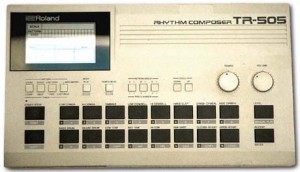
A cheap (budget) drum machine. It features 16 drum tones which unfortunately, are only mediocre samples. Its memory contains 48 patterns and 6 songs. Unlike its TR cousins it does not have individual drum tone outputs. There is no drum tone editing capability either. It does however feature extensive MIDI implementation, even the pads will transmit MIDI data. The 505 works well with a computer and sequencer or as a stand alone drum machine. It is extremely basic and unexciting but does make a good starter or play-along drum machine.
Using Multi Cues & Loops – Tutorial
http://youtu.be/ktADwlMuDnU
Here’s a brand new tutorial from MixrDJ – Learn how to master the multi cues to quickly produce loops, cuts and remixes with muscle memory exercises and technique. Mixr features 4 hot cues that allow you to instantly go back to a specific point in time. You can tap on multi cue/loop button to activate the panel. To set a cue, simply tap on the “set” button, or the “in” buttons in the multi cue panel to set your markers. Each marker is color coded to help differentiate the multi cues.
You can set up to 3 manual loops by setting “out” points and enabling the “loop” function. You can clear out the in and out points by tapping on the “in” and “out” buttons. Each multi cue is saved and can be used when you reload your tracks. Each deck can save a different set of multi cues per song allowing you to customize your cue sets. Alright, and thats how to use multi cues and loops. Remember, each deck can save a new set of multi cues per song. Don’t forget to follow us on twitter, Facebook and subscribe on youtube, we’ll see you guys in the next video.
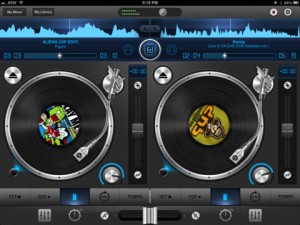
Mixr delivers a rich feature set designed for mobile DJ’s. You can pitch, tap to tempo, scratch, multi-cue and mix with precision. You can manage your iPod library with the revolutionary Crate Manager. Make crates with the touch of your finger in the drag-n-drop interface, you have complete control over your mixes. Featuring high quality DSP effects, you can add Delay and Reverb to your mixes to add that extra punch to your sets. Supporting mono split audio output, you can monitor pre-cueing with your headphones for live performances. Record your mixes and play them back in a sleek player. Recording a mix automatically creates playlists! Turn your iPad into the best mobile DJ Turntable Studio, with Mixr.
Check out the demo of Rockmate – version alpha – Fingerlab
http://youtu.be/U3z4ww2e2es
Rockmate Version Alpha demo test- Fingerlab
http://www.fingerlab.net/rockmate
Rockmate is ready to rock !
We have developed Rockmate with the intention of delivering the best realtime rock music performance environment for iPad. Your guitars are always well tuned, no need to carry your drum-set or to patch your keyboard. A smart metronome and a realtime looper will help you to compose and record your songs and demos. Share your recording by mail, Facebook or iTunes sharing folders
Specifications:
✔ Realistic design and animations
✔ High quality samples*
✔ 4 players available in one single iPad
✔ Realtime Looper with unlimited undo
✔ Metronome with light and custom sounds
✔ Mixer with level and pan control
✔ Realtime Fx (distortion, multiFX, powerchord)
✔ Chords progression customizable (select 2X4 chords from 160)
✔ Guitar open tuning
✔ Save your styles (Chords progression, FX, Drum, keyboard style…)
✔ Audio Background
✔ Export: .wav or .aac
✔ Sharing: iTunes sharing folder, Facebook and Email.
*All samples have been selected from most the famous rock instruments, recorded, edited and mastered at Fingerlab professional studio: Jazzmaster,Stratocaster, Ludwig, Gretsh, Melotron, Rhodes, Wurlitzer…
Get iPhase electronic instrument for free

“!!!!!!!FREE FOR A LIMITED TIME!!!!!!!!!!!!
iPhase is a generative music application made by Mikael Holmqvist.
Create amazing beats and melodies with the swipe of your fingers and watch it bounce back and forth on the iPhase grid. Choose from 5 different instruments and drum kits and 14 different musical scales.
Make sure to use loudspeakers or headphones for best possible sound quality!
—————————————————
NEW IN iPHASE 2.0
—————————————————
– Make more complex and better sounding beats with “bounceEdges”
– Save/Load function
– SHARE your beats to the iPhase Community and listen/play along/vote for others.
– Play iPhase arcade modes
—————————————————
—————————————————
INSTRUCTIONS/DETAILS
—————————————————
-SWIPE in any direction to create a TONE. Tones are higher towards the top and right side of the grid. The tones will move on the grid in the swipe direction and continue bouncing between the edges of the grid and the start position of the tone. Every grid edge have its own instrument and you can change the setup whenever you want using the instrument buttons.
– TAP the grid to create a BOUNCE EDGE. When a tone hit a bounce edge, it will turn 90 degrees and change instrument. Tap again to change the orientation of the bounce edge and tap a third time to remove the bounce edge from the grid.
-The tones are arranged in PENTATONIC MUSICAL SCALES which makes every swipe sound good. You can change the scales choosing from a total of 14 major and minor scales – the possibilities are endless!
-Use the PLAY/PAUSE BUTTON to pause your beat. Tones can still be created in pause mode and this can be used to make your beat more precise.
-Use the LOOP MODE TOGGLE BUTTON to switch loop mode on and off. This can be used to first create a cool beat in loop mode and then switch it off to start playing some melody to your beat.
-SHAKE your device to create a RANDOM BEAT. Good when you run out of ideas and want some inspiration from chance.
-SAVE your beats with the SAVE BUTTON. They will then be found in “my saved beats” on the main menu.
———–THE iPHASE COMMUNITY————-
One of the biggest new features of iPhase 2.0 is the iPhase Community. Share your beats to the community and listen to (and play along with) others. There is also a rating system and you can vote for beats on a scale from 1-5.
———————————————
———–ARCADE- and ∏ MODE———–
There are 2 new arcade modes available in iPhase 2.0. Standard arcade mode is a memory game ála “Simon Says”.
The second arcade mode is called π-mode and is not unlocked until you score 30 points or more in arcade mode.
TOP 10 high scores from both arcade modes will be shown in the iPhase Community!
———————————————-
ENJOY!! and remember to use headphones/loudspeakers for best sound quality!!”
More on the 76 Synthesizer for iPad
“Hey guys! just a quick demo of the iPad app “76 Synthesizer” by Never Be Normal. Enjoy!”
76 Synthesizer bringing retro look beauty to your iPad
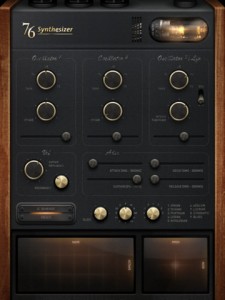
Keen on getting that true retro feeling onto your iPad, well here’s your chance. 76 Synthesizer is a virtual analog monophonic synth for the iPad. Inspired by synthesizers from the 70’s, the 76 Synthesizer combines playability with style.
For a limited time only, get 76 Synthesizer for 50% off!
If you have already tried it – let us know what you think
Features:
- Three Oscillators with sine, sawtooth, triangle, square waves and switchable filter LFO.
- Voltage controlled filter
- ADSR
- Glide
- Pitch bend/modulation touch pad
- Three octave touch pad for note input with nine different scales
- Eight different effects: reverb, phaser, flanger, chorus, overdrive, delay, tremolo and vocoder— tap the outputs to patch into two effects simultaneously
- Eight different writable presets
- Stunning retro interface
The app is priced at $1.99.
Make music with your voice, or any sound!
Background info: Everyday Looper allows you to record 4 musical phrases – 6 on an iPad – and loop them right away. You can then mix and merge them on the fly. Your Adventures Into Sound begin here – Live Looping on any iOS device! Perhaps the easiest introduction into this DIY music style which is taking the world by storm.
New In Version 1.5
STEREO TRACKS
• Pan your tracks. Compatible devices : iPhone 3GS, iPod Touch 3G, iPad and newer.
MIDI CONTROLLERS
• Record, Play/Pause and Stop can be triggered by a MIDI controller through Core MIDI.
2 INPUT CHANNELS
• Record channel 1 or 2, both simultaneously or as a stereo source. Require an audio device that provides 2 input channels such as the Alesis iO Dock.
“Can ANYONE guess what the Mystery Object is, near the end of the video? “
New version of The Elektron Tapes
Elektron tapes (#4). Studies inspired by Aphex Twin & Venetian Snares productions — using Elektron Monomachine SFX60+ Elektron Octatrack w/ Pro X Fade coss-fader on Vestax PMC-05 Pro III. Also featuring Oto Biscuit (w/ iPad as sound source) + Korg Kaoss Pad KP3 (x2). [Apps used on the iPad are: Moog’s Animoog & MorphWiz]. Performed by sound artist & noise designer Zviij © 2011.
* Booking : zviij AT zviij.com
UP-DATE#2: “Naked flowers” (Album) is available on iTunes! http://itunes.apple.com/us/album/naked-flowers/id475830077 and Bandcamp http://zviij.bandcamp.com/album/naked-flowers
UP-DATE#1: “High heels failure” (5 ‘single’ tracks) are available on iTunes! http://itunes.apple.com/us/artist/zviij/id422672054 and Bandcamp http://zviij.bandcamp.com
N.B.— Zviij’s singles “Bug Machines III, IV, V” are available for download on iTunes http://itunes.apple.com/us/album/bug-machines-v-single/id432389810
Zviij — (born Franck Smith) is a French sound artist, noise designer and electronic musician, active as a soloist, living and working in Brussels.
The Geo Synthesizer has been released
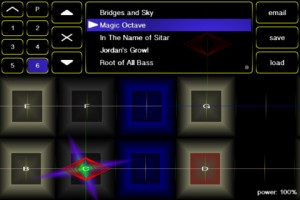
The long awaited Geo Synthesizer arrives! Here are the details:
Geo Synthesizer is a musical instrument and MIDI controller. A collaboration of Wizdom Music’s Jordan Rudess and Kevin Chartier (MorphWiz, SampleWiz) and Rob Fielding (Mugician), Geo Synthesizer is an incredibly expressive musical instrument specifically created for a multitouch surface.
Jordan says: “Since touching a preliminary piano keyboard on an iPhone screen and realizing the amazing potential for musical expression on a multitouch device, I have been inspired to create next-generation musical instruments for iOS. Geo Synthesizer is a dream come true in many ways. It is the fastest truly playable iOS instrument that I have put my hands on to date. I can fly through the range of an instrument while expanding on the kind of advanced pitch control we introduced in MorphWiz. As someone who grew up with synthesizers, I can tell you that pitch bending has never been this good!
“Geo features many of my custom sounds and in addition, Geo is also a MIDI controller, so you can use it with any external midi instrument or virtual MIDI. Virtual MIDI allows you to control an app running in the background on the same device! A great feature of Geo is that internally and externally we send independent voices on each note played, so as an example, you can pitch bend one note and not the other, or add unique expression on every note! I can’t wait to see the YouTube videos of all of you guys rocking out with Geo Synthesizer!!!”
Features:
- ability to load waveforms from SampleWiz presets
- octave rounding for effortless soloing over large ranges
- whammy slider with absolute and relative modes
- 12ET, 24ET, 53ET, and 665ET temperament options
- mono, string, and full-polyphony modes
- tuning and transposition controls
- snap speed control to affect how quickly the instrument pulls notes in tune
- playing surface options for number of rows and columns on screen
- octave and fifth harmonics synthesis options to rich, organ-like sounds
- gain control to add distortion to the sound
- FM and touch FM controls for timbal variation
- mono out for use with guitar amps
- sine, sawtooth, square, and custom (SampleWiz) wave options
- attack and release controls
- synthesis body control
- lowpass filter with resonance
- stereo delay
- reverb
- MIDI output with polyphonic note bending and multiple configuration options to allow compatibility with a wide range of hardware and software synthesizers
- performance menu lets you make your own custom menu so all the controls you need are always right at your fingertips
- 40 presets carefully selected by Jordan Rudess, including patches from Jordan’s personal sound library
The app is priced at $9.99.
DATAMASKIN

