
Expert Sleepers unveils Augustus Loop v2.3.0.
Expert Sleepers unveils Augustus Loop v2.3.0.

Augustus Loop is an emulation of a tape-based delay effect for both Windows and Mac OS, with some extra features to facilitate its use as a looping device.
We’re proud to announce the release of Augustus Loop v2.3.0.
The headline here is that this is our first 64 bit Mac OS XVST, and
so is usable without a ‘bridge’ in apps such as the 64 bit version of
Reaper, and will be usable in any forthcoming 64 bit Mac release of
Cubase.The AU and Windows VST versions are also updated.
Changes:
- * First 64 bit Mac OS X VST release.
- * Improved handling of mouse events (dragging knobs would temporarily
- freeze the host UI on some platforms).
- * Improved accuracy of MIDI event handling.
Price: $49
MIDI Edit for iPhone
This is a quick demo of MIDI Edit for iPhone (App Store link) – a 16 Multi-track Midi Editor for the iPhone that includes 128 GM instruments.
Features:
- User-friendly easy Pianoroll Editor with full functionalities (draw, erase, move, velocity, copy/cut/paste, zoom, scroll, undo/redo)
- 128 General Midi Instruments included. (Pianos, Guitars, basses, leads, strings …)
- Chord helper helps to generate various chords easily. (It supports 132 various chords and Arpegio mode with various voicing styles)
- Beat helper helps to generate various drum beats easily. (It supports various beats, combos and feel-ins)
- You can export midi file to use in your favorite sequencer in your PC! (You can co-work with your VST instruments in your PC through midi file.
Details below.
If you’ve used MIDI Edit, leave a comment with your thoughts!
Main Screen
# Main Rack
0. New / Load / Save Project
1. Add Midi / Drum Track with Full GM 128 Instruments
2. Set Track Instrument
3. Volume Mixer
4. Set Tempo
5. Export project (email)
6. Information
7. Mode Flip
Pianoroll Screen
# Main Menu
1. Play / Pause
2. Stop
3. Draw note
4. Erase note
5. Select note
6. Velocity
7. Chord helper / Beat helper
8. Snap Unit / Note Unit
9. Flip
Context Menu
0. Scroll
1. Unlimited Undo / Redo
2. Mute / Solo
3. Play
4. Zoom In / Out
5. Copy / Cut
6. Paste
7. Clear
8. Note Unit
9. Snap Unit
Chord Helper System
1. Chord Types
– C, C#, D, D#, E, F, F#, G, G#, A, A#, B
– Major, 6, 7, minor, m6, m7, M7, sus4, dim, +5, 9
2. Length
3. Mode
– Base / Closed Voicing / Open Voicing
– Chord 1, Chord 2, Chord 3
– Arp 1, Arp 2, Arp 3, Arp 4
– Arp 5, Arp 6, Arp 7, Arp 8
– Arp 9, Arp10, Arp11, Arp12
– Down Stroke 1, 2, 3
– Up Stroke 1, 2, 3
4. Octave
Beat Helper System
1. Length
2. Hihat
– 4 / 8 / 16 beat
3. Kick
– 4 / 8 / 16 beat
4. Snare
– 4 / 8 / 16 beat
5. Combo
– Combo beats
– Feel-ins
BoomComb, a MIDI tuneable comb filter
Boomplug has released BoomComb, a MIDI tuneable comb filter perfect for creating similar effects to a flanger or for spicing up synthetic drums.
Now you may ask what is a comb filter? Well a comb filter a delay based effect where it feedsback a delayed version of itself. Because of this it can create an effect similar to a flanger and can also give resonation type effects. The delay time of the comb is specified in Hz rather than time this allows the delay time can also be set via MIDI input from the key pressed and the pitch can also be bent using the pitch wheel, this allows the effect to be played like an instrument.
In the feedback loop of the effect is a damping filter which allows you to soften the sound of the comb. There is also Saturation in the feedback loop which can also be overdriven to really dirty up the sound. You can also control how much of signal is feedback and with more feedback the effect will resonate more.
Finally the the input to the comb can mixed mixed with the output of the comb and is set by the dry/wet knob.

Boomplug BoomComb V1
BoomComb features
- Tuneable Comb Filter controlled via MIDI or knob.
- Damping Filter in Feedback to reduce the harmonics or resonation.
- Saturation in feedback loop for really dirtying a sound or to be used subtly to add character.
- Custom GUI designed by Leonard “paniq” Ritter.
- Uses custom GUI Framework using the latest Windows Drawing API.
BoomComb is available to download as a freeware VST effect plug-in for Windows. It comes in two versions:
- GUI version of BoomComb for Win Vista SP2, Win 7 and above.
- Non GUI version for Windows XP.
More information: Boomplug
Ever heard of Nodal?
What is Nodal?
Nodal is a generative software application for composing music.
It uses a novel method for the notation and playing of MIDI based music.
How does it work?
This method is based around the concept of a user-defined graph. The graph consists of nodes (musical events) and edges (connections between events). You interactively define the graph, which is then traversed by any number of voices. These voices play the musical events as they encounter them on the graph. The time taken to travel from one node to another is based on the length of the edges that connect the nodes. Nodal allows you to create complex, changing sequences using just a few simple elements. Its unique visual representation shows a structural representation for generative systems that you can edit and interact with in real-time as the composition plays.

The Ocean Beach Digital DB-1 Drawbar Module
The Ocean Beach Digital DB-1 Drawbar Module is an add-on MIDI drawbar module, designed specifically for Nord keyboards:
The Ocean Beach Digital DB-1 Drawbar Module already knows how to send the right commands for your Nord. The sliders have the exact same spacing as the drawbars on a B-3, and they move the same distance, all in a very small package that fits nicely on top of your Nord. It has an extra set of MIDI jacks so you don’t lose the ability to communicate with other gear. It even has a MIDI merge function built-in, so you can use a second keyboard controller as a lower organ manual. You can use one DB-1 Drawbar Module to control both manuals, or you can use two of them together to have dedicated drawbars for upper and lower manual. No other drawbar controller does all that.
It supports the Nord Electro, Electro 2, Electro3, Stage, Stage EX, and the C1 & C2 organs.
The Ocean Beach Digital DB-1 Drawbar Module is expected to ship soon and sell for $279.
New versions of its M-Audio Axiom USB MIDI keyboard controller
Avid today introduced new versions of its M-Audio Axiom USB MIDI keyboard controller series designed for live performance and software-based music production: Axiom 25, Axiom 49, and Axiom 61.
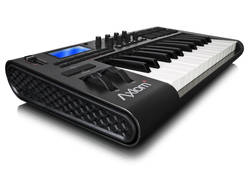
Building on the comprehensive feature set that popularized the original Axiom line, new features and highlights include:
DirectLink technology: Provides dedicated control surface functionality that automatically maps keyboard controls to common mixer and virtual instrument parameters, giving users hands-on control over their mix and their music, without any complicated set up or user configuration required. DirectLink works with popular DAWs, including Pro Tools®, Ableton Live, Apple Logic Pro and Steinberg Cubase.
Enhanced keybed: An updated semi-weighted piano-style keyboard delivers a musically satisfying playing experience—ideal for playing software and hardware instruments.
Redesigned user interface: Offers better ergonomics for the studio and stage with an angled top panel that makes controls easier to access and view in any environment. New low-profile mixer-style faders (Axiom 49 and Axiom 61 only) enable a hands-on mix experience, while smooth rotary encoders provide precise control over software and MIDI parameters. All models provide informative feedback via a graphic LCD, which is centrally positioned on the Axiom 49 and Axiom 61 for easy viewing.
“Our new Axiom keyboard controllers were designed to make it easier for musicians and producers to play and work with software instruments within their DAW of choice,” said John Krogh, audio segment marketing manager for Avid.
“With out-of-box integration with the industry’s most popular music software, an enhanced keybed, and a modern, ergonomic interface, players and producers can elevate their performance using an affordable, flexible, easy-to-use solution – in the studio and on stage.”
Multi-channel MIDI playback sequencer for the Apple iPad

Garren Langford has released MIDI Live (App Store link), a $39.99 multi-channel MIDI playback sequencer for the Apple iPad.
MIDI Live works with the Line 6 MIDI Mobilizer, so you can use it to control playback of hardware gear.
MIDI Live provides realtime modification of MIDI file parameters including:
- Song Tempo
- Key Change
- Instrument Assignment
- Song Cue
- Mixing Parameters
It is possible to alter these parameters while the song is playing or save for future playback. Playlists are also supported. Songs can be freely downloaded from the internet or loaded from your laptop.
Note: This application does not make sound on its own, it requires the Midi Mobilizer from Line 6.
MIDI Live is notable for the fact that it turns the iPad into a hardware MIDI playback controller – but we’re still looking for a multi-channel sequencer that works with the MIDI Mobilizer.
via PalmSounds
First glimpse at Alexander Randon’s Kaossonome MIDI controller
This video offers a first look at Alexander Randon’s Kaossonome MIDI controller – a new DIY electronic music controller inspired by both the Korg Kaoss Pad and the monome.
Here’s what Randon has to say about the new Kaossonome:
The Kaossonome is my first electronic music controller design. It interfaces the musician via a touchscreen, resting on top of a 256 LED matrix, and eight rotary encoders with push?buttons. Enclosed within an aluminum front panel, a dark wooden frame, and a clear Plexiglas back panel, the controller is protected from external forces and is less than an inch thick.
The touchscreen can be controlled with either a finger or a stylus and the knobs turn and toggle with ease. The Kaossonome powers and transmits serial data over USB. The serial data is then intercepted by a modified version of ArduinomeSerial, which transforms the data into MIDI and OSC. The software savvy electronic musician can design intermediate software devices to grab data from the device, route touch-screen presses and rotary encoder changes to musically defined parameters, and then send data back to the device to control the LEDs.
nspired by Korg’s Kaoss Pad and the Monome, the Kaossonome features Kaoss Pad-like sampling programs and is fully Monome 256 compliant. Additional programs include an algorithmic step sequencer, a beat synced sample chopping performance controller, and many more.
Randon is planning to sell Kaossonome kits. If you’re interested, check out his site.
Making music with PS2
Found this little demo on Youtube – apart for some glitches here and there, why not
“this is just a test to see if i can make my playstation into a midi master. it seems to work but there is a few glitches too,
its synced with my midi gameboy SP running LSDJ
arduino based.”
Beatfly – small illuminated remote-control blimp
Beatfly is a small illuminated remote-control blimp that can be controlled via various interfaces such as MIDI controller, iPhone multi-touch interface, Flash interface on a web site, computer keyboard, mobile phones and voice, and music.
Beatfly is based on open source hardware and software technology, and its technical resources themselves including materials, circuit diagram, mechanical diagram, and software programs are also published as open source under the Creative Commons license.
Kits are available for $65 – but some additional supplies are needed to build it, such as helium and an Arduino.
DATAMASKIN

