
Demo of nativeKONTROL blockLive
This is a demo of nativeKONTROL blockLive, a preset for Livid Instruments Block that turns the controller into a powerful control surface for Ableton Live 8.
nativeKONTROL creates Windows and OS X software solutions that are designed to “empower your MIDI controller, allowing you to focus on making music, while spending less time with a mouse in hand.”
Controlling Ableton Live through an Ohm 64
Producer/DJ Eliot Lipp discusses and demonstrates how he uses his Livid Instruments OHM 64 MIDI controller to control Ableton Live.
Eliot explains the functionality and layout of his project and controller; as well as his custom effects and tools to add variation and complexity to his music.
After the tutorial there is a section of his live performance from a recent show in Austin, Texas.
The Ohm64 is an adaptable, programmable, and interactive MIDI control surface designed to give you hands-on control over your performance. High-quality sliders, knobs and buttons provide the interface for creative expression, whether you’re mixing samples and synths or DJ’ing a cutting-edge set. Constructed with an aluminum faceplate and a gorgeous body of hand-finished wood, the quality is felt down to your fingertips. All of our controllers are proudly hand crafted and assembled for artists by artists in our Austin, Texas shop.
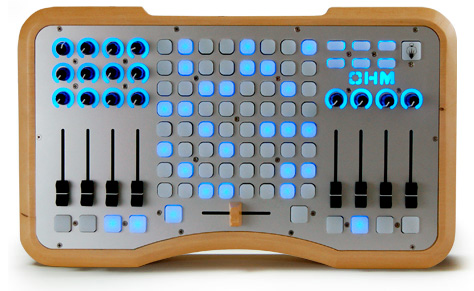
The Ohm64 has bi-directional talkback communication allowing the controller to talk to your software, and software to your device. MIDI messages can be sent to the Ohm64 to light up the buttons for an interactive performance. Completely programable and mappable, the Ohm64 provides a flexible control surface that be used with any software or setup. Completely USB powered means you don’t have to worry about adapters and and power strips, and it is plug and play so no drivers are required.
Self made MIDI controller
Looks pretty nice I must say
It is a self-made MIDI controller based on the ucapps.de hardware platform, extended with goodies such as RGB LEDs.
VST emulator from Argentina
Argentina-based DJ Pablo Martin gives us some insight on his new Emulator software.
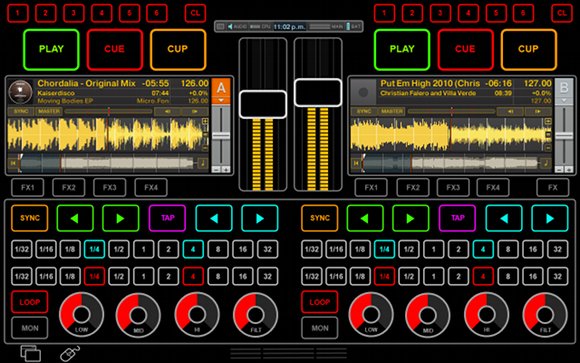
This are the first images i make public of my new touchscreen MIDI controller (now with mulitouch support). The older Monotouchlive is now discontinued and the new software born is called EMULATOR.
The first version i plan to launch very soon, including control for traktor on internal mode; the other interfaces are under development (traktor external ableton etc etc)
This software is designed to work with tablet PCs, the model i suggest for use with my software is the wonderful HP TM2, or the older model TM2Z. It also can be used with lenovo multitouch tablet and DELL XT tablet. All these tablets support multitouch, have capacitive digitizers, but again i suggest the HP TM2, due to it having a wonderful capacitive digitizer from WACOM; it’s really good quality tablet.
The CPU power of TM2 is perfect to run Traktor; I tested with Ableton without any troubles. Some guys think the CPU on HP TM2 doesn’t have enough power, but that is wrong.The major problem with present touchscreen controllers is that you don’t have tactile feedback (you can’t feel with your fingers knobs, buttons, sliders etc etc), for that reason you need put your eyes all time on the touchscreen device for use the controller, and lose the focus over music software.
Emulator is a software where you have all what you need on same screen and combine the power of multitouch, the useful standard mouse and the native interface of software to be controlled all in one nice and useful GUI.
This software runs under windows 7; the first version I plan to launch only works on tablet PCs with 12.1 inch screen (1280×800). I decided to do this because the big LCD multitouch screens available on the market aren’t really accurate and enough for pro usage; [optical sensors can] generate false touch, ghost touches, etc. and you lose portability [on larger screens].
Toontrack releases Songwriters Fillpack

Are you a songwriter, do you program your own MIDI or do you use one or more of the amazing packs in the Toontrack MIDI Collection? Are you short on some pro-played fills or need a creative booster? If so, look no further! Session veteran and drummer behind the Songwriters Drumpack, Ricard “Huxflux” Nettermalm, is back – this time with a fantastically useful and well-played collection of more than 500 1-2 bar fills in different tempos and styles!
· More than 500 individually played fills
· Swing/straight in 4/4 and/or 6/8
· Short fills with lead-ins
· Long fills with lead-ins
· Single fills
Works with EZdrummer®, Superior Drummer® (optimized for 1 kick, 1 snare, 2 toms, 1 floor-tom, 2 crash-cymbals, 1 ride-cymbal)
Visit this link to get it now: http://www.toontrack.com/products.asp?item=79
Modular MIDI sequencer for the Lemur
Clip featuring a modular synthesizer jam with Sequencomat V3 – an 8 track 16 step MIDI sequencer in Max/MSP, with a touch control surface for the Jazzmutant Lemur. Sequencomat is based on the idea of traditional hardware step sequencers, but with an touchscreen control surface, and below that he tests out Sequencomat v3, running its own clock and sequencing a Nord Modular G1 on the first 4 channels and the G2 on the 4 following.
A simple test with the sequencomat v3 running its own clock and sequencing a nord modular G1 on the first 4 channels and the G2 on the 4 following. check http://music-interface.com/ for more info on sequencomat v3
Turn your iPhone into a hardware MIDI control surface

Line 6 has introduced a new $5.99 app, MIDI Surface (App Store link), that lets you turn your iPhone, or iPod touch into a hardware MIDI control surface.
MIDI Surface works with the Line 6 MIDI Mobilizer, a MIDI adapter that connects to the iPhone or iPod touch.
This is pretty interesting – but adapt this for the iPad and get third-party app support and MIDI Mobilizer could become a new platform for musicians.
Details below.
Control Surfaces:
Keyboard
- Channel
- Velocity
Sliders
- Channel
- Controller (Mod Wheel, Channel Volume, Expression, etc.)
- Low Value
- High Value
Drum Pads
- Channel
- Category (Note On, Controller, Program Change)
- Note
- Note Off (Immediate, Touch Up)
- Velocity
X-Y Control
- Supports up to 4 touches
- Channel
- Controller
- Left Value
- Right Value
Each interface can be configured with detail and you can save Presets for quick recall.
Teach yourself on Synthesia

Synthesia, formerly called Piano Hero, is a free program plus game that teaches you to play the piano using visual cues like falling notes. Don’t worry if you can’t read sheet music, because you require none. Synthesia lets you learn to play the keyboard and also keep track of your progress.
To use Synthesia you will require a real piano or synthesizer, a Windows or Mac computer to run the game and MIDI files of the music you want to practice. There are plenty of free MIDI resources on the web. If your synthesizer is capable of connecting to your computer (via USB, MIDI cables, or an adapter) then Synthesia can read as you play and score your playing. If not, Synthesia lets you follow along on your own but without scoring.
For more info >> Synthesia
The HEX Harmonic keyboard
Hex Series is musical keyboard software for iPhone / iPad / iPod touch, which has substantial 98 keys. The keyboard layout can be changed in order to extend tone range by a single shake while you play in iPhone / iPod touch. Hexagonal keys have certain note relationships like guitar chords. When you know the patterns, you can transpose smoothly. Furthermore, both Hex OSC and Hex OSC Full transmit OSC(Open Sound Control), so you can control software and hardware ,which can deal with OSC. You can also control MIDI software and hardware by converting OSC to MIDI.
Free MIDI metronome

KMetronome is a MIDI metronome with KDE interface, based on the ALSA sequencer. The intended audience is musicians and music students. Like solid, real metronomes it is a tool to keep the rhythm while playing musical instruments. It uses MIDI for sound generation instead of digital audio, allowing low CPU usage, and very accurate timing thanks to the ALSA sequencer.
New in v0.9.3
- Build system adapted to the changes in Drumstick-0.3
- Bundled Drumstick-0.3.1 library sources
Visit: kmetronome.sourceforge.net
DATAMASKIN

