
Checking out the Gesturespark
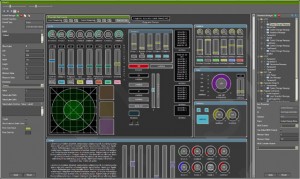
Early development version of my multitouch controller software for Windows 7 with support for OSC and MIDI.
The music is from a track I’m working on and is not related to the hand movements 😉
See http://www.gesturespark.com for more information.
SynthTronica – unique multitouch music
The surface of your cherished tablet becomes a sensual and expressive musical instrument. This may be just the way to show iPad how much you care.
touch.modularDemo
The full demo of multi-touch synthesis application touch.modular.
Shared by Bridget Johnson
mikrosonic SPC – Music Sketchpad for Android
SPC — Music Sketchpad is a sample-based audio tool designed for aspiring and accomplished musicians alike
The SPC is designed for Android users to produce, record and share original music incorporating their own loops and samples or those provided by mikrosonic. A 16-pad multi-touch enabled opening screen lights up rhythmically to simplify playing live. There are then five additional screens for editing samples and programming sequences
SPC can integrate content from various sources. Additional audio material is available on mikrosonic’s website, and loops created with RD3 – Groovebox are directly loaded into SPC — Music Sketchpad.
more info at: http://www.mikrosonic.com/spc
SynthTronica – synth for iPad – Dynamic Multitouch Filter
SynthTronica (App Store link) is a new polyphonic spectral synthesizer for iPad, designed to take full advantage of iPad’s multitouch capabilities.
This video demonstrates SynthTronica, the spectral synth by Leisuresonic for the iPad. This episode showcases SynthTronica’s Dynamic Multitouch Filter, an expressive and innovative musical controller, for use in live performance, and for touch sound synthesis.
Features:
92 ARTISAN SOUND PRESETS
- Virtual analog sounds
- Vocal sounds including vocoder effects
- Looped grooves providing a full ensemble sound
*DYNAMIC MULTITOUCH FILTER
- Control up to 11 independent filters by intuitive touch
- Unique live expressive control
FORMANT SYNTHESIZER ARCHITECTURE
- Filters use complex time-varying spectral formants
FORMANT EDITOR
- Organize, edit and view formants in spectral form
CREATE NEW FORMANTS IN SEVERAL WAYS*
- Import audio files (mp3, m4a, AIFF, WAV, et al)
- using the iPad’s microphone
- through SynthTronica’s unique Dynamic Multitouch Filter
MULTIPLE KEYBOARDS
- Two piano-style layouts and a unique grid keyboard
RECORD AND MIX YOUR PERFORMANCES
- Simultaneous recording and playback of mixes
- Bouncing
SHARE YOUR MIXES
- export SynthTronica recordings as 24-bit or 16-bit AIFF or WAV audio files
EXPLORE MUSICAL SCALES
- Display scale patterns on keyboards
- Over 70 scale choices
POWERFUL INTERACTIVE SYNTH CONTROLS
- Virtual analog synth front-end
- Reverberation
CONTEXTUAL HELP
- Nearly all interface elements have documentation by touch
Sekuensaa ??
This is a musical exploration experience in which multiple participants simultaneously interact with a sound synthesizer by arranging a special set of pieces on top of a multitouch surface.
Pieces exhibit different behaviours when placed on the surface – some act like triggers in a drum machine, some behave like a kaoss pad, while others add extra layers of sound to make the performance really come together. Pieces are sensitive to their position and orientation on the table, so users can cycle through different instruments or modulate sound parameters with a simple twisting or sliding motion.
We believe the key here is to design a system which is simple enough for people with little musical ability to enjoy, while providing enough control to allow people with a stronger background to deliver more complex performances. It´s similar to the reactable, but provides a simpler interface for everyone to enjoy.
Please visit http://www.sensaa.com for more info.
Sound design and music production by Santiago Abadía: www.santiagoabadia.com
Orphion – rough demo teaser
Multitouch instrument on the iPad
by Bastus Trump
So what is the Audioprom really?
Audioprom is an audio sequencer and live performance application for the iPad.
“We just launched Audioprom, a super intuitive audio sequencer app for the iPad. Audioprom doesn’t look or feel like other iPad sequencers out there because it doesn’t simulate popular physical interfaces from 90’s drum machines. We built it from the ground up for the multitouch screen.
It’s been a labor of love. We built it because we wanted it for ourselves and now we hope others might like it enough to buy it so we get to keep working on it.
We posted some how-to and demo videos at audioprom.cwandt.com.
We are CW&T, a Brooklyn based art and design duo. We make hard and soft things for fun and to feed ourselves. This is our first go at an iPad app. cwandt.com”
You can find more info and videos on http://audioprom.cwandt.com/
Turn your iOS device to a custom multitouch controller
Fantastick (App Store link) is a free app that turns your iOS device to a custom multitouch controller. Send multitouch data to the host program and receive drawing commands.
Instead of a limited set of built-in widgets, the interface logic resides in Max/MSP and only drawing commands are sent to the device. This lets you buid interfaces that
- work and look exactly the way you want
- change dynamically to fit the musical context
- are experimental and would not be possible with other apps
Features:
- Minimalistic, fullscreen control area with nothing on it but what you provide.
- Multitouch-events on the device are forwarded to your host via UDP. Information includes the touch state (begin, move, end) and coordinates for all touch points.
- Designed for no-hassle: zero-click startup, the device does not sleep or suspend network, flicker- and lag-free.
- Displaying images (fetched with URLs) and caching them on the device for use on non-networked locations.
- Basic drawing with lines, boxes and text.
- Advanced drawing with OpenGL.
Multi-touch control surface for Pro Tools
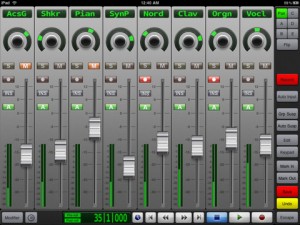
V-Control Pro (App Store link) is a $49.99 iPad app that provides a fully-featured, multi-touch control surface for Pro Tools on a Mac and soon for Windows.
V-Control Pro uses WiFi to control transport, editing, and mixing functions with Pro Tools 9, HD, or LE. V-Control Pro provides advanced control of sends, automation, groups, auditioning, plug-ins, scrub/shuttle, I/O assignment, and other controls within an easy-to-use interface.
Features:
- Large, touch-sensitive moving faders
- Solo, mute, record, and pan controls
- Flip mode send editing
- Scrub / shuttle control
- Automation mode controls and display
- Automation and group suspend buttons
- Automation and group status display
- Automation write enable controls
- Plug-in editing
- Input monitoring switch
- Big counter display
- Save and Undo buttons
- Pre-roll / Post-roll buttons
- I/O assignment
- Zoom presets
- Window display controls
- Keypad popover provides access to many Pro Tools features
DATAMASKIN

